OP
OP

MachDoc

Well-Known Member
Joined
Apr 4, 2021
Threads
3
Messages
61
Reaction score
103
Location
New Jersey
Vehicles
2021 Premium Grey, 2023 GT Vapor Blue
Country flag
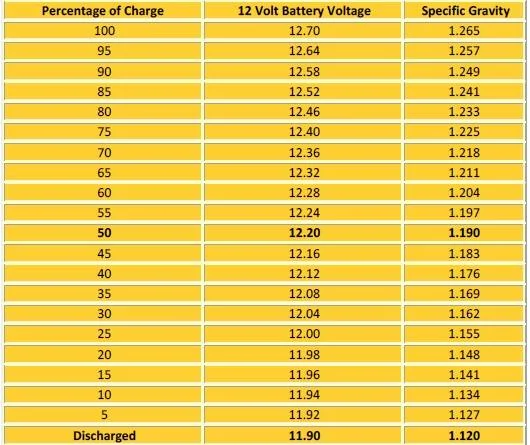
I had never seen that table before; very cool. I'm going on a similar trip soon. I will measure again when I get back after not using for 10+ days of not being plugged in and the dashcam drawing down power the whole time.
 

joel-tron

New Member
First Name
Joel
Joined
Jun 25, 2021
Threads
1
Messages
4
Reaction score
3
Location
Texas
Vehicles
Route-1
Country flag
If the HV battery keeps the 12V at a nominal state of charge, continuously, that is amazing! Makes sense that it would but this was not the in the Bolt I owned.

From the owner's manual; page 285

Code:
Charging the 12V Battery
Your vehicle has a high voltage to low
voltage energy transfer feature that keeps
the 12 volt battery charged by the high
voltage battery. If the 12 volt battery level
is low, the high voltage battery transfers
energy to the 12 volt battery when the
vehicle is off.
 
Last edited:

MachTee

Well-Known Member
First Name
Andy
Joined
Jun 9, 2021
Threads
5
Messages
368
Reaction score
574
Location
USA
Vehicles
MME Premium Infinite Blue SR AWD
Country flag
Rather than starting another thread, I'll just post here how I chose to run the wires.

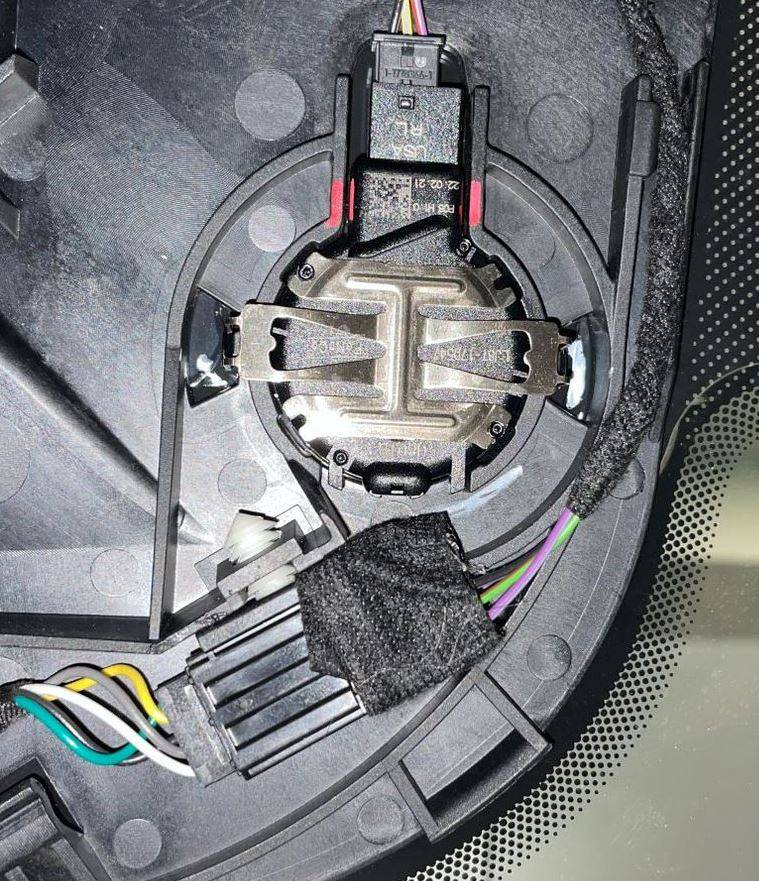
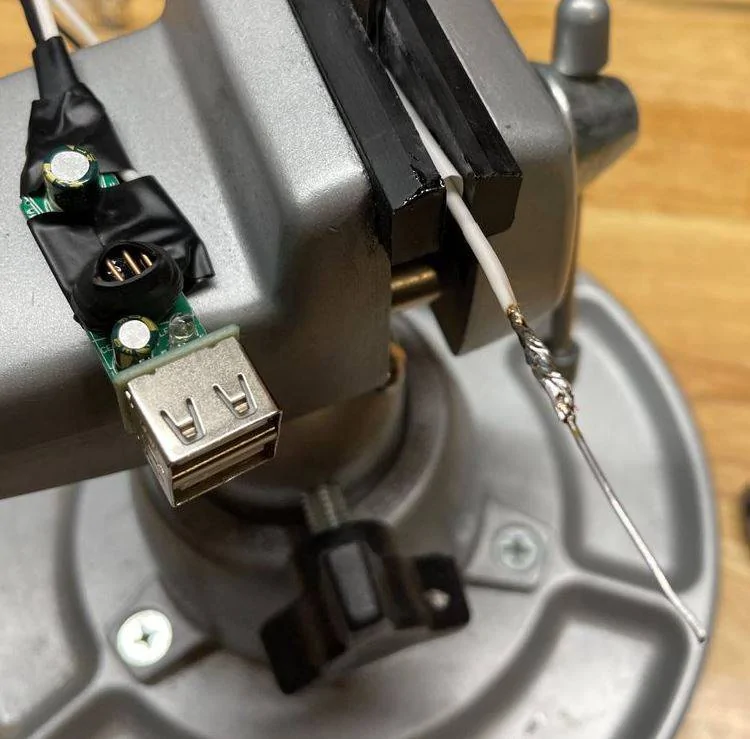
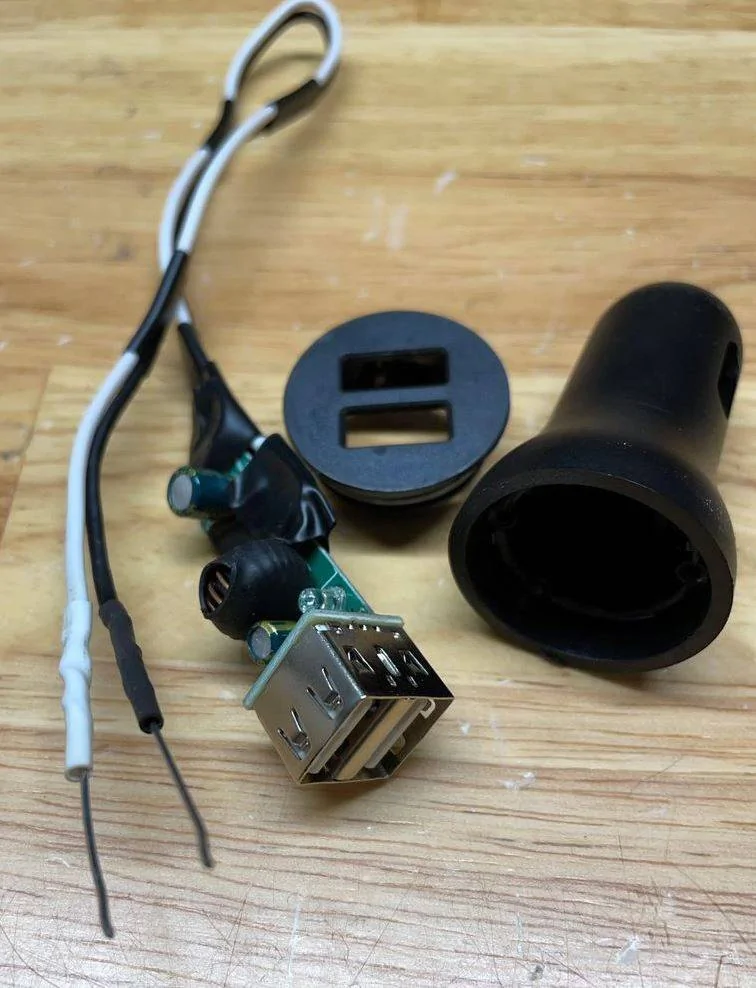
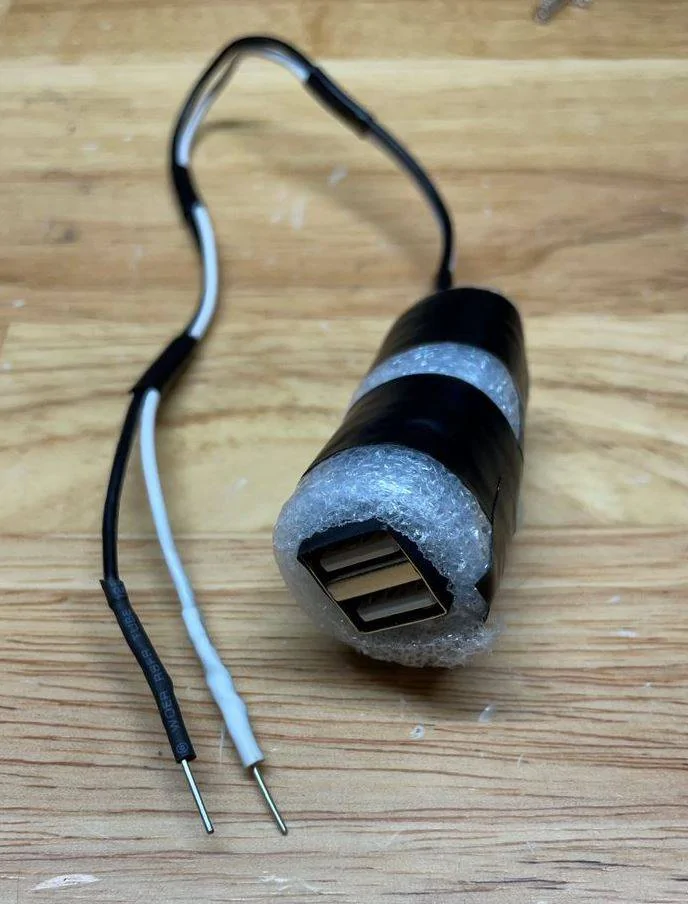
The MME was by far the easiest car I did this on. For power, I ripped apart the 12V USB power adapter that came with my dashcam and soldered a piece of paper clip, and tapped into the mirror, and tucked the USB adapter in the void behind the sunglasses holder.

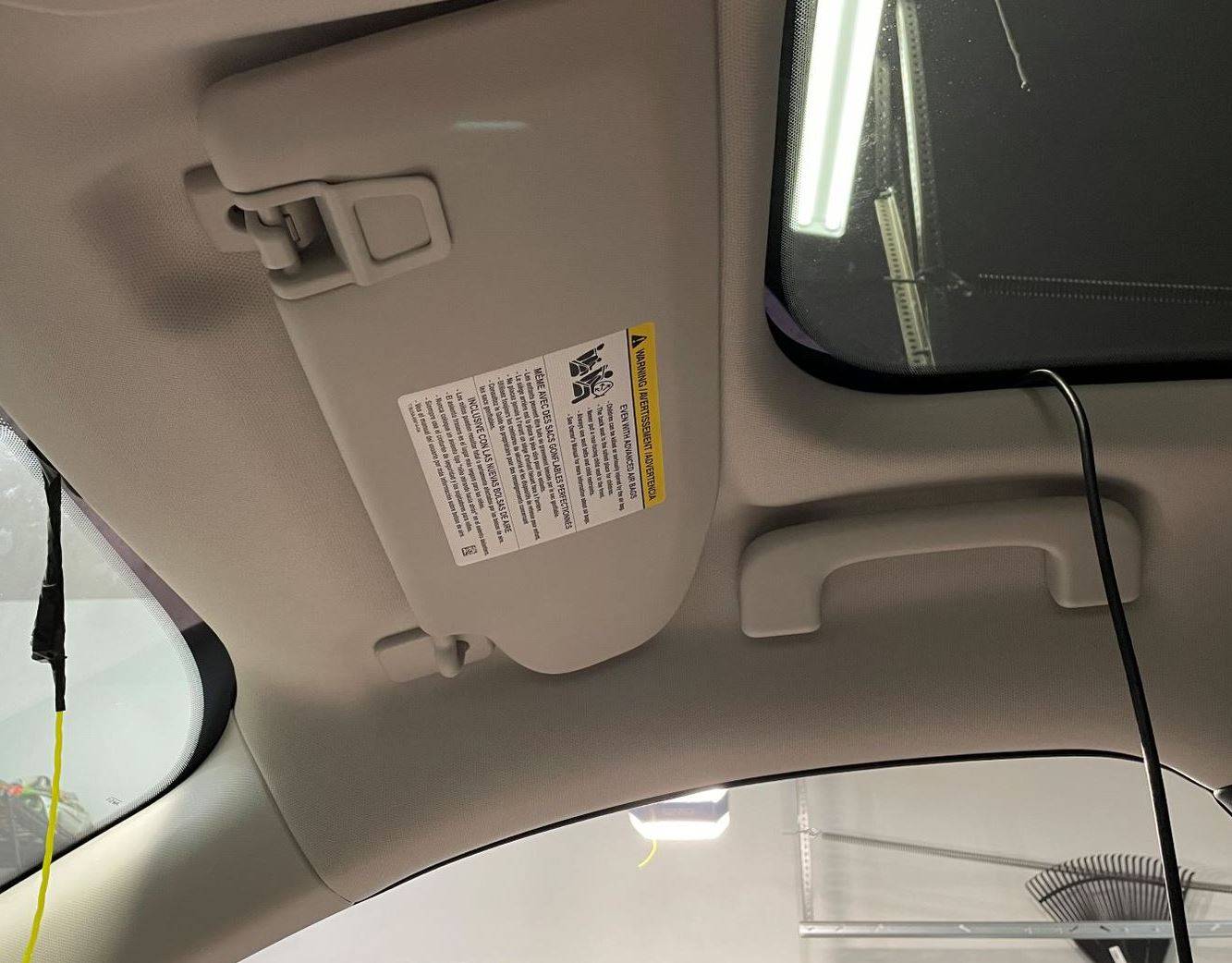
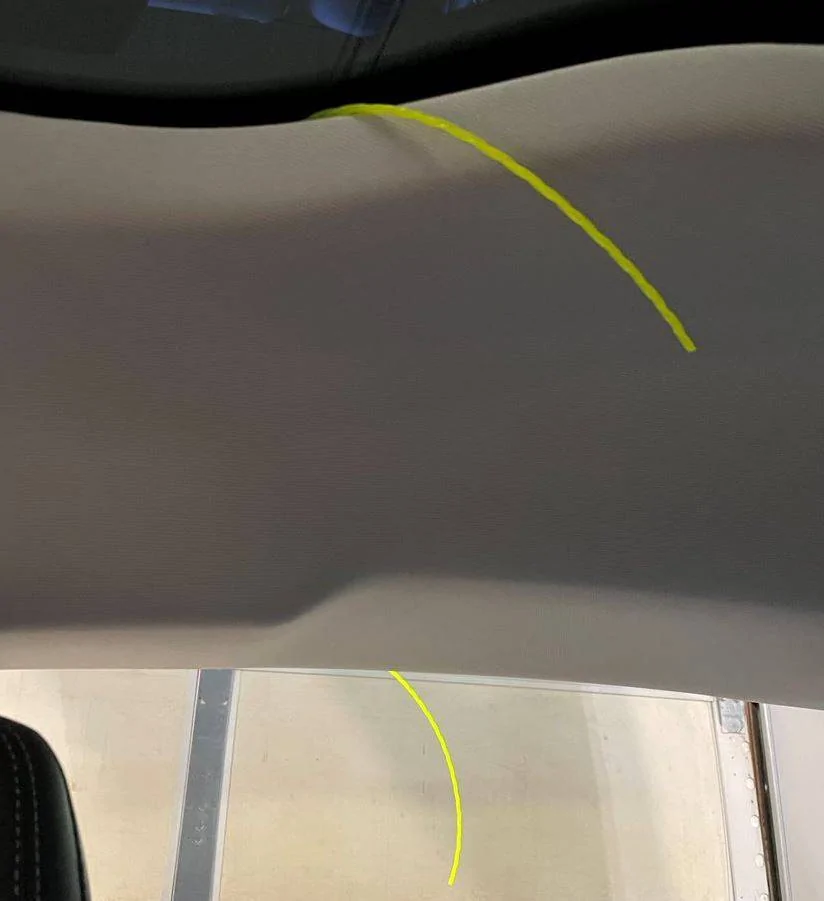
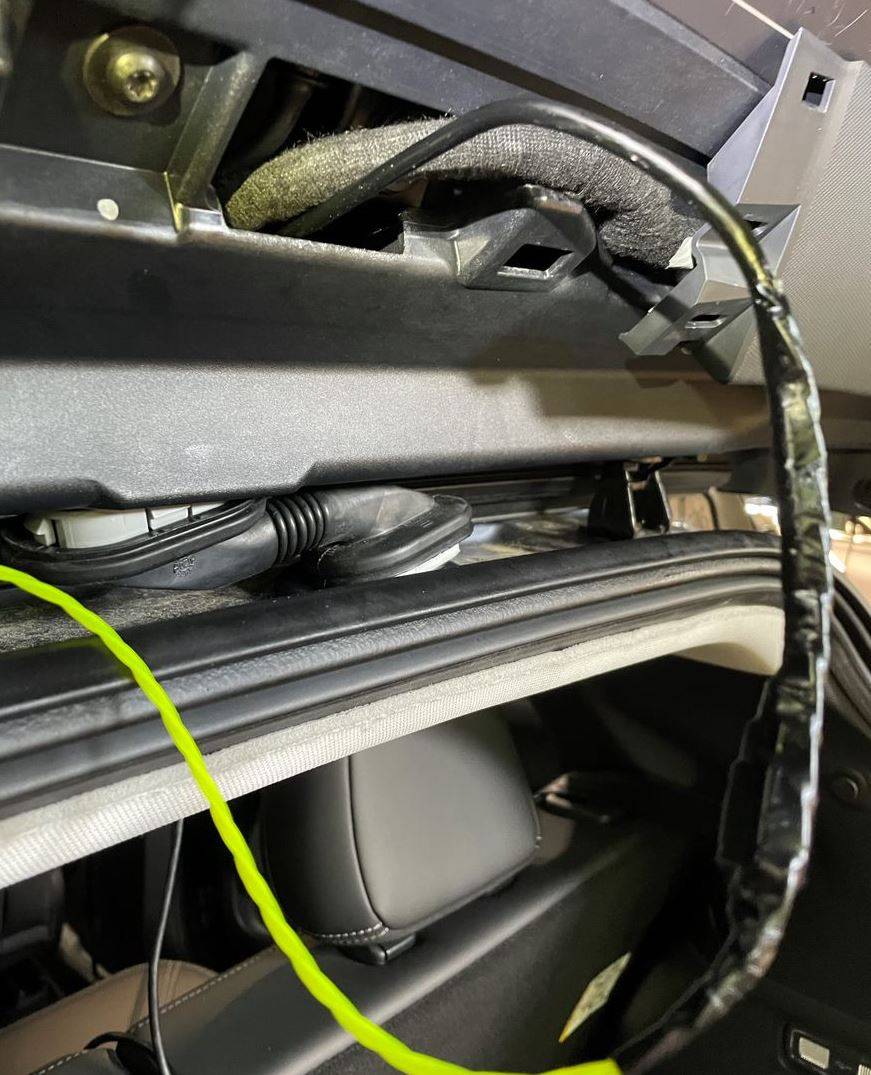
For the rear camera cable, I just ran the cable straight back around the headliner. This took me all 2 minutes to run. Have a look at the pictures below. Some of the headliner fasteners are magnetic which makes working on this car a snap. The areas I found the magnetic fasteners are above the sunglasses holder, above the rear seats in the center, around the passenger's side rear seat grab handle, and at the rear by the hatch opening. You simply grab and pull down without much force, and no risk of breaking those fragile plastic fasteners. The only real tricky part was running the rear camera cable through the rubber grommet because it's very tight in there but I managed. The trick is to lubricate the wire and your fish tape (I just used a length of weed whacker string) when pulling.

Ford Mustang Mach-E DIY Tutorial for Hardwiring a Dashcam and Radar Detector mirror tap.JPG


Ford Mustang Mach-E DIY Tutorial for Hardwiring a Dashcam and Radar Detector power1


Ford Mustang Mach-E DIY Tutorial for Hardwiring a Dashcam and Radar Detector power2


Ford Mustang Mach-E DIY Tutorial for Hardwiring a Dashcam and Radar Detector power3


Ford Mustang Mach-E DIY Tutorial for Hardwiring a Dashcam and Radar Detector power4.JPG


Ford Mustang Mach-E DIY Tutorial for Hardwiring a Dashcam and Radar Detector wire1.JPG


Ford Mustang Mach-E DIY Tutorial for Hardwiring a Dashcam and Radar Detector wire2


Ford Mustang Mach-E DIY Tutorial for Hardwiring a Dashcam and Radar Detector wire3.JPG


Ford Mustang Mach-E DIY Tutorial for Hardwiring a Dashcam and Radar Detector wire4.JPG


Ford Mustang Mach-E DIY Tutorial for Hardwiring a Dashcam and Radar Detector wire5.JPG


OP
OP

MachDoc

Well-Known Member
Joined
Apr 4, 2021
Threads
3
Messages
61
Reaction score
103
Location
New Jersey
Vehicles
2021 Premium Grey, 2023 GT Vapor Blue
Country flag
1. I love the idea of the weed wacker string!!! I'll have to try that one.

2. Did you find both constant and switched power in the mirror?
 

Wk217

Active Member
First Name
William
Joined
Jan 19, 2021
Threads
4
Messages
39
Reaction score
29
Location
Southern Utah
Vehicles
'25 F-150 Lightning Flash, '22 Mach-E 4X, '15 Flex Limited, '13 C-Max SEL
Country flag
Looks like you both went with the Viofo A129? I assuming with GPS mount, and it looks like mounted behind the rearview mirror, directly below where the rearview mirror mounts to the windshield.

Are you able to pick up a GPS signal? I installed the Viofo A139 in the same area yesterday, and it looks like I'm not able to reliably pick up GPS. Wondering if its a hardware issue or if its the coating on the windshield?

I made a video out of all the photos I took during my installation:


Rather than starting another thread, I'll just post here how I chose to run the wires.

The MME was by far the easiest car I did this on. For power, I ripped apart the 12V USB power adapter that came with my dashcam and soldered a piece of paper clip, and tapped into the mirror, and tucked the USB adapter in the void behind the sunglasses holder.

For the rear camera cable, I just ran the cable straight back around the headliner. This took me all 2 minutes to run. Have a look at the pictures below. Some of the headliner fasteners are magnetic which makes working on this car a snap. The areas I found the magnetic fasteners are above the sunglasses holder, above the rear seats in the center, around the passenger's side rear seat grab handle, and at the rear by the hatch opening. You simply grab and pull down without much force, and no risk of breaking those fragile plastic fasteners. The only real tricky part was running the rear camera cable through the rubber grommet because it's very tight in there but I managed. The trick is to lubricate the wire and your fish tape (I just used a length of weed whacker string) when pulling.

mirror tap.JPG


power1.JPG


power2.JPG


power3.JPG


power4.JPG


wire1.JPG


wire2.JPG


wire3.JPG


wire4.JPG


wire5.JPG
 

Benjamin Kegele

Well-Known Member
First Name
Benjamin
Joined
Mar 7, 2021
Threads
133
Messages
451
Reaction score
866
Location
Northern California
Vehicles
MME 21, VW Atlas, Harley Davidson Heritage Softail
Country flag
Looks like you both went with the Viofo A129? I assuming with GPS mount, and it looks like mounted behind the rearview mirror, directly below where the rearview mirror mounts to the windshield.

Are you able to pick up a GPS signal? I installed the Viofo A139 in the same area yesterday, and it looks like I'm not able to reliably pick up GPS. Wondering if its a hardware issue or if its the coating on the windshield?
Gps was not important for me so I never checked.
Sorry
 
OP
OP

MachDoc

Well-Known Member
Joined
Apr 4, 2021
Threads
3
Messages
61
Reaction score
103
Location
New Jersey
Vehicles
2021 Premium Grey, 2023 GT Vapor Blue
Country flag
Are you able to pick up a GPS signal? I installed the Viofo A139 in the same area yesterday, and it looks like I'm not able to reliably pick up GPS. Wondering if its a hardware issue or if its the coating on the windshield?
I am using a Uniden R3. I get a GPS signal intermittently.
 

MachTee

Well-Known Member
First Name
Andy
Joined
Jun 9, 2021
Threads
5
Messages
368
Reaction score
574
Location
USA
Vehicles
MME Premium Infinite Blue SR AWD
Country flag
Looks like you both went with the Viofo A129? I assuming with GPS mount, and it looks like mounted behind the rearview mirror, directly below where the rearview mirror mounts to the windshield.

Are you able to pick up a GPS signal? I installed the Viofo A139 in the same area yesterday, and it looks like I'm not able to reliably pick up GPS. Wondering if its a hardware issue or if its the coating on the windshield?
Yes A129. I mounted my front camera to the left of the housing, not below the mirror. I have no problem receiving the GPS signal.
 

jdwagner888

Member
First Name
Jeff
Joined
Jul 7, 2021
Threads
1
Messages
11
Reaction score
19
Location
Bucks County, PA
Vehicles
2021 Mustang Mach E Premium Extended Range RWD
Country flag
This is a lengthy tutorial with photos showing how I added my dash cam and radar detector to my Mach-E

A few points before we get started:

  • While this is not a difficult project, it is not for the faint of heart. Messing with a brand new car could potentially void your warranty or cause more serious problems.
  • There are sharp metal edges behind all of the pretty stuff - wear gloves!
  • This is my fifth or sixth vehicle doing similar upgrades. The rest were 2 BMW's, an Audi, a Tesla model S, and 2 Subarus. This car was by far the easiest to do but that also could be because I have more experience.
  • Never pry plastic panels with a screwdriver. Either use your fingers or a simple plastic pry set similar to this one on Amazon:
  • When you do pry these plastic components with your fingers or a pry tool, occasionally the little plastic retaining clips may break. While you can buy these from Ford, AutoZone sells them in bunches of three or four at half the price. I found out the hard way that Tesla was charging large sums of money for clips that I could easily have purchased for a Subaru at less than $.50 a pop.

Obtaining switched and constant 12 V power

The radar detector needs a switched 12 V power supply and the dash cam needs both a switched 12 V supply and a constant 12 V supply to record problems while the car is parked. In previous vehicles, I had no trouble finding both switched and constant power somewhere in the overhead mirror compartment but could only find switched on this car.

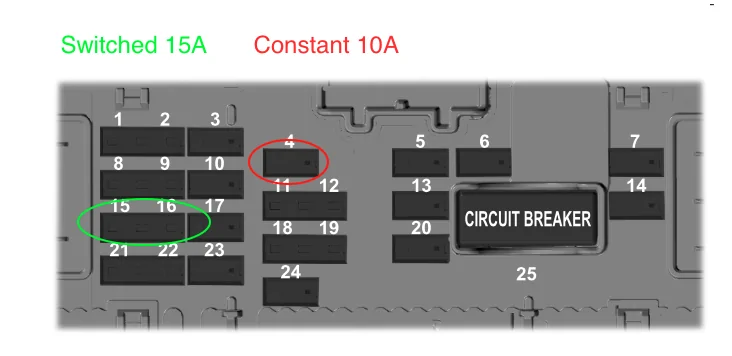
I also do not like to overly strain the built-in wires. When possible, I prefer to run new circuits from the fuse box up to the windshield to power both toys. That is what I did in this case. There is a fuse box behind the passenger kick panel. With a little experimentation, I found high capacity circuits of both types. Page 278 of the owners manual will show you how to remove that kick plate.

From page 279 of the owners manual:

Pic1.png


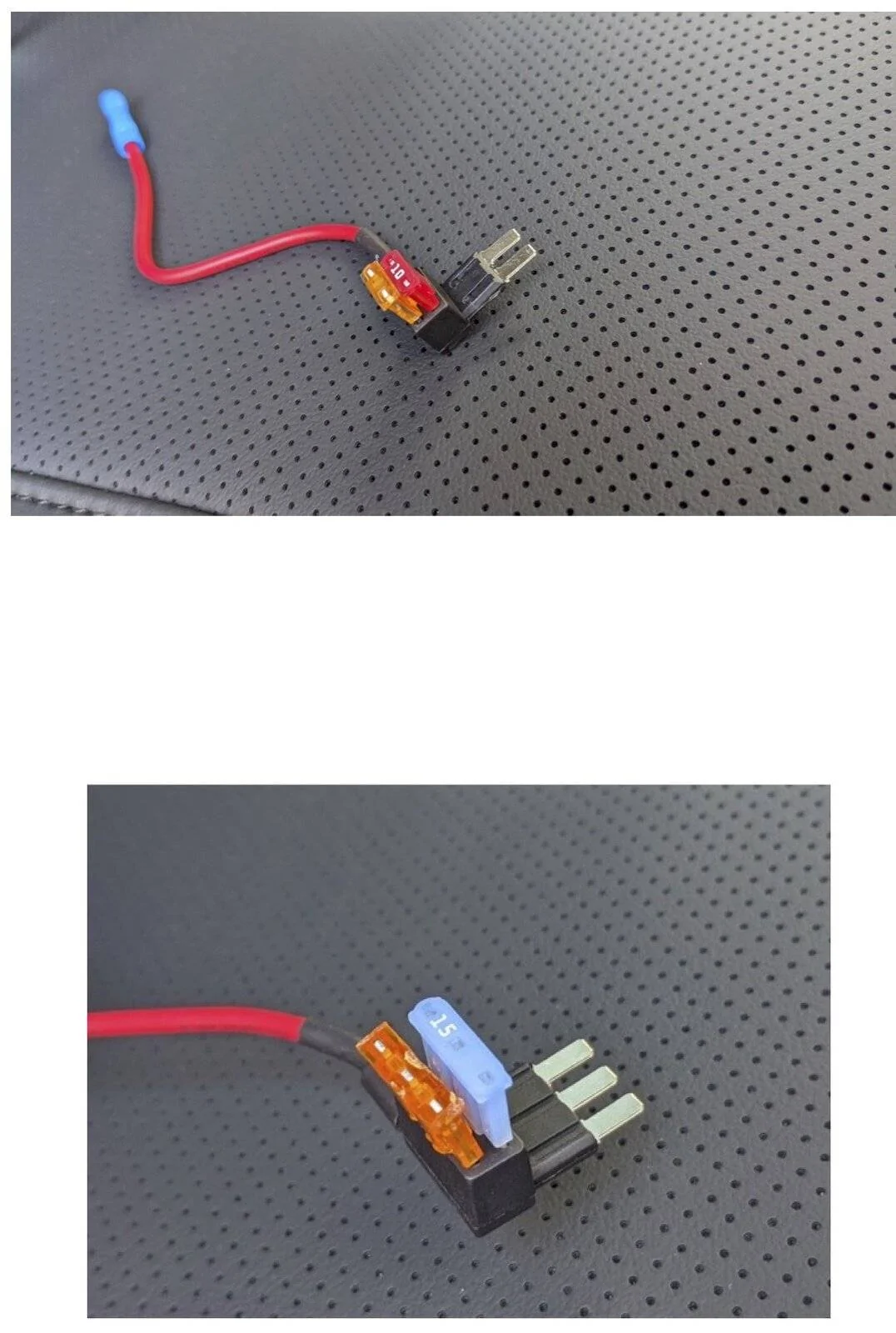
While I previously would simply tap into an existing wire, I like my toys to have their own fuses in case something goes wrong. I recently started using these "add a tap" products to make tapping-in easier and safer. The existing fuse gets moved into the bottom slot and a new 2.5 amp fuse goes to my toys.

merge2.jpg


The physically smaller fuse it is called a Micro 2 and the larger one is called a Micro 3.

Here are the links for the add-a-taps:

https://www.amazon.com/gp/product/B082YZWSSY/ref=ppx_yo_dt_b_asin_title_o03_s00?ie=UTF8&psc=1

https://www.amazon.com/gp/product/B07R8R2T7T/ref=ppx_yo_dt_b_asin_title_o04_s00?ie=UTF8&psc=1


I normally have extra three conductor wire around the house however I had to purchase some for this project. I normally like 20 gauge wire but somehow accidentally bought 22 gauge wire. This is definitely capable of carrying enough power for these two small devices.

Routing Wires

I was able to easily route this wire up towards the mirror housing. First I removed this side panel using a small plastic pry tool. It is held on by six plastic clips:

Pic4.jpg


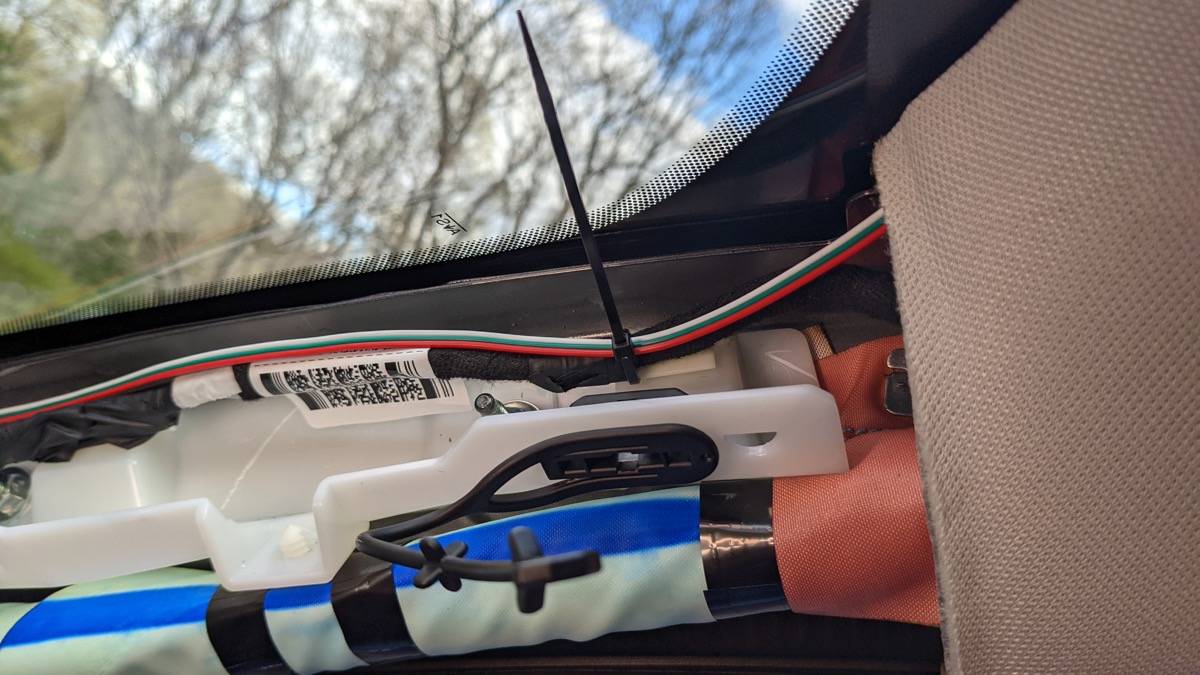
Next, I carefully pried off the A column cover with the pry tools. There is an airbag in here. Any wires you run must go behind the airbag. I prefer to zip tie them to ensure they do not fall in front of the airbag.

Pic5.jpg


I next removed the cover over the mirror housing. I did this with gentle finger pressure pulling downward to release the 5 clips.

Pic6.jpg


Next, I connected the appropriate switched power to my radar detector, switched and constant to the dash cam plug and both to negative. I prefer to solder all wires and cover with shrink wrap tubing. I also have serious OCD therefore labeled everything however in this picture you cannot read the labels because they are facing away from you. Red is constant, green is switched and the white is my negative.

Pic 7.jpg


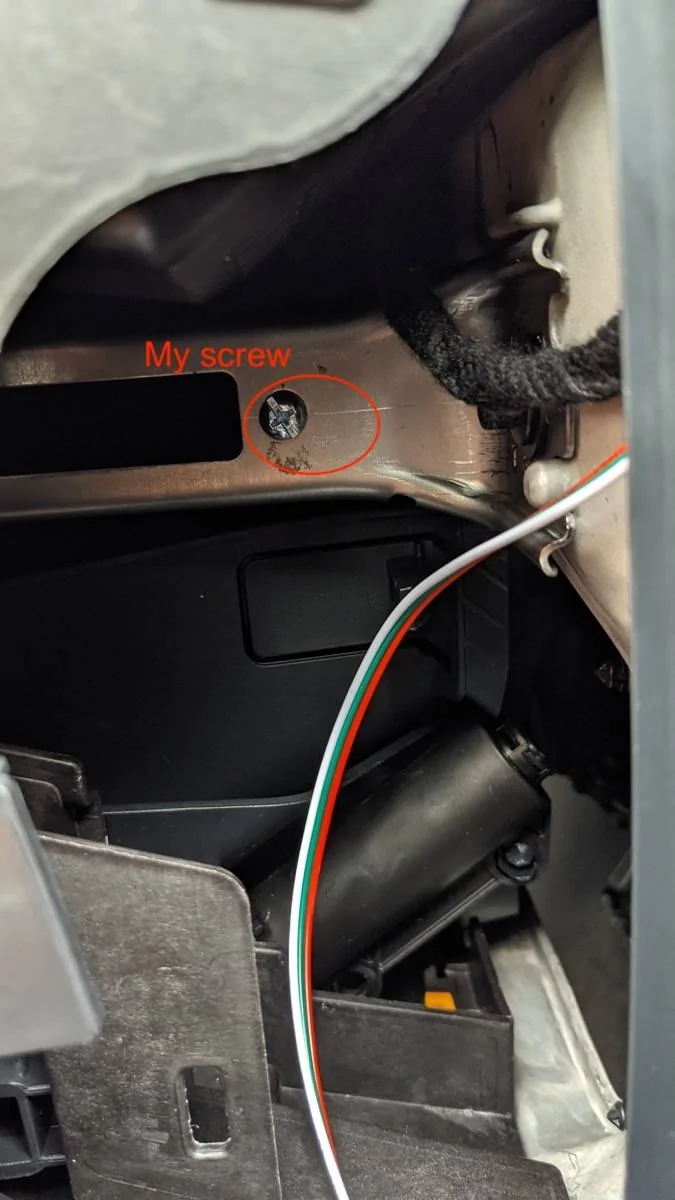
I almost forgot, speaking about the negative lead, I could not find a good metal anchoring point anywhere in that fuse box. Everything is plastic in there. Therefore, I found a nice piece of steel in that side compartment below the A column. There were two round holes. I took a metal machine screw, washer and nut and fastened the raw white wire directly to that piece of the frame. Again, with the OCD, I used thread locker liquid on the bolt to ensure it never came loose accidentally.

Pic 8.jpg


At this point, I connected the red and green leads to the add-a-taps below in the fuse box, plugged everything in, and made sure everything worked as I expected with the car on and off.

Connection to Rear Camera

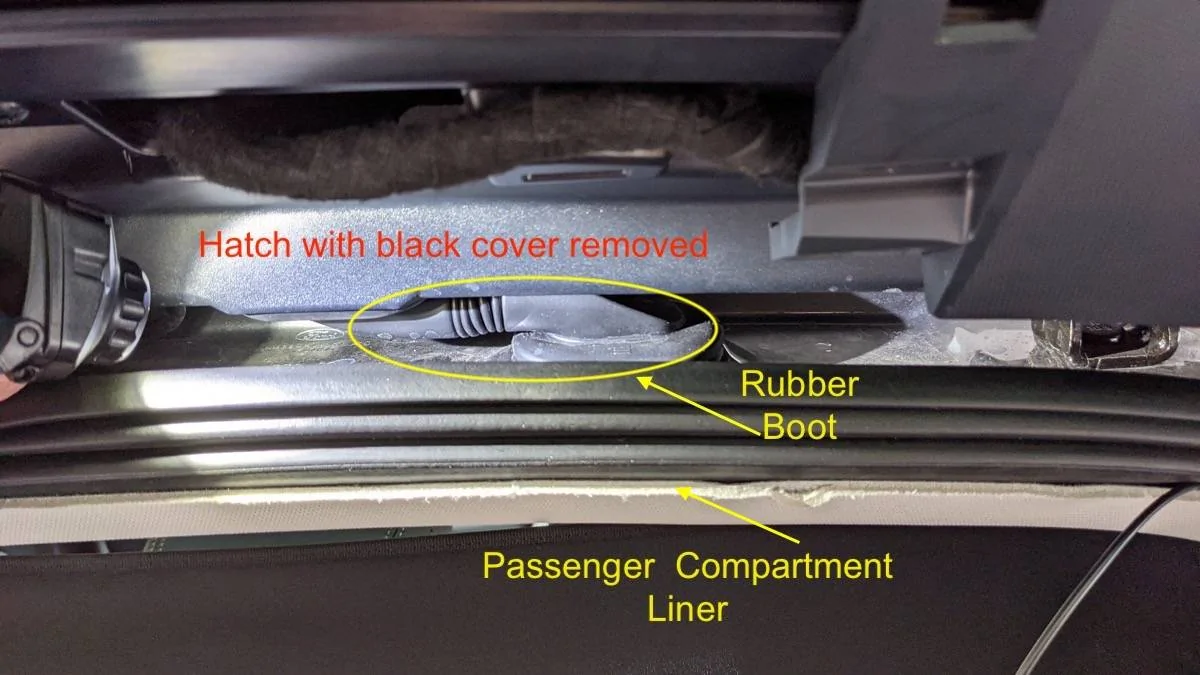
The next step was to run the video lead to the rear camera. Fortunately, the ceiling liner is not strongly attached to the roof as in the other cars I had to work on. Simply pull down gently using a pry tool to work under the rubber gasket. Going between the front and rear doors around the B column required a little work. Instead of using my fish tape, I took a small diameter wire hanger to thread the wire through. Once the wire hanger is visible on both ends, I simply used electrical tape and pulled it through. Note: I could not pry the B column cover off easily and didn't want to risk breaking anything. Likewise, going to the trunk, the plastic holding the liner in place felt too sturdy and I simply used fish tape to pull the wire all the way into the trunk.

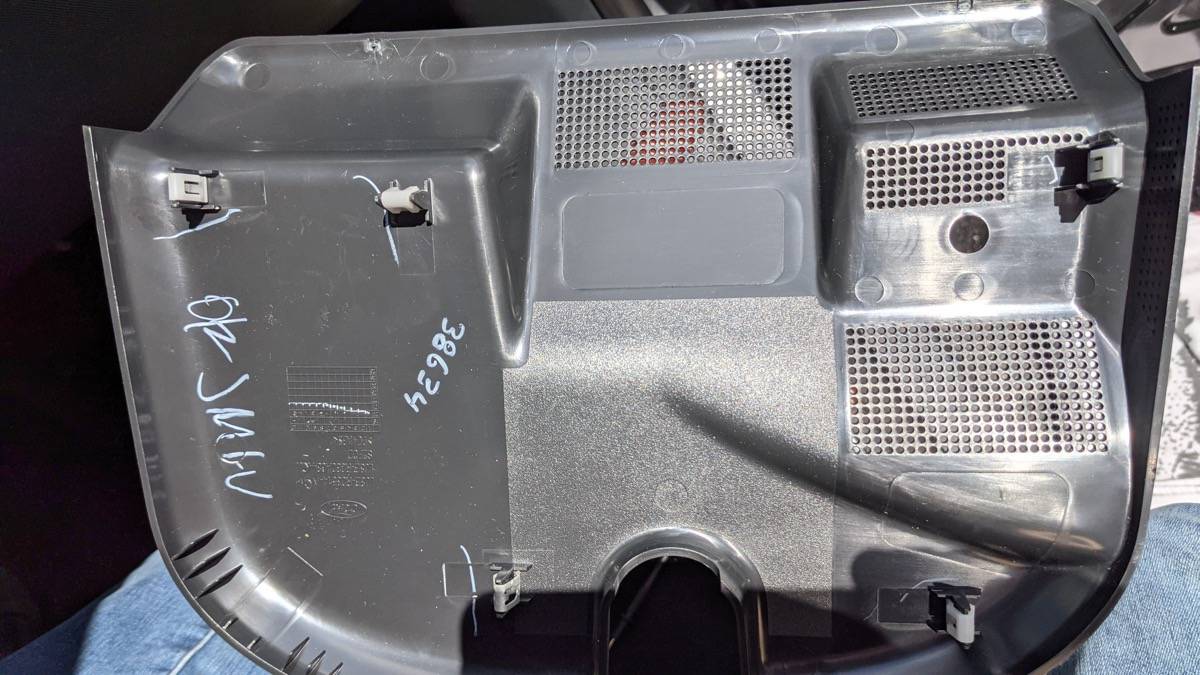
pic9.jpg


Pic10.jpg


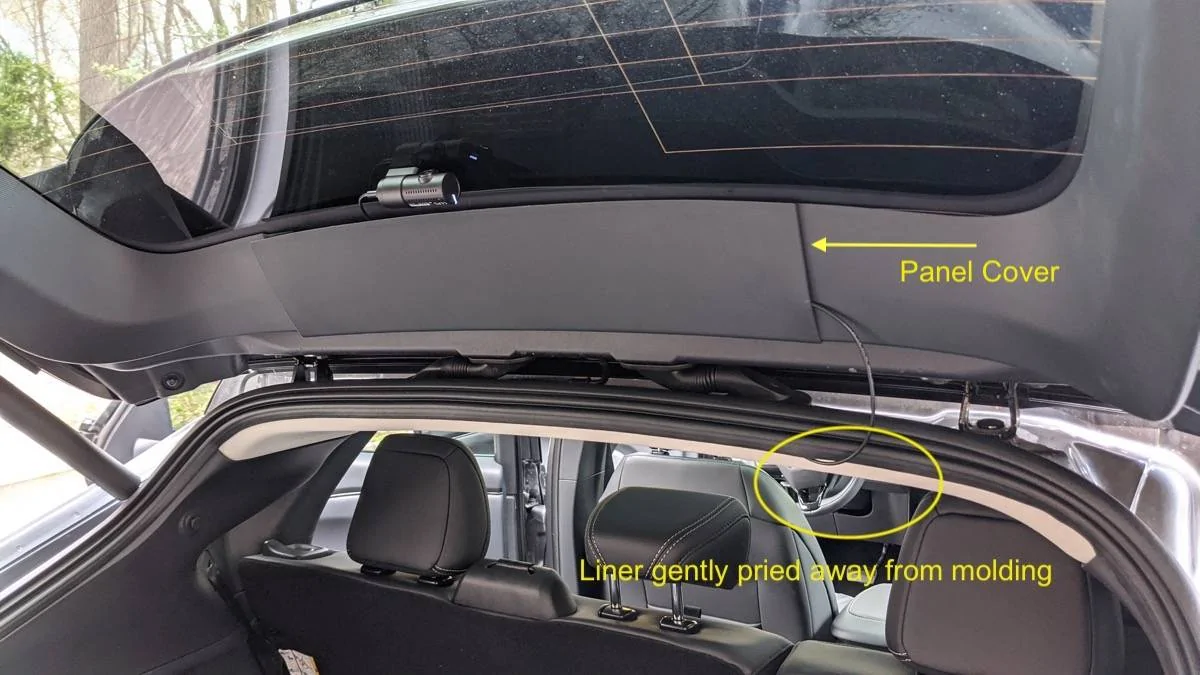
To make the job as neat as possible, I also pried off the plastic cover noted in the photo above. It is held on by six retaining clips. I then mounted the rear camera as high up as possible on the window.


Normally, I would run the wire to the rear camera through the "boot" between the main compartment and the hatch. This is the first car that I was not able to do so. The boot is sufficiently deep under the liner and into the hatch, that no amount of manipulation with fish tape would let me get a string through there. Therefore, I will have that little bit of wire hanging down between the liner and the hatch on the right side but it is not visible when I look in the rearview mirror.

Pic11.jpg


Once that was done, it was simply a matter of putting everything back together. The only difficult part was getting the A column to sit properly. Work slowly. There is a vent built into that column that has to be seated at the base in order for the column to fit properly.


The final result:

Merge4.jpg


Please write with any questions. I am happy to help out anyone trying a similar project.

Jeff
Awesome write up.
is that a blackvue camera setup? Does it stay on 24/7 and have you noticed any significant battery draw from it?
I would assume it would take many months to drain a mme battery with a dash camera.
 

Wk217

Active Member
First Name
William
Joined
Jan 19, 2021
Threads
4
Messages
39
Reaction score
29
Location
Southern Utah
Vehicles
'25 F-150 Lightning Flash, '22 Mach-E 4X, '15 Flex Limited, '13 C-Max SEL
Country flag
Yes A129. I mounted my front camera to the left of the housing, not below the mirror. I have no problem receiving the GPS signal.
Ok. I moved the dash cam to the side of the mirror/sensor housing instead of below it and the GPS now works fine.
 

Locksnapper

New Member
Joined
Jul 20, 2021
Threads
0
Messages
1
Reaction score
0
Location
UK
Vehicles
Mach-E
Country flag
Great write up Machdoc, thank you. finally Mach-E’s are starting to filter through here in the UK at last. looking to fit a dash cam, so this is really helpful.

has anyone tried to fish tape the cable for the rear cam through the center of the roof liner?
 

Benjamin Kegele

Well-Known Member
First Name
Benjamin
Joined
Mar 7, 2021
Threads
133
Messages
451
Reaction score
866
Location
Northern California
Vehicles
MME 21, VW Atlas, Harley Davidson Heritage Softail
Country flag
Great write up Machdoc, thank you. finally Mach-E’s are starting to filter through here in the UK at last. looking to fit a dash cam, so this is really helpful.

has anyone tried to fish tape the cable for the rear cam through the center of the roof liner?
Yes a guy did it, it is somewhere here in the forum he said it was the easiest install he ever did. He said he used a weed wacker string

I went through the side not even thinking about it.

I did a video about my installation
Sponsored


Top