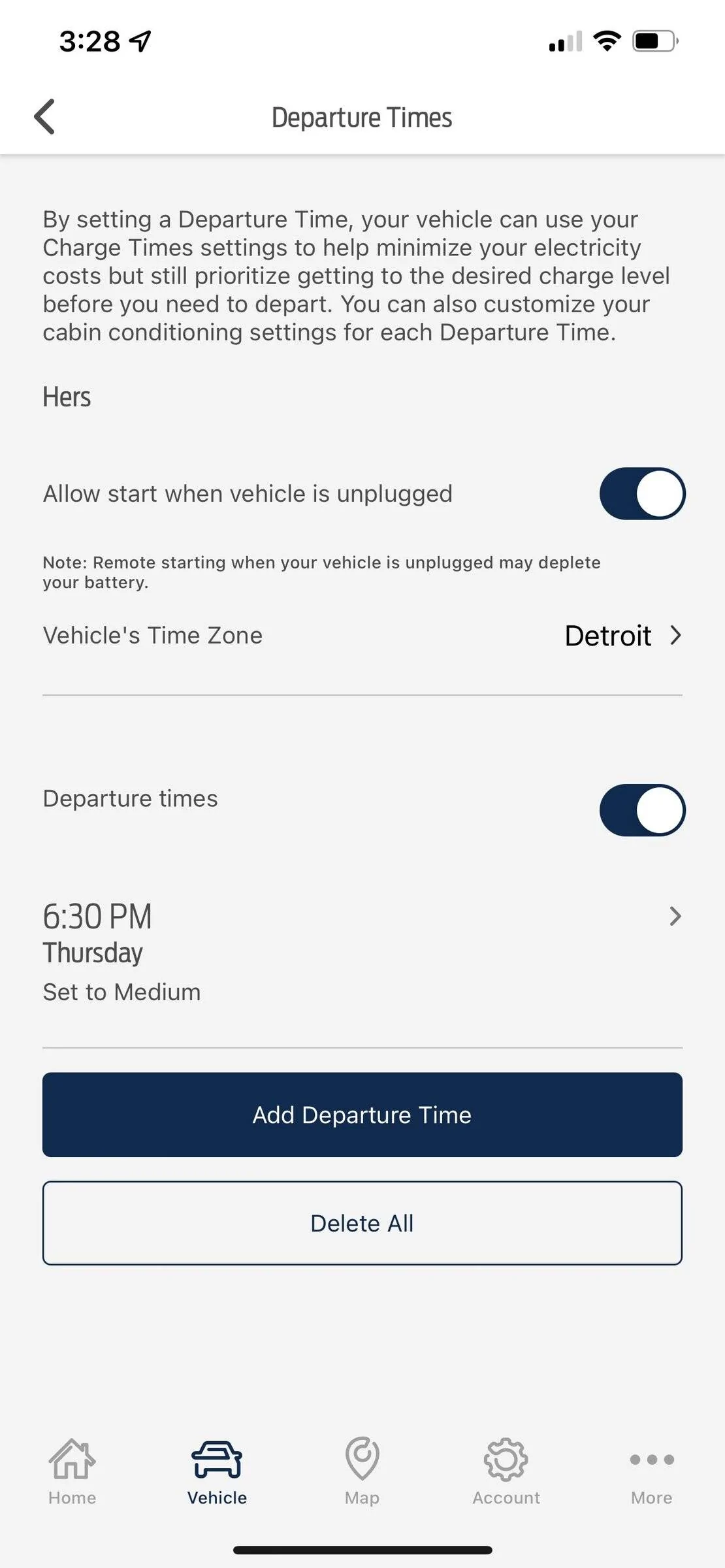
Does anyone know how to change the time zone in the Ford Pass App

adam_thedad

Well-Known Member
First Name
Adam
Joined
Aug 24, 2021
Threads
15
Messages
80
Reaction score
73
Location
Orange County, CA
Vehicles
Mach E Select (Route 1 on Order)
Country flag
Hey friends,

I'm wondering if anyone knows how to change the time zone in the Ford Pass app for departure times? Mine is stuck in Detroit and I can get it to let me change it. Thanks!

Ford Mustang Mach-E Does anyone know how to change the time zone in the Ford Pass App IMG_0161
Sponsored


Polar

Well-Known Member
First Name
SBJ
Joined
Jun 5, 2021
Threads
25
Messages
652
Reaction score
1,142
Location
PNW
Vehicles
2021 Select RWD SR
Country flag
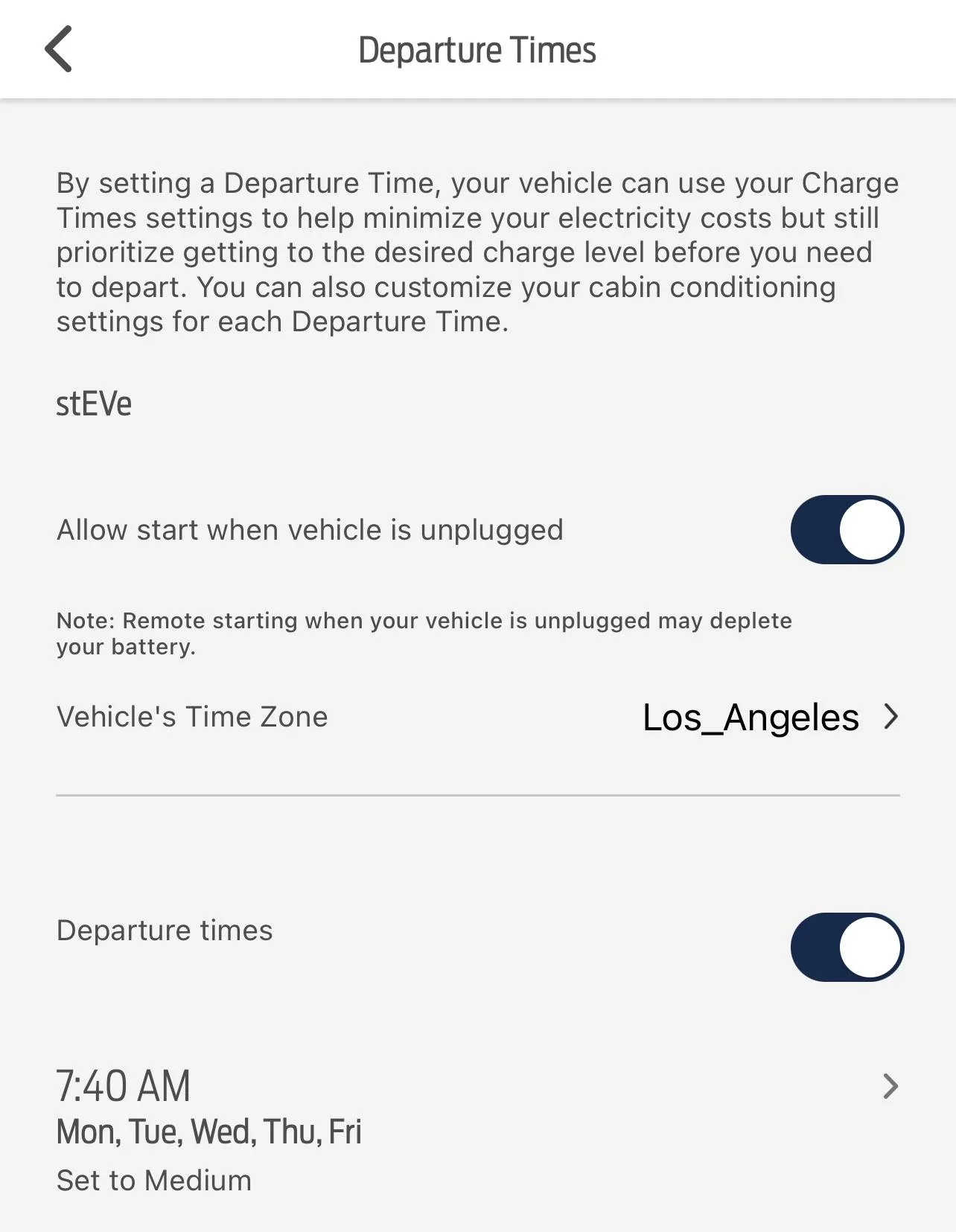
If you click on Detroit you can’t change it? Weird.
Ford Mustang Mach-E Does anyone know how to change the time zone in the Ford Pass App D15EFD6A-62E6-4447-B003-CA695CE20AF9
 
OP
OP

adam_thedad

Well-Known Member
First Name
Adam
Joined
Aug 24, 2021
Threads
15
Messages
80
Reaction score
73
Location
Orange County, CA
Vehicles
Mach E Select (Route 1 on Order)
Country flag

DMx

Member
First Name
Dustin
Joined
Dec 20, 2021
Threads
0
Messages
7
Reaction score
0
Location
Southern CA
Vehicles
2021 Mach-e
Country flag
I’m having the same issue and am on hold with the app chat feature. Did you resolve your issue?


jddrews

Well-Known Member
First Name
Jonathan
Joined
Apr 22, 2021
Threads
11
Messages
235
Reaction score
338
Location
Portland, OR
Vehicles
2021 Mach-E Premium ER AWD Dark Matter Grey
Country flag
Mine used to do the same thing (I think they all did). I recently reset my FordPass app because of a PaaK issue and the time change option was available finally.
 

DMx

Member
First Name
Dustin
Joined
Dec 20, 2021
Threads
0
Messages
7
Reaction score
0
Location
Southern CA
Vehicles
2021 Mach-e
Country flag
Mine used to do the same thing (I think they all did). I recently reset my FordPass app because of a PaaK issue and the time change option was available finally.
How do you “reset” the app? Are you talking log out and back in, or do I need to delete the app and then reinstall?
 
OP
OP

adam_thedad

Well-Known Member
First Name
Adam
Joined
Aug 24, 2021
Threads
15
Messages
80
Reaction score
73
Location
Orange County, CA
Vehicles
Mach E Select (Route 1 on Order)
Country flag
I’m having the same issue and am on hold with the app chat feature. Did you resolve your issue?
They told me there was an issue with the modem connecting and I should have it serviced. I was taking it in this week for the recall and software update anyway, so will have them look.
 

jddrews

Well-Known Member
First Name
Jonathan
Joined
Apr 22, 2021
Threads
11
Messages
235
Reaction score
338
Location
Portland, OR
Vehicles
2021 Mach-E Premium ER AWD Dark Matter Grey
Country flag
How do you “reset” the app? Are you talking log out and back in, or do I need to delete the app and then reinstall?
I deleted the app from my phone and started over. I didn't need to delete my profile from the car or anything, it was just a matter of re-pairing my phone to my car. But in doing so, I lost my departure time schedule so I had to re-do that and that's when I discovered the time-zone issue had been fixed.
 

DMx

Member
First Name
Dustin
Joined
Dec 20, 2021
Threads
0
Messages
7
Reaction score
0
Location
Southern CA
Vehicles
2021 Mach-e
Country flag
They told me there was an issue with the modem connecting and I should have it serviced. I was taking it in this week for the recall and software update anyway, so will have them look.
Ok, please advise as to the outcome. The app chat netted me zero results, they said they would have to escalate the issue and would get back to me in 3-5 days. I’ve only owned the vehicle for 4 days (Ordered it back in May and just took delivery of it).
 

DMx

Member
First Name
Dustin
Joined
Dec 20, 2021
Threads
0
Messages
7
Reaction score
0
Location
Southern CA
Vehicles
2021 Mach-e
Country flag
I deleted the app from my phone and started over. I didn't need to delete my profile from the car or anything, it was just a matter of re-pairing my phone to my car. But in doing so, I lost my departure time schedule so I had to re-do that and that's when I discovered the time-zone issue had been fixed.
Ok, I’ll give that a try and keep y’all posted. Thank you for the tip.
 

DMx

Member
First Name
Dustin
Joined
Dec 20, 2021
Threads
0
Messages
7
Reaction score
0
Location
Southern CA
Vehicles
2021 Mach-e
Country flag
I signed out and then deleted the app. When I got back in, the departure time was still saved. I ended up just turning off the “allow start when vehicle is unplugged” and then the “Detroit” time zone disappears. I’m not sure if my charging time zone schedule is set to the Detroit time zone or if it is based on the charging address. I’ll have to look to see when it warms the vehicle and when it starts charging as well. thennill wait to see what Ford says when they get back to me.
 

DMx

Member
First Name
Dustin
Joined
Dec 20, 2021
Threads
0
Messages
7
Reaction score
0
Location
Southern CA
Vehicles
2021 Mach-e
Country flag
I got a call from Ford yesterday, but it was just a courtesy call to say they received my complaint and that they had to “escalate it to the next level’“ and that I should hear from a technician with 3-5 more days. I will update what needs to be done to fix it, but still looking for someone on here that has already gone through this issue so I know what to expect. Thanks all.
 

DMx

Member
First Name
Dustin
Joined
Dec 20, 2021
Threads
0
Messages
7
Reaction score
0
Location
Southern CA
Vehicles
2021 Mach-e
Country flag
Got another courtesy call from Ford yesterday saying it will be an additional 7-10 days before I hear anything.
Sponsored


Top