Scheduled Start missing from FordPass app

Johnny B

Well-Known Member
First Name
John
Joined
Jan 14, 2022
Threads
9
Messages
148
Reaction score
178
Location
Chandler, AZ
Vehicles
2021 Mach E Premium RWD 2017Nissan Titan XD Diesel
Occupation
Retired Software Developer
Country flag
OP
OP
mikeynags

mikeynags

Active Member
Joined
Feb 15, 2022
Threads
2
Messages
35
Reaction score
13
Location
US
Vehicles
2021 MachE Select
Occupation
Network and Security Engineer
Country flag
Couple of updates - did call FordPass support and they weren't much help. They made me apply the latest iOS update to the phone (16.2) and that did nothing. The next step is escalation to next level support apparently. So now I have a case number but no idea when I will hear back from Ford on this.

As a test, I did try setting up a new FP account and granted access to the MachE from my original account to see if it was a problem related to the account. It wasn't but now, when I removed the Mach E from the "garage" of the 2nd account, the process removed all PAAK settings from all other users. I could not believe there was no "confirm this now" type of prompt or anything, it just whacked everything.

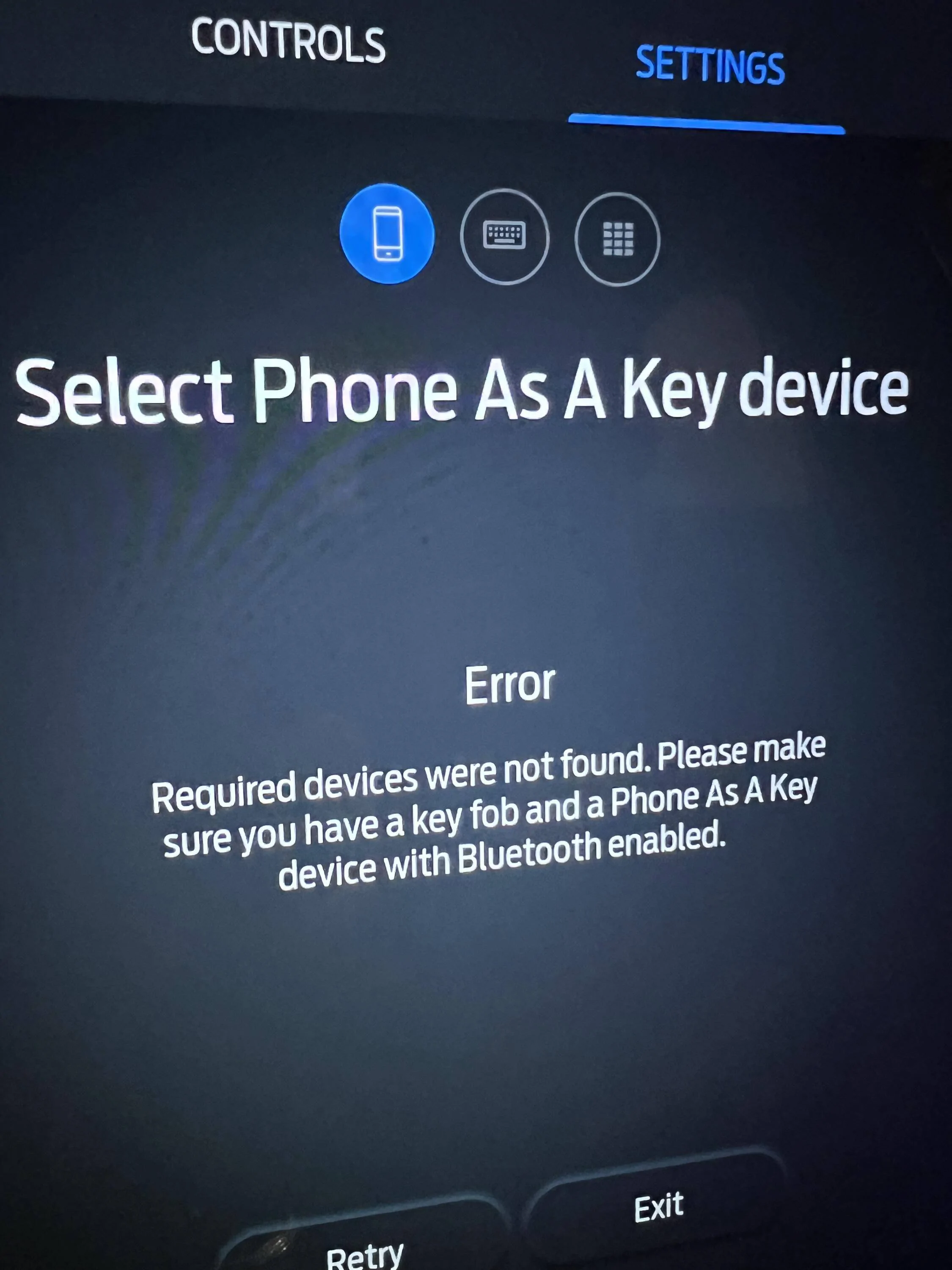
This PAAK whack job has now unmasked yet another problem. I'm not able to re-add PAAK functionality to my phone or my wife's phone. I get this error now.

Ford Mustang Mach-E Scheduled Start missing from FordPass app 1671041227186

I'm thinking all of this needs to be relateted somehow to the Power up 3.6.1 update that happened on 11/20.

Thoughts?
 

Mach-Lee

Well-Known Member
First Name
Lee
Joined
Jul 16, 2021
Threads
262
Messages
11,344
Reaction score
24,964
Location
Wisconsin
Vehicles
2022 Mach-E Premium AWD
Occupation
Sci/Eng
Country flag
Couple of updates - did call FordPass support and they weren't much help. They made me apply the latest iOS update to the phone (16.2) and that did nothing. The next step is escalation to next level support apparently. So now I have a case number but no idea when I will hear back from Ford on this.

As a test, I did try setting up a new FP account and granted access to the MachE from my original account to see if it was a problem related to the account. It wasn't but now, when I removed the Mach E from the "garage" of the 2nd account, the process removed all PAAK settings from all other users. I could not believe there was no "confirm this now" type of prompt or anything, it just whacked everything.

This PAAK whack job has now unmasked yet another problem. I'm not able to re-add PAAK functionality to my phone or my wife's phone. I get this error now.

1671041227186.png

I'm thinking all of this needs to be relateted somehow to the Power up 3.6.1 update that happened on 11/20.

Thoughts?
Did you try pulling fuse #19 yet?
 

johnmark

Well-Known Member
First Name
JM
Joined
Jun 22, 2022
Threads
14
Messages
364
Reaction score
373
Location
Massachusetts
Vehicles
'22 Mustang Mach-E GT
Country flag
Not sure if this is related, but for the last week or so, whenever I try to view departure times I get the error "fordpass isn't responding. Please try again later"


OP
OP
mikeynags

mikeynags

Active Member
Joined
Feb 15, 2022
Threads
2
Messages
35
Reaction score
13
Location
US
Vehicles
2021 MachE Select
Occupation
Network and Security Engineer
Country flag
And just to make sure, you have both a fob and your phone in the car at the same time during that step?
Absolutely - this is driving me nuts
 
OP
OP
mikeynags

mikeynags

Active Member
Joined
Feb 15, 2022
Threads
2
Messages
35
Reaction score
13
Location
US
Vehicles
2021 MachE Select
Occupation
Network and Security Engineer
Country flag
Absolutely - this is driving me nuts
one other thing I forgot to mention, is that the Bluetooth to the phone(s) seems fine and Carplay works fine too
 

Lynsey

Well-Known Member
Joined
Oct 30, 2021
Threads
26
Messages
524
Reaction score
869
Location
San Diego, CA
Vehicles
2022 Mustang Mach E GT - Star White
Country flag
Not sure if this is related, but for the last week or so, whenever I try to view departure times I get the error "fordpass isn't responding. Please try again later"
I am getting the same thing. I uninstalled and reinstalled too.
 
Last edited:
OP
OP
mikeynags

mikeynags

Active Member
Joined
Feb 15, 2022
Threads
2
Messages
35
Reaction score
13
Location
US
Vehicles
2021 MachE Select
Occupation
Network and Security Engineer
Country flag
Posting this here as well as the " FordPass Not Updating "topic:

I was to resolve this one so I thought I would update the thread on just how I did it.

I lucked out with a Google search and came across a site that had troubleshooting steps for PAAK problems. Site with the instructions found here: https://www.metromotors.com/mach-e-paak.html

Basically, I turned off connected services in the car, removed the Mach-E from the FordPass app and then re-added it by VIN. After a short while, the app prompted me to setup PAAK again. It generated a temporary Bluetooth PIN and successfully turned on all the connected services again. I did the same thing for my wife's phone and bingo - back in business.

I couldn't believe my eyes but everything that was previously not working, by some miracle now was working. So far, had 2 calls from FordPass support and they could not understand what was going on with the vehicle.

Hope this helps.

--mike
Sponsored


Top