Is there any way to save a favorite location on Android Auto Maps?

CameraCarl

Well-Known Member
First Name
Karl
Joined
Feb 26, 2024
Threads
46
Messages
412
Reaction score
425
Location
Twin Cities
Vehicles
Mustang Mach-E
Occupation
Retired
Country flag
I use my Galaxy phone and Google Maps for navigation via Android Auto in my Mach-E. I'm coming from an old-fashioned Garmin GPS unit where I can save my current location as a "Favorite" with a few simple and intuitive taps on the screen. I have been trying to do the same kind of thing on my Mach-E when using Android Auto/Google Maps, but can't figure out how to do it on the screen in the car. For example, I take road trips and often find a location that I want to save so I can go back at a future date to take photos. With the old Garmin GPS, I can drop a pin with my location and save it as a Favorite. But I have tried every possible thing I can think of on the Mach-E screen to do this, and nothing seems to work. Is this possible in the car?
Sponsored

 

AliRafiee

Well-Known Member
First Name
Ali
Joined
Jan 20, 2023
Threads
103
Messages
3,267
Reaction score
4,192
Location
Seattle WA
Vehicles
2022 Mach E GT - Grabber Blue
Occupation
Software Eng.
Country flag
I’m pretty sure you have to use the phone to drop a pin.
 

Mark813

Well-Known Member
First Name
Mark
Joined
Feb 1, 2025
Threads
18
Messages
390
Reaction score
294
Location
Tampa, FL
Vehicles
2024 Mustang Mach-E Premium AWD Extended Range
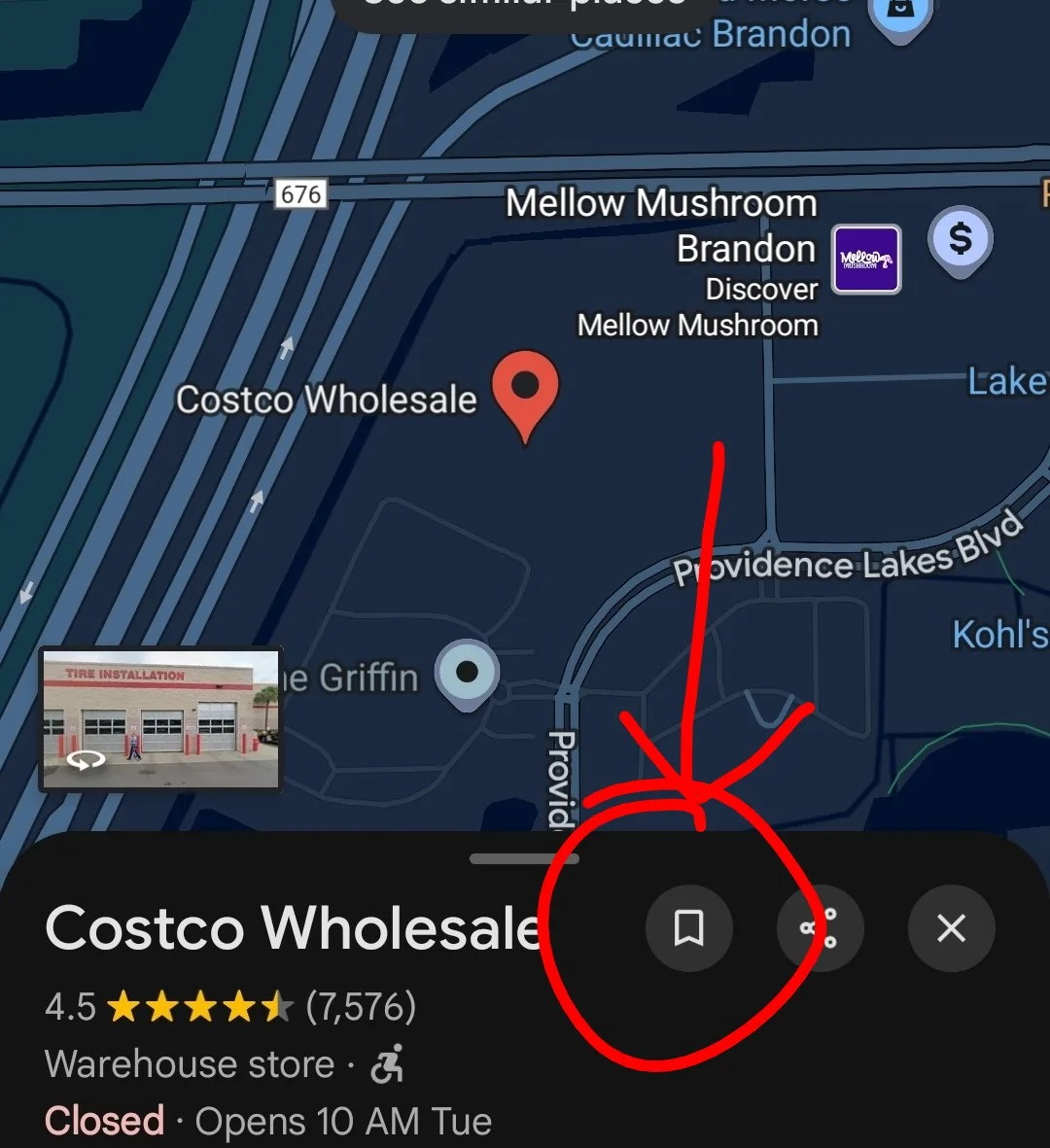
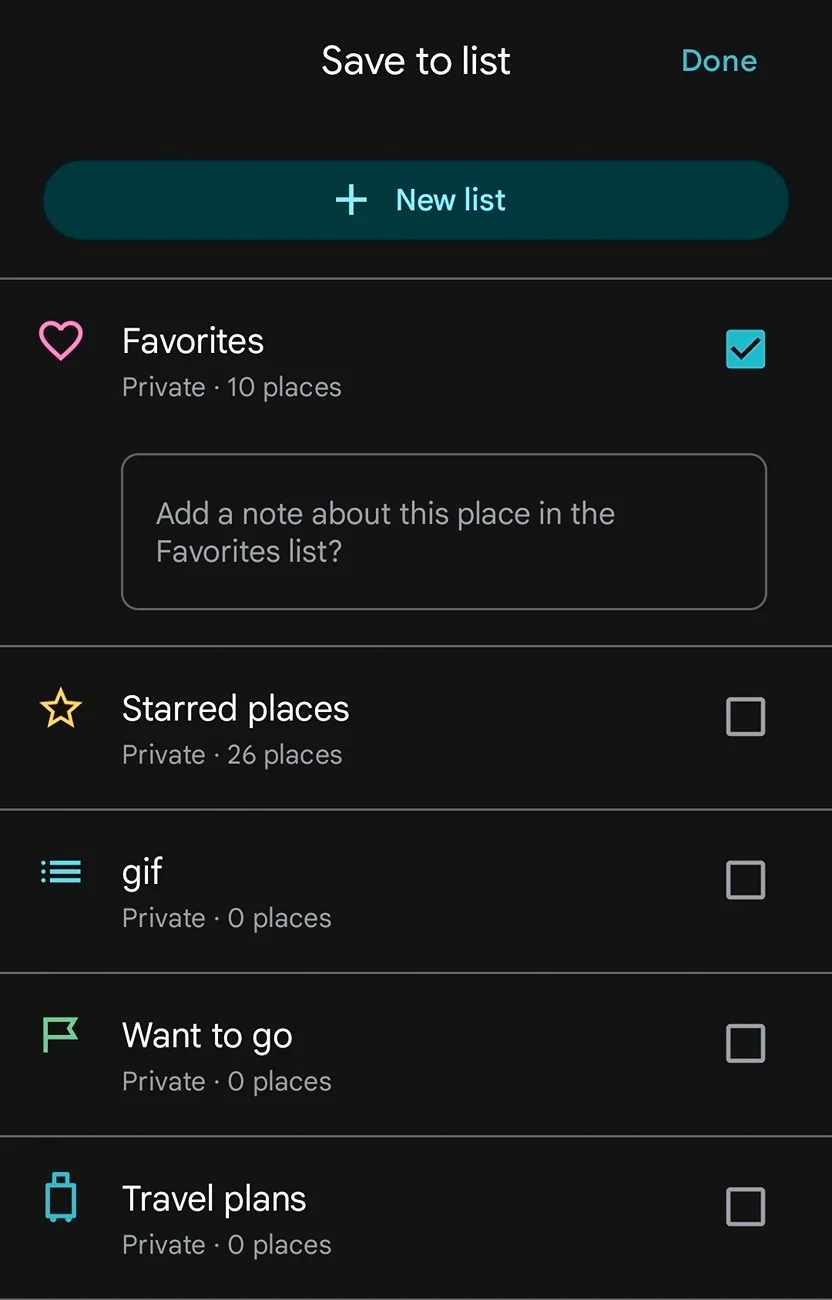
In android when you look up a location in maps you should have an option to save it as "Starred" or "Favorite".

Look for the bookmark symbol (circled in red) and then it will pop up the save and favorite options

I save a bunch of common locations but only favorite family or friends addresses

Pictures are from my phone, it's *similar* on the big screen in the MME but not as easy to see and weird because you'd bring saving it before you press navigate

Ford Mustang Mach-E Is there any way to save a favorite location on Android Auto Maps? Screenshot_20251027_211405_Maps~2


Ford Mustang Mach-E Is there any way to save a favorite location on Android Auto Maps? Screenshot_20251027_211420_Maps
 
Last edited:
OP
OP
CameraCarl

CameraCarl

Well-Known Member
First Name
Karl
Joined
Feb 26, 2024
Threads
46
Messages
412
Reaction score
425
Location
Twin Cities
Vehicles
Mustang Mach-E
Occupation
Retired
Country flag
In android when you look up a location in maps you should have an option to save it as "Starred" or "Favorite".

Look for the bookmark symbol (circled in red) and then it will pop up the save and favorite options

I save a bunch of common locations but only favorite family or friends addresses

Pictures are from my phone, it's *similar* on the big screen in the MME but not as easy to see and weird because you'd bring saving it before you press navigate

Screenshot_20251027_211405_Maps~2.webp


Screenshot_20251027_211420_Maps.webp
Thanks. This is helpful, but it doesn't do what I need. This assumes you enter a destination first and then want to save it. My situation is that when I am driving around looking for landscape photo locations, I might find a location to which I want to return at a later date or time. I want to drop a pin there so I can navigate back again later. I can't find a way to do this on the screen in the Mach-E. The only way I can find to accomplish this is to get my phone out and do it on the phone, and I was hoping that there was an easier way. Apparently not....
 

Xweb

Well-Known Member
Joined
Dec 20, 2021
Threads
10
Messages
150
Reaction score
123
Location
Los Angeles
Vehicles
2026 Optiq Premium Lux AWD - PAST: 2022 Mustang Mach E Premium eAWD
Country flag
Google maps + the Android Auto interface is rather limited so it does not get too crowded with functionality. You probably need to do this on your phone.


Mark813

Well-Known Member
First Name
Mark
Joined
Feb 1, 2025
Threads
18
Messages
390
Reaction score
294
Location
Tampa, FL
Vehicles
2024 Mustang Mach-E Premium AWD Extended Range
Thanks. This is helpful, but it doesn't do what I need. This assumes you enter a destination first and then want to save it. My situation is that when I am driving around looking for landscape photo locations, I might find a location to which I want to return at a later date or time. I want to drop a pin there so I can navigate back again later. I can't find a way to do this on the screen in the Mach-E. The only way I can find to accomplish this is to get my phone out and do it on the phone, and I was hoping that there was an easier way. Apparently not....
Ok I see, so not trying to save the location of a business or friends location just dropping a pin in the classic way.

I haven't tried so I'm guessing the press a spot and hold doesn't work on the big MME screen so you will have to do it on your phone.
 
Last edited:

Mark813

Well-Known Member
First Name
Mark
Joined
Feb 1, 2025
Threads
18
Messages
390
Reaction score
294
Location
Tampa, FL
Vehicles
2024 Mustang Mach-E Premium AWD Extended Range
I use my Galaxy phone and Google Maps for navigation via Android Auto in my Mach-E. I'm coming from an old-fashioned Garmin GPS unit where I can save my current location as a "Favorite" with a few simple and intuitive taps on the screen. I have been trying to do the same kind of thing on my Mach-E when using Android Auto/Google Maps, but can't figure out how to do it on the screen in the car. For example, I take road trips and often find a location that I want to save so I can go back at a future date to take photos. With the old Garmin GPS, I can drop a pin with my location and save it as a Favorite. But I have tried every possible thing I can think of on the Mach-E screen to do this, and nothing seems to work. Is this possible in the car?

I'm wondering if the "Save Parking Location" in Android auto would work at least temporarily until you could save it more permanently
Sponsored


Top