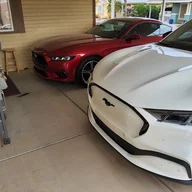
Newbie looking for help to learn all of the key features

New-MachE-Owner

New Member
First Name
Greg
Joined
Jan 2, 2026
Threads
1
Messages
3
Reaction score
4
Location
California
Vehicles
Mach E
I just picked up a 2025 Mach-E Premium Extended Range and I’m trying to get up to speed on all the key features.

I went through the owner’s manual on the center screen, but it wasn’t very helpful. I’ve also found some YouTube videos, though many feel more like marketing than true “how-to” content. I’m hoping this group can point me to solid instructional resources (websites, YouTube channels, etc.) or share some firsthand guidance.

A few specific questions I’m trying to sort out
  • How can I confirm whether my battery is NMC or LFP? (I believe all Extended Range batteries are NMC, but want to be sure. The salesman did not sound confident when I asked him)
  • Charging best practices:
    • If it’s NMC, should I generally charge to 80%?
    • If it were LFP, would 100% be recommended?
  • I’ll charge almost entirely at home, but for longer trips:
    • Should I be using the BlueOval Charge Network?
    • I’ve read that Tesla Superchargers can work with an adapter, but CCS is easier—any reason to avoid Superchargers?
  • How often are you rotating tires on the Mach-E?
  • Does the built-in navigation:
    • Automatically show chargers along a route (similar to Tesla)?
    • Route you to chargers when needed?
    • If so, how do I enable or properly use that feature?
  • Does the Mach-E precondition the battery before fast charging to improve charging speed?
  • What maintenance needs to be done other than tire rotation? I am coming from a Tesla and had to do ZERO maintenance on it in 5 years of ownership other than tire rotation/replacement and covered warranty work.
And one random question:
  • Any tips for keeping rats from nesting under the hood? They are in my neighborhood. I’ve tried a battery-powered ultrasonic + strobe device and spraying Grandpa Gus’s Rodent Repellent a few times a week, but neither seems very effective. I also have traps around the driveway.
Any advice, links, or “wish I knew this earlier” tips would be greatly appreciated. Thanks in advance!
Sponsored

 
Last edited:

AtomicInternet

Well-Known Member
Joined
Jul 31, 2023
Threads
29
Messages
889
Reaction score
1,475
Location
SC
Vehicles
Focus RS, Mach E Premium
Country flag
How can I confirm whether my battery is NMC or LFP? (I believe all Extended Range batteries are NMC, but want to be sure. The salesman did not sound confident when I asked him)
  • Charging best practices:
    • If it’s NMC, should I generally charge to 80%?
    • If it were LFP, would 100% be recommended?
  • I’ll charge almost entirely at home, but for longer trips:
    • Should I be using the BlueOval Charge Network?
    • I’ve read that Tesla Superchargers can work with an adapter, but CCS is easier—any reason to avoid Superchargers?
  • How often are you rotating tires on the Mach-E?
  • Does the built-in navigation:
    • Automatically show chargers along a route (similar to Tesla)?
    • Route you to chargers when needed?
    • If so, how do I enable or properly use that feature?
  • Does the Mach-E precondition the battery before fast charging to improve charging speed?
  • What maintenance needs to be done other than tire rotation? I am coming from a Tesla and had to do ZERO maintenance on it in 5 years of ownership other than tire rotation/replacement and covered warranty work.
And one random question:
  • Any tips for keeping rats from nesting under the hood? They are in my neighborhood. I’ve tried a battery-powered ultrasonic + strobe device and spraying Grandpa Gus’s Rodent Repellent a few times a week, but neither seems very effective. I also have traps around the driveway.
Any advice, links, or “wish I knew this earlier” tips would be greatly appreciated. Thanks in advance!
Searching these forums is the best way to learn everything about your new car. The info is spread out, but starting with a search of "LFP" you'll stumble onto all kinds of threads and learn stuff you didn't even know you were looking for.

That said, here are your answers:

NMC/LFP is your 8th VIN digit (4 or 5 = LFP). Check this article: https://fordauthority.com/2024/08/heres-how-to-tell-if-your-ford-ev-has-an-lfp-battery-video/
For LFP charge to 100% at least once monthly (or all the time). I have NMC and charge to 80% (most limit to 90%) but will go to 100% before a long trip. Ford has designed your battery management so you don't need to even think about this, but if you're OCD about things then stick to 80-90% for optimum life.

Trip Charging: I use the Ford network whenever possible since most times I just have to plug in and it will charge my payment me through Ford. I prefer Superchargers since they work almost 100% of the time I try, vs others which are less reliable. What you call CCS charging is Level 3 (DC fast charge) and likely the only type you'll find on trips. I'm sure with your Tesla since you use the same charge plug for everything you don't even have to think about this. At your hotel you can use Level 2 (240v AC) or 1 (120v AC) to charge overnight.

Tire Rotation: I rotate at home every 5k miles since EVs put a lot more wear on tires. BE CAREFUL where you jack your car if you rotate at home. There are specific jack points (not the rails) to jack from.

Navigation: Chargers are listed in the navigation, but definitely not the most up to date. I'll still search for Tesla chargers that are compatible with our adapter (or have a "magic dock") before a trip and usually set them as waypoints. Sometimes they are in the nav, but more often they aren't. The car will BEGIN TO FREAK OUT as you get low on charge. Routing you to the closest charger it can find, or if you can't reach one tell you to FIND SOMEWHERE TO PLUG IN. You will not be surprised if you run low on charge, the car will get very angry with you lol.

Precondition: The MachE DOES pre-condition IF you are routed to a charger destination IN THE STOCK NAVIGATION app. As mentioned above, you need to be lucky enough the destination is IN the navigation app for it to precondition. On very cold days I've set destination to a very close charger and then drive to a Tesla supercharger nearby instead. The pre-condition seems to have worked since my actual charger was so close, but the disappointment with the Mach E currently is there's no way to tell if it is pre-conditioning until you arrive and plug in. And then you can only tell if your charge rate reflects a warm battery.

Maintenance: I've taken my car to the dealership exactly one time in 3 years for a bad parking sensor. You'll find the same zero maintenance as your Tesla, with tire rotation being your only major maintenance.

Rats: I won't summarize the volumes of rodent control in this forum, just search for "rats" or "rodents" and read away.
 

mkhuffman

Well-Known Member
First Name
Mike
Joined
Nov 19, 2020
Threads
29
Messages
6,878
Reaction score
9,514
Location
Virginia
Vehicles
2025 Rivian R1T Tri-Max, Jeep GC-L, VW Jetta
Country flag
Searching these forums is the best way to learn everything about your new car. The info is spread out, but starting with a search of "LFP" you'll stumble onto all kinds of threads and learn stuff you didn't even know you were looking for.

That said, here are your answers:

NMC/LFP is your 8th VIN digit (4 or 5 = LFP). Check this article: https://fordauthority.com/2024/08/heres-how-to-tell-if-your-ford-ev-has-an-lfp-battery-video/
For LFP charge to 100% at least once monthly (or all the time). I have NMC and charge to 80% (most limit to 90%) but will go to 100% before a long trip. Ford has designed your battery management so you don't need to even think about this, but if you're OCD about things then stick to 80-90% for optimum life.

Trip Charging: I use the Ford network whenever possible since most times I just have to plug in and it will charge my payment me through Ford. I prefer Superchargers since they work almost 100% of the time I try, vs others which are less reliable. What you call CCS charging is Level 3 (DC fast charge) and likely the only type you'll find on trips. I'm sure with your Tesla since you use the same charge plug for everything you don't even have to think about this. At your hotel you can use Level 2 (240v AC) or 1 (120v AC) to charge overnight.

Tire Rotation: I rotate at home every 5k miles since EVs put a lot more wear on tires. BE CAREFUL where you jack your car if you rotate at home. There are specific jack points (not the rails) to jack from.

Navigation: Chargers are listed in the navigation, but definitely not the most up to date. I'll still search for Tesla chargers that are compatible with our adapter (or have a "magic dock") before a trip and usually set them as waypoints. Sometimes they are in the nav, but more often they aren't. The car will BEGIN TO FREAK OUT as you get low on charge. Routing you to the closest charger it can find, or if you can't reach one tell you to FIND SOMEWHERE TO PLUG IN. You will not be surprised if you run low on charge, the car will get very angry with you lol.

Precondition: The MachE DOES pre-condition IF you are routed to a charger destination IN THE STOCK NAVIGATION app. As mentioned above, you need to be lucky enough the destination is IN the navigation app for it to precondition. On very cold days I've set destination to a very close charger and then drive to a Tesla supercharger nearby instead. The pre-condition seems to have worked since my actual charger was so close, but the disappointment with the Mach E currently is there's no way to tell if it is pre-conditioning until you arrive and plug in. And then you can only tell if your charge rate reflects a warm battery.

Maintenance: I've taken my car to the dealership exactly one time in 3 years for a bad parking sensor. You'll find the same zero maintenance as your Tesla, with tire rotation being your only major maintenance.

Rats: I won't summarize the volumes of rodent control in this forum, just search for "rats" or "rodents" and read away.
With the way Ford integrated Android Auto, I found my MME would precondition if I had any charging destination set in Google Maps when connected via AA. Using that connection, Google Maps on the MME display shows expected charge at destination just like on the Ford Nav. It is an amazing feature if you are a Android phone and Google Maps user. I bet Google Maps will have those chargers you could not find in the Ford Nav.
 

RickMachE

Well-Known Member
Joined
Jul 1, 2021
Threads
267
Messages
17,957
Reaction score
27,994
Location
SE MI
Vehicles
2022 Mach-E Premium 4X, 2022 Lightning Lariat ER
Country flag
I just picked up a 2025 Mach-E Premium Extended Range and I’m trying to get up to speed on all the key features.

I went through the owner’s manual on the center screen, but it wasn’t very helpful. I’ve also found some YouTube videos, though many feel more like marketing than true “how-to” content. I’m hoping this group can point me to solid instructional resources (websites, YouTube channels, etc.) or share some firsthand guidance.

A few specific questions I’m trying to sort out
  • How can I confirm whether my battery is NMC or LFP? (I believe all Extended Range batteries are NMC, but want to be sure. The salesman did not sound confident when I asked him)
  • Charging best practices:
    • If it’s NMC, should I generally charge to 80%?
    • If it were LFP, would 100% be recommended?
  • I’ll charge almost entirely at home, but for longer trips:
    • Should I be using the BlueOval Charge Network?
    • I’ve read that Tesla Superchargers can work with an adapter, but CCS is easier—any reason to avoid Superchargers?
  • How often are you rotating tires on the Mach-E?
  • Does the built-in navigation:
    • Automatically show chargers along a route (similar to Tesla)?
    • Route you to chargers when needed?
    • If so, how do I enable or properly use that feature?
  • Does the Mach-E precondition the battery before fast charging to improve charging speed?
  • What maintenance needs to be done other than tire rotation? I am coming from a Tesla and had to do ZERO maintenance on it in 5 years of ownership other than tire rotation/replacement and covered warranty work.
And one random question:
  • Any tips for keeping rats from nesting under the hood? They are in my neighborhood. I’ve tried a battery-powered ultrasonic + strobe device and spraying Grandpa Gus’s Rodent Repellent a few times a week, but neither seems very effective. I also have traps around the driveway.
Any advice, links, or “wish I knew this earlier” tips would be greatly appreciated. Thanks in advance!
The owner's manual is also in your Ford app, and is downloadable in PDF format from owner.ford.com. Nearly everything you asked is answered there.

All ER models are NMC. No need to look at VIN. Manual tells you to charge to 90%.

BlueOval network is discussed here in detail, and Ford has videos. The reasons to include Tesla Superchargers are availability and price. Note that you can get Tesla's lower owner rate by paying $12.99 membership AND using the Tesla app to charge. Same with EA - membership and use their app. BlueOval Charge Network gets you no discounts, but is Plug and Charge with EA, Tesla, and Ionna.
 

HuntingPudel

Well-Known Member
First Name
Steve
Joined
Mar 23, 2021
Threads
88
Messages
12,946
Reaction score
17,394
Location
Bay Area, CA
Vehicles
2024 MME GT with Performance Upgrade, 1979 Fire-Am, 1972 K/5 Blazer
Occupation
Engineering
Country flag
Regarding charging, the MME's extended range battery has buffers both above and below its range window (i.e. 100% indicated is lower than 100% actual and 0% indicated is higher than 0% actual). So, an indicated SoC of 85% is very close to an actual SoC of 80%. To what SoC you charge the battery is pretty much up to you and your circumstances. If you're going to be taking 15% to 20% off of the charge level right after charging, charging to 95% or more is perfectly reasonable. If the car is going to sit for a period of time after being charged, it's likely that charging to a lower SoC is better for the battery. 🤔🐩

Regarding preconditioning the battery prior to DCFC, the car will do this only if the native navigation or Android Auto with Google Maps has a DCFC set as its next destination. The car will not precondition if a DCFC is not its next destination or if you are not using the native navigation or Google Maps on Android Auto. Note that the native navigation's database doesn't recognize Tesla Superchargers (and likely some newer CCS1 stations) as DCFC yet, so preconditioning will not happen unless you route the navigation to the nearest CCS1 station to the Supercharger you intend to use. 😰🐩

There's no reason to avoid Tesla Superchargers unless you simply don't like to use them. They function just fine. 😁🐩

Tire rotation interval really depends on a lot of factors. When I had Summer UHP tires on my GT-PE, I rotated them every 3000-4000 miles since they wear crazy fast (I did the same or even more frequently back when I had S-compound tires on my T/A in the '80s and '90s). I have All-Season UHPs on my 2024 GT and rotate on a 5K interval since I sometimes drive the car hard. The owner's manual calls for a 10,000 mile interval for tire rotation on a Premium. 🤷‍♂️🐩


RonTCat

Well-Known Member
First Name
Ron
Joined
Jul 21, 2020
Threads
27
Messages
1,137
Reaction score
2,982
Location
USA
Vehicles
Mach-E wannabuy
Country flag
Charge to 100% once in a while (maybe every 2 months), because it lets the cell balancing process complete.
 

GroceryGetter

New Member
Joined
Dec 9, 2025
Threads
1
Messages
3
Reaction score
1
Location
NY
Vehicles
Fusion, Explorer
I am a new 2024 MME owner and my first charge was at a Tesla Supercharger. Many older Superchargers are not compatible with non-Teslas, they need to show up when you search for chargers in the Tesla app. If it doesn't show up in the search results list, you can't charge there. Be sure to change your vehicle in the Tesla app to the Mach-E.
 
OP
OP

New-MachE-Owner

New Member
First Name
Greg
Joined
Jan 2, 2026
Threads
1
Messages
3
Reaction score
4
Location
California
Vehicles
Mach E
I am a new 2024 MME owner and my first charge was at a Tesla Supercharger. Many older Superchargers are not compatible with non-Teslas, they need to show up when you search for chargers in the Tesla app. If it doesn't show up in the search results list, you can't charge there. Be sure to change your vehicle in the Tesla app to the Mach-E.
Does the Tesla App navigate you to the charger or do you need to see the address and manually enter it into the Mach-E through a voice command or typing it?
 

HughJazzol

Well-Known Member
First Name
Norman
Joined
Jan 27, 2025
Threads
37
Messages
445
Reaction score
225
Location
Miami
Vehicles
2024 MachE Premium RWD
Occupation
Project Manager & Swim coach
Charge to 100% once in a while (maybe every 2 months), because it lets the cell balancing process complete.
Yup
Do a search here for a calibration guide/post that explains the logic and steps behind the calibration. It also explains the type of battery based on vin, but you already know that from previous posts.
 

Mark813

Well-Known Member
First Name
Mark
Joined
Feb 1, 2025
Threads
18
Messages
390
Reaction score
294
Location
Tampa, FL
Vehicles
2024 Mustang Mach-E Premium AWD Extended Range
Does the Tesla App navigate you to the charger or do you need to see the address and manually enter it into the Mach-E through a voice command or typing it?
When you chose a Tesla Supercharger inside of the Tesla app, the app have a button to push that says directions but it's going to give you options like Waze, Google, or Apple maps. But they will not trigger preconditioning.

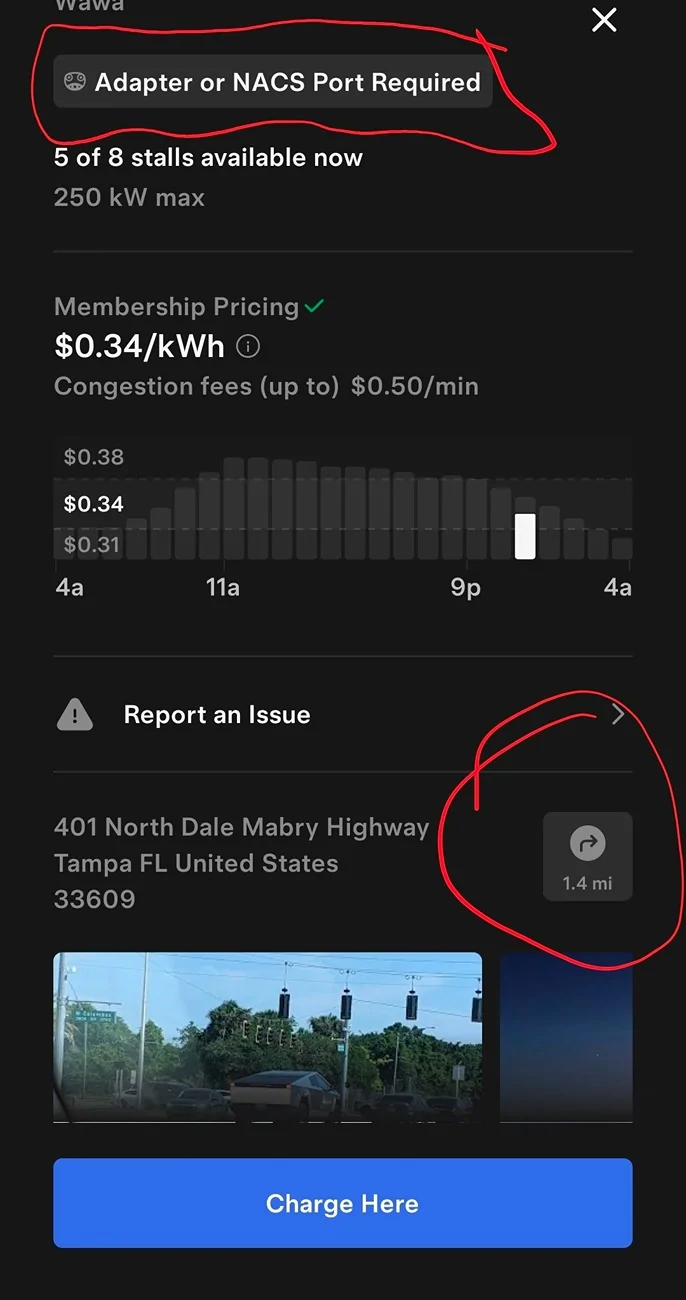
As mentioned above, make sure you have put your vehicle inside the Tesla app so it only takes you to compatible Tesla Chargers. There are plenty of older Tesla V2 charges which will not charge anything but a Tesla. You should see a statement saying you need the adapter.

You haven't mentioned if you have a Android or Apple phone

If you have an Android phone, you can set up Android Auto in your Mach-e. Then you can search chargers on your Mach-e's 14" touch screen and navigate to them which will also trigger the preconditioning. There are settings in Android that let you tell it you have a adapter for Tesla stations so they show up in the search.

Ford Mustang Mach-E Newbie looking for help to learn all of the key features Screenshot_20260104_233356_Tesla
 
OP
OP

New-MachE-Owner

New Member
First Name
Greg
Joined
Jan 2, 2026
Threads
1
Messages
3
Reaction score
4
Location
California
Vehicles
Mach E
When you chose a Tesla Supercharger inside of the Tesla app, the app have a button to push that says directions but it's going to give you options like Waze, Google, or Apple maps. But they will not trigger preconditioning.

As mentioned above, make sure you have put your vehicle inside the Tesla app so it only takes you to compatible Tesla Chargers. There are plenty of older Tesla V2 charges which will not charge anything but a Tesla. You should see a statement saying you need the adapter.

You haven't mentioned if you have a Android or Apple phone

If you have an Android phone, you can set up Android Auto in your Mach-e. Then you can search chargers on your Mach-e's 14" touch screen and navigate to them which will also trigger the preconditioning. There are settings in Android that let you tell it you have a adapter for Tesla stations so they show up in the search.

Screenshot_20260104_233356_Tesla.webp
I have an iPhone. I understant that I need to use the navigation on the Mach-E to have the car pre-condition the battery. At least I now know the Tesla app will navigate me to the charger, but I'll likely just verbally tell the car to give me directions to it.

I know I need an adapter for the Supercharger. That is why just before the deal was made, I said to the salesman "throw in the Supercharger adapter and you have a deal!". It's sitting in the trunk at the ready.
 

CoyoteMach

Well-Known Member
First Name
Gary
Joined
Aug 5, 2025
Threads
2
Messages
71
Reaction score
59
Location
Arizona
Vehicles
2025 Mach E, 2024 Mustang
Occupation
,Retired
Does the Tesla App navigate you to the charger or do you need to see the address and manually enter it into the Mach-E through a voice command or typing it?
On the 2025 MachE, the Tesla charging stations are listed in the Connected Navigation. Simply search for and select the one you want to use, and it will take you right to it, including preconditioning when appropriate. It will show only Superchargrs that are open to non-tesla use. I forced mine once to show an ineligible site, it it displayed a circle with a red slash through it showing it it in fact was not eligible. It actually works pretty well.
Sponsored


Top