Departure times in FordPass app not working

Dan the Man

Well-Known Member
First Name
Dan
Joined
Dec 8, 2021
Threads
6
Messages
58
Reaction score
13
Location
Chicago IL
Vehicles
Fusion Hybrid
Occupation
Realtor
Country flag
Same here - it done broke when I upgraded to 4.23 (Android.) Makes things a little more challenging since departure times vary daily for me and being able to use the app was nice. Will just have to adjust to setting it in the car.
Sponsored

 

Dan the Man

Well-Known Member
First Name
Dan
Joined
Dec 8, 2021
Threads
6
Messages
58
Reaction score
13
Location
Chicago IL
Vehicles
Fusion Hybrid
Occupation
Realtor
Country flag
My Ford app is version 4.23 not Android. My Android version is 13.

I still believe it's a problem with the Ford app because the message says Ford pass not responding try again later but I'm still getting all vitals from the car IE battery percentage mileage tire pressure status etc

My departure function works when I set it in the car though I am going to do a check right now to make sure that it is still working
 

Cherie

Active Member
First Name
Cherie
Joined
Nov 11, 2021
Threads
6
Messages
33
Reaction score
9
Location
Bay Area
Vehicles
Mustang Mach E
Country flag
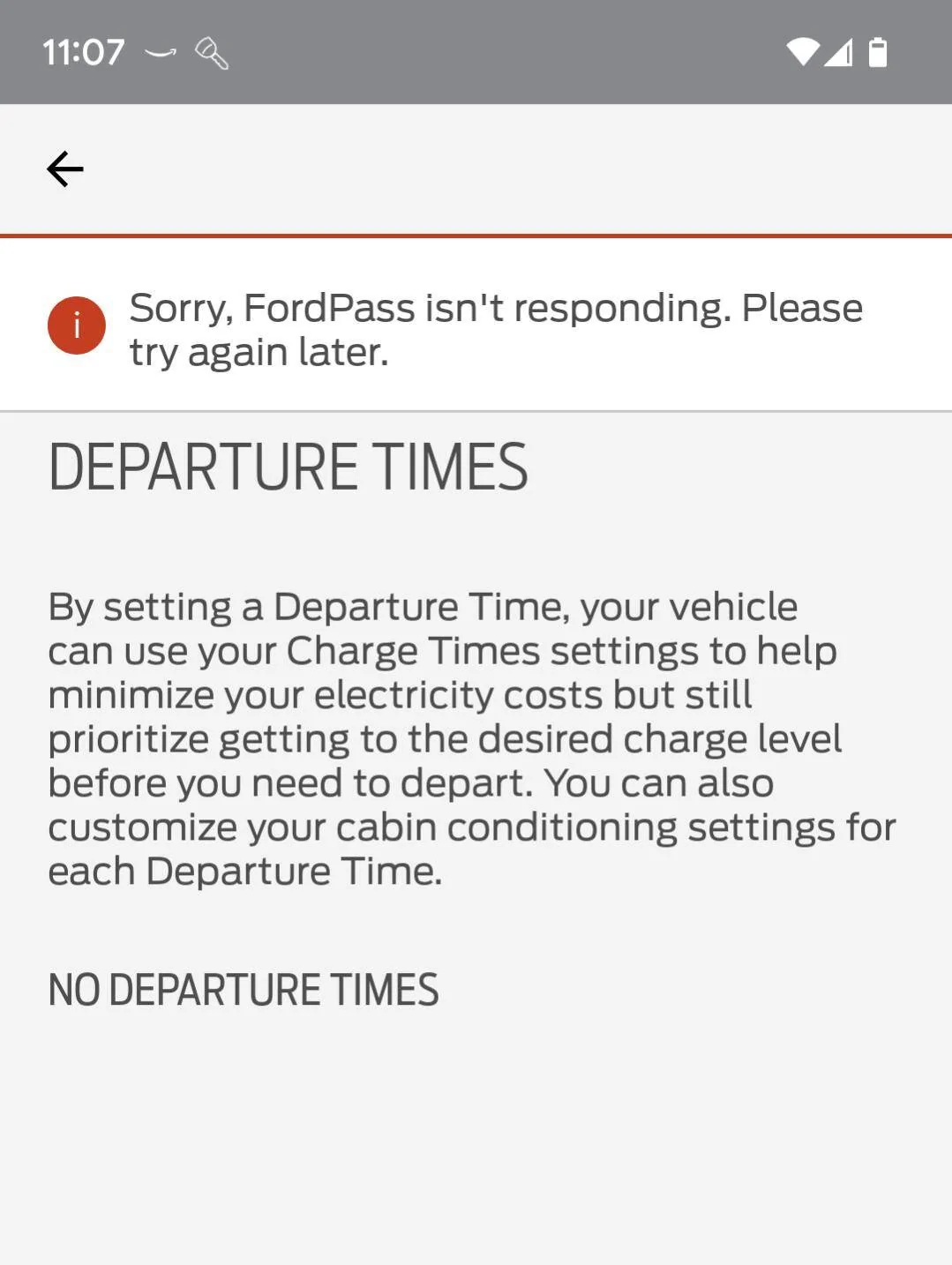
I just got my 2023 MME yesterday. Everything is working great accept for scheduling departure times in the FordPass app. My phone is a Google pixel 7. When I go to set departure times in the app I get the attached error. The app is otherwise connecting to the car just fine. Is this a known issue? Any help will be appreciated!

Screenshot_20221209-110749.png
This feature has been down in my app too for about 4 days. Most likely a Ford Server issue. Gonna be a cold next few mornings...
 

Johnny B

Well-Known Member
First Name
John
Joined
Jan 14, 2022
Threads
9
Messages
148
Reaction score
178
Location
Chandler, AZ
Vehicles
2021 Mach E Premium RWD 2017Nissan Titan XD Diesel
Occupation
Retired Software Developer
Country flag
Last edited:

HAH

New Member
First Name
Håvard Andreas
Joined
Nov 17, 2022
Threads
0
Messages
2
Reaction score
0
Location
Norway
Vehicles
mach-e
Country flag
Bought my '21 MMe FE a month ago. Departure times worked for a while, but now I get the same error message. About time Ford gets online and fixes this.


4HERMES

Active Member
First Name
Anna
Joined
Feb 16, 2022
Threads
1
Messages
31
Reaction score
8
Location
OHIO
Vehicles
Mach-GT
My fordpass app actually “greyed out” the ability to set departure times so i was wondering the same thing…
 

Machecs

New Member
First Name
Capt
Joined
Jun 21, 2022
Threads
0
Messages
3
Reaction score
0
Location
MI
Vehicles
2017 Fusion Platinum AWD/2022 MachE Prem 4X Black
Occupation
IT
Country flag
My fordpass app actually “greyed out” the ability to set departure times so i was wondering the same thing…
99% confirmed the culprit is Fordpass app v.4.23.0. Had the same issue so I called the support number in the app. After being "Passed" around to 5 different "guides", spoke to Stephanie at Fordpass support who told me they were having issues with 4.23 and the developers in California were working on a solution, no resolution date available. I asked if there was a way to revert back to 4.22 and was told no. At this point they gave me a case number.

Decided to check it out myself so I found and downloaded an apk Fordpass v.4.22 file and install it on my android burner phone. Alternatively you can install it on an android emulator for Windows 10. (I recommend that you perform these workarounds only if you are computer/android savvy). After installing it on the burner, logged in to Fordpass, tapped departure times and behold! The departure time setting appeared. Set it up to depart 45 minutes later, which it accomplished successfully. I was also able to view, but not change, the new setting times on my primary phone with v.4.23. It also sent me a message when the cabin was ready. Will call Fordpass support tomorrow (800-883-2966) and advise them although it probably wont do any good. Recommend upgrading to a new developer team as the Fordpass app is unreliable, innaccurate, and takes many refreshing attempts to provide current vehicle status.
 
OP
OP
Kmp14

Kmp14

Well-Known Member
First Name
Ken
Joined
May 30, 2022
Threads
24
Messages
383
Reaction score
334
Location
Chicago
Vehicles
2023 Mach-E Premium AWD Extended
Country flag
99% confirmed the culprit is Fordpass app v.4.23.0. Had the same issue so I called the support number in the app. After being "Passed" around to 5 different "guides", spoke to Stephanie at Fordpass support who told me they were having issues with 4.23 and the developers in California were working on a solution, no resolution date available. I asked if there was a way to revert back to 4.22 and was told no. At this point they gave me a case number.

Decided to check it out myself so I found and downloaded an apk Fordpass v.4.22 file and install it on my android burner phone. Alternatively you can install it on an android emulator for Windows 10. (I recommend that you perform these workarounds only if you are computer/android savvy). After installing it on the burner, logged in to Fordpass, tapped departure times and behold! The departure time setting appeared. Set it up to depart 45 minutes later, which it accomplished successfully. I was also able to view, but not change, the new setting times on my primary phone with v.4.23. It also sent me a message when the cabin was ready. Will call Fordpass support tomorrow (800-883-2966) and advise them although it probably wont do any good. Recommend upgrading to a new developer team as the Fordpass app is unreliable, innaccurate, and takes many refreshing attempts to provide current vehicle status.
Great idea. I loaded up 4.22 on an old phone and departure times work. Ford does not appear to have very good regression testing protocols for their app releases. Scary.
 
OP
OP
Kmp14

Kmp14

Well-Known Member
First Name
Ken
Joined
May 30, 2022
Threads
24
Messages
383
Reaction score
334
Location
Chicago
Vehicles
2023 Mach-E Premium AWD Extended
Country flag
Well this is strange. I loaded up 4.22 on an old android phone and departure times worked.

For the heck of it, I opened up 4.23 of my main phone, pixel 7, and now departure times work there too! Coincidence? Did they just fix something on the server side? Did connecting via 4.22 somehow make 4.23 work? Mysteries abound!
 

jterhune

New Member
First Name
Joey
Joined
Nov 27, 2022
Threads
0
Messages
4
Reaction score
1
Location
Arkansas
Vehicles
2023 Mach e Gt
Country flag
I have the same issue with Apple IPhone pro max. I can set it in the car but Ford pass does not work or even show what has been set in the car.
 

johnmark

Well-Known Member
First Name
JM
Joined
Jun 22, 2022
Threads
14
Messages
364
Reaction score
373
Location
Massachusetts
Vehicles
'22 Mustang Mach-E GT
Country flag
Well this is strange. I loaded up 4.22 on an old android phone and departure times worked.

For the heck of it, I opened up 4.23 of my main phone, pixel 7, and now departure times work there too! Coincidence? Did they just fix something on the server side? Did connecting via 4.22 somehow make 4.23 work? Mysteries abound!
If I can find an older version I'll test and see if this is a proven workaround. Would be really dumb if so.
 

Machecs

New Member
First Name
Capt
Joined
Jun 21, 2022
Threads
0
Messages
3
Reaction score
0
Location
MI
Vehicles
2017 Fusion Platinum AWD/2022 MachE Prem 4X Black
Occupation
IT
Country flag
Well this is strange. I loaded up 4.22 on an old android phone and departure times worked.

For the heck of it, I opened up 4.23 of my main phone, pixel 7, and now departure times work there too! Coincidence? Did they just fix something on the server side? Did connecting via 4.22 somehow make 4.23 work? Mysteries abound!
Just confirming that you can now use your main phone with 4.23 to add, change, and delete departure times? Installing a different version on a distinctly separate device should not affect your main phone. I tried again on my primary phone with 4.23, there were no changes, even after clearing the cache, force stop, log out, and restarting. One thing I didn't mention is eventually the 4.22 version will want to upgrade to 4.23, unless the developers were smart enough to turn off the auto-upgrades until they fix this issue......
 
OP
OP
Kmp14

Kmp14

Well-Known Member
First Name
Ken
Joined
May 30, 2022
Threads
24
Messages
383
Reaction score
334
Location
Chicago
Vehicles
2023 Mach-E Premium AWD Extended
Country flag
Just confirming that you can now use your main phone with 4.23 to add, change, and delete departure times? Installing a different version on a distinctly separate device should not affect your main phone. I tried again on my primary phone with 4.23, there were no changes, even after clearing the cache, force stop, log out, and restarting. One thing I didn't mention is eventually the 4.22 version will want to upgrade to 4.23, unless the developers were smart enough to turn off the auto-upgrades until they fix this issue......
Confirming, on my main phone, pixel 7, running FordPass 4.23, departure times are working. I actually went in this morning, added a scheduled departure for about 40 minutes later, and it worked, immediately started preconditioning. No idea what magic made it start working for me, but it is.
 

JustSomeQuickGuy

Well-Known Member
Joined
Sep 22, 2022
Threads
1
Messages
73
Reaction score
192
Location
Illinois
Vehicles
2023 Mach-E Premium AWD
Country flag
I'm on 4.23 on my main phone, I was able to add a departure time but then got the FordPass error, continued to get that error no matter what I did.

Installed 4.22 on another phone, I see the departure time there that I set from 4.23. Changed it just to test, no issues changing/adding new times from 4.22

Went back to my 4.23 phone, still getting the FordPass error. I will confirm it actually preconditioned the car in a few hours.
 

Dan the Man

Well-Known Member
First Name
Dan
Joined
Dec 8, 2021
Threads
6
Messages
58
Reaction score
13
Location
Chicago IL
Vehicles
Fusion Hybrid
Occupation
Realtor
Country flag
I'm on 4.23 on my main phone, I was able to add a departure time but then got the FordPass error, continued to get that error no matter what I did.

Installed 4.22 on another phone, I see the departure time there that I set from 4.23. Changed it just to test, no issues changing/adding new times from 4.22

Went back to my 4.23 phone, still getting the FordPass error. I will confirm it actually preconditioned the car in a few hours.

Can someone please post the link that they are using the get 4.22 on their older phone thanks
Sponsored


Top