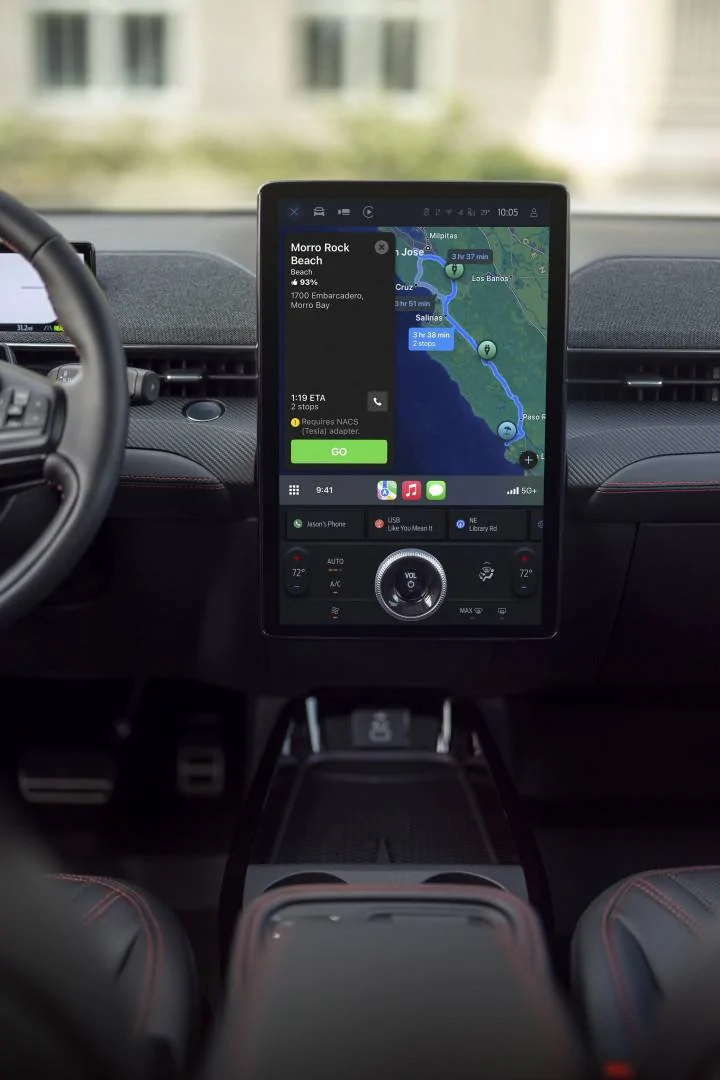
Apple Maps EV Routing in CarPlay – Now Including Tesla Superchargers

ChasingCoral

Well-Known Member
First Name
Mark
Joined
Feb 3, 2020
Threads
502
Messages
14,318
Reaction score
28,680
Location
Maryland
Vehicles
2021 GB E4X FE, 2022 F-150 Lightning Lariat ER
Occupation
Retired oceanographer
Country flag
18.4 is currently in beta.
Go to your maps app, and only add Tesla as preferred company for your car and see if that makes a difference.
I followed the suggestion from @Mach-Lee, deleted all networks and added back in Tesla and then Electrify America. That worked. A test route from DC to Jacksonville FL was found with both Tesla and EA charging stops. It’s working fine note in iOS 18.3.1 on my iPhone 16 Pro.
Sponsored


ChasingCoral

Well-Known Member
First Name
Mark
Joined
Feb 3, 2020
Threads
502
Messages
14,318
Reaction score
28,680
Location
Maryland
Vehicles
2021 GB E4X FE, 2022 F-150 Lightning Lariat ER
Occupation
Retired oceanographer
Country flag

AndyR

Well-Known Member
First Name
Andrew
Joined
Apr 28, 2021
Threads
0
Messages
133
Reaction score
170
Location
Cincinnati, OH
Vehicles
Mach-E X
Country flag
working on 18.3.1
Huh,
When I remove all other charger locations and just add Tesla, mine is still adding other charger locations and not Tesla ones.

Maybe I’m doing something wrong?

I’m going into the maps app on my phone, selecting myself, then the Vehicle, then adding and subtracting chargers.

Anything else I should be doing?

iPhone 13 Pro Max, 18.3.1
 

AndyR

Well-Known Member
First Name
Andrew
Joined
Apr 28, 2021
Threads
0
Messages
133
Reaction score
170
Location
Cincinnati, OH
Vehicles
Mach-E X
Country flag
It works on 18.3.1 and I have an old iPhone 13 Pro Max. You will need to click on your profile pic within maps, then go to vehicles, select the Mach-E, then edit to add Tesla in charging network. If already select it, unselect, click done and go back in to select again.

Hmm, I have the same phone and have done just this, but it still doesn’t seem to give me any Tesla chargers. I will try to remove all again…


moog

Banned
Banned
Joined
Feb 12, 2024
Threads
3
Messages
304
Reaction score
808
Location
california
Vehicles
2022 Mustang MachE Premium AWD Extended Range
Country flag
Also, battery preconditioning when en route to a charger is not available for Apple Maps EV Routing.

Boooooooooo!!!!!!

Apple: figure this out.
Ford: figure this out.
 

AndyR

Well-Known Member
First Name
Andrew
Joined
Apr 28, 2021
Threads
0
Messages
133
Reaction score
170
Location
Cincinnati, OH
Vehicles
Mach-E X
Country flag
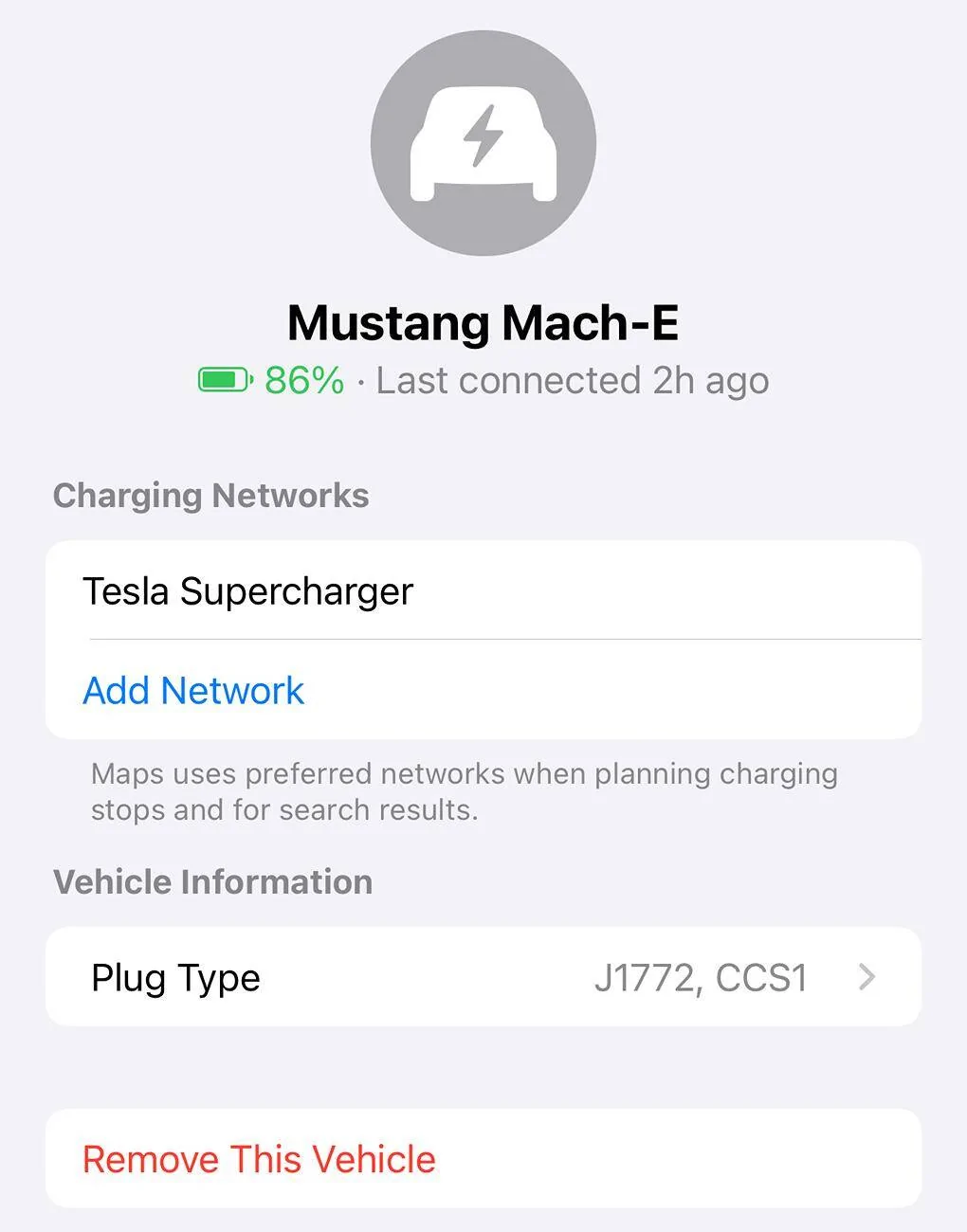
I do see that my car only lists CCS and J1772. Not NACS as plug type.

I wonder if I need to delete my car and reset up my car with NACS listed also?

for those who it is working, what does yours show?

Ford Mustang Mach-E Apple Maps EV Routing in CarPlay – Now Including Tesla Superchargers 1741707529739-h
 

ArtG

New Member
Joined
Jan 17, 2025
Threads
0
Messages
4
Reaction score
3
Location
Massachusetts
Vehicles
2021 Mach-E Select
My 2021 doesn’t give me any of the EV options in carplay because the car’s software is so out of date. Does this fix that?

Edit: I get EV chargers listed but not battery percentage.
 
Last edited:

Charge_Rob

Well-Known Member
Joined
Nov 25, 2024
Threads
1
Messages
234
Reaction score
433
Location
Dearborn, MI
Vehicles
2024 Ford F-150 Lightning (2025 Mustang Mach-E Rally on the way!)
Occupation
Charging Nerd
The issue with it is that (unlike the Tesla app), it gives you no warning that you need an adapter to use. If someone is clueless, they will have a bad experience.
Apple Maps provides a pop-up warning that an adapter is required, unless you've added Tesla Supercharger as a preferred network, then it will assume you know that.
 

AndyR

Well-Known Member
First Name
Andrew
Joined
Apr 28, 2021
Threads
0
Messages
133
Reaction score
170
Location
Cincinnati, OH
Vehicles
Mach-E X
Country flag
My 2021 doesn’t give me any of the EV options in carplay because the car’s software is so out of date. Does this fix that?

Edit: I get EV chargers listed but not battery percentage.
If it helps, I have a 2021 job one, and it does give me percentage.
 

ChasingCoral

Well-Known Member
First Name
Mark
Joined
Feb 3, 2020
Threads
502
Messages
14,318
Reaction score
28,680
Location
Maryland
Vehicles
2021 GB E4X FE, 2022 F-150 Lightning Lariat ER
Occupation
Retired oceanographer
Country flag
Huh,
When I remove all other charger locations and just add Tesla, mine is still adding other charger locations and not Tesla ones.

Maybe I’m doing something wrong?

I’m going into the maps app on my phone, selecting myself, then the Vehicle, then adding and subtracting chargers.

Anything else I should be doing?

iPhone 13 Pro Max, 18.3.1
Go into the app as you are doing, remove all networks, then add in only Tesla. Test with a route from DC to Jacksonville, Florida and see what happens.
 

John Perry

Member
First Name
John
Joined
Feb 9, 2025
Threads
1
Messages
21
Reaction score
8
Location
San Antonio TX
Vehicles
2024 Mach-e Premium RWD
Mustang Mach-E_Apple Maps.jpg


Hi Mustang Mach-E Owners,

We’re excited to share that starting today, when you use Apple Maps EV Routing in CarPlay to plan your next trip, you can now be routed to a North American Charging Standard (NACS) fast charging station, such as compatible Tesla Superchargers along the way – if you need a charge.

So, how is this new? Apple Maps EV Routing already helps with trip planning – you can view your estimated battery level you will have when arriving at a destination, and see suggested charging stops along the way if charging is needed.

Now, if a charge stop is needed, you may see a route that includes a Tesla Supercharger or other NACS fast charger. Just make sure you indicate your charge preferences in Apple Maps Settings to a NACS fast charging station, such as Tesla Supercharger.

The best part about all of this? It’s available right now! No software update required, just connect your iPhone to CarPlay and hit the road!

Let us know what you think!

How to Use Apple Maps EV Routing in CarPlay:
  • Connect your iPhone to CarPlay

  • Open Apple Maps, go to Settings and confirm your preferred charging network(s) – make sure you select a NACS fast charging station, such as Tesla Supercharger. You only have to do this once!

  • Enter a destination.

  • Apple Maps will then calculate the estimated state of charge you will have when you get to a destination.

  • If a charge is required, depending on the fastest route, it will automatically route you to a NACS fast charging station.

  • Please Note: When planning a route that includes Tesla Superchargers, you may see a warning that the route requires your Fast Charging Adapter – make sure you have it with you. Also, battery preconditioning when en route to a charger is not available for Apple Maps EV Routing.
To learn more about charging with a Fast-Charging Adapter, please visit https://ford.com/fastchargingadapter.

To purchase your own Fast Charging Adapter, please visit https://go.ford/fordadapter.

-Brian, not AI, from Ford
Where can I find reliable instructions to make this work? I have a 2024 MME and have not been able to get Apple Maps to show my vehicle so it can read battery level. And it will not show any charging locations. No instructions from Apple have helped.
 

Jtbuster

Well-Known Member
First Name
Brian oConnor
Joined
May 7, 2022
Threads
6
Messages
278
Reaction score
156
Location
Calif
Vehicles
Mach e
Country flag
The issue with it is that (unlike the Tesla app), it gives you no warning that you need an adapter to use. If someone is clueless, they will have a bad experience.
Not so!
“Please Note: When planning a route that includes Tesla Superchargers, you may see a warning that the route requires your Fast Charging Adapter – make sure you have it with you”
 

bdeweese

Well-Known Member
First Name
Bob
Joined
Feb 9, 2025
Threads
3
Messages
116
Reaction score
92
Location
WA, USA
Vehicles
24 Mach-E Premium
Where can I find reliable instructions to make this work? I have a 2024 MME and have not been able to get Apple Maps to show my vehicle so it can read battery level. And it will not show any charging locations. No instructions from Apple have helped.
Do you already have a “vehicle” set up in Apple Maps? (Click on your profile pic in maps and look in settings). If so, try deleting and re-adding. If not, go to Apple map settings and add it. Once added, pick the Tesla network. It “should” be that simple.

Note: I believe I had to connect my phone to the Mach-e CarPlay initially to get the “vehicle” option to show up in Apple Maps - but not 100% sure of that.

p.s. I have 24 MME Premium and Apple iPhone 15 pro max, iOS 18.3.1.
Sponsored


Top