OBD2 scanner and apps

mylittlepony

Well-Known Member
First Name
Dominick
Joined
Jun 27, 2020
Threads
6
Messages
126
Reaction score
69
Location
Fallbrook
Vehicles
MachE
Country flag
Anyone have OBD2 scanner and apps that will measure battery usage? There are multiple scanners and apps but which is best for measuring MME stats?
Sponsored
 

Nklem

Well-Known Member
First Name
Norm
Joined
May 20, 2021
Threads
105
Messages
1,318
Reaction score
1,699
Location
Coast of Maine
Vehicles
Subaru Solterra
Occupation
Mechanical Engineer
Country flag
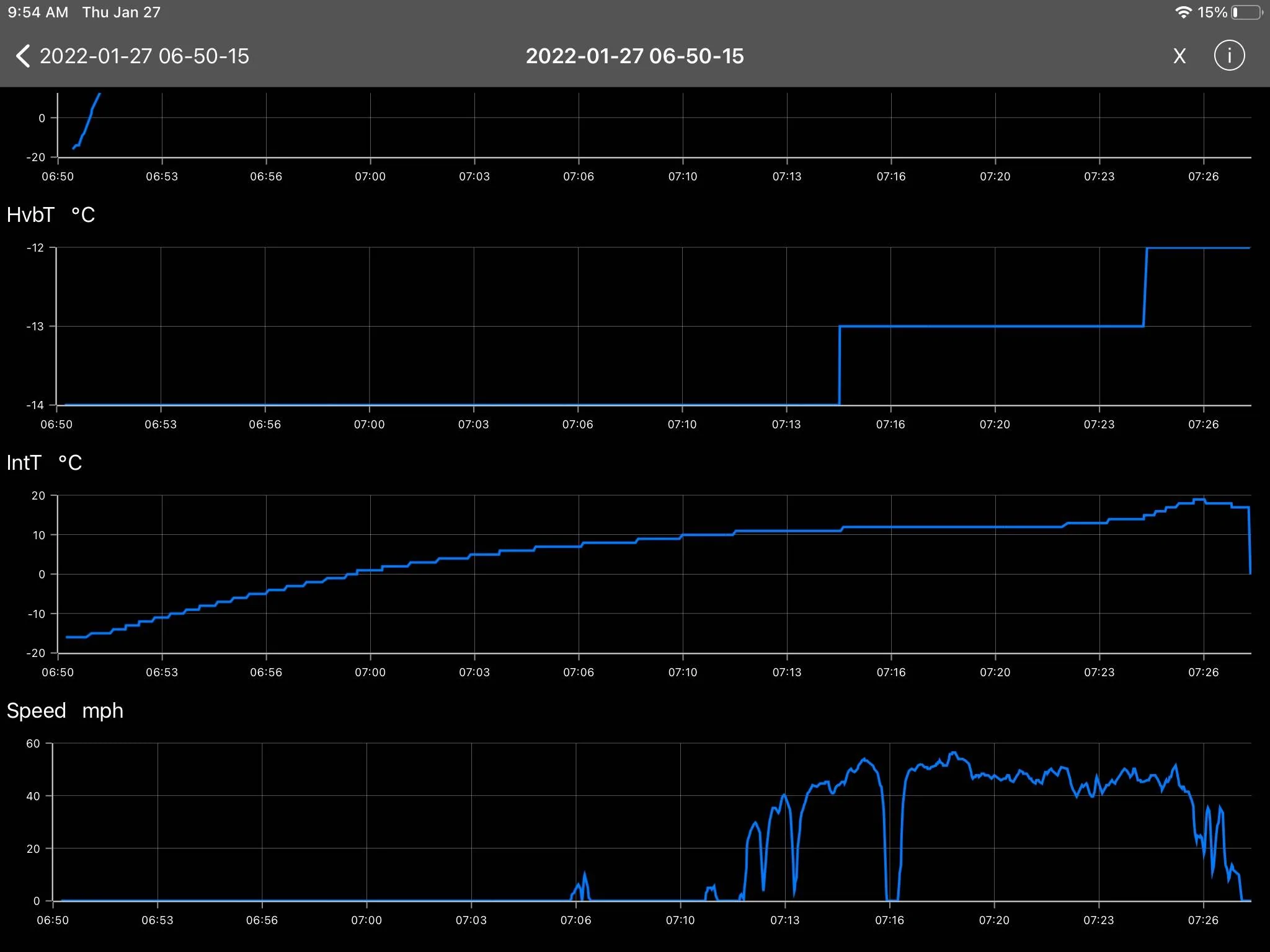
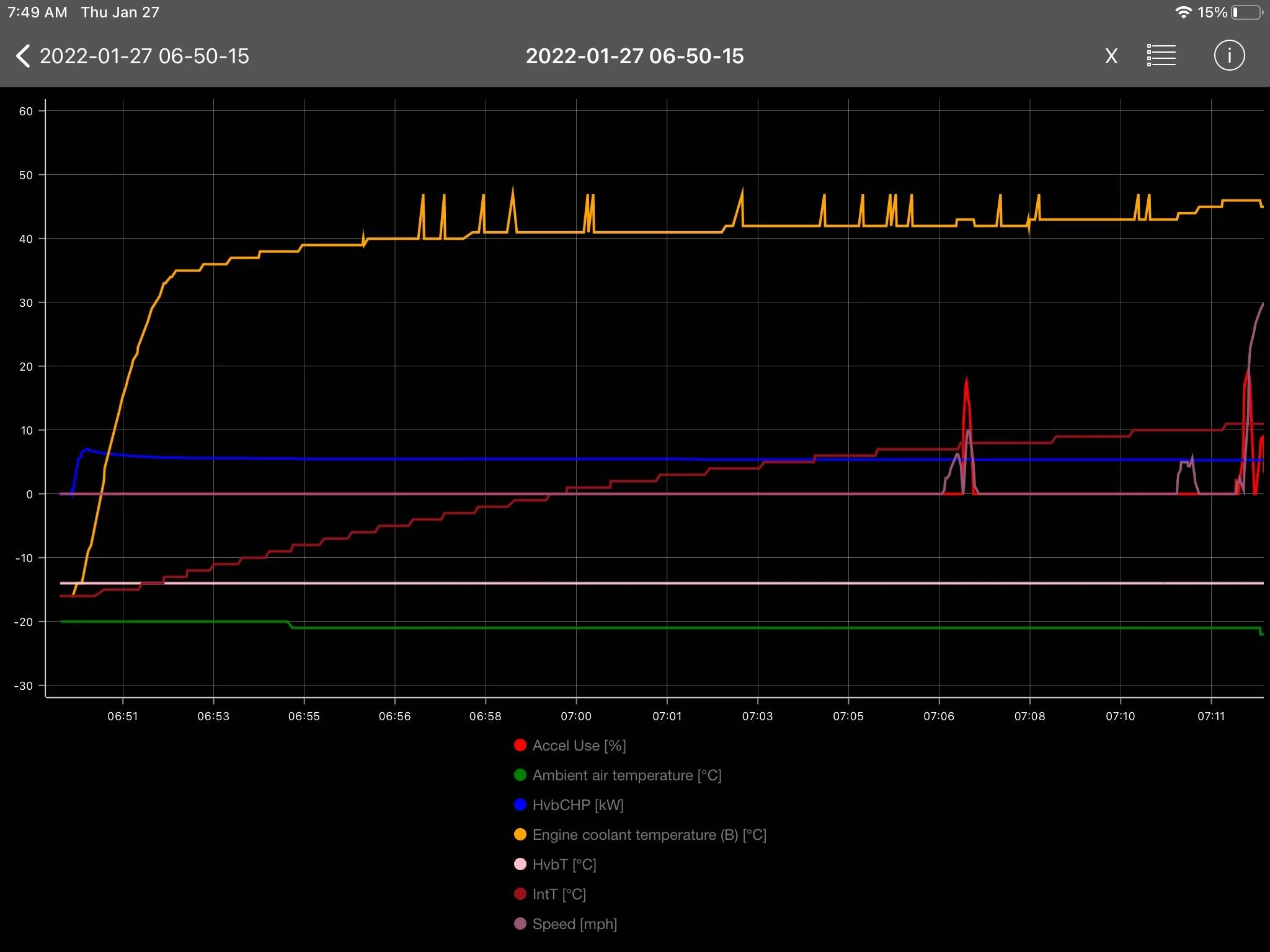
Carscanner pro and a $20 OBD dongle. Give it a try for free on the App Store. The upgrade was only $6.99. It may do what you want and your out only a few bucks. I installed on my IPAD and my OBD dongle is WiFi. I am attempting to get it working with the MMB player to get it live on the Mache Screen. No time to get that done yet but I think it will work. That way I can have a custom dashboard on specific Mach E parameters displayed on the screen.

Ford Mustang Mach-E OBD2 scanner and apps A47ED81A-D245-4C3F-982C-35FD4453B251


Ford Mustang Mach-E OBD2 scanner and apps 7D6F4C2E-AD15-4792-B895-24C8F4CD1AD7
 

mkhuffman

Well-Known Member
First Name
Mike
Joined
Nov 19, 2020
Threads
29
Messages
6,875
Reaction score
9,507
Location
Virginia
Vehicles
2025 Rivian R1T Tri-Max, Jeep GC-L, VW Jetta
Country flag
Like Norm, I also recommend Car Scanner. I used to use Torque, but then I saw people posting in this forum about Car Scanner and it is awesome. It even has a MME profile you can load that has 10+ prebuilt dashboards that show you everything you could want to see from the OBDII scanner.

Note that a OBDII scanner can kill your LVB when left plugged in and the car is off.
 

alexgorod

Well-Known Member
First Name
Alex
Joined
Jul 27, 2021
Threads
21
Messages
1,304
Reaction score
1,400
Location
Michigan
Vehicles
21 Job 2 MME Premium SR AWD (21 CR-V - wife's)
Occupation
DBA
Country flag
Can CarScanner be used on the same phone as PAAK, or it will interfere with its connection?
I use it on a separate (old) phone, but curious.


mkhuffman

Well-Known Member
First Name
Mike
Joined
Nov 19, 2020
Threads
29
Messages
6,875
Reaction score
9,507
Location
Virginia
Vehicles
2025 Rivian R1T Tri-Max, Jeep GC-L, VW Jetta
Country flag

mikeinet

Well-Known Member
First Name
Mike
Joined
Oct 5, 2021
Threads
43
Messages
554
Reaction score
438
Location
New York
Vehicles
Standard AWD Tech/Comfort
Occupation
Cyber Security, First Responder
Country flag
With CarScanner are you able to get battery life data? I have a ton of missing data on mine... wasn't sure if it's my cheap (probably knock off) dongle, or the app or the car?
 

mkhuffman

Well-Known Member
First Name
Mike
Joined
Nov 19, 2020
Threads
29
Messages
6,875
Reaction score
9,507
Location
Virginia
Vehicles
2025 Rivian R1T Tri-Max, Jeep GC-L, VW Jetta
Country flag
With CarScanner are you able to get battery life data? I have a ton of missing data on mine... wasn't sure if it's my cheap (probably knock off) dongle, or the app or the car?
If you mean the HVB State of Health (SoH), yes.
 

doogie63

Well-Known Member
Joined
Nov 26, 2022
Threads
46
Messages
310
Reaction score
304
Location
NC
Vehicles
Mach-E
Country flag
Like Norm, I also recommend Car Scanner. I used to use Torque, but then I saw people posting in this forum about Car Scanner and it is awesome. It even has a MME profile you can load that has 10+ prebuilt dashboards that show you everything you could want to see from the OBDII scanner.

Note that a OBDII scanner can kill your LVB when left plugged in and the car is off.

I been looking at ‎OBDLink MX+ because it says
  • Intelligent sleep mode: plug it in, and forget about it — it won't drain your car's battery
 

JimmyMachE

Well-Known Member
Joined
Jul 21, 2021
Threads
1
Messages
218
Reaction score
124
Location
Montana
Vehicles
Mach E
I chose Vgate vLinker MC+
- a button on the scanner to put it in pairing mode
- intelligent sleep mode
 

mkhuffman

Well-Known Member
First Name
Mike
Joined
Nov 19, 2020
Threads
29
Messages
6,875
Reaction score
9,507
Location
Virginia
Vehicles
2025 Rivian R1T Tri-Max, Jeep GC-L, VW Jetta
Country flag

I been looking at ‎OBDLink MX+ because it says
  • Intelligent sleep mode: plug it in, and forget about it — it won't drain your car's battery
My comment you replied to was incomplete. The OBDII scanner will kill your LVB if you are using it to read data. If you disconnect Car Scanner (or whatever software you are using) the car will go to sleep and the OBDII scanner will not drain your LVB. Well, at least the ones I have tried won't. Power draw is very small. What drains the battery is keeping the car's modules active while you read data from them.

I also have a Veepak scanner and it won't drain your battery either. But I would not leave that one plugged in because it is always in pairing mode. I leave my MX+ plugged in all the time with no issues.
 

mkhuffman

Well-Known Member
First Name
Mike
Joined
Nov 19, 2020
Threads
29
Messages
6,875
Reaction score
9,507
Location
Virginia
Vehicles
2025 Rivian R1T Tri-Max, Jeep GC-L, VW Jetta
Country flag
Can CarScanner be used on the same phone as PAAK, or it will interfere with its connection?
I use it on a separate (old) phone, but curious.
PaaK problems are so difficult to troubleshoot it is hard to know. I have used Car Scanner on my PaaK phone many times without issues. The problem is if you want to record data while away from the car, you have to leave your PaaK phone in the car. I won't do that. Having a separate phone is a good idea in that case.
 

PhillyYa

Well-Known Member
Joined
Oct 28, 2022
Threads
35
Messages
249
Reaction score
156
Location
Philadelphia
Vehicles
2022 Mach-e Premium Extended
Country flag
Sooooo, I bought the OBDLinkMX+ during Amazon Prime. I've also downloaded CarScanner for IOS. I am able to connect the dongle to their own OBDLink app, but for the life of me can't get it to connect to Car Scanner's app. I get a big long error message which says if trying to connect via wifi, I have my permissions disabled and have to go to settings and enable it. I went to the settings and it was already enabled. Then it says if I want to connect via bluetooth, go to the bluetooth settings, when I do that and select it, it doesn't connect. The error messages just go in a circle. Any advice? Thanks all...

Quick Update: no, the wifi network cast by the OBDLink does NOT show up in my list of available networks to connect to in my iPhone and yes, my phone is connected successfully to the dongle via Bluetooth, but yet the app still does not connect.
 
Last edited:

Mach-Lee

Well-Known Member
First Name
Lee
Joined
Jul 16, 2021
Threads
262
Messages
11,349
Reaction score
24,971
Location
Wisconsin
Vehicles
2022 Mach-E Premium AWD
Occupation
Sci/Eng
Country flag
Sooooo, I bought the OBDLinkMX+ during Amazon Prime. I've also downloaded CarScanner for IOS. I am able to connect the dongle to their own OBDLink app, but for the life of me can't get it to connect to Car Scanner's app. I get a big long error message which says if trying to connect via wifi, I have my permissions disabled and have to go to settings and enable it. I went to the settings and it was already enabled. Then it says if I want to connect via bluetooth, go to the bluetooth settings, when I do that and select it, it doesn't connect. The error messages just go in a circle. Any advice? Thanks all...

Quick Update: no, the wifi network cast by the OBDLink does NOT show up in my list of available networks to connect to in my iPhone and yes, my phone is connected successfully to the dongle via Bluetooth, but yet the app still does not connect.
Update the firmware on the OBDLink first, there were some connection bugs. Then unplug it, plug it back in, and immediately try to connect to it in bluetooth settings. If it's been plugged in for more than a couple minutes it won't accept new connections for security.
Sponsored


Top