PAAK - Help, cannot create backup passcodes and PAAK “connects and creates key” but will not function.

Polar

Well-Known Member
First Name
SBJ
Joined
Jun 5, 2021
Threads
25
Messages
652
Reaction score
1,142
Location
PNW
Vehicles
2021 Select RWD SR
Country flag
I am unable to fully set up PAAK after some dealer installed updates. Going to be heading back again, but checking here prior.

Prior to setting up PAAK, I can remote start and lock/unlock via FordPass.

Once I set up PAAK, sync with car and enter the trusted code these features stop working. I can see via Bluetooth my phone is connected to the car however (MachEXXXXX ID).
Once I attempt to set up the backup passcodes the whole system fails with this error -
Ford Mustang Mach-E PAAK - Help, cannot create backup passcodes and PAAK “connects and creates key” but will not function. A66025FF-E5B5-45E6-BBC5-CF7BD223CB2C


I had used PAAK solely for my MachE across two phones in the prior 20 months of ownership. Just curious if anyone else has seen this error and failing/partial PAAK connection.

I’ve tried three iPhones and even two different FordPass accounts at this point
Sponsored


Ford Motor Company

Well-Known Member
Official Ford Account
First Name
Brian
Joined
May 10, 2021
Threads
68
Messages
3,455
Reaction score
6,528
Location
Michigan
Vehicles
Mustang Mach-E
Occupation
Real Human & Community Manager
Country flag
I am unable to fully set up PAAK after some dealer installed updates. Going to be heading back again, but checking here prior.

Prior to setting up PAAK, I can remote start and lock/unlock via FordPass.

Once I set up PAAK, sync with car and enter the trusted code these features stop working. I can see via Bluetooth my phone is connected to the car however (MachEXXXXX ID).
Once I attempt to set up the backup passcodes the whole system fails with this error -
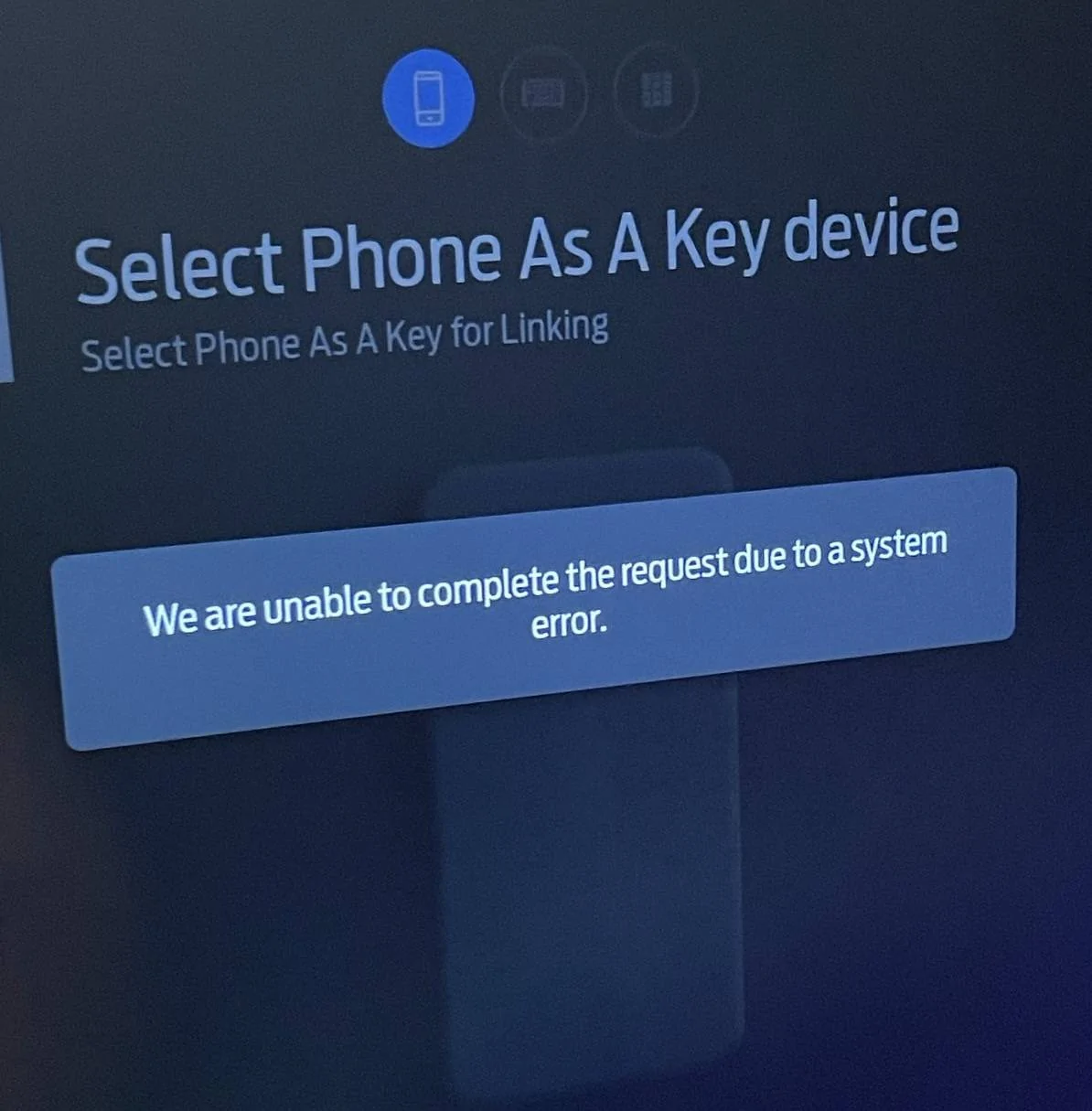
A66025FF-E5B5-45E6-BBC5-CF7BD223CB2C.jpeg


I had used PAAK solely for my MachE across two phones in the prior 20 months of ownership. Just curious if anyone else has seen this error and failing/partial PAAK connection.

I’ve tried three iPhones and even two different FordPass accounts at this point
Good morning! If you are able to send over a private message with your VIN and dealership info, I can look into this for you.
 

Mach-Lee

Well-Known Member
First Name
Lee
Joined
Jul 16, 2021
Threads
262
Messages
11,344
Reaction score
24,963
Location
Wisconsin
Vehicles
2022 Mach-E Premium AWD
Occupation
Sci/Eng
Country flag
Try pulling fuse #19 (7.5A) for 5 minutes and trying again. That will reboot the RFA or PAAK module.

Otherwise do your connect services work (e.g. weather forecast in the Nav, etc)?
 
OP
OP
Polar

Polar

Well-Known Member
First Name
SBJ
Joined
Jun 5, 2021
Threads
25
Messages
652
Reaction score
1,142
Location
PNW
Vehicles
2021 Select RWD SR
Country flag
Try pulling fuse #19 (7.5A) for 5 minutes and trying again. That will reboot the RFA or PAAK module.

Otherwise do your connect services work (e.g. weather forecast in the Nav, etc)?
I have pulled the fuse; I think you recommended back in December - when this first started happening. But I’ll try again; it does seem based on the error and behavior that the PAAK Bluetooth module is stuck/corrupted some hiw.

My other connected services do function just fine - I will specifically verify weather in nav as a data point though.
 

BeachMam00

Member
Joined
Oct 15, 2022
Threads
0
Messages
6
Reaction score
1
Location
Ct
Vehicles
2021 Mach e
Country flag
I am unable to fully set up PAAK after some dealer installed updates. Going to be heading back again, but checking here prior.

Prior to setting up PAAK, I can remote start and lock/unlock via FordPass.

Once I set up PAAK, sync with car and enter the trusted code these features stop working. I can see via Bluetooth my phone is connected to the car however (MachEXXXXX ID).
Once I attempt to set up the backup passcodes the whole system fails with this error -
A66025FF-E5B5-45E6-BBC5-CF7BD223CB2C.jpeg


I had used PAAK solely for my MachE across two phones in the prior 20 months of ownership. Just curious if anyone else has seen this error and failing/partial PAAK connection.

I’ve tried three iPhones and even two different FordPass accounts at this point
I noticed that FORD has replied to your issue. It’s interesting that they seem to be selective on what they offer assistance on. FORD, if you’re listening, I’ve been dealing with your support department and the dealership I purchased a 2021 MME Select a little over a year ago. Loved the car, even though I was given only one FOB and was assured that my phone would be my 2nd FOB. Most of the time I didn’t need to use the phone because it’s my wife’s car and she carries the actual FOB. I took her car to another town on an errand. Used my phone when approaching the car to go home. When I got in and pressed the start button it said “No Key Detected “. Ford Roadside Assistance tried 2 different towing services. One didn’t know how to transport an EV. The other refused because Ford doesn’t pay him enough. My wife came to me in my car to bring me her FOB. I brought the car to the dealership and they kept it for a week until they said it was ready. I begged the dealership owner to sell me another FOB. He said it was Ford policy not to offer a second fob on a 2021 Mach-E. I called Ford customer service and was told to try another dealer. I found one about an hour away from my house who asked the Vin number of my car. He then said I will have one for you in two days two days later I picked up the fob and paid $398. I then found out last week after going to pick up the car at the dealership for a charging problem that they handed me an extra FOB. I asked what is this? They said that back in August Ford was giving the extra FOBS to the customers that purchased 2021 Mach-E’s. I called Ford customer service, and they did not want to do anything about finding a way to refund the money I spent. I texted the owner of the dealership where I bought the car and he sent back an emoji of a person riding a bicycle, just spinning, his wheels. Very professional. The bigger problem started back in August when my car began giving me problems just trying to charge it. For the last six months, my car has been back and forth at the dealership trying to be repaired. It was there for 10 days last week when they finally called and said it was ready. When I got into the car, it said it was only 44% charged. I asked why wasn’t it charged 100%? They apologized and said they’ll put it on the charger and deliver the car to me when it’s ready. I kept checking my app for the next two days and never saw that it was charged. The dealer finally told me to file a lemon law claim. instead, I asked if he would buy the car back from me. He agreed at a ridiculous buyback price which I took because I did not want to deal with this any longer. Comments?


OP
OP
Polar

Polar

Well-Known Member
First Name
SBJ
Joined
Jun 5, 2021
Threads
25
Messages
652
Reaction score
1,142
Location
PNW
Vehicles
2021 Select RWD SR
Country flag
Try pulling fuse #19 (7.5A) for 5 minutes and trying again. That will reboot the RFA or PAAK module.

Otherwise do your connect services work (e.g. weather forecast in the Nav, etc)?
Aye - fuse pulled and sat for 30 min. Not change in behavior.
Validated that connected services are fully functional.
Even got an update today for sync - 3.6.2 was hopeful this would kick start PAAK to work again.
I think the module(s) isn’t talking to the main ecu thus the constant error.
 

SeanE

Member
First Name
Sean
Joined
Jan 14, 2021
Threads
0
Messages
7
Reaction score
10
Location
Tampa, FL
Vehicles
2021 Ford Mach E AWD
Country flag
Similar issue here. We got stuck a few hours from home and couldn't get the car to start with either of our phones. Thought we could use backup codes to get back on the road... they were somehow gone. Some update seemed to delete our PAAK backup codes. Now we can't seem to setup PAAK or backup codes.
 
OP
OP
Polar

Polar

Well-Known Member
First Name
SBJ
Joined
Jun 5, 2021
Threads
25
Messages
652
Reaction score
1,142
Location
PNW
Vehicles
2021 Select RWD SR
Country flag
Similar issue here. We got stuck a few hours from home and couldn't get the car to start with either of our phones. Thought we could use backup codes to get back on the road... they were somehow gone. Some update seemed to delete our PAAK backup codes. Now we can't seem to setup PAAK or backup codes.
Do you get the same error screen? Or does it error in a different state/location/process?
 

Ampac27

New Member
First Name
Frank
Joined
Dec 16, 2023
Threads
0
Messages
3
Reaction score
0
Location
New Jersey
Vehicles
Mach-e
Occupation
Laborer
Country flag
I am unable to fully set up PAAK after some dealer installed updates. Going to be heading back again, but checking here prior.

Prior to setting up PAAK, I can remote start and lock/unlock via FordPass.

Once I set up PAAK, sync with car and enter the trusted code these features stop working. I can see via Bluetooth my phone is connected to the car however (MachEXXXXX ID).
Once I attempt to set up the backup passcodes the whole system fails with this error -
A66025FF-E5B5-45E6-BBC5-CF7BD223CB2C.jpeg


I had used PAAK solely for my MachE across two phones in the prior 20 months of ownership. Just curious if anyone else has seen this error and failing/partial PAAK connection.

I’ve tried three iPhones and even two different FordPass accounts at this point
Hey! Did you get your issue resolved? I’ve been having the same problem for the last four or five months.


Top