"there was an issue loading maps"

emichnov

Well-Known Member
First Name
Eric
Joined
Mar 14, 2022
Threads
29
Messages
363
Reaction score
433
Location
Mass
Vehicles
2022 Mach-E Premium
Country flag
I started getting this issue yesterday related to Android Auto and Google maps. All other Android auto features seems to work. Samsung Galaxy S23, Android Auto version "11.1.640234-release". I think that version just came a couple of days ago. Anyone else having this issue? Any suggestions on how to fix? Android auto has been pretty reliable for the past few months, although it does occasionally "lock up" (i.e. not allow any button pressing). Never anything like this.

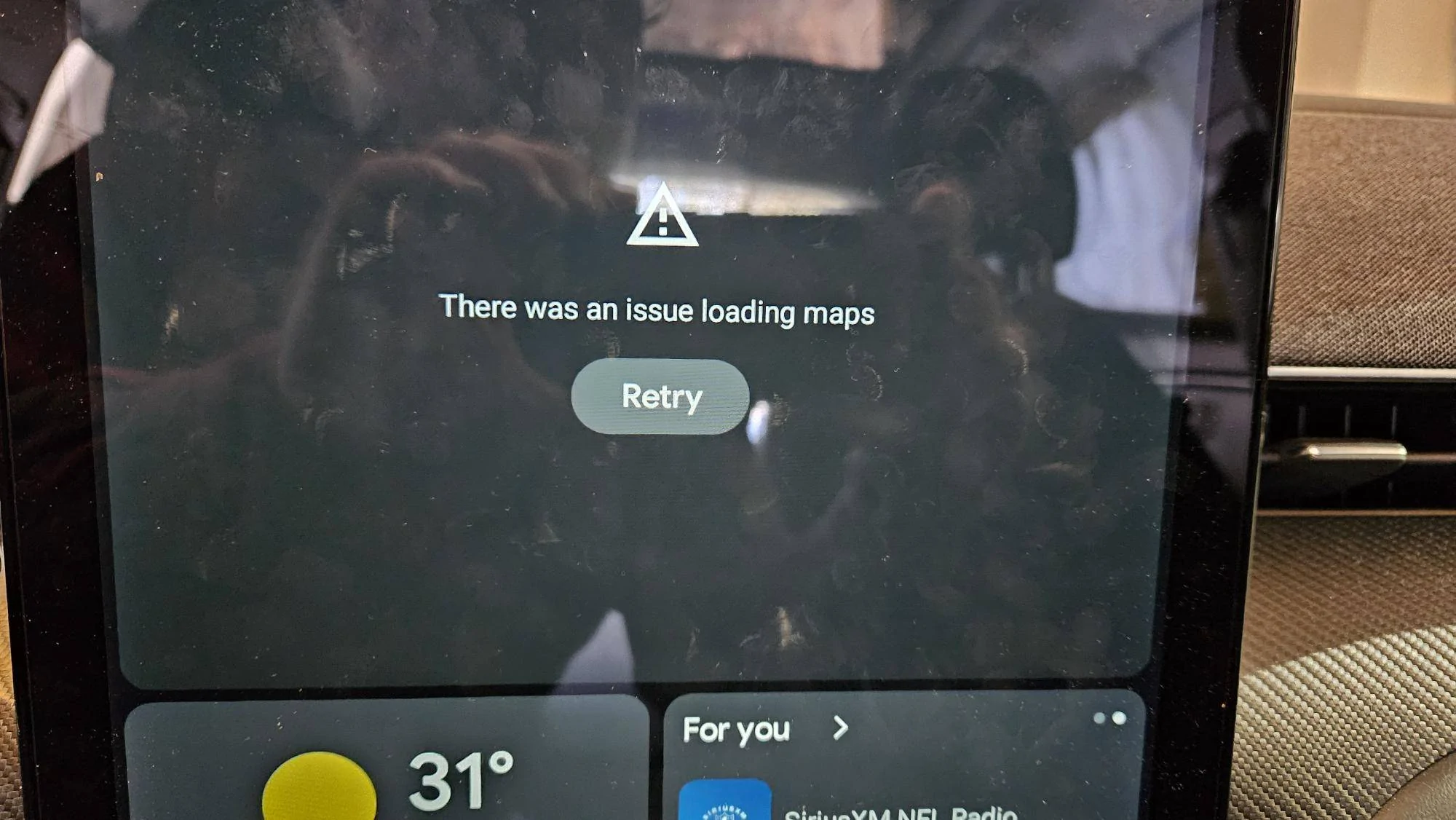
Ford Mustang Mach-E "there was an issue loading maps" 20240203_105629
Sponsored


ChehRob

Well-Known Member
First Name
Rob
Joined
Aug 24, 2023
Threads
13
Messages
995
Reaction score
614
Location
Seattle WA
Vehicles
MME Premium AWD Ext. Range (Job2)
Occupation
ret
Country flag
Navigation was slow coming up yesterday for me, first time that has happened.
 

Noctivigan

Well-Known Member
Joined
Feb 20, 2021
Threads
4
Messages
48
Reaction score
21
Location
Charleston, SC
Vehicles
Current GTPE Grabber Blue,Previous FE Grabber Blue
Country flag
Been getting this too for the last 2 weeks, also Android Auto, Samsung S22 Ultra.
 

Paisano

Active Member
First Name
Phil
Joined
Sep 1, 2023
Threads
0
Messages
29
Reaction score
16
Location
North Carolina
Vehicles
2022 Mustang Mach e Premium AWDx
Occupation
Retired
Country flag
I've had this happen for a long time. My MME is just about 2 years old and I've had the Samsung 20 all that time. I also get 'Android auto will not connect' for some reason. This usually happens when I leave the car for a while, get back in and then "can't connect". I've turned off the car, rebooted phone, no joy. Come back to the car the next time and perfect. WTF
 
OP
OP
emichnov

emichnov

Well-Known Member
First Name
Eric
Joined
Mar 14, 2022
Threads
29
Messages
363
Reaction score
433
Location
Mass
Vehicles
2022 Mach-E Premium
Country flag
Turns out this was the phone, not the car. I was messing with some settings on the phone and I must have tuned off the setting giving Android auto access to Location (at least, I think that's what is was). It's working now, yay!


Hooooves

New Member
Joined
Mar 22, 2024
Threads
0
Messages
4
Reaction score
0
Location
CHICAGO
Vehicles
GMC sierra
Country flag
I started getting this issue yesterday related to Android Auto and Google maps. All other Android auto features seems to work. Samsung Galaxy S23, Android Auto version "11.1.640234-release". I think that version just came a couple of days ago. Anyone else having this issue? Any suggestions on how to fix? Android auto has been pretty reliable for the past few months, although it does occasionally "lock up" (i.e. not allow any button pressing). Never anything like this.

20240203_105629.jpg
Not a Ford owner, but created this account to assist with this issue. On my GMC Sierra I experienced the same problem, and its caused by the phones battery settings. Follow these steps....

Settings
Device Care
Battery
Backgroud Usage Limits
Deep Sleeping Apps

Now remove MAPS from your list.

Restart phone and you should be good to go! Please let me know if this solves your issue.
 

Hooooves

New Member
Joined
Mar 22, 2024
Threads
0
Messages
4
Reaction score
0
Location
CHICAGO
Vehicles
GMC sierra
Country flag
Turns out this was the phone, not the car. I was messing with some settings on the phone and I must have tuned off the setting giving Android auto access to Location (at least, I think that's what is was). It's working now, yay!
Not a Ford owner, but created this account to assist with this issue. On my GMC Sierra I experienced the same problem, and its caused by the phones battery settings, not location access. If your problem returns, Follow these steps....

Settings
Device Care
Battery
Backgroud Usage Limits
Deep Sleeping Apps

Now remove MAPS from your list.

Restart phone and you should be good to go! Please let me know if this solves your issue.
 

Hooooves

New Member
Joined
Mar 22, 2024
Threads
0
Messages
4
Reaction score
0
Location
CHICAGO
Vehicles
GMC sierra
Country flag
Been getting this too for the last 2 weeks, also Android Auto, Samsung S22 Ultra.
Not a Ford owner, but created this account to assist with this issue. On my GMC Sierra I experienced the same problem, and its caused by the phones battery settings. Follow these steps....

Settings
Device Care
Battery
Backgroud Usage Limits
Deep Sleeping Apps

Now remove MAPS from your list.

Restart phone and you should be good to go! Please let me know if this solves your issue.
 

Hooooves

New Member
Joined
Mar 22, 2024
Threads
0
Messages
4
Reaction score
0
Location
CHICAGO
Vehicles
GMC sierra
Country flag
I've had this happen for a long time. My MME is just about 2 years old and I've had the Samsung 20 all that time. I also get 'Android auto will not connect' for some reason. This usually happens when I leave the car for a while, get back in and then "can't connect". I've turned off the car, rebooted phone, no joy. Come back to the car the next time and perfect. WTF
Not a Ford owner, but created this account to assist with this issue. On my GMC Sierra I experienced the same problem, and its caused by the phones battery settings. Follow these steps....

Settings
Device Care
Battery
Backgroud Usage Limits
Deep Sleeping Apps

Now remove MAPS from your list.

Restart phone and you should be good to go! Please let me know if this solves your issue.
 

Floyd R.

New Member
First Name
Floyd
Joined
Jul 13, 2025
Threads
0
Messages
3
Reaction score
0
Location
Union City CA
Vehicles
2024 Mache
Occupation
retired
Not a Ford owner, but created this account to assist with this issue. On my GMC Sierra I experienced the same problem, and its caused by the phones battery settings. Follow these steps....

Settings
Device Care
Battery
Backgroud Usage Limits
Deep Sleeping Apps

Now remove MAPS from your list.

Restart phone and you should be good to go! Please let me know if this solves your issue.


Top