mkhuffman
Well-Known Member
- First Name
- Mike
- Joined
- Nov 19, 2020
- Threads
- 29
- Messages
- 6,878
- Reaction score
- 9,512
- Location
- Virginia
- Vehicles
- 2025 Rivian R1T Tri-Max, Jeep GC-L, VW Jetta

- Thread starter
- #1
I did a couple trips to compare the results of using ABRP with live data from both Tronity and when connected to the OBDII scanner. As you would expect, the direction connection to the car via the OBDII scanner worked best. But if you don’t have that available, the Tronity connection works.
ABRP does a good job predicting the charge at destination. Here is how it did with Tronity:

You can see when I started the trip, ABRP was predicting I would arrive with 35% charge remaining. The Ford navigation was predicting 26%. But after driving a little farther, ABRP adjusted the prediction down. Maybe because I was driving faster than expected? Maybe because it was routing me off the highway to avoid traffic:

Google Maps didn’t recommend I do that. The Ford nav didn’t recommend I do that. Why did ABRP? I think because of delayed traffic information that was more up to date with the other navigation tools. I didn’t get off the highway and it was fine. Some traffic, but not horrible and not worth getting off the Interstate.

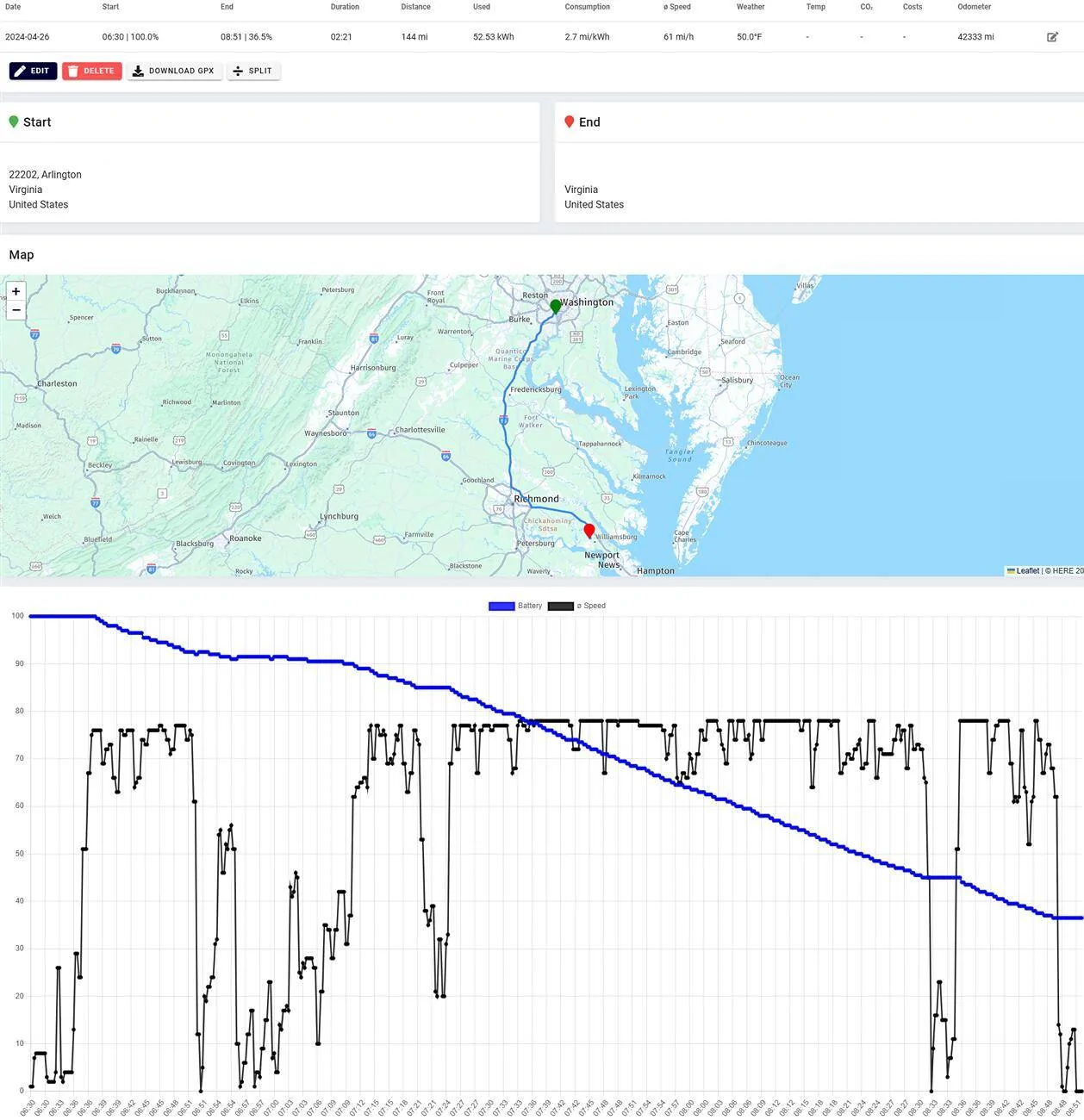
In reality, the original ABRP prediction was the most accurate, and more accurate than the Ford prediction. I arrived at home with 36.5% charge remaining. From Tronity:

The SoC predictions were good except for one thing: the data connection between ABRP and Tronity is slightly delayed. You can see ABRP was showing the current charge level to be 97%, when it was actually 94%.

That difference was consistent throughout the trip. It equated to about a 10-minute delay.
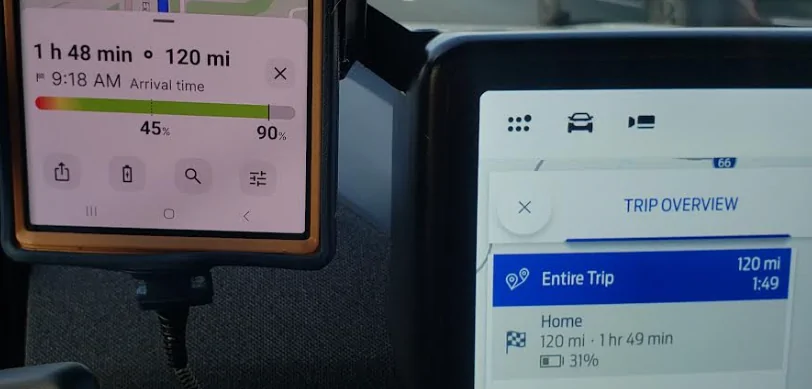
With the OBDII scanner, there is no delay. ABRP behaved the same way, making the best prediction at the very start of the trip, and adjusting as I drove. With the OBDII test, ABRP predicted 40% SoC at arrival. As I drove, the prediction actually went up. I guess because of heavier traffic? IDK. But it was much higher than the Ford prediction:

I don’t think this has anything to do with the live data connection. This is just ABRP behavior.
45% SoC predicted by ABRP was too high. 31% SoC predicted by Ford was too low. I arrived with 42.5% SoC remaining.
Can you use ABRP with live data and travel without any other tools? I think so. It did show traffic but the traffic was not up to date. Google Maps has much more accurate traffic. And I don’t think I would 100% rely on the routing. Definitely compare it with Google Maps to see if the ABRP route makes sense. For my first test, it did not.
When doing this test, I was running all three navigation systems at the same time: ABRP, Google Maps and the Ford nav. Google Maps had the best pure navigation accuracy with traffic. This is why I pretty much only use Google Maps for navigation, and the Ford nav when I need to know the SoC on arrival.
When traveling to a new destination, I use ABRP and the Ford nav to compare and see which one I think is giving me the right prediction. But I don’t normally use the OBDII live connection because it requires a Bluetooth BLE scanner, and I like to use my regular Bluetooth scanner and Car Scanner to monitor all the data coming from the car. You can’t do both. But if you use Tronity, you can do both.
Tronity is a great tool, BTW. I finally have all the data coming in accurately and I have good data going back to January when they turned their Ford interface back on. This isn’t really the point of this thread, but here is my cost history so far this year:

Amazing how much money spending $62k can save you!

ABRP does a good job predicting the charge at destination. Here is how it did with Tronity:
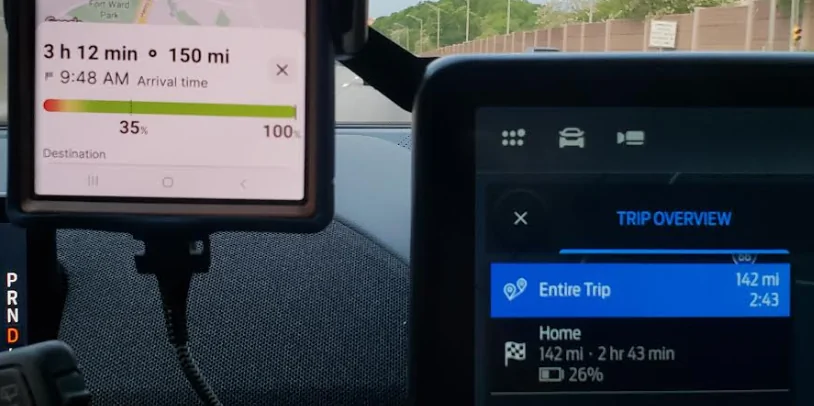
You can see when I started the trip, ABRP was predicting I would arrive with 35% charge remaining. The Ford navigation was predicting 26%. But after driving a little farther, ABRP adjusted the prediction down. Maybe because I was driving faster than expected? Maybe because it was routing me off the highway to avoid traffic:
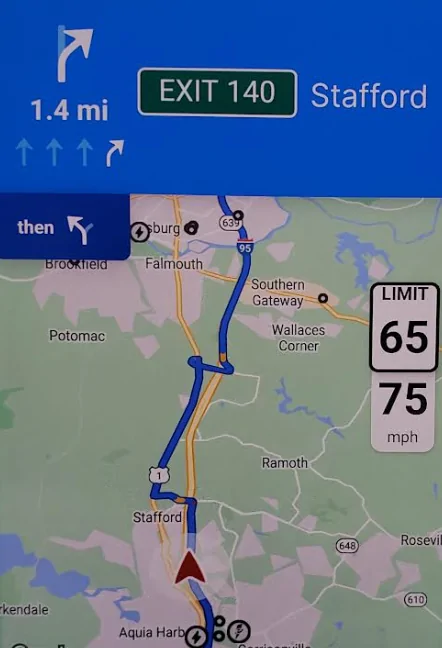
Google Maps didn’t recommend I do that. The Ford nav didn’t recommend I do that. Why did ABRP? I think because of delayed traffic information that was more up to date with the other navigation tools. I didn’t get off the highway and it was fine. Some traffic, but not horrible and not worth getting off the Interstate.
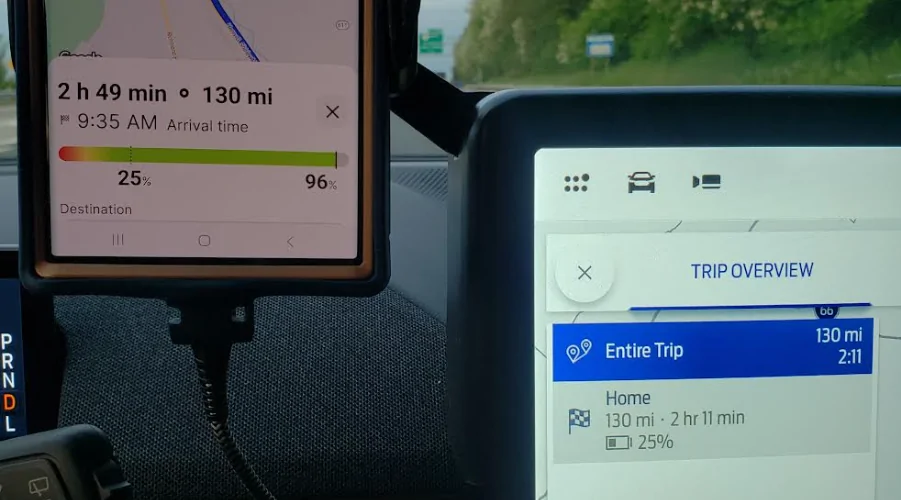
In reality, the original ABRP prediction was the most accurate, and more accurate than the Ford prediction. I arrived at home with 36.5% charge remaining. From Tronity:
The SoC predictions were good except for one thing: the data connection between ABRP and Tronity is slightly delayed. You can see ABRP was showing the current charge level to be 97%, when it was actually 94%.
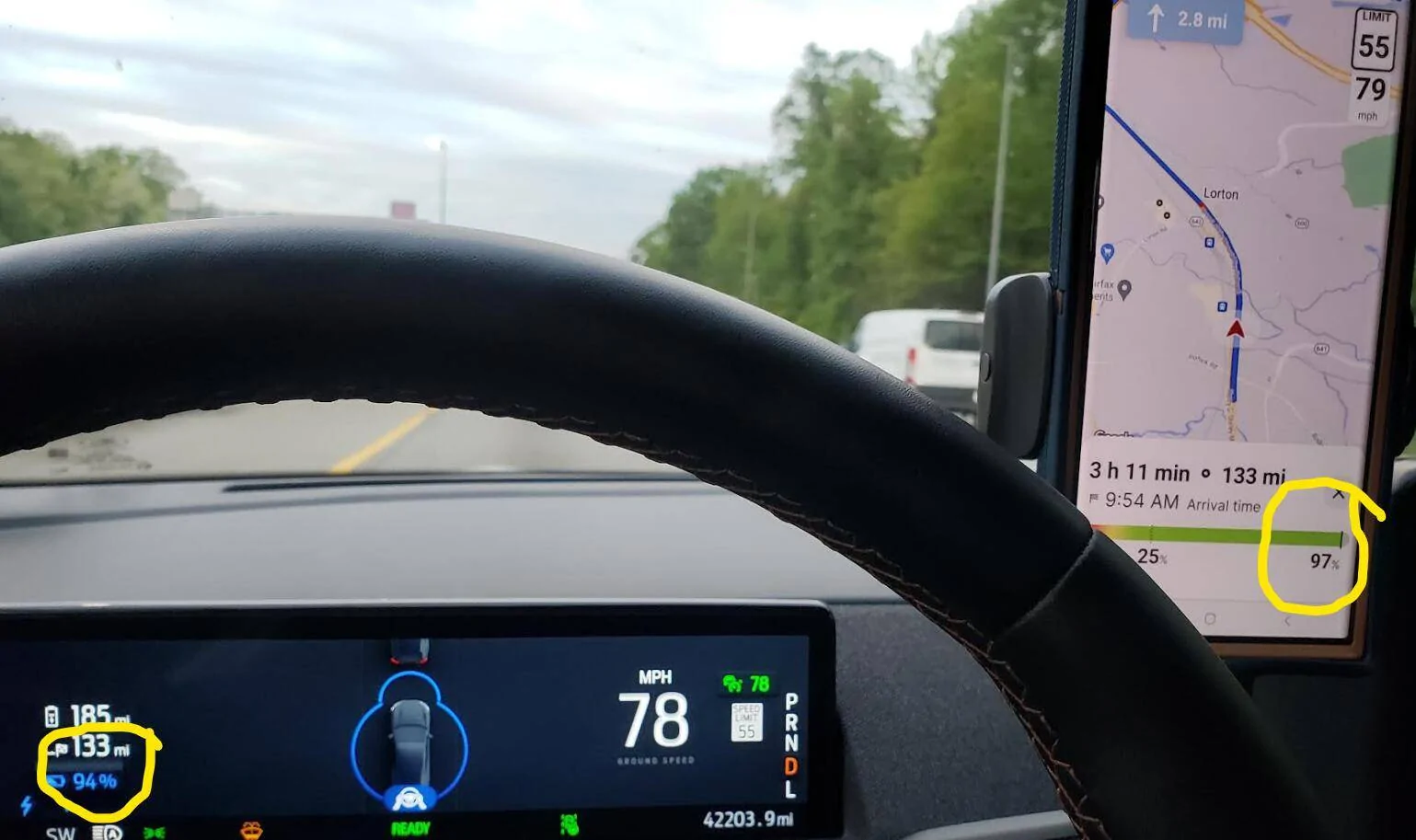
That difference was consistent throughout the trip. It equated to about a 10-minute delay.
With the OBDII scanner, there is no delay. ABRP behaved the same way, making the best prediction at the very start of the trip, and adjusting as I drove. With the OBDII test, ABRP predicted 40% SoC at arrival. As I drove, the prediction actually went up. I guess because of heavier traffic? IDK. But it was much higher than the Ford prediction:
I don’t think this has anything to do with the live data connection. This is just ABRP behavior.
45% SoC predicted by ABRP was too high. 31% SoC predicted by Ford was too low. I arrived with 42.5% SoC remaining.
Can you use ABRP with live data and travel without any other tools? I think so. It did show traffic but the traffic was not up to date. Google Maps has much more accurate traffic. And I don’t think I would 100% rely on the routing. Definitely compare it with Google Maps to see if the ABRP route makes sense. For my first test, it did not.
When doing this test, I was running all three navigation systems at the same time: ABRP, Google Maps and the Ford nav. Google Maps had the best pure navigation accuracy with traffic. This is why I pretty much only use Google Maps for navigation, and the Ford nav when I need to know the SoC on arrival.
When traveling to a new destination, I use ABRP and the Ford nav to compare and see which one I think is giving me the right prediction. But I don’t normally use the OBDII live connection because it requires a Bluetooth BLE scanner, and I like to use my regular Bluetooth scanner and Car Scanner to monitor all the data coming from the car. You can’t do both. But if you use Tronity, you can do both.
Tronity is a great tool, BTW. I finally have all the data coming in accurately and I have good data going back to January when they turned their Ford interface back on. This isn’t really the point of this thread, but here is my cost history so far this year:
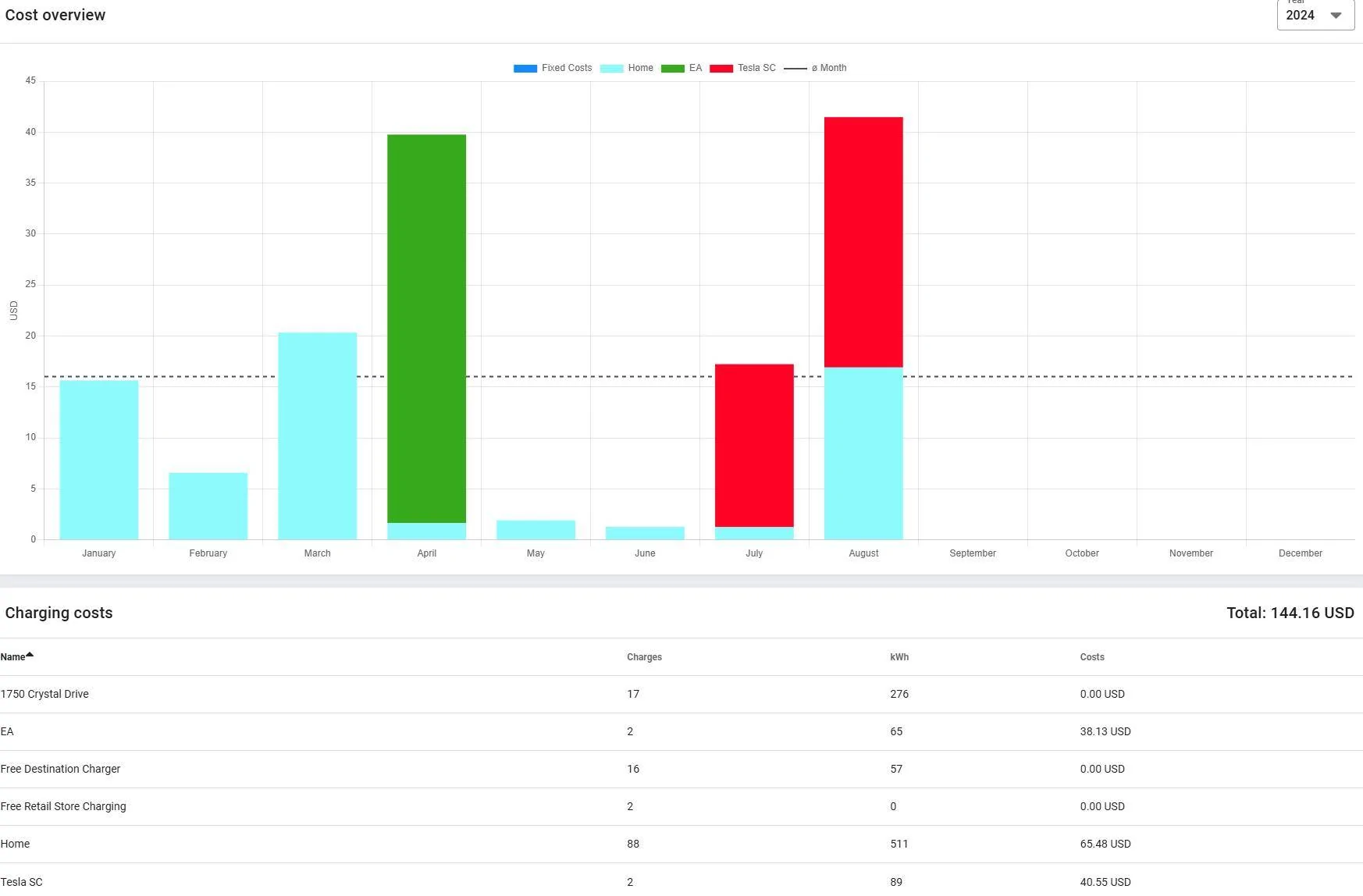
Amazing how much money spending $62k can save you!
Sponsored