mrlindstrom

Active Member
First Name
Matthew
Joined
Apr 11, 2024
Threads
0
Messages
27
Reaction score
5
Location
Texas
Vehicles
22 Select
Country flag
Contemplating tackling the CMR, IPMA/PSCM later today since I already have everything out to do the updates to resolve the 1PD issues.

Since these are longer updates, are there any best practices to look for to make sure they finish successfully? I typically disconnect all accessories, turn off the headlights and ac/blower, but should I also be disabling the auto power off?
Sponsored


 

Snakebitten

Well-Known Member
Joined
Mar 1, 2024
Threads
0
Messages
2,264
Reaction score
3,782
Location
Coastal Texas
Vehicles
2023.5 Mach-E
Country flag
@Helly

Make sure you have this folder in your pc's directory:

C:\ProgramData\Ford Motor Company\FDRS\fdrs\data\vehicle_software

If it is not in there, create it.


Good idea. He's actually an IT systems engineer and knows more than a thing or two. I'm really stumped. I had you-know-who look into his issue, too, and we can't figure it out. He made a custom USB update to get his TCU updated and even though his car never confirmed it went through, it went through and his TCU is updated (I checked the strategy myself) but FDRS still shows an update pending. We don't want to make a USB update for the IPC, because that will only install part of the update and if FDRS does not pick up on the rest, then he'll be in no-man's land and the only way to fix it would be with him remoting in to do it. Any time I am trying to help someone here that requires remote access, people get scared and back off so I don't even bother anymore and just let people figure it out on their own.
Yeah, I didn't say much on this forum when I ran into immediate snags updating my new Mach-E with the same updates that my Powerboost updates flawlessly.
And yeah, you-know-who packaged up a GWM/TCU for me with hopes that getting them updated might solve whatever the issue might be.

He also spotted the file-size discrepancy, and that is what finally led to me spotting the problem. At least the problem I was/am having with FDRS and the Mach-E.
Again, FDRS does not have a problem with the other 2 vehicles I update with on the SAME laptop(s).

In short, the procedure code written for most of the Mach-E updates I have done (about a dozen of 18 or so) will include deleting the downloads folder after the update has been consumed.

C:\programData\Ford Motor Company\FDRS\fdrs\data\vehicle_software\downloads

So the subsequent update will create that directory in preparation to temporarily store the necessary downloaded files.

Right? Just as it should. And just as it has many times with the Powerboost.

BUT. And a big but. The downloads folder that the FDRS script creates does NOT have write privileges and therefore FDRS can't write/save the files that it downloads.
That failure to write the file from memory to the hard-drive is what aborts the update and generates the log entry for filesize exception.
There really is no file size exception, it's just that the actual file size doesn't match the size of the downloaded file in-memory at the instant Windows attempts to write.

I know. I sound crazy! Lol

Here's how I got around it.......
If the previous update deleted the downloads folder, I would create the folder myself and manually give the necessary write privileges to the folder. This made the next FDRS update skip the folder creation task and use the pre-prepared folder instead.

Wallah. I marched through the dozen or so FDRS updates no differently than the Powerboost updates. But I did have to do the folder creation for most of the Mach-E updates.

By the way, I experienced this on a Windows 10 Surface
A different Windows 11 Surface
One being a corporate Azure Active Directory machine. The other being a local right machine only.
3 different versions of FDRS.......

I have my own opinion of why it wouldn't affect lots of users. But I think it is only likely to affect Mach-E updates for users who have only installed FDRS recently. The bug, I believe, is in a recent code snippet that the Mach-E software team is using to script the FDRS update procedure.

Therefore the same update via OTA would be unaffected. It is definitely an FDRS bug.
 

rugedraw

Well-Known Member
First Name
Javier
Joined
Nov 13, 2023
Threads
0
Messages
2,684
Reaction score
2,440
Location
Miami, FL
Vehicles
2021 Ford F150 Platinum FX4 EB/2023 Bronco Sport Badlands/1991 Mustang 5.0 coupe
Occupation
Auto Sales
Country flag
Yeah, I didn't say much on this forum when I ran into immediate snags updating my new Mach-E with the same updates that my Powerboost updates flawlessly.
And yeah, you-know-who packaged up a GWM/TCU for me with hopes that getting them updated might solve whatever the issue might be.

He also spotted the file-size discrepancy, and that is what finally led to me spotting the problem. At least the problem I was/am having with FDRS and the Mach-E.
Again, FDRS does not have a problem with the other 2 vehicles I update with on the SAME laptop(s).

In short, the procedure code written for most of the Mach-E updates I have done (about a dozen of 18 or so) will include deleting the downloads folder after the update has been consumed.

C:\programData\Ford Motor Company\FDRS\fdrs\data\vehicle_software\downloads

So the subsequent update will create that directory in preparation to temporarily store the necessary downloaded files.

Right? Just as it should. And just as it has many times with the Powerboost.

BUT. And a big but. The downloads folder that the FDRS script creates does NOT have write privileges and therefore FDRS can't write/save the files that it downloads.
That failure to write the file from memory to the hard-drive is what aborts the update and generates the log entry for filesize exception.
There really is no file size exception, it's just that the actual file size doesn't match the size of the downloaded file in-memory at the instant Windows attempts to write.

I know. I sound crazy! Lol

Here's how I got around it.......
If the previous update deleted the downloads folder, I would create the folder myself and manually give the necessary write privileges to the folder. This made the next FDRS update skip the folder creation task and use the pre-prepared folder instead.

Wallah. I marched through the dozen or so FDRS updates no differently than the Powerboost updates. But I did have to do the folder creation for most of the Mach-E updates.

By the way, I experienced this on a Windows 10 Surface
A different Windows 11 Surface
One being a corporate Azure Active Directory machine. The other being a local right machine only.
3 different versions of FDRS.......

I have my own opinion of why it wouldn't affect lots of users. But I think it is only likely to affect Mach-E updates for users who have only installed FDRS recently. The bug, I believe, is in a recent code snippet that the Mach-E software team is using to script the FDRS update procedure.

Therefore the same update via OTA would be unaffected. It is definitely an FDRS bug.
Yea, I had him go into that folder and delete everything that may have been in there when I was talking to him in PM's.

@Helly please check out the above posts from @Snakebitten to see if this helps your cause.
 

Kamuelaflyer

Well-Known Member
First Name
Bill
Joined
Feb 18, 2020
Threads
11
Messages
11,409
Reaction score
23,097
Location
Hawaii
Vehicles
2021 Premium Infinite Blue. ER AWD. 2020 Raptor, 2021 Ranger.
Country flag
Yeah, I didn't say much on this forum when I ran into immediate snags updating my new Mach-E with the same updates that my Powerboost updates flawlessly.
And yeah, you-know-who packaged up a GWM/TCU for me with hopes that getting them updated might solve whatever the issue might be.

He also spotted the file-size discrepancy, and that is what finally led to me spotting the problem. At least the problem I was/am having with FDRS and the Mach-E.
Again, FDRS does not have a problem with the other 2 vehicles I update with on the SAME laptop(s).

In short, the procedure code written for most of the Mach-E updates I have done (about a dozen of 18 or so) will include deleting the downloads folder after the update has been consumed.

C:\programData\Ford Motor Company\FDRS\fdrs\data\vehicle_software\downloads

So the subsequent update will create that directory in preparation to temporarily store the necessary downloaded files.

Right? Just as it should. And just as it has many times with the Powerboost.

BUT. And a big but. The downloads folder that the FDRS script creates does NOT have write privileges and therefore FDRS can't write/save the files that it downloads.
That failure to write the file from memory to the hard-drive is what aborts the update and generates the log entry for filesize exception.
There really is no file size exception, it's just that the actual file size doesn't match the size of the downloaded file in-memory at the instant Windows attempts to write.

I know. I sound crazy! Lol

Here's how I got around it.......
If the previous update deleted the downloads folder, I would create the folder myself and manually give the necessary write privileges to the folder. This made the next FDRS update skip the folder creation task and use the pre-prepared folder instead.

Wallah. I marched through the dozen or so FDRS updates no differently than the Powerboost updates. But I did have to do the folder creation for most of the Mach-E updates.

By the way, I experienced this on a Windows 10 Surface
A different Windows 11 Surface
One being a corporate Azure Active Directory machine. The other being a local right machine only.
3 different versions of FDRS.......

I have my own opinion of why it wouldn't affect lots of users. But I think it is only likely to affect Mach-E updates for users who have only installed FDRS recently. The bug, I believe, is in a recent code snippet that the Mach-E software team is using to script the FDRS update procedure.

Therefore the same update via OTA would be unaffected. It is definitely an FDRS bug.
I’ve been reading this thread for way too long. Every word made sense to me and I’m a retired airline pilot. ;)

Carry on.
 

rugedraw

Well-Known Member
First Name
Javier
Joined
Nov 13, 2023
Threads
0
Messages
2,684
Reaction score
2,440
Location
Miami, FL
Vehicles
2021 Ford F150 Platinum FX4 EB/2023 Bronco Sport Badlands/1991 Mustang 5.0 coupe
Occupation
Auto Sales
Country flag
Contemplating tackling the CMR, IPMA/PSCM later today since I already have everything out to do the updates to resolve the 1PD issues.

Since these are longer updates, are there any best practices to look for to make sure they finish successfully? I typically disconnect all accessories, turn off the headlights and ac/blower, but should I also be disabling the auto power off?
Yes. If the CMR or IPMA hangs for a long time in the "configuring module" process at the end, then you will have to close out FDRS and re-open it. Chances are, this will require some trouble-shooting once you connect back up. If the CMR or IPMA appear in purple, then PMI the module and select "no" when asked if it is the original module.

If all you're getting is a bunch of codes, then clear the codes and run config process with FDRS. Please note a PMI will take as long as the update process itself, so about an hour for the CMR and 3 hours for the IPMA.


Helly

Well-Known Member
Joined
Jan 18, 2024
Threads
0
Messages
48
Reaction score
13
Location
france
Vehicles
MME
Country flag
I hesitate to post this because I wouldn't want to send anyone down this rabbit hole unnecessarily. I don't believe this affects very many folks, but I am pretty sure you are describing exactly what I encountered.

Check your FDRS log file, and if you find entries that resemble the ones I would get (below), FDRS will abort the file download because it thinks the file size "expected" doesn't match the file size "received".

Sample of the log:

com.ford.otx.resource.exception.InvalidDownloadException: File has been downloaded, but the size is not valid, uid: PU5T-14H481-BAD, uri: https://xxxxxxxxxx.ford.com/7dfebcef-0147-4073-afc3-040cf7da595b_PU5T-14H481-BAD.vbf, expected file size: 18884882, size of received file: 18631435

Obviously your filename and size would be the first file that the particular update you are attempting to perform tries to download.

And if you tried various updates, you will have similar failures early in the download process, and find similar entries in the log file at the matching timestamp for the FDRS error.

If you verify what I described, I will be happy to post further what I found necessary to do to get these recent updates to succeed on my Mach-E.

By the way, the log file is:

C:\programdata\Ford Motor Company\FDRS\fdrs-runtime.log

I know the first time you open that file it can be a bit intimidating. But it really is just a very granular recording of what your most recent FDRS session experienced.
And in this case we are simply looking for any record of "InvalidDownloadException"
Oh thanks for this log

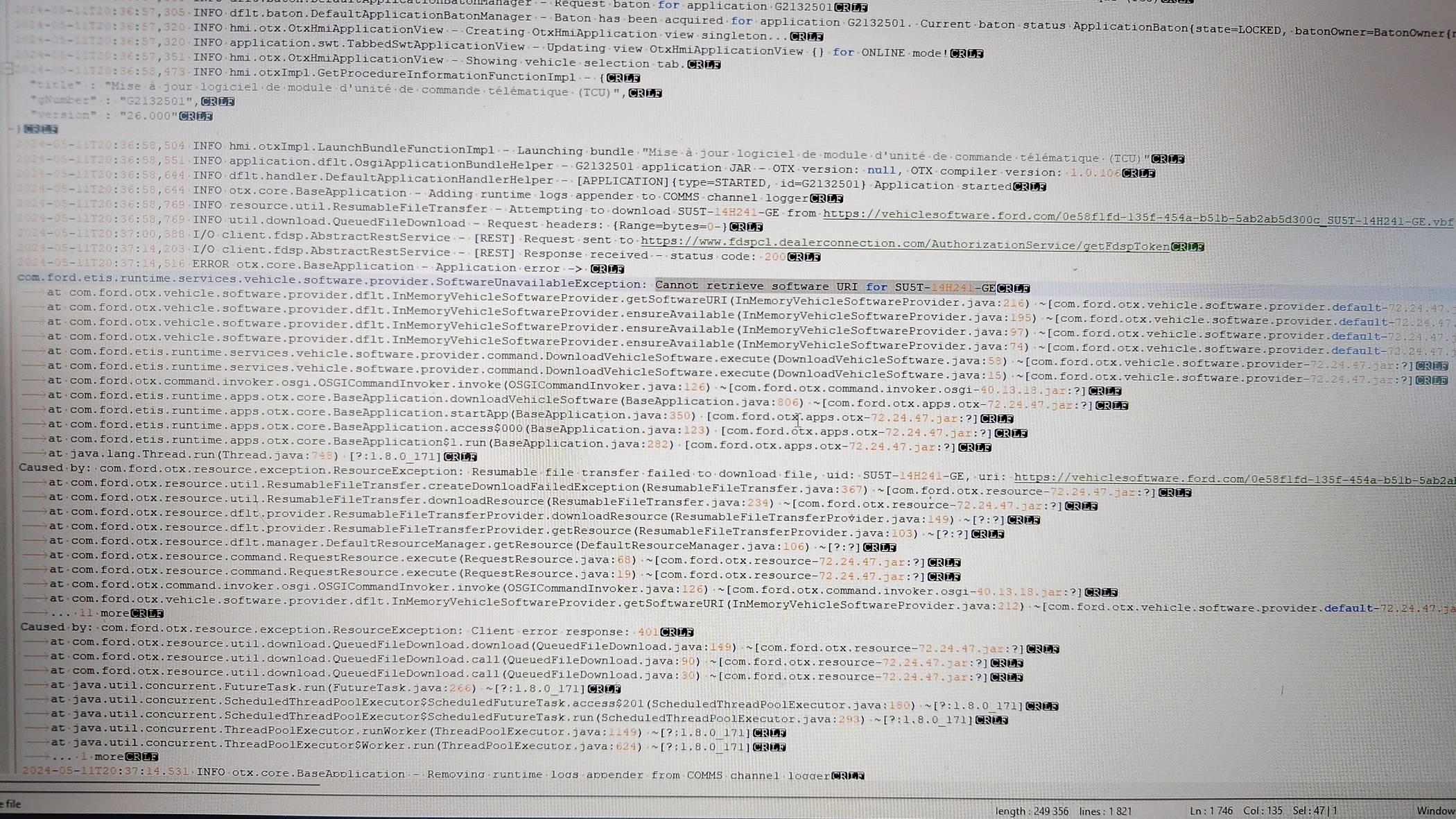
Effectively i have a java error. The webservice can t retreve the file that my fdrs want to download for my car... (Error is highlight on my pics)
Ford Mustang Mach-E The Complete DIY Guide to Updating Your Mach-E with FDRS P_20240511_204344


Many thanks to all for your support.

Oh i get the ota 6.3.0 this morning but allways the same tcu and ipc to update
 

Snakebitten

Well-Known Member
Joined
Mar 1, 2024
Threads
0
Messages
2,264
Reaction score
3,782
Location
Coastal Texas
Vehicles
2023.5 Mach-E
Country flag
I’ve been reading this thread for way too long. Every word made sense to me and I’m a retired airline pilot. ;)

Carry on.
That's encouraging, so thanks for confirming that it made sense, one sentence at a time. ?

I often worry about that.

And hey, some pilots are really sharp fellas! (I'm in IT for private aviation)
But I don't think it's because they are pilots. I'm just saying. Lol
 

Snakebitten

Well-Known Member
Joined
Mar 1, 2024
Threads
0
Messages
2,264
Reaction score
3,782
Location
Coastal Texas
Vehicles
2023.5 Mach-E
Country flag
Oh thanks for this log

Effectively i have a java error. The webservice can t retreve the file that my fdrs want to download for my car... (Error is highlight on my pics)
P_20240511_204344.jpg


Many thanks to all for your support.
Bummer!
I really hoped that you had the same correct-able issue.

I'm assuming you've tried appropriate VPN attempts.
 

Helly

Well-Known Member
Joined
Jan 18, 2024
Threads
0
Messages
48
Reaction score
13
Location
france
Vehicles
MME
Country flag
Bummer!
I really hoped that you had the same correct-able issue.

I'm assuming you've tried appropriate VPN attempts.
i'm not behind a vpn or proxy . when I use the url in my chrome i could download the file but not in fdrs...

but why fdrs on APIM, TCU and IPC can't download these files itself?
 

rugedraw

Well-Known Member
First Name
Javier
Joined
Nov 13, 2023
Threads
0
Messages
2,684
Reaction score
2,440
Location
Miami, FL
Vehicles
2021 Ford F150 Platinum FX4 EB/2023 Bronco Sport Badlands/1991 Mustang 5.0 coupe
Occupation
Auto Sales
Country flag
i'm not behind a vpn or proxy . when I use the url in my chrome i could download the file but not in fdrs...

but why fdrs on APIM, TCU and IPC can't download these files itself?
This is a very common issue I have come across helping people in other countries outside the US. For those modules (the GWM often gives problems, too), FDRS does not properly pull the files. There is no way around this as far as I know. Since you know about these things, if you decide to try the VPN route and it works, please let me know so I can pass that info along to others.

In most cases outside the US, FDRS will not even show any pending updates for any of those 4 modules. In your case, since they were showing, I figured you could do them, but apparently, it is not that simple.
 

Snakebitten

Well-Known Member
Joined
Mar 1, 2024
Threads
0
Messages
2,264
Reaction score
3,782
Location
Coastal Texas
Vehicles
2023.5 Mach-E
Country flag
i'm not behind a vpn or proxy . when I use the url in my chrome i could download the file but not in fdrs...

but why fdrs on APIM, TCU and IPC can't download these files itself?
I admit that the log file logs an http url, implying that FDRS is using the same protocol and method as your browser. (Chrome)

But there definitely are differences. Example, the target path for the Payload.

C:\users\download
Vs
C:\programdata\.........

So there's other differences too.

Have you attempted disabling the pc's firewall completely?
And I would attempt a VPN with a USA gateway, just to see.
 

Helly

Well-Known Member
Joined
Jan 18, 2024
Threads
0
Messages
48
Reaction score
13
Location
france
Vehicles
MME
Country flag
I admit that the log file logs an http url, implying that FDRS is using the same protocol and method as your browser. (Chrome)

But there definitely are differences. Example, the target path for the Payload.

C:\users\download
Vs
C:\programdata\.........

So there's other differences too.

Have you attempted disabling the pc's firewall completely?
And I would attempt a VPN with a USA gateway, just to see.
Yes I have disable firewall antivirus and antimalware ...


For TCU is now working I have download all files one by one manualy(by looking which one is trying to download in the runtime log) and put them in the directory /vehicule_software/ .... /download (where FDRS try to copy them). When the module have all the file he need it's ok. it begin to burn the firmware...

For IPC I have done a first file but on second one I think that FDRS download it in multipart and my process not work...

May be someone have the file LJ8T-14C025-LF in \ProgramData\Ford Motor Company\FDRS\fdrs\data\vehicle_software\SECONDARY_BOOTLOADER and could send me this one. (may be i will need other file but for the moment FDRS try to download this one)

It's 23:15 here so time to go to bed ;)

many thanks
 

rugedraw

Well-Known Member
First Name
Javier
Joined
Nov 13, 2023
Threads
0
Messages
2,684
Reaction score
2,440
Location
Miami, FL
Vehicles
2021 Ford F150 Platinum FX4 EB/2023 Bronco Sport Badlands/1991 Mustang 5.0 coupe
Occupation
Auto Sales
Country flag
Yes I have disable firewall antivirus and antimalware ...


For TCU is now working I have download all files one by one manualy(by looking which one is trying to download in the runtime log) and put them in the directory /vehicule_software/ .... /download (where FDRS try to copy them). When the module have all the file he need it's ok. it begin to burn the firmware...

For IPC I have done a first file but on second one I think that FDRS download it in multipart and my process not work...

May be someone have the file LJ8T-14C025-LF in \ProgramData\Ford Motor Company\FDRS\fdrs\data\vehicle_software\SECONDARY_BOOTLOADER and could send me this one. (may be i will need other file but for the moment FDRS try to download this one)
That is correct. It is very unlikely that FDRS will pull the second part. This is why I did not offer you a USB update option for that module.
 

Helly

Well-Known Member
Joined
Jan 18, 2024
Threads
0
Messages
48
Reaction score
13
Location
france
Vehicles
MME
Country flag
That is correct. It is very unlikely that FDRS will pull the second part. This is why I did not offer you a USB update option for that module.
so there is no solution to have the complete file LJ8T-14C025-LF ? my version do 3Ko
 

rugedraw

Well-Known Member
First Name
Javier
Joined
Nov 13, 2023
Threads
0
Messages
2,684
Reaction score
2,440
Location
Miami, FL
Vehicles
2021 Ford F150 Platinum FX4 EB/2023 Bronco Sport Badlands/1991 Mustang 5.0 coupe
Occupation
Auto Sales
Country flag
so there is no solution to have the complete file LJ8T-14C025-LF ? my version do 3Ko
Maybe. Stand by.
Sponsored


Top