Now that Fordpass trip planning is dead is there *any* way to pick a point on the map to add it to a trip

music_cities

Well-Known Member
Joined
Nov 7, 2023
Threads
53
Messages
676
Reaction score
684
Location
Calgary, Canada
Vehicles
Mach E 2022 GT
Country flag
I'm planning a trip and want to visit some place that doesn't show up in search. Doesn't matter the site, but Ford Nav Maps is missing a lot of places, e.g. Atlas Coal Mine national historic site https://atlascoalmine.ab.ca/. Or Paint Pots trailhead in Kootenay National Park.

I already have two stops added to my trip, now I want to add a third stop, which I can't find in any search, but I can scroll to it on the on-screen navigation map. Then *how can I add it* to the trip? Doesn't matter how hard I press the screen, or whether I double or triple tap the screen, there doesn't seem to be a way to select a map location after scrolling to it, if it's not an existing POI.

The only workaround I've found is to go to Google Maps, find the location, figure out its GPS coordinates there, and then enter it into the on-screen car navigation using the coordinates.

Am I missing something? Is there some other way?

In the past, when we had trip planning on FordPass, I also couldn't figure out how to add a random location. This forum helped me figure it out, it was actually fairly simple. But now that we don't have Fordpass trip planning anymore, I have to figure out how to do it using the in-car display. Maybe it's again some simple thing that I'm missing.

Thanks!
Sponsored
 

AtomicInternet

Well-Known Member
Joined
Jul 31, 2023
Threads
29
Messages
885
Reaction score
1,472
Location
SC
Vehicles
Focus RS, Mach E Premium
Country flag
GPS coordinates are what I used for my trip. Saved each one as a favorite. Put them all in while I was waiting at a charger, so had time to kill anyway. Don't know of any other way.
 
OP
OP

music_cities

Well-Known Member
Joined
Nov 7, 2023
Threads
53
Messages
676
Reaction score
684
Location
Calgary, Canada
Vehicles
Mach E 2022 GT
Country flag
Ok, I figured out a way. If you cancel your whole route (save your progress before if you want), you can then scroll and zoom over to your place on the map, and long-press on it, which drops a pin. You can't drop a pin when you're building a route, you have to cancel that process first. Once you've dropped a pin, you can click "Coordinates" (rather than "Go"), and press the star to save it as a favourite (rename it from "Coordinates" to the actual name you want to give it).

Now I think you have to press "Go" so that you can press "Cancel Trip" and get back to your main navigation screen (maybe there's another way to exit without pressing "Go", but this is fast enough.)

Then you can click the "Where To" magnifying glass, click "My trips", click the plus sign to add a new trip, and now when you're building your trip with up to six destinations, you can add your new favourite as one of the six.

Maybe this video will help, link good until Sept 3 2024:
https://share.icloud.com/photos/0deaq-KwqGJnIdvR1893kwpUg
 

woody

Well-Known Member
Joined
Sep 27, 2020
Threads
0
Messages
865
Reaction score
712
Location
CO
Vehicles
'19 Chevy Bolt, '25 Chevy Equinox
Country flag
another lovely feature we pay for w/ Ford navigation which only (and if it) works w/ jumping through a bunch of hoops.
Ain't it grand.


James III

Well-Known Member
First Name
James
Joined
Jun 10, 2022
Threads
1
Messages
81
Reaction score
34
Location
United Kingdom
Vehicles
2021 (build1) Mach-e AWD EXT (iconic silver)
Occupation
Developer
Country flag
Sadly , the loss of Ford Pass Trip Planning
was unfortunately not about the priority or loyalty to their customers it’s the value of selling our data that they’re more interested in!
It’ hasn’t been enough to sell the privacy we have to give away just to be able to use Ford Pass or Sync4A. Ford disclosed this from the beginning of releasing the Mach-e. Data Sharing is explicitly required to. use most functions.

Thats not enough. The mapping function of the previous versions of FordPass used Garmin map servers as used Ford Navigation in Sync4A. That way you could plan your trips and send them to the vehicle, including any blue oval charge points along the way. Those charge points now allow pre-conditioning to start before reaching the planned ChargePoint in Ford Navigation in the vehicle. This was a big selling point for Ford Pass Trip Planning and the further development. In OTA’s, but now they’ve dumped it.! But the Ford Pass Trip section is still on Ford Nav in SYNC4A Now it’s just called ‘Location’ on the App.

The reason behind giving up the Maps section and Trip Planning in Ford Pass App is because Ford Pass has now gone into business with Google Maps. and given up the previous garim navigation servers in the app. This is because Google pays for it! So this is about money, not about convenience, loyalty or customer satisfaction. We are the cash-cows.?

Google gets the data, and all the info of our use, driving & location of your vehicle through FordPass, running on your phone. You have to grant full permission to Google. as long as Ford Pass is on your phone Google is always getting all the information Ford has outlined below. Obviously, this isn’t compatible with being able to be compatible with the navigation in your car or send information to it.

It’s very sad, and I am very mad because I used this feature more than any other for 3 years. . I planned all my trips before leaving send it to the car and off I go. I used to get the departure time amount of time in the journey know when to set my departure preconditioning. when charging. Etc.

I feel completely sold out and betrayed., as we all have been once again. Customer satisfaction does not matter that much once they’ve sold us our cars. Now it’s our valuable data they want!

Here is proof found In the fine print in Privacy disclosure, right from the horses mouth ….

“FordPass uses Google Maps services and Google Application Programming Interfaces (APIs) to provide essential functionality for FordPass features with maps, address information and searches for places or points of interest, including features like FordPass Location (to help locate a vehicle in your FordPass garage) and Public Charging (if available for your vehicle).
When enabled, Google will use cookies and the following data will be shared with Google for their purposes described in their Privacy Policy (below).
· Precise location – depending on the FordPass feature or the functionality being used, this could be the precise location of a vehicle, your mobile device, a charging station, or another place or point of interest you search for. Your location information will only be shared with Google in the foreground.
· Identifiers (such as device IP addressed , a unique Maps Software Development Kit (SDK) identifier, a generic FordPass App identifier)
· Technical device information (such as device type, operating system version number, SDK version number, screen size, color theme, etc.);
· Maps performance and interaction events data (such as panning, zooming, and abnormal termination/crash metrics); and
· Your search queries.
Google uses cookies and the personal information it collects through use of the Google Maps services and Google APIs: to provide the Google Maps services and other services supported by the Google APIs; to troubleshoot and provide technical support; to maintain Google Maps platform security and capacity; to improve Google Maps and other Google APIs, products, and services; and for their other purposes described in Google’s Privacy Policy

What does that say about Trusting Ford?
I learned my lesson z!
 
Last edited:

ShoreTang

Well-Known Member
First Name
Michael
Joined
Jul 27, 2023
Threads
1
Messages
58
Reaction score
37
Location
USA
Vehicles
2023 Mach-E GT
Occupation
Engineer
Country flag
@Ford Motor Company really needs to do something about the trip planner. If it’s going to be this bad and not be on the app anymore, why are we paying for the gps?
I believe it (Ford Nav) to be the only means to condition the battery for charging, so for faster roadtrip charge times I guess we pay :(. Ultimately I believe the post by @James III above says it best :(
 

James III

Well-Known Member
First Name
James
Joined
Jun 10, 2022
Threads
1
Messages
81
Reaction score
34
Location
United Kingdom
Vehicles
2021 (build1) Mach-e AWD EXT (iconic silver)
Occupation
Developer
Country flag
If you’ve set Apple maps up for the EV data of your vehicle, you can use Apple maps for planning your trip and use CarPlay. It’s similar, but you don’t get any advantages with navigating to a charge point for preconditioning. And I’m not so keen on the mapping function of Apple maps compared to the more minimalistic oem navigation. I also like seeing My trip data on the (Driver) display instead of looking at the Sync4A screen.

It’s just all such a shame! i’m still in shock about this. It’s worse than when they took away the EV data function of the FordPass app.
 
OP
OP

music_cities

Well-Known Member
Joined
Nov 7, 2023
Threads
53
Messages
676
Reaction score
684
Location
Calgary, Canada
Vehicles
Mach E 2022 GT
Country flag
If you’ve set Apple maps up for the EV data of your vehicle, you can use Apple maps for planning your trip and use CarPlay. It’s similar, but you don’t get any advantages with navigating to a charge point for preconditioning. And I’m not so keen on the mapping function of Apple maps compared to the more minimalistic oem navigation. I also like seeing My trip data on the (Driver) display instead of looking at the Sync4A screen.

It’s just all such a shame! i’m still in shock about this. It’s worse than when they took away the EV data function of the FordPass app.
although at least Apple Maps shows the turn directions on the IPA.
 

Tampamike

Well-Known Member
First Name
Mike
Joined
Feb 19, 2021
Threads
25
Messages
2,076
Reaction score
2,813
Location
Tampa, FL
Vehicles
‘24 Mach E Premium RWD
Country flag
I'm planning a trip and want to visit some place that doesn't show up in search. Doesn't matter the site, but Ford Nav Maps is missing a lot of places, e.g. Atlas Coal Mine national historic site https://atlascoalmine.ab.ca/. Or Paint Pots trailhead in Kootenay National Park.

Am I missing something? Is there some other way?


Thanks!
 

Tampamike

Well-Known Member
First Name
Mike
Joined
Feb 19, 2021
Threads
25
Messages
2,076
Reaction score
2,813
Location
Tampa, FL
Vehicles
‘24 Mach E Premium RWD
Country flag
There’s an easier way.

1) Create a route to your final destination of the day.

2) With that route active, scroll and zoom the map to the spot that you want to add.

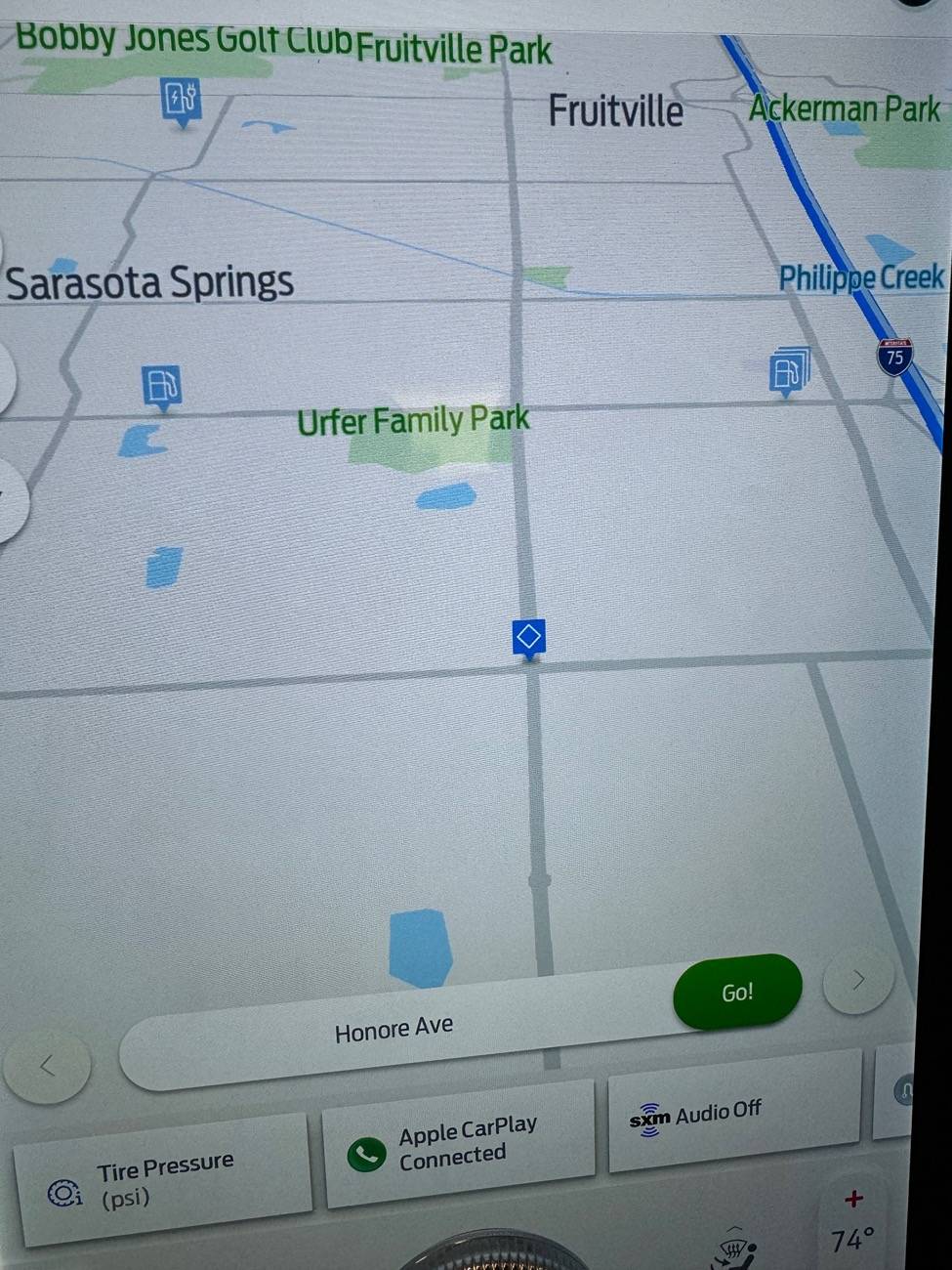
3) Single tap the map at that spot. A blue box with a white diamond shows up on the map with a horizontal box at the bottom showing the address and a green “Go” button.
Ford Mustang Mach-E Now that Fordpass trip planning is dead is there *any* way to pick a point on the map to add it to a trip IMG_6468


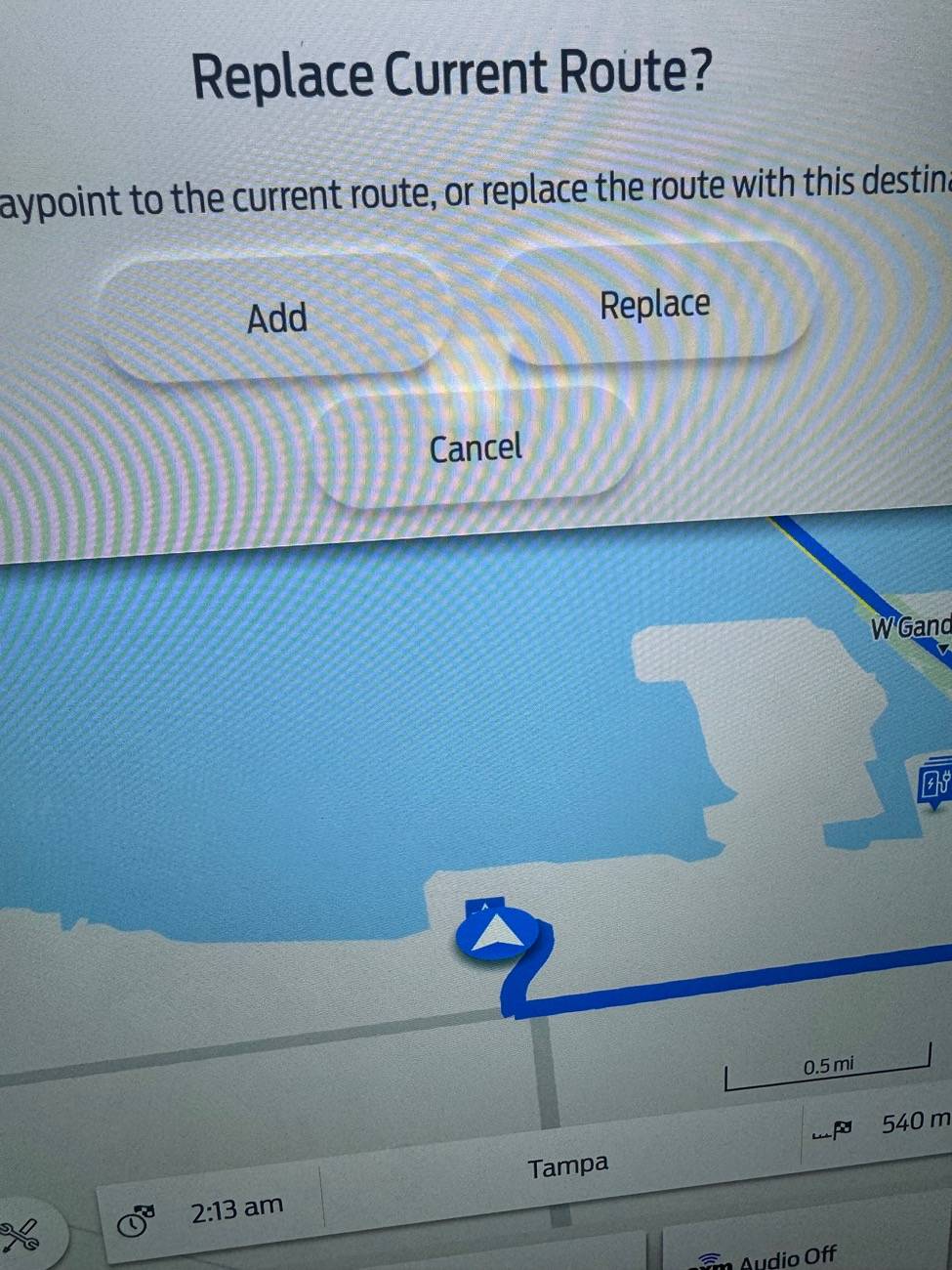
4) Press “Go.” A new large box shows up at the top of the map giving you options, one of which is ”Add as waypoint.”

Ford Mustang Mach-E Now that Fordpass trip planning is dead is there *any* way to pick a point on the map to add it to a trip IMG_6469


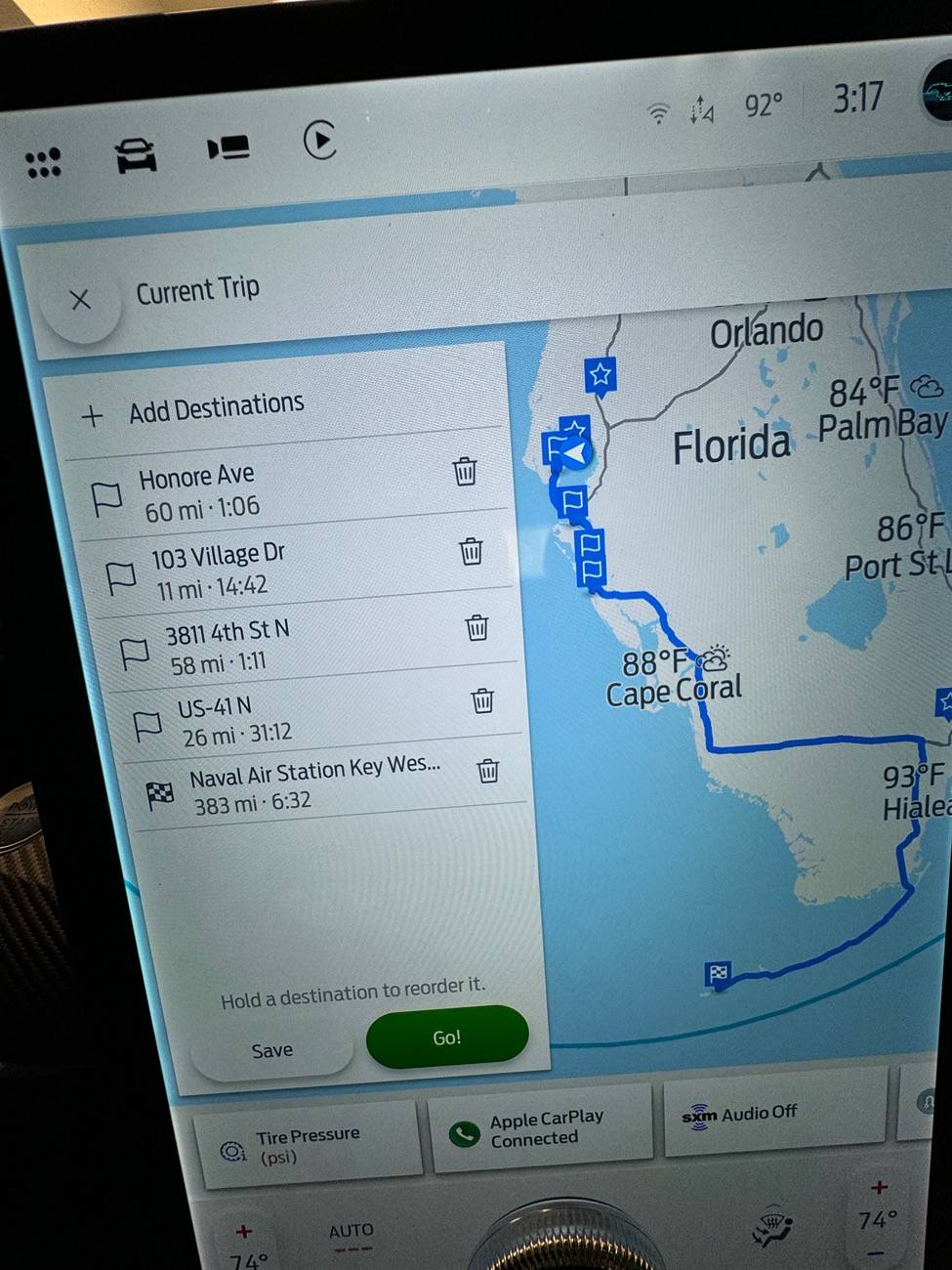
5) Select “Add as waypoint.” A new box shows up with your destination, waypoints and a green “Go“ button.

Ford Mustang Mach-E Now that Fordpass trip planning is dead is there *any* way to pick a point on the map to add it to a trip IMG_6470


6 Select “Go.” The car then calculates the new route and adds chargers. Done.
 
OP
OP

music_cities

Well-Known Member
Joined
Nov 7, 2023
Threads
53
Messages
676
Reaction score
684
Location
Calgary, Canada
Vehicles
Mach E 2022 GT
Country flag
There’s an easier way.

1) Create a route to your final destination of the day.

2) With that route active, scroll and zoom the map to the spot that you want to add.

3) Single tap the map at that spot. A blue box with a white diamond shows up on the map with a horizontal box at the bottom showing the address and a green “Go” button.
IMG_6468.jpeg


4) Press “Go.” A new large box shows up at the top of the map giving you options, one of which is ”Add as waypoint.”

IMG_6469.jpeg


5) Select “Add as waypoint.” A new box shows up with your destination, waypoints and a green “Go“ button.

IMG_6470.jpeg


6 Select “Go.” The car then calculates the new route and adds chargers. Done.
Ah yes. I guess I knew that. But then is there anyway to save your plan as a saved trip? I like to plan my trips in advance sometimes.


Top