Purchasing used Mache from private party. Anything I need to know before hitting the road?

TheVirtualTim

Well-Known Member
First Name
Tim
Joined
Oct 11, 2020
Threads
26
Messages
1,366
Reaction score
2,469
Location
Dearborn, MI
Vehicles
‘21 Mach-E First Edition, ‘23 Mach-E GT Performance
Country flag
Im attempting to buy used Mache out of state. Assuming everything goes to plan and I end up purchasing it, is there anything I need to know before hitting the road back?

-Do I need to erase previous drivers profile and registering to myself before starting 1 drive back?

-Should I download and signup for various EV charging apps before I even look at the car?

-Do I need any adapters if I want to charge at CCS Combo1 stations, or do I just pull up and it will be simple plug&play operation?

-Anything particular to look for when test driving? (carfax is clean. Pictures and videos are also flawless)
You didn't mention the trim or model year (and there are differences in cars built in the first half vs the second half of each model year).

On your drive home ... when you stop for charging, only charge to 80% -- do not wait to charge to 100% (it will be a very long wait). The rate of charge will gradually decrease as the battery reaches higher states of charge. By the time it hits 80% it's not worth the wait. It will take as long to go from 80% to 100% ... as it did to go from 10% to 80%. So you will reach your destination sooner if you stop charging at 80% and get back on the road ... and just plan another charging stop. The bottom 50% of the battery charges the fastest.

Also... plan to stop for a charge by the time the battery reaches 10%. The batteries works best in the middle part of its capacity. e.g. keeping the battery state of charge between 20% and 80% is great. Keeping it between 10% and 90% is good. Stay away from the extremes (0% and 100%). The battery will undergo stress as the battery dips below 10% ... and it also gets more stress above 90%. The stress on the battery hurts the overall battery life.

You DO want to perform a Master Reset.

The Mach-E supports "phone as a key" (PaaK). Ford was so convinced that everyone would use this feature that, in the 2021 models, they only included a single key-fob. But this means that the previous owner can unlock and drive your car.​
Using the Master Reset wipes all of this. It removes any PaaK phones. It erases the door codes (pin code to unlock the driver door) and backup start codes (you can unlock and start a Mach-E with no key fob and no phone at all IF you have a door code and backup start code).​
It resets driving history.​
It will NOT erase the "factory" door code. That code was printed on a card that was included in the glove box ... but even if that card is lost, it is also printed on the fuse panel in the passenger-side footwell. That code cannot be changed. But ... while that code can be used to unlock the car ... it cannot be used to start or drive the car.​
Erasing previous driving history isn't critical ... it's just "nice to do". The range estimates that the car provides is based on the driving habits of the previous trips. If they were an aggressive driver ... it will show poorer range than if they were a less aggressive drive. Reseting this just sets the range estimates back to factory default and then the car will re-learn based on YOUR driving habits.

If you are picking up the car from another state (far enough away that it will require some charging stops to make it home) then you'll want to know HOW to use DC Fast Charging.
  • While not critical to do this on day #1 before you drive it home ... you ultimately want to make sure you have an account on the Ford owner's portal (owner.ford.com). You can create an account and then do an "Add Vehicle" and enter the VIN.

    I'm not sure if you can "add" the VIN before it is removed from the previous owner's account. When cars get re-titled, the manufacturers get notified (for recall reasons -- they have to know the address of the current owner) and that might remove the VIN from the previous owners. They can either delete the car voluntarily ... or you may need Ford's help.

  • Once you have added the car ... you can go into "Connected Services" (on the owner's portal - scroll the page down to the "quick links" section) and then go to "Blue Oval Charging Network". This is where you can add a payment method so that you can use "Plug & Charge".

    "Plug & Charge", as the name suggests, means that when you arrive at either an Electrify America DC Fast Charger -or- a Tesla SuperCharger ... you can just "plug in" and walk away. The protocol will "talk" to the car, get your VIN, contact the manufacturer, authorize the charge (make sure you have a valid payment method) and then it starts charging. You don't need to do ANYTHING to the station other than plug in.

    Note that this ONLY works at Electrify America DC Fast Chargers or Tesla SuperChargers (either a NACS adapter or a site that has Tesla "Magic Dock" will be needed). At any other DC Fast Charger you'll have to follow instructions on the charging station to pay for the charge the traditional way (using their charging app or using a credit card).

  • IF you set up a payment method in Blue Oval Charge Network, then you can use the in-vehicle menu to activate chargers as long as they are considered "in network". This works at many charging networks (not just EA and Tesla sites) and also works at many AC (slow) chargers that you might find at restaurants, shopping malls, etc.

    SOME hotels (if you are driving far enough that you need a hotel) have AC chargers for overnight charging. Often these are free to guests. DO NOT RELY on having an open

  • IF the car does not have an active BlueCruise subscription and you want to add one ... this Connect Services section of the portal is where you would do that. It is also where you would enroll in any other features (Connected Navigation or the Premium Connectivity packages (such as wi-fi hot-spot, streaming, etc.)
Of course you can drive the car home without enabling the Connected Services features and just do that later.

IF the car already has a Tesla NACS adapter and you want to use Tesla SuperChargers and you haven't enrolled in Blue Oval Charging Network then you can download the Tesla App and pay for the charge using your phone (there is no credit card reader on a Tesla charging station).

You can only use a Tesla site if it is a Gen 3 or NEWER site (Gen 2 and older sites are not compatible -- not even with an adapter. Those older sites are not able to "speak" the CCS1 communication protocol required between the car and charging station. But even at a Gen 3 or newer site, an adapter is REQUIRED (ether you need to have your own adapter or the station needs to have the built-in "Magic Dock" adapter -- which are rare. Not many Tesla sites have stations with the Magic Dock).

Tesla NACS adapter:

IF the current owner already registered for and received the NACS adapter ... make SURE you get it with the car. If they have registered for the adapter but HAVE NOT received it yet (a lot of people are still waiting), make sure the current owner agrees to forward it to you (because you will not be able to register for one of your own -- you would have to pay for a new one).

You will be able to order the official adapter through the Ford Parts department. You can also buy one from either A2Z or Lectron (both make adapters -- around $200).

Apps:

If you don't have Plug & Charge enabled, then the ONLY way to pay for a charge at a Tesla site is via the Tesla app -- so you'd want to download that.

Most other sites do not _require_ that you have their app. You can usually pay via a credit card using the station.

You SHOULD download:
  1. PlugShare app - this lets you find chargers anywhere and it's quite good at filtering results. You can filter by charging speed because not all DC Fast Chargers charge at the same rate and some are downright slow (25kW speed). An extended range Mach-E can charge at speeds up to 150kW (for a brief minute or two it may get a little above that) and a standard range car I think is 115kW speed. There's no need for the chargers that do 350kW speed because our cars wont charge that fast.

    But you can filter PlugShare and tell it to only show chargers that can do say ... at least 100kW or faster charging speed so that you don't end up at a slow <50kW station.

    One of my favorite ways to filter for a road-trip is to find chargers with nearby dining or nearby lodging... this way I can be charging while I eat or I can be charging while I sleep.

    PlugShare also has a "social" element in that people get to "check in" and leave comments when they charge. They'll tell you if the station is broken or not charging at full speed ... or how to find the charger on the property (some are in non-obvious locations)
  2. A Better Route Planner (ABRP) - this app is really good at ... "route planning" (hence the name). This isn't an app you use daily ... it's an app you use when doing a road-trip. You tell it what car you have and it knows the efficiency of each car model. It then plans the route and works out all the optimal charging stops along the way.

    The in-vehicle Ford Navigation system will do this as well (in fact, I like the in-car system better) ... BUT I still use ABRP because I might decide to stop and get a hotel for the night after 500 or 600 miles and this helps me figure out where I'll need to look for a hotel with a charger (and I'll use PlugShare to filter for chargers "with lodging" to find those.) BTW, hotels with chargers are usually a first-come ... basis. So if you arrive at the hotel too late and all the chargers are taken ... you may have to find a DC Fast Charger the next day instead of waking up to a fully-charged car. If you show up at a hotel early enough to fully charge before going to bed ... it's nice to unplug and move the car so that the charger is available to a late arriving guest.
Check the tires -- EV's can experience tire wear faster than normal cars because EV's are heavy. You are driving something that basically ways as much as a full-size pickup truck. If the tires weren't kept at proper inflation (39 psi for this car) then they may have uneven tread wear.

The last thing _I_ would check if I were buying a used EV ... is the battery health. There is no menu on the car that will show you this. You would have to own a Bluetooth OBD scanner (I use this one: https://www.amazon.com/OBDLink-Bluetooth-Professional-Grade-Diagnostic-Performance/dp/B07JFRFJG6/ ) and an app such as "OBD Fusion". The app has a LOT of dashboards but there are dashboards that have a lot of information about EV-specific info. One of those is the battery health. I would want a used EV to have battery health that is 95% or better.

If the owner abused the car by charging to 100% every night ... that can degrade the battery health. A battery that is not abused ... will outlast the useful life of the car itself (that is to say ... the car will be falling apart and a rust-bucket and it will STILL have a useful original battery).

All Mach-E's with an extended range battery have NMC battery chemistry (Lithium Nickel Manganese Cobalt) and those cars should NOT be charged above 90% on a daily basis. Charge to 100% only when you really need the range. (perhaps a few times per year). Otherwise stop charging at 90% for daily use (or 80% is even better).

SOME standard-range cars have NMC batteries ... but the newer cars (i think the 2nd half of 2023 is when Ford made the change) nave LFP batteries (Lithium Iron Phosphate). Those cars need an occasional 100% charge to reset the battery management system accuracy. Ford recommends doing this at least once per month.
 
OP
OP

groovemach

Member
Joined
Oct 22, 2024
Threads
3
Messages
22
Reaction score
3
Location
texas
Vehicles
2022 RT1
Resale values are in the toilet bowl
Im in the works in getting one 10k under kbb with used EV credit
You didn't mention the trim or model year (and there are differences in cars built in the first half vs the second half of each model year).

On your drive home ... when you stop for charging, only charge to 80% -- do not wait to charge to 100% (it will be a very long wait). The rate of charge will gradually decrease as the battery reaches higher states of charge. By the time it hits 80% it's not worth the wait. It will take as long to go from 80% to 100% ... as it did to go from 10% to 80%. So you will reach your destination sooner if you stop charging at 80% and get back on the road ... and just plan another charging stop. The bottom 50% of the battery charges the fastest.

Also... plan to stop for a charge by the time the battery reaches 10%. The batteries works best in the middle part of its capacity. e.g. keeping the battery state of charge between 20% and 80% is great. Keeping it between 10% and 90% is good. Stay away from the extremes (0% and 100%). The battery will undergo stress as the battery dips below 10% ... and it also gets more stress above 90%. The stress on the battery hurts the overall battery life.

You DO want to perform a Master Reset.

The Mach-E supports "phone as a key" (PaaK). Ford was so convinced that everyone would use this feature that, in the 2021 models, they only included a single key-fob. But this means that the previous owner can unlock and drive your car.​
Using the Master Reset wipes all of this. It removes any PaaK phones. It erases the door codes (pin code to unlock the driver door) and backup start codes (you can unlock and start a Mach-E with no key fob and no phone at all IF you have a door code and backup start code).​
It resets driving history.​
It will NOT erase the "factory" door code. That code was printed on a card that was included in the glove box ... but even if that card is lost, it is also printed on the fuse panel in the passenger-side footwell. That code cannot be changed. But ... while that code can be used to unlock the car ... it cannot be used to start or drive the car.​
Erasing previous driving history isn't critical ... it's just "nice to do". The range estimates that the car provides is based on the driving habits of the previous trips. If they were an aggressive driver ... it will show poorer range than if they were a less aggressive drive. Reseting this just sets the range estimates back to factory default and then the car will re-learn based on YOUR driving habits.

If you are picking up the car from another state (far enough away that it will require some charging stops to make it home) then you'll want to know HOW to use DC Fast Charging.
  • While not critical to do this on day #1 before you drive it home ... you ultimately want to make sure you have an account on the Ford owner's portal (owner.ford.com). You can create an account and then do an "Add Vehicle" and enter the VIN.

    I'm not sure if you can "add" the VIN before it is removed from the previous owner's account. When cars get re-titled, the manufacturers get notified (for recall reasons -- they have to know the address of the current owner) and that might remove the VIN from the previous owners. They can either delete the car voluntarily ... or you may need Ford's help.

  • Once you have added the car ... you can go into "Connected Services" (on the owner's portal - scroll the page down to the "quick links" section) and then go to "Blue Oval Charging Network". This is where you can add a payment method so that you can use "Plug & Charge".

    "Plug & Charge", as the name suggests, means that when you arrive at either an Electrify America DC Fast Charger -or- a Tesla SuperCharger ... you can just "plug in" and walk away. The protocol will "talk" to the car, get your VIN, contact the manufacturer, authorize the charge (make sure you have a valid payment method) and then it starts charging. You don't need to do ANYTHING to the station other than plug in.

    Note that this ONLY works at Electrify America DC Fast Chargers or Tesla SuperChargers (either a NACS adapter or a site that has Tesla "Magic Dock" will be needed). At any other DC Fast Charger you'll have to follow instructions on the charging station to pay for the charge the traditional way (using their charging app or using a credit card).

  • IF you set up a payment method in Blue Oval Charge Network, then you can use the in-vehicle menu to activate chargers as long as they are considered "in network". This works at many charging networks (not just EA and Tesla sites) and also works at many AC (slow) chargers that you might find at restaurants, shopping malls, etc.

    SOME hotels (if you are driving far enough that you need a hotel) have AC chargers for overnight charging. Often these are free to guests. DO NOT RELY on having an open

  • IF the car does not have an active BlueCruise subscription and you want to add one ... this Connect Services section of the portal is where you would do that. It is also where you would enroll in any other features (Connected Navigation or the Premium Connectivity packages (such as wi-fi hot-spot, streaming, etc.)
Of course you can drive the car home without enabling the Connected Services features and just do that later.

IF the car already has a Tesla NACS adapter and you want to use Tesla SuperChargers and you haven't enrolled in Blue Oval Charging Network then you can download the Tesla App and pay for the charge using your phone (there is no credit card reader on a Tesla charging station).

You can only use a Tesla site if it is a Gen 3 or NEWER site (Gen 2 and older sites are not compatible -- not even with an adapter. Those older sites are not able to "speak" the CCS1 communication protocol required between the car and charging station. But even at a Gen 3 or newer site, an adapter is REQUIRED (ether you need to have your own adapter or the station needs to have the built-in "Magic Dock" adapter -- which are rare. Not many Tesla sites have stations with the Magic Dock).

Tesla NACS adapter:

IF the current owner already registered for and received the NACS adapter ... make SURE you get it with the car. If they have registered for the adapter but HAVE NOT received it yet (a lot of people are still waiting), make sure the current owner agrees to forward it to you (because you will not be able to register for one of your own -- you would have to pay for a new one).

You will be able to order the official adapter through the Ford Parts department. You can also buy one from either A2Z or Lectron (both make adapters -- around $200).

Apps:

If you don't have Plug & Charge enabled, then the ONLY way to pay for a charge at a Tesla site is via the Tesla app -- so you'd want to download that.

Most other sites do not _require_ that you have their app. You can usually pay via a credit card using the station.

You SHOULD download:
  1. PlugShare app - this lets you find chargers anywhere and it's quite good at filtering results. You can filter by charging speed because not all DC Fast Chargers charge at the same rate and some are downright slow (25kW speed). An extended range Mach-E can charge at speeds up to 150kW (for a brief minute or two it may get a little above that) and a standard range car I think is 115kW speed. There's no need for the chargers that do 350kW speed because our cars wont charge that fast.

    But you can filter PlugShare and tell it to only show chargers that can do say ... at least 100kW or faster charging speed so that you don't end up at a slow <50kW station.

    One of my favorite ways to filter for a road-trip is to find chargers with nearby dining or nearby lodging... this way I can be charging while I eat or I can be charging while I sleep.

    PlugShare also has a "social" element in that people get to "check in" and leave comments when they charge. They'll tell you if the station is broken or not charging at full speed ... or how to find the charger on the property (some are in non-obvious locations)
  2. A Better Route Planner (ABRP) - this app is really good at ... "route planning" (hence the name). This isn't an app you use daily ... it's an app you use when doing a road-trip. You tell it what car you have and it knows the efficiency of each car model. It then plans the route and works out all the optimal charging stops along the way.

    The in-vehicle Ford Navigation system will do this as well (in fact, I like the in-car system better) ... BUT I still use ABRP because I might decide to stop and get a hotel for the night after 500 or 600 miles and this helps me figure out where I'll need to look for a hotel with a charger (and I'll use PlugShare to filter for chargers "with lodging" to find those.) BTW, hotels with chargers are usually a first-come ... basis. So if you arrive at the hotel too late and all the chargers are taken ... you may have to find a DC Fast Charger the next day instead of waking up to a fully-charged car. If you show up at a hotel early enough to fully charge before going to bed ... it's nice to unplug and move the car so that the charger is available to a late arriving guest.
Check the tires -- EV's can experience tire wear faster than normal cars because EV's are heavy. You are driving something that basically ways as much as a full-size pickup truck. If the tires weren't kept at proper inflation (39 psi for this car) then they may have uneven tread wear.

The last thing _I_ would check if I were buying a used EV ... is the battery health. There is no menu on the car that will show you this. You would have to own a Bluetooth OBD scanner (I use this one: https://www.amazon.com/OBDLink-Bluetooth-Professional-Grade-Diagnostic-Performance/dp/B07JFRFJG6/ ) and an app such as "OBD Fusion". The app has a LOT of dashboards but there are dashboards that have a lot of information about EV-specific info. One of those is the battery health. I would want a used EV to have battery health that is 95% or better.

If the owner abused the car by charging to 100% every night ... that can degrade the battery health. A battery that is not abused ... will outlast the useful life of the car itself (that is to say ... the car will be falling apart and a rust-bucket and it will STILL have a useful original battery).

All Mach-E's with an extended range battery have NMC battery chemistry (Lithium Nickel Manganese Cobalt) and those cars should NOT be charged above 90% on a daily basis. Charge to 100% only when you really need the range. (perhaps a few times per year). Otherwise stop charging at 90% for daily use (or 80% is even better).

SOME standard-range cars have NMC batteries ... but the newer cars (i think the 2nd half of 2023 is when Ford made the change) nave LFP batteries (Lithium Iron Phosphate). Those cars need an occasional 100% charge to reset the battery management system accuracy. Ford recommends doing this at least once per month.
thanks for a very informative reply. This needs to be a sticky for every potential used mach-e buyer
 

ipca204

Well-Known Member
Joined
Mar 18, 2024
Threads
19
Messages
814
Reaction score
1,197
Location
60543
Vehicles
2024 GT PE, 2023 VW ID.4, 2025 Equinox EV
Occupation
retired
Country flag
Find out if the registered for and have/have not received the NACS adapter from Ford. If they have, make sure it's included with the car. If they have registered for it, you won't be able to do so.
bad advice. just buy an A2z one and not worry about the Ford one..


johnnycombo

Well-Known Member
First Name
John
Joined
Jul 15, 2021
Threads
9
Messages
475
Reaction score
453
Location
Pennsylvania
Vehicles
Mustang Mach-E
Country flag
Make sure you get two key fobs! And the keys that are in the fobs are blanks because the Mach-e does not have keys.
 

johnnycombo

Well-Known Member
First Name
John
Joined
Jul 15, 2021
Threads
9
Messages
475
Reaction score
453
Location
Pennsylvania
Vehicles
Mustang Mach-E
Country flag
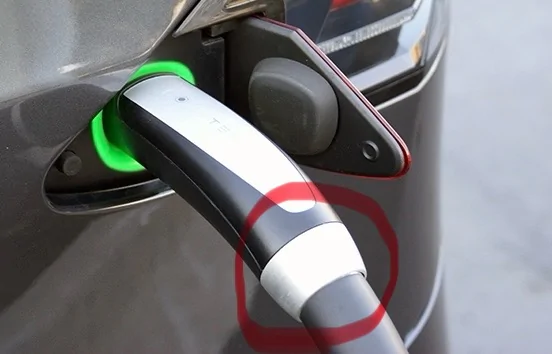
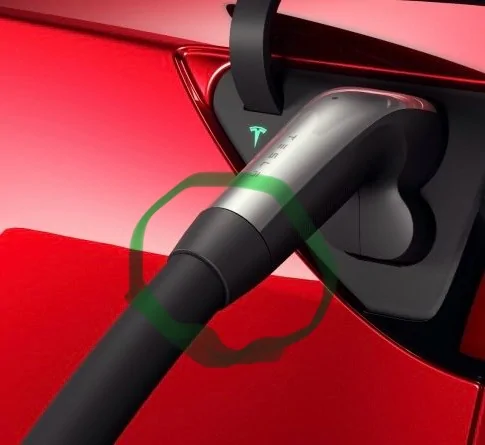
A note about the Tesla chargers, the silver ring will not work with the NACS adapter, the black ring will work with the NACS adapter. I believe chargers with the silver ring connectors are not updated yet to accept the adapter.

Ford Mustang Mach-E Purchasing used Mache from private party. Anything I need to know before hitting the road? IMG_1087


Ford Mustang Mach-E Purchasing used Mache from private party. Anything I need to know before hitting the road? IMG_1086
 

Mach e Mark

Well-Known Member
First Name
Mark
Joined
Apr 28, 2021
Threads
6
Messages
74
Reaction score
106
Location
Upstate NY
Vehicles
Mustang Mach e. F-150 Powerboost
Country flag
Here's a tip on the Back up pass code. (They should rename this the "I forgot my key code") When you set your door code (These are the LED's that light up on your B-Post) you must enter a 5 digit code. There is a factory setting that never changes (already covered in this thread) but you can and should set up a code that you can easily remember, for instance 55592 (it has to be five digits) or some old zip code that you can't get out of your head. Once you've set up your door code, you now want to set up your back up pass code on the big screen inside the pony. This code must be 10 digits and whoa who can remember a 10 digit code that you may never use.... Here's what to do. Just make your BUPC a double of your door code. In this example the BUPC would be 5559255592, easy peezy. I set a reminder in outlook (Use whatever reminder app works for you) to pop up once a month to use these codes on the door and BUPC so I don't forget. I rarely / never have my Fob with me because I use PAAK pretty much exclusively but sometimes I have issues with my phone and it's a no go so when that happens I just punch in my BAPC and as Willie say's, I'm "on the road again". This forum is the right place to learn all things Mach e so you've started on the right foot. If you get the Pony, don't get too caught up in having to know everything right away, just enjoy the ride because at the end of the day it's just flat out fun to drive. I've had mine 3.5 years now and I still get excited to go for a spin.
Sponsored


Top