CaptMachE

Banned
Banned
First Name
Mark
Joined
Dec 5, 2024
Threads
1
Messages
20
Reaction score
12
Location
Mission Viejo, CA
Vehicles
2024 Mach E
Occupation
pilot
Hi Mustang Mach-E owners,

We’re excited to announce that launching with the 2025 Mustang Mach-E is an expanded Charge Settings app on the touchscreen and other improvements to allow you to take better control of your vehicle’s charging, including many improvements based on suggestions from our customers and owners (including many within this group!) – thank you.

01 - Charge Settings Not Plugged In.webp


Here’s how it works:

Live Charging

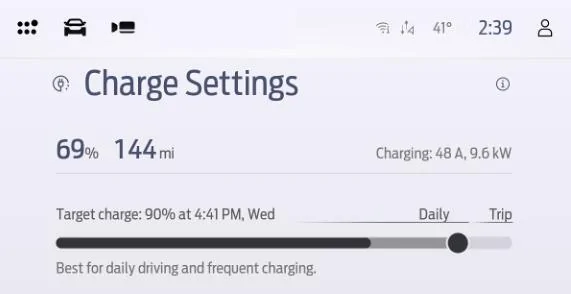
With the addition of Live Charging, you will be able to view your Mustang Mach-E’s charging speed in real time within the Charge Settings app.

When you’re charging on a Level 1 or Level 2 AC charger, you’ll see both your charge rate in Amps as well as kW:
02 - Live Charging AC Crop.webp


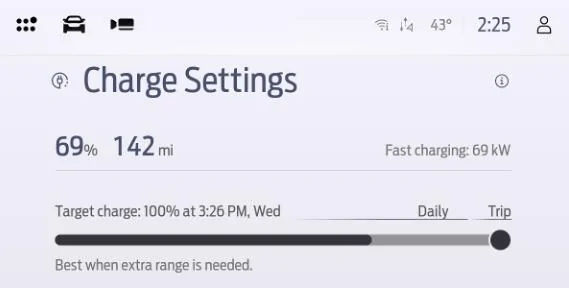
And when you’re DC Fast Charging, you’ll see your charge rate displayed in kW:
03 - Live Charging DC Crop.webp


Global Target Charge

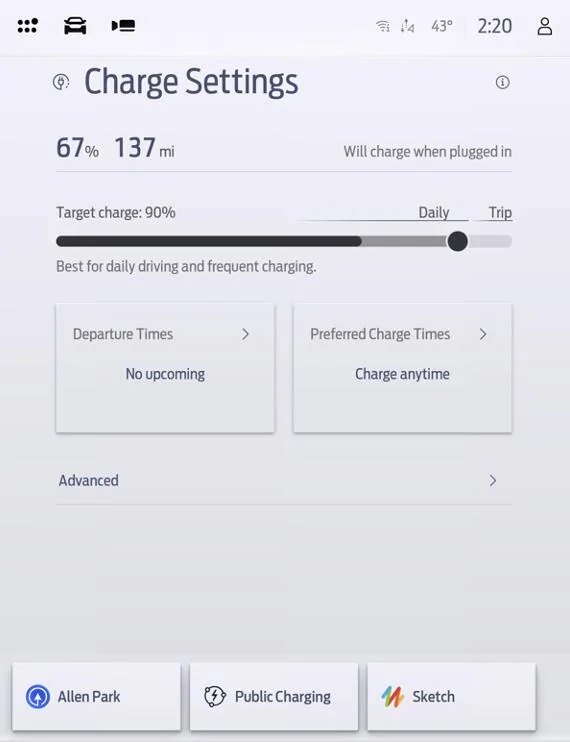
With the updated Charge Settings app, your Target Charge limit can be set with one simple slider, and the target will apply everywhere – no need to save a location first. To change it, just drag and release the slider. This target charge level will apply to all Level 1 and Level 2 AC charging as well as DC Fast Charging.

04 - Slider Detail Crop.webp


There are two different versions of the slider, depending on what type of battery you have.

If you have an Extended Range battery, you will see a “Daily” portion of the slider from 50% to 90% and a “Trip” section between 90% and 100%. Ford recommends charging your battery to a limit within the Daily range for day-to-day driving and frequent charging, and using the Trip range when you need extra range.

If you have a Standard Range battery, you will see a recommendation to charge to 100% on a day-to-day basis. When the charge limit is selected below 100%, a reminder will display to charge to 100% at least once per month to maintain battery health.

Preferred Charge Times allow you to save charging locations you’ve previously visited and schedule your charging at those locations individually.

AC Charge Rate Control

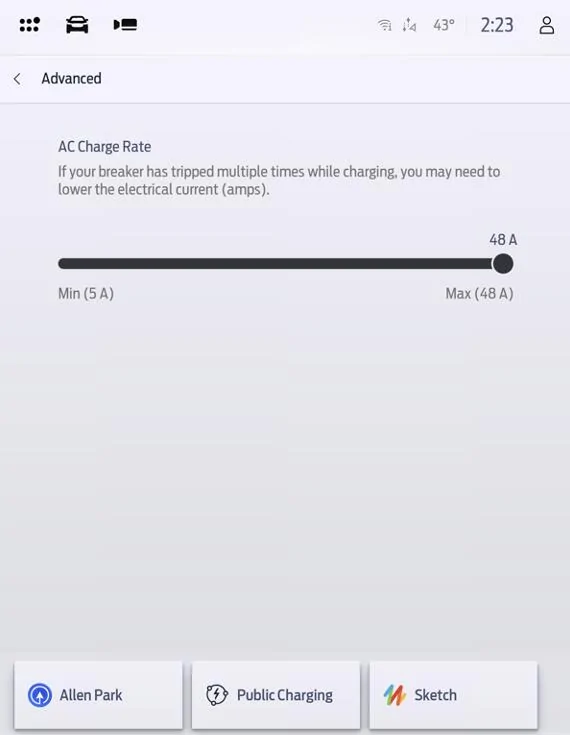
With the addition of charge rate control for AC charging, you can adjust your vehicle’s maximum charging speed on a Level 1 or Level 2 charger.

This feature is designed to help make life easier if you wish to slow your charging down, for example to time the completion of charging to align with when you will return to your vehicle, or if you’ve experienced circuit breaker trips at a certain charger.

By default, this value will be set at maximum AC charge rate for your vehicle. To reduce this rate, tap the Advanced option from the Charge Settings screen, and an AC Charge Rate slider will appear.
05 - AC Charge Rate.webp


Charge Port Locking

To improve Fast Charging Adapter security and reduce the chance of your vehicle being unexpectedly unplugged when fast charging, your vehicle’s charge port will no longer automatically unlock when fast charging is completed.

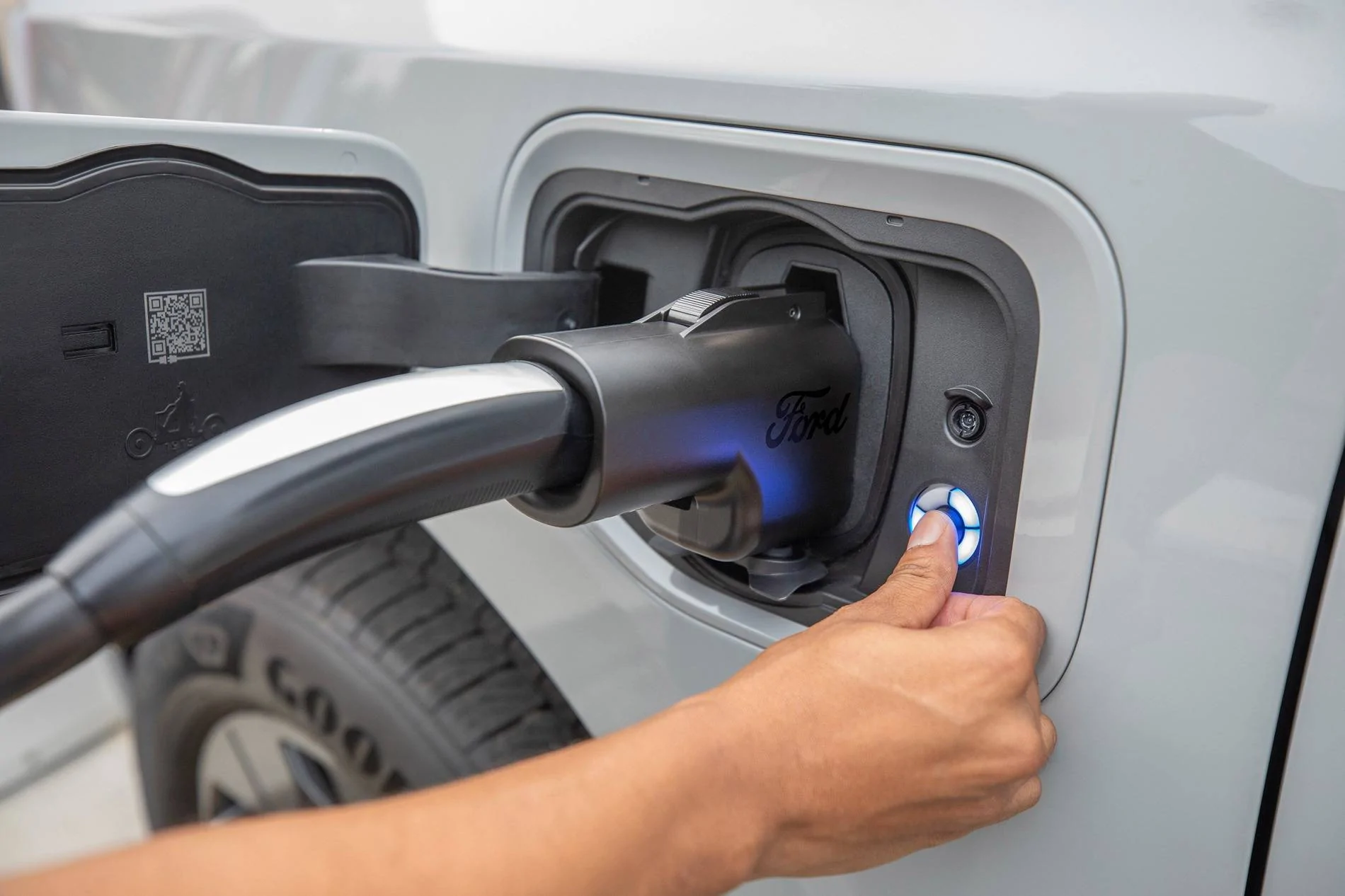
To unlock the charge port, you will use the unlock button in the middle of the Charge Status Indicator light located next to charge port:

06 - Charge Status Indicator.webp


When pressing this button with your vehicle’s key (or your phone with Phone as a Key (if equipped)) near the charge port or with vehicle doors unlocked, charging will stop and the charge port will unlock.

If the unlock button is pressed without the vehicle’s key present,the charge port will remain locked and charging will continue. If a press of the charge port unlock button does not unlock the charge port, ensure a key is positioned near the charge port, or press the door unlock button inside the vehicle.

Charge port locking applies to DC Fast Charging only. Level 1 and Level 2 AC charging can be unplugged without pressing the unlock button.

Thank you for your feedback which we used to develop these features.

Robert and Brian
Need a “start now“ button for those that want the new charge level to start now, or for the majorty of users they would rather wait until they are on reduced rates with their electric company and start at the preferred charge time they always have set. Ridiculous that You can’t figure this very basic concept out.
Sponsored


Charge_Rob

Well-Known Member
Joined
Nov 25, 2024
Threads
1
Messages
234
Reaction score
433
Location
Dearborn, MI
Vehicles
2024 Ford F-150 Lightning (2025 Mustang Mach-E Rally on the way!)
Occupation
Charging Nerd
Why can’t we also lock the port when L1/2 charging? Maybe a setting in the car to enable this feature? I don’t want people to interrupt my charging when I’m not near the car.
By not extending the locking to AC, it helps avoid unnecessary hassle when multi-EV households may share the same charger, or if you may wish to unplug and return the cable to tidy up the garage, but not have the key with you at all times at home, that sort of thing.
 

Aubury

Well-Known Member
Joined
Dec 4, 2023
Threads
3
Messages
230
Reaction score
272
Location
Dearborn, MI
Vehicles
2023 Mach E Premium - Grabber Blue
Country flag
Charge port locking is already present in latest software. So hopefully everyone gets that eventually. I’m going to guess the other stuff is 2025 only because of the new UI.

I’m glad they added these features, but the charge rate display belongs in the cluster IMO, not the main screen. That way it’s always visible when using other apps on the touchscreen.

What OTA was that a part of? I tried testing DC charging lockout a couple months ago or so and was able to unlock without my key present.

I agree on it being in the cluster but they might have kept it on the infotainment screen because they plan on back porting the feature to the previous model years. Updating the cluster would likely require going to the cluster supplier and making requirement changes. Having a different UI for the 25 cluster complicates things, and if they're using different suppliers for different models years that complicates it even further.

The sync 4 infotainment system is developed entirely in-house so updating the charging app in the infotainment software to add the charge rate feature would be significantly simpler, bureaucracy-wise if there's a plan to add the feature to previous models.
 

Sikkun

Well-Known Member
Joined
May 9, 2024
Threads
3
Messages
1,777
Reaction score
3,396
Location
USA
Vehicles
2023 Mach E
Country flag
I'm not expecting to get this via OTA ... they would have mentioned it otherwise. Begs the question as to why they are even posting this when everyone on the forum has a 2024 or older car.
Option #1 don’t post.

WHY ARE YOU NOT COMMUNICATING!

Option #2 post.

WHY ARE YOU COMMUNCATING!
 

Charge_Rob

Well-Known Member
Joined
Nov 25, 2024
Threads
1
Messages
234
Reaction score
433
Location
Dearborn, MI
Vehicles
2024 Ford F-150 Lightning (2025 Mustang Mach-E Rally on the way!)
Occupation
Charging Nerd
Need a “start now“ button for those that want the new charge level to start now, or for the majorty of users they would rather wait until they are on reduced rates with their electric company and start at the preferred charge time they always have set. Ridiculous that You can’t figure this very basic concept out.
The Global Target Charge feature doesn't take away the ability to schedule Preferred Charge Times for saved locations. The Preferred Charge Time feature remains available to help take advantage of Time of Use rates and save on your charging.


Mach-Lee

Well-Known Member
First Name
Lee
Joined
Jul 16, 2021
Threads
262
Messages
11,366
Reaction score
25,033
Location
Wisconsin
Vehicles
2022 Mach-E Premium AWD
Occupation
Sci/Eng
Country flag
What OTA was that a part of? I tried testing DC charging lockout a couple months ago or so and was able to unlock without my key present.
FDRS only at this point. If you happened to get your car updated at a dealer in the past couple months you could have it. Otherwise no.
 

Aubury

Well-Known Member
Joined
Dec 4, 2023
Threads
3
Messages
230
Reaction score
272
Location
Dearborn, MI
Vehicles
2023 Mach E Premium - Grabber Blue
Country flag
By not extending the locking to AC, it helps avoid unnecessary hassle when multi-EV households may share the same charger, or if you may wish to unplug and return the cable to tidy up the garage, but not have the key with you at all times at home, that sort of thing.
The IONIQ 5 does is a good way. For L2 charging you can configure it to always stay unlocked, always be locked when plugged in, or automatically unlock when done charging.
 

CaptMachE

Banned
Banned
First Name
Mark
Joined
Dec 5, 2024
Threads
1
Messages
20
Reaction score
12
Location
Mission Viejo, CA
Vehicles
2024 Mach E
Occupation
pilot
The Global Target Charge feature doesn't take away the ability to schedule Preferred Charge Times for saved locations. The Preferred Charge Time feature remains available to help take advantage of Time of Use rates and save on your charging.
You don’t seem to understand, I don’t want to go into the global settings everytime to change it to 100%. ShouLe be on main screen like they added above. The problem is when you select 100% it will start charging immediately. Not waiting for your global settings.
pits a simple concept, 5-6 days of the week my car Uses the global settings and charges to 90% at 10 Pm, the other 2 days, which are very random, I want it to charge to 100% starting at my preferred charge time,mento right when I select it. See how easy that is.
 

AliRafiee

Well-Known Member
First Name
Ali
Joined
Jan 20, 2023
Threads
103
Messages
3,267
Reaction score
4,192
Location
Seattle WA
Vehicles
2022 Mach E GT - Grabber Blue
Occupation
Software Eng.
Country flag
By not extending the locking to AC, it helps avoid unnecessary hassle when multi-EV households may share the same charger, or if you may wish to unplug and return the cable to tidy up the garage, but not have the key with you at all times at home, that sort of thing.
That won’t be a problem if there is a button on the screen to lock or not. I obviously didn’t lock my LEAF’s port when I was charging at home.


There is already a button on the screen that lights up to unlock DCFC, that can also be used for AC
 

Charge_Rob

Well-Known Member
Joined
Nov 25, 2024
Threads
1
Messages
234
Reaction score
433
Location
Dearborn, MI
Vehicles
2024 Ford F-150 Lightning (2025 Mustang Mach-E Rally on the way!)
Occupation
Charging Nerd
You don’t seem to understand, I don’t want to go into the global settings everytime to change it to 100%. ShouLe be on main screen like they added above. The problem is when you select 100% it will start charging immediately. Not waiting for your global settings.
pits a simple concept, 5-6 days of the week my car Uses the global settings and charges to 90% at 10 Pm, the other 2 days, which are very random, I want it to charge to 100% starting at my preferred charge time,mento right when I select it. See how easy that is.
I'm confused what the ask is here even the secound time around, sorry.

There is no global "waiting" since all Preferred Charge Times are location-dependent. If there is no location saved it will always begin charging immediately, to the Global Target Charge level.

You can drag the slider at any time to adjust the Global Target Charge from FordPass or the touchscreen without saving any location-specific setting like you currently must do. This is significantly easier to adjust than it was before this change, this change was developed based on owner request.
 

Charge_Rob

Well-Known Member
Joined
Nov 25, 2024
Threads
1
Messages
234
Reaction score
433
Location
Dearborn, MI
Vehicles
2024 Ford F-150 Lightning (2025 Mustang Mach-E Rally on the way!)
Occupation
Charging Nerd
That won’t be a problem if there is a button on the screen to lock or not. I obviously didn’t lock my LEAF’s port when I was charging at home.


There is already a button on the screen that lights up to unlock DCFC, that can also be used for AC
These were designed to simplify some very complicated features. It's always possible to re-add the complexity of menus and toggles back, if there's enough demand. The more complicated these features get the more confusion they can create.

Keeping it simple was the goal. DC = Locked, needs the key to unlock. AC = unlocked.
 

rcechinel

Well-Known Member
First Name
Rod
Joined
Dec 30, 2021
Threads
9
Messages
855
Reaction score
870
Location
Atlanta
Vehicles
2022 Mach-E Premium ER AWD
Occupation
Tech
Country flag
I’m glad they added these features, but the charge rate display belongs in the cluster IMO, not the main screen. That way it’s always visible when using other apps on the touchscreen.
That. Ford took the feedback, great. But the supplier that owns the ipc programming charged too much. So let's place it in a not so convenient location. At least the MME won't be the only car in the category that doesn't display the charge rate info.
 

TheVirtualTim

Well-Known Member
First Name
Tim
Joined
Oct 11, 2020
Threads
26
Messages
1,366
Reaction score
2,470
Location
Dearborn, MI
Vehicles
‘21 Mach-E First Edition, ‘23 Mach-E GT Performance
Country flag
Need a “start now“ button for those that want the new charge level to start now, or for the majorty of users they would rather wait until they are on reduced rates with their electric company and start at the preferred charge time they always have set. Ridiculous that You can’t figure this very basic concept out.
You have that today … and have always had that.

By default, at any undefined charging location, the car will begin charging as soon as you connect the chargIng cable. It will “Start now”.

If you would prefer it only charge at specific times then you can create a charging schedule. That schedule is specific to that location. It is based on geo-location and not based on identifying a specific charger (with 100 meters of wiggle room … any charger within that radius of the location you set will be treated the same — so it works for locations where you might not necessarily park in the same space and use the same charging unit.)

Lastly… even if you did create a charging schedule for a location … but for some reason you want to ignore the schedule and “start now” … open FordPass, go to the Energy screen (icon along the bottom) and there is a “start” button near the upper-right corner.
 

TheVirtualTim

Well-Known Member
First Name
Tim
Joined
Oct 11, 2020
Threads
26
Messages
1,366
Reaction score
2,470
Location
Dearborn, MI
Vehicles
‘21 Mach-E First Edition, ‘23 Mach-E GT Performance
Country flag
The feature I _really_ want … is ad-hoc pre-conditioning of the battery pack.

I don’t have a daily “schedule” where I need to leave at the same predictable time each day. If I have an appointment at 2pm … I might want to pre-condition the car for say … a 1pm departure. But only for that one-time event.

The way the software currently works … is I have to create a scheduled departure for that time and select the days of the week where I want to use that schedule … and then save it. After the car is pre-conditioned, I have to go back into FordPass and delete the schedule (because for me it was really just a one-time event).

I’d like to be able to tell the app “start preconditioning now” (no schedule) -or- set a “have the car ready by 1pm” (no recurring schedule). I want to simplify the ability to pre-condition for non-recurring events.

We’ve had polls here and while this feature request usually isn’t the #1 requested feature … it does poll rather well (I am not the only person who wants this.)
Sponsored


Top