Apple Maps EV Routing in CarPlay – Now Including Tesla Superchargers

Ford Motor Company

Well-Known Member
Official Ford Account
First Name
Brian
Joined
May 10, 2021
Threads
68
Messages
3,462
Reaction score
6,547
Location
Michigan
Vehicles
Mustang Mach-E
Occupation
Real Human & Community Manager
Country flag
Ford Mustang Mach-E Apple Maps EV Routing in CarPlay – Now Including Tesla Superchargers Mustang Mach-E_Apple Maps


Hi Mustang Mach-E Owners,

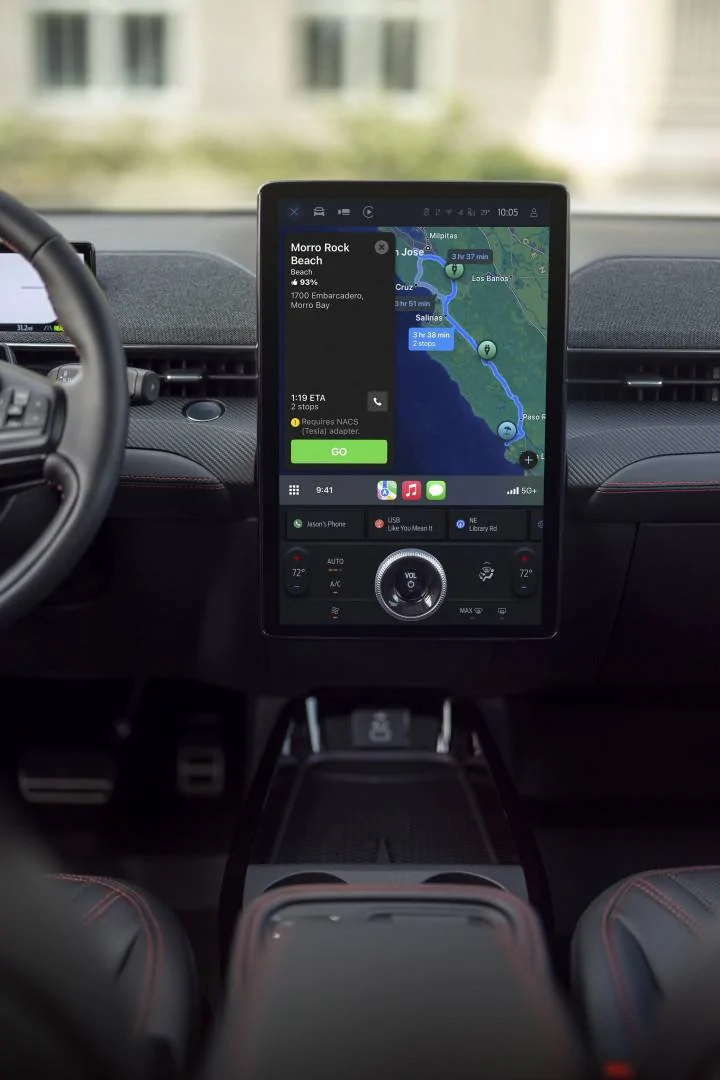
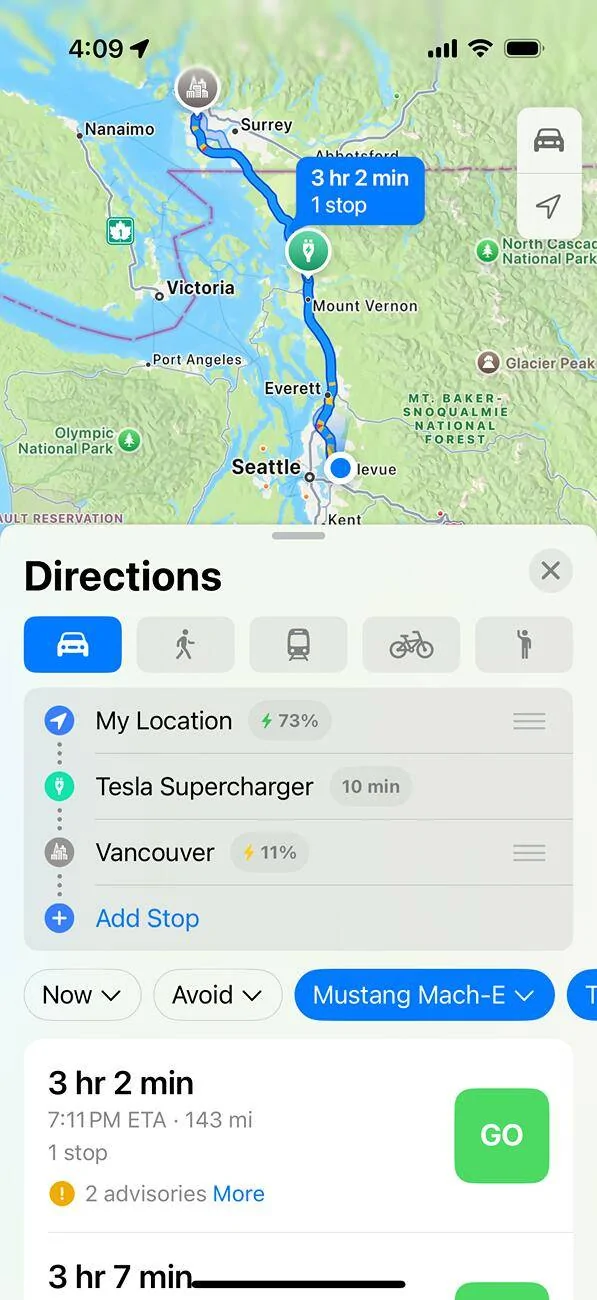
We’re excited to share that starting today, when you use Apple Maps EV Routing in CarPlay to plan your next trip, you can now be routed to a North American Charging Standard (NACS) fast charging station, such as compatible Tesla Superchargers along the way – if you need a charge.

So, how is this new? Apple Maps EV Routing already helps with trip planning – you can view your estimated battery level you will have when arriving at a destination, and see suggested charging stops along the way if charging is needed.

Now, if a charge stop is needed, you may see a route that includes a Tesla Supercharger or other NACS fast charger. Just make sure you indicate your charge preferences in Apple Maps Settings to a NACS fast charging station, such as Tesla Supercharger.

The best part about all of this? It’s available right now! No software update required, just connect your iPhone to CarPlay and hit the road!

Let us know what you think!

How to Use Apple Maps EV Routing in CarPlay:
  • Connect your iPhone to CarPlay

  • Open Apple Maps, go to Settings and confirm your preferred charging network(s) – make sure you select a NACS fast charging station, such as Tesla Supercharger. You only have to do this once!

  • Enter a destination.

  • Apple Maps will then calculate the estimated state of charge you will have when you get to a destination.

  • If a charge is required, depending on the fastest route, it will automatically route you to a NACS fast charging station.

  • Please Note: When planning a route that includes Tesla Superchargers, you may see a warning that the route requires your Fast Charging Adapter – make sure you have it with you. Also, battery preconditioning when en route to a charger is not available for Apple Maps EV Routing.
To learn more about charging with a Fast-Charging Adapter, please visit https://ford.com/fastchargingadapter.

To purchase your own Fast Charging Adapter, please visit https://go.ford/fordadapter.

-Brian, not AI, from Ford
Sponsored

 

GreaseMonkey

Well-Known Member
First Name
Steve
Joined
Oct 3, 2021
Threads
21
Messages
3,270
Reaction score
5,227
Location
Chicago, IL
Vehicles
24 Mach-E GT
Country flag
Brian, let’s pls focus on preconditioning through the Apple Maps app or give us an option to turn it on ourselves.

Some of us have no interest in using the native maps but should not be disadvantaged for using CarPlay.
 

ChasingCoral

Well-Known Member
First Name
Mark
Joined
Feb 3, 2020
Threads
502
Messages
14,318
Reaction score
28,680
Location
Maryland
Vehicles
2021 GB E4X FE, 2022 F-150 Lightning Lariat ER
Occupation
Retired oceanographer
Country flag


kens

Well-Known Member
First Name
Ken
Joined
Jan 27, 2025
Threads
8
Messages
419
Reaction score
432
Location
IL, USA
Vehicles
2022 GT
Just how much time at a charger would
If the charge curve is starting at 40kWh, and it can maintain that level, it'll take an extra hour to charge 10-80%. So, like I said in the other thread, a ton of time. It's been plenty cold enough here for me to see charging that slow. I've only had my car a month, so haven't experienced any warm weather charging yet.

Now that I've got preconditioning figured out I shouldn't see charging that slow again. It would be awesome to have Apple step up and be willing to allow it through Carplay, until then we'll have to stay away from Apple for nav when we are going to charge, or accept the wait. I'm glad to see this change though, it's a step in the right direction, even if it's not good enough.
 

Mach-Lee

Well-Known Member
First Name
Lee
Joined
Jul 16, 2021
Threads
262
Messages
11,379
Reaction score
25,062
Location
Wisconsin
Vehicles
2022 Mach-E Premium AWD
Occupation
Sci/Eng
Country flag
FYI, I had already added Tesla supercharger as my preferred network and it wasn’t working. You have to clear out all of your preferred charging networks and then re-add Tesla supercharger. Then it worked.
 

2FlyMache

Well-Known Member
First Name
Patrick
Joined
Aug 9, 2021
Threads
10
Messages
686
Reaction score
791
Location
Martinez GA
Vehicles
2021 Rapid Red Ex4 MachE
Country flag
It works for me. It's nice to have another nav option that includes all of our charging stations. I'll still probably use ABRP with OBD connection
 

ChasingCoral

Well-Known Member
First Name
Mark
Joined
Feb 3, 2020
Threads
502
Messages
14,318
Reaction score
28,680
Location
Maryland
Vehicles
2021 GB E4X FE, 2022 F-150 Lightning Lariat ER
Occupation
Retired oceanographer
Country flag
iOS 18.4 on iPhone 16 pro
Thanks Ali. Is that a beta release? I have an iPhone 16Pro with 18.3.1 but still don’t show 18.4 being available.

FYI, I had already added Tesla supercharger as my preferred network and it wasn’t working. You have to clear out all of your preferred charging networks and then re-add Tesla supercharger. Then it worked.
Thanks Lee. I’ll try that next.
 

AndyR

Well-Known Member
First Name
Andrew
Joined
Apr 28, 2021
Threads
0
Messages
133
Reaction score
170
Location
Cincinnati, OH
Vehicles
Mach-E X
Country flag
Mustang Mach-E_Apple Maps.jpg


Hi Mustang Mach-E Owners,

We’re excited to share that starting today, when you use Apple Maps EV Routing in CarPlay to plan your next trip, you can now be routed to a North American Charging Standard (NACS) fast charging station, such as compatible Tesla Superchargers along the way – if you need a charge.

So, how is this new? Apple Maps EV Routing already helps with trip planning – you can view your estimated battery level you will have when arriving at a destination, and see suggested charging stops along the way if charging is needed.

Now, if a charge stop is needed, you may see a route that includes a Tesla Supercharger or other NACS fast charger. Just make sure you indicate your charge preferences in Apple Maps Settings to a NACS fast charging station, such as Tesla Supercharger.

The best part about all of this? It’s available right now! No software update required, just connect your iPhone to CarPlay and hit the road!

Let us know what you think!

How to Use Apple Maps EV Routing in CarPlay:
  • Connect your iPhone to CarPlay

  • Open Apple Maps, go to Settings and confirm your preferred charging network(s) – make sure you select a NACS fast charging station, such as Tesla Supercharger. You only have to do this once!

  • Enter a destination.

  • Apple Maps will then calculate the estimated state of charge you will have when you get to a destination.

  • If a charge is required, depending on the fastest route, it will automatically route you to a NACS fast charging station.

  • Please Note: When planning a route that includes Tesla Superchargers, you may see a warning that the route requires your Fast Charging Adapter – make sure you have it with you. Also, battery preconditioning when en route to a charger is not available for Apple Maps EV Routing.
To learn more about charging with a Fast-Charging Adapter, please visit https://ford.com/fastchargingadapter.

To purchase your own Fast Charging Adapter, please visit https://go.ford/fordadapter.

-Brian, not AI, from Ford
Does this require 18.4?

Not working on 18.3.1.
 

Shepherd

Well-Known Member
First Name
Shepherd
Joined
Mar 19, 2024
Threads
6
Messages
294
Reaction score
335
Location
Undisclosed
Vehicles
2023 GT
Occupation
Retired by doge
Most of these are available to add as preferred in Apple Maps:

BlueOval Charge Network Providers
Network providers include:

  • Ford Charge
  • Tesla Superchargers
  • Electrify America®
  • Shell Recharge™
  • ChargePoint®
  • EVgo
  • EV Connect™
  • Blink
  • FLO®
  • Electric Circuit
  • Red E
  • Francis Energy
  • FPL EVolution®
 

GreaseMonkey

Well-Known Member
First Name
Steve
Joined
Oct 3, 2021
Threads
21
Messages
3,270
Reaction score
5,227
Location
Chicago, IL
Vehicles
24 Mach-E GT
Country flag
Does this require 18.4?

Not working on 18.3.1.
It works on 18.3.1 and I have an old iPhone 13 Pro Max. You will need to click on your profile pic within maps, then go to vehicles, select the Mach-E, then edit to add Tesla in charging network. If already select it, unselect, click done and go back in to select again.
 

GreaseMonkey

Well-Known Member
First Name
Steve
Joined
Oct 3, 2021
Threads
21
Messages
3,270
Reaction score
5,227
Location
Chicago, IL
Vehicles
24 Mach-E GT
Country flag
The issue with it is that (unlike the Tesla app), it gives you no warning that you need an adapter to use. If someone is clueless, they will have a bad experience.
 

AliRafiee

Well-Known Member
First Name
Ali
Joined
Jan 20, 2023
Threads
103
Messages
3,267
Reaction score
4,192
Location
Seattle WA
Vehicles
2022 Mach E GT - Grabber Blue
Occupation
Software Eng.
Country flag
Thanks Ali. Is that a beta release? I have an iPhone 16Pro with 18.3.1 but still don’t show 18.4 being available.


Thanks Lee. I’ll try that next.
18.4 is currently in beta.
Go to your maps app, and only add Tesla as preferred company for your car and see if that makes a difference.
Sponsored


Top