Mach-Lee
Well-Known Member
- First Name
- Lee
- Joined
- Jul 16, 2021
- Threads
- 262
- Messages
- 11,365
- Reaction score
- 25,025
- Location
- Wisconsin
- Vehicles
- 2022 Mach-E Premium AWD
- Occupation
- Sci/Eng

- Thread starter
- #1
You're probably seeing a couple of BlueCruise 1.5 reviews coming out today. Ford also gave me the opportunity to test it along with @Mach-E VLOG. I spent an hour or two with it during I-25 rush hour traffic in Colorado.
First thing to understand is that BlueCruise 1.5 is only available on 2025 models and later. There were some hardware changes (new front camera and IPMA hardware revision, I believe) to enable the new features, which means that BC 1.5 will not be backwards compatible with pre-2025 models.
The big new feature with BC 1.5 is fully automatic lane changes, which means it will do everything for you without lifting a finger. More on that later. In-lane stability and dropouts have also been improved greatly.
New UI:

The instrument cluster graphics have been redesigned for 2025. This is what hands-free mode looks like. Some things have been moved around, but it has the same functions as before. Following distance is displayed with bars in front, and the position of the car moves around with lane shifts (around semis) like before. Left and right arrows show up in Blue Zones when lane changes are available. We still only have a single lane being rendered; I would have liked to see multi-lane rendering for increased situational awareness.
Lane Stability and Curves:
The first thing I noticed is the lane centering force has been significantly improved. If you've ever driven a Tesla or Rivian, you know the steering wheel is very much "locked in" while lane centering modes are engaged—the steering wheel is hard to turn unless you force it to "break free" from lane centering (which can cause an overcorrection into the next lane). In older BC versions, it's the exact opposite. Steering is very lazy and cooperative, easy to turn. With BlueCruise 1.5, the lane centering feel is now much more of a hybrid between old BlueCruise and Tesla. You will definitely feel more resistance if you want to move the lane position over a bit to go around roadkill or a pothole, but it still lets you do that smoothly and cooperatively without disengaging. When you let go, it very quickly returns you to the center of the lane (better path calculations). It's much more immediate about it than the older versions. I actually prefer that compared to my car (a 2022 with BlueCruise 1.3).
Performance on curves is improved compared to previous versions. On the freeway, I did not notice an appreciable bias to one side of the lane or the other. It may move over slightly to the inside of the curve, but that's what most people do anyway. Lane shifts around large vehicles and semis worked as expected. The number of hands-free dropouts was also significantly reduced compared to what I see with BC 1.3. There was only one or two times during the entire drive (~70 miles) it required hands-on. So that was a welcome improvement.
On sharper curves (on lesser roads), the lane centering still had some odd behavior at the extremes. It had a tendency to overcorrect before cancelling. Definitely keep your hand on the wheel if you see a sharp curve coming up while using lane centering, or you could find yourself yeeted into the next lane during an extreme case. Expanding the operating envelope of lane centering (in terms of max steering wheel angle) is something I'd like to see in future versions. It's not bad, but could be better.
Stability through intersections with no lines was also improved. It was less likely to cancel or do something nuts when the lines disappear, but still has its limits and gets confused if you go more than a couple of seconds without lines.
Adaptive Cruise Control and Braking
Things are pretty much the same here as before. You have four following distance levels, and I prefer using distance 1 or 2 in traffic to prevent cut-ins. Braking smoothness has improved slightly compared to my car. The management of the following distance gap seems similar to older versions as well. During heavy braking, it handles it but it still gets a little close, which can be a bit disconcerting if you're not used to it. It dealt with stop-and-go traffic very well, no big complaints there. However, in the next version of BlueCruise, I would like to see some focus on braking and following distance control (especially during heavy braking from 70-20 MPH) rather than just steering improvements.
With stopped traffic, the car will still slow down and end up creeping forward to the stopped vehicle. However, one big improvement is Auto Resume now waits 30+ seconds at stop lights!

On my car, it will only wait 5 seconds outside of a Blue Zone before it timeouts (then you have to press the resume button or tap the pedal when the light turns green). It seems they've made a change to allow 30+ seconds of auto-resume globally. This was a small but very welcome change, less things to constantly pay attention to at each stop, the car just starts again on its own most of the time. I hope it's something that could be fixed in older vehicles as well, it's so much nicer to get the full 30 seconds.
Automatic Lane Changes
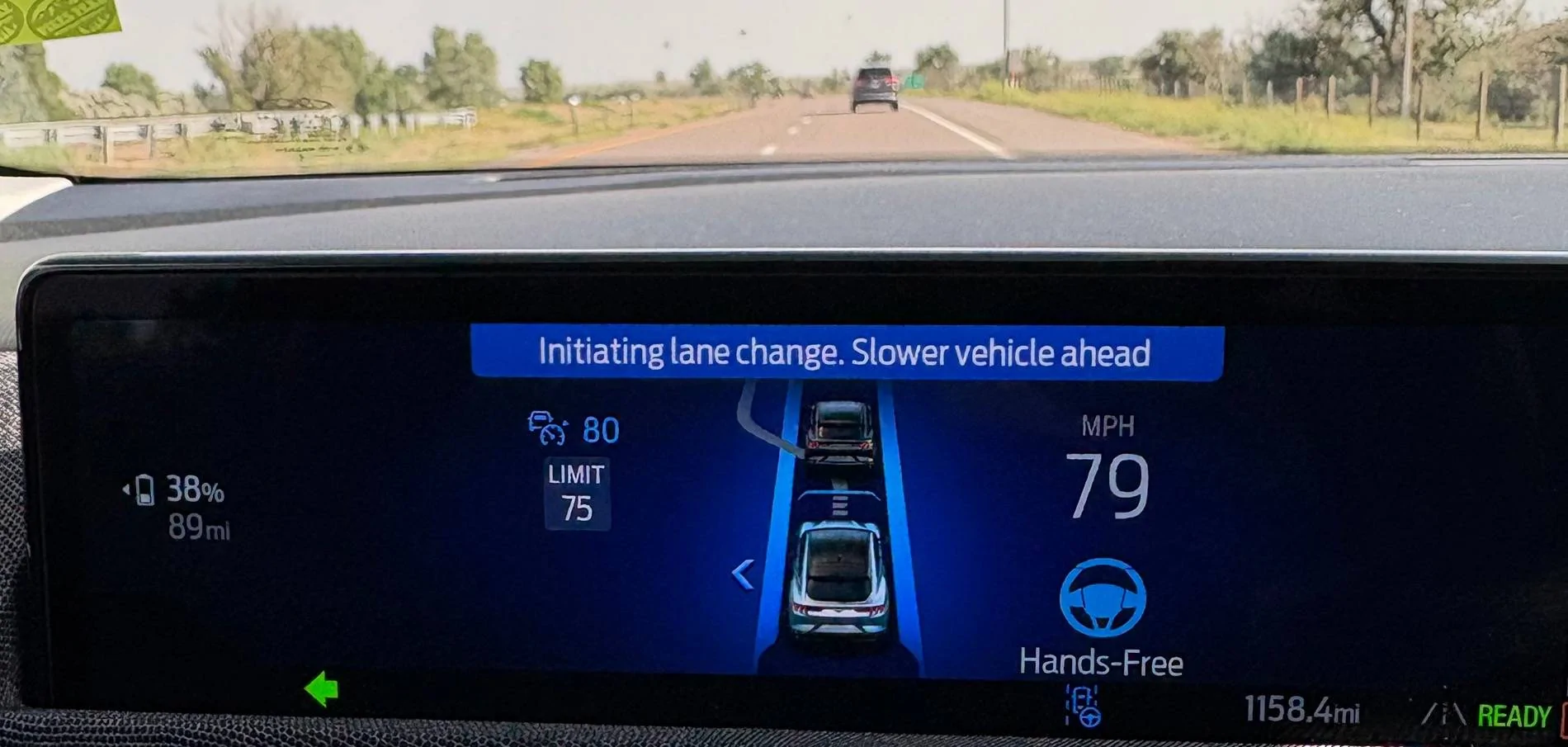
This is the key new feature for BlueCruise 1.5, lane changes are now fully automated. If the left lane is clear and you're approaching a slower vehicle, you will see the following prompt before the car moves over all by itself. Notice the distance to the vehicle, it starts plenty early:

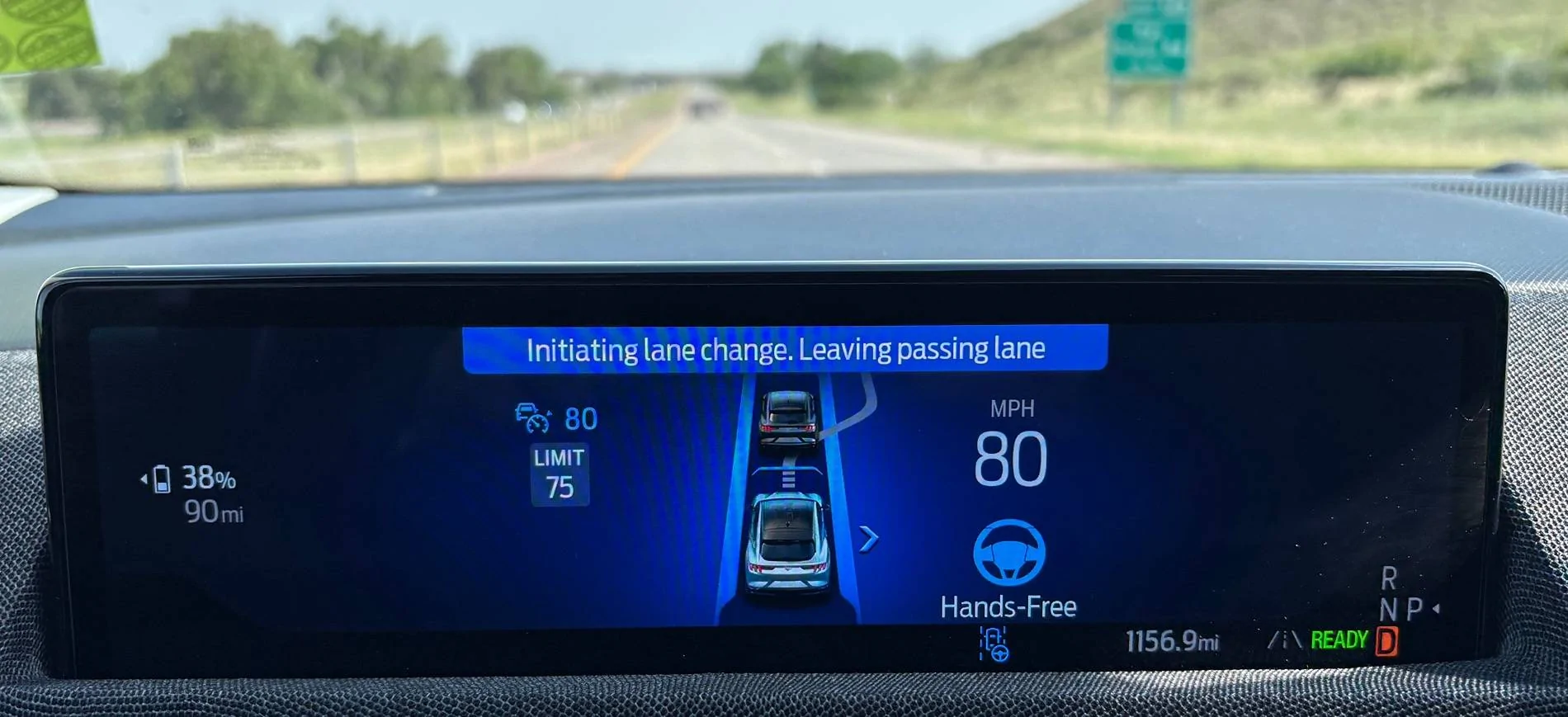
Car moves over, you go by the slower vehicle, then afterwards if the lane is clear you'll see this:

Of course, you can also initiate the lane change yourself at any time by tapping the turn signal stalk. If there are two lanes, the automatic lane change will want to keep you in the right lane, and if there are three lanes, it will want to keep you in the middle lane. It will only pass vehicles on the left, never on the right side. So if you get in a left lane hog situation, you'll have to change manually to pass on the right.
The lane change logic was extremely smart and avoided unnecessary lane changes. If there was any kind of slower vehicle up ahead in the right lane, it would wait to move back over. The distance it was looking ahead before moving over seemed incredible, beyond radar range, so I'm guessing it's using the camera to look for vehicles in the adjacent lane as well as radar? If anything, it was almost too conservative about getting back over, but I prefer it that way to avoid having to change lanes again in a short time. That or else the lane changes were inhibited by following a vehicle in front of me (which is often the case in rush hour traffic).
Unfortunately, lane changes are only for slower vehicles and not tied to navigation (like Tesla Navigate on Autopilot), so if you have an exit coming up, you will have to manually maneuver. The only time the automatic lane change gets annoying is if you're in an exit lane, and it decides to move you left out of the exit lane. Perhaps they could add logic to disable auto changes when you're in an exit-only lane, or when you are less than 1 mile to an exit in the active navigation.
Overall, I think the automatic lane change feature was very well done; it made a very pleasing driving experience of "set it and forget it". I could see going for many dozens of miles without lifting a finger using BlueCruise 1.5. We have arrived at the final frontier of sit there and do nothing (but watch).
Desired Improvements
There is still an 80 MPH speed limit on hands-free BlueCruise. In many states with 75+ MPH speed limits, people often drive 85 MPH or more. I would like to see the speed threshold raised to at least 85 MPH.
The coverage of hands-free Blue Cruise has still not expanded (especially in Canada), and is limited to protected access freeways only. That is very unfortunate, because I believe the technology has progressed to the point that hands-free can be safely allowed on many more roads, which GM has done with Super Cruise. If you look at the coverage map, it's no comparison (130,000 miles vs. 750,000 miles):

I hope that Ford will do what it takes to significantly expand the coverage of hands-free BlueCruise in the near future.
Summary
Overall, BlueCruise 1.5 provides some good improvements. Lane stability is better, there are fewer dropouts, and you get fully automated lane changes. Overall performance is very good, and it's a very safe system. Hands-free is limited to mapped freeways, but the lane centering works well on the rest of the roads.
Last, I'm happy to answer any questions you might have.
First thing to understand is that BlueCruise 1.5 is only available on 2025 models and later. There were some hardware changes (new front camera and IPMA hardware revision, I believe) to enable the new features, which means that BC 1.5 will not be backwards compatible with pre-2025 models.
The big new feature with BC 1.5 is fully automatic lane changes, which means it will do everything for you without lifting a finger. More on that later. In-lane stability and dropouts have also been improved greatly.
New UI:
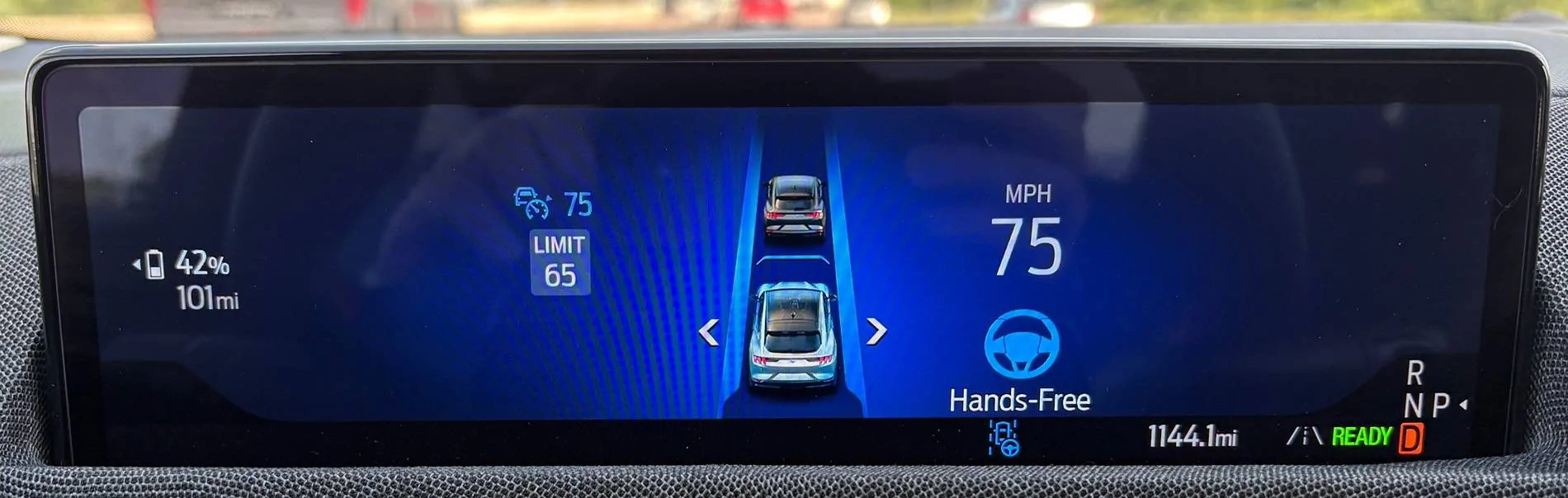
The instrument cluster graphics have been redesigned for 2025. This is what hands-free mode looks like. Some things have been moved around, but it has the same functions as before. Following distance is displayed with bars in front, and the position of the car moves around with lane shifts (around semis) like before. Left and right arrows show up in Blue Zones when lane changes are available. We still only have a single lane being rendered; I would have liked to see multi-lane rendering for increased situational awareness.
Lane Stability and Curves:
The first thing I noticed is the lane centering force has been significantly improved. If you've ever driven a Tesla or Rivian, you know the steering wheel is very much "locked in" while lane centering modes are engaged—the steering wheel is hard to turn unless you force it to "break free" from lane centering (which can cause an overcorrection into the next lane). In older BC versions, it's the exact opposite. Steering is very lazy and cooperative, easy to turn. With BlueCruise 1.5, the lane centering feel is now much more of a hybrid between old BlueCruise and Tesla. You will definitely feel more resistance if you want to move the lane position over a bit to go around roadkill or a pothole, but it still lets you do that smoothly and cooperatively without disengaging. When you let go, it very quickly returns you to the center of the lane (better path calculations). It's much more immediate about it than the older versions. I actually prefer that compared to my car (a 2022 with BlueCruise 1.3).
Performance on curves is improved compared to previous versions. On the freeway, I did not notice an appreciable bias to one side of the lane or the other. It may move over slightly to the inside of the curve, but that's what most people do anyway. Lane shifts around large vehicles and semis worked as expected. The number of hands-free dropouts was also significantly reduced compared to what I see with BC 1.3. There was only one or two times during the entire drive (~70 miles) it required hands-on. So that was a welcome improvement.
On sharper curves (on lesser roads), the lane centering still had some odd behavior at the extremes. It had a tendency to overcorrect before cancelling. Definitely keep your hand on the wheel if you see a sharp curve coming up while using lane centering, or you could find yourself yeeted into the next lane during an extreme case. Expanding the operating envelope of lane centering (in terms of max steering wheel angle) is something I'd like to see in future versions. It's not bad, but could be better.
Stability through intersections with no lines was also improved. It was less likely to cancel or do something nuts when the lines disappear, but still has its limits and gets confused if you go more than a couple of seconds without lines.
Adaptive Cruise Control and Braking
Things are pretty much the same here as before. You have four following distance levels, and I prefer using distance 1 or 2 in traffic to prevent cut-ins. Braking smoothness has improved slightly compared to my car. The management of the following distance gap seems similar to older versions as well. During heavy braking, it handles it but it still gets a little close, which can be a bit disconcerting if you're not used to it. It dealt with stop-and-go traffic very well, no big complaints there. However, in the next version of BlueCruise, I would like to see some focus on braking and following distance control (especially during heavy braking from 70-20 MPH) rather than just steering improvements.
With stopped traffic, the car will still slow down and end up creeping forward to the stopped vehicle. However, one big improvement is Auto Resume now waits 30+ seconds at stop lights!
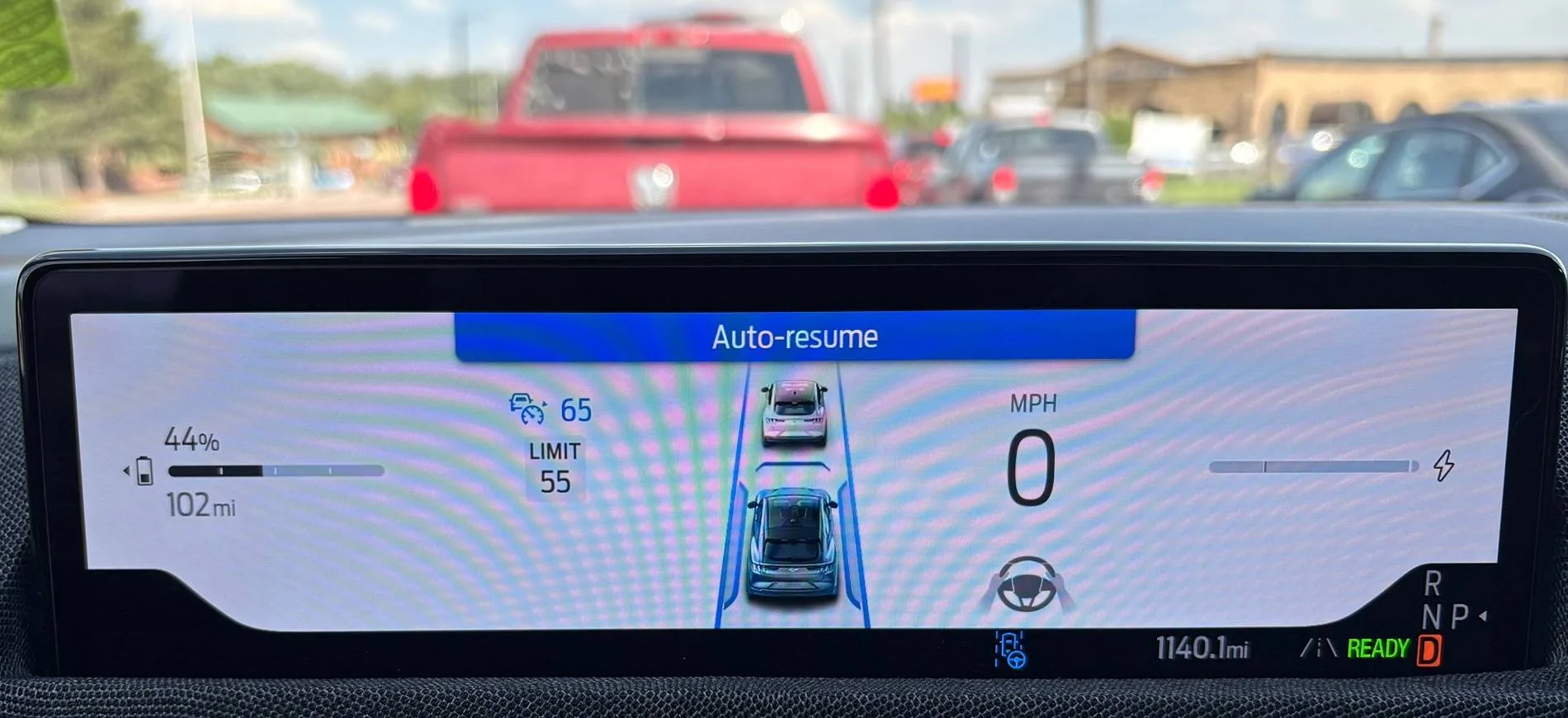
On my car, it will only wait 5 seconds outside of a Blue Zone before it timeouts (then you have to press the resume button or tap the pedal when the light turns green). It seems they've made a change to allow 30+ seconds of auto-resume globally. This was a small but very welcome change, less things to constantly pay attention to at each stop, the car just starts again on its own most of the time. I hope it's something that could be fixed in older vehicles as well, it's so much nicer to get the full 30 seconds.
Automatic Lane Changes
This is the key new feature for BlueCruise 1.5, lane changes are now fully automated. If the left lane is clear and you're approaching a slower vehicle, you will see the following prompt before the car moves over all by itself. Notice the distance to the vehicle, it starts plenty early:
Car moves over, you go by the slower vehicle, then afterwards if the lane is clear you'll see this:
Of course, you can also initiate the lane change yourself at any time by tapping the turn signal stalk. If there are two lanes, the automatic lane change will want to keep you in the right lane, and if there are three lanes, it will want to keep you in the middle lane. It will only pass vehicles on the left, never on the right side. So if you get in a left lane hog situation, you'll have to change manually to pass on the right.
The lane change logic was extremely smart and avoided unnecessary lane changes. If there was any kind of slower vehicle up ahead in the right lane, it would wait to move back over. The distance it was looking ahead before moving over seemed incredible, beyond radar range, so I'm guessing it's using the camera to look for vehicles in the adjacent lane as well as radar? If anything, it was almost too conservative about getting back over, but I prefer it that way to avoid having to change lanes again in a short time. That or else the lane changes were inhibited by following a vehicle in front of me (which is often the case in rush hour traffic).
Unfortunately, lane changes are only for slower vehicles and not tied to navigation (like Tesla Navigate on Autopilot), so if you have an exit coming up, you will have to manually maneuver. The only time the automatic lane change gets annoying is if you're in an exit lane, and it decides to move you left out of the exit lane. Perhaps they could add logic to disable auto changes when you're in an exit-only lane, or when you are less than 1 mile to an exit in the active navigation.
Overall, I think the automatic lane change feature was very well done; it made a very pleasing driving experience of "set it and forget it". I could see going for many dozens of miles without lifting a finger using BlueCruise 1.5. We have arrived at the final frontier of sit there and do nothing (but watch).
Desired Improvements
There is still an 80 MPH speed limit on hands-free BlueCruise. In many states with 75+ MPH speed limits, people often drive 85 MPH or more. I would like to see the speed threshold raised to at least 85 MPH.
The coverage of hands-free Blue Cruise has still not expanded (especially in Canada), and is limited to protected access freeways only. That is very unfortunate, because I believe the technology has progressed to the point that hands-free can be safely allowed on many more roads, which GM has done with Super Cruise. If you look at the coverage map, it's no comparison (130,000 miles vs. 750,000 miles):

I hope that Ford will do what it takes to significantly expand the coverage of hands-free BlueCruise in the near future.
Summary
Overall, BlueCruise 1.5 provides some good improvements. Lane stability is better, there are fewer dropouts, and you get fully automated lane changes. Overall performance is very good, and it's a very safe system. Hands-free is limited to mapped freeways, but the lane centering works well on the rest of the roads.
Last, I'm happy to answer any questions you might have.
Sponsored
Last edited: