2022 Mach-E Causing Dashcam GPS Interference Near Rearview Mirror? Comparison with 2025

NY_Cade69

Well-Known Member
First Name
Cade
Joined
Mar 26, 2026
Threads
12
Messages
415
Reaction score
541
Location
30308
Vehicles
2025 Premium Sport package Molten Magenta Extended Range eAWD Pano
I just typed in the lat and long and it didn't put me in my driveway. It put me just outside of Suzhou, China. it is missing the "-" on the longitude.

I guess if I get a speeding ticket, I could always say, "It wasn't me. I was in china andI have a video and GPS data to prove it."
you in Fullerton?
Sponsored


NY_Cade69

Well-Known Member
First Name
Cade
Joined
Mar 26, 2026
Threads
12
Messages
415
Reaction score
541
Location
30308
Vehicles
2025 Premium Sport package Molten Magenta Extended Range eAWD Pano
Decimal Coordinates assumes positive (NE):
Latitude is either North (+) or South (-) of the Equator
Longitude is either East (+) or West (-) of Prime
33.906889, -117.909639 (you need the - for the longitude in the Western Hemisphere, this is probably an oversight on the coding for the display of your GPS)

Degrees, Mins, Secs needs NS/EW after the values:
33°54'24.8"N 117°54'34.7"W
 

sergiomo

Active Member
First Name
Sergio
Joined
Sep 1, 2025
Threads
2
Messages
42
Reaction score
62
Location
Bay Area, CA
Vehicles
2025 Premium RWD ER
OP, I’d check that the camera coaxial connector is seated tightly. Check all connectors under the mirror while you’re at it. My guess is that something in there isn’t properly grounded.

If all else fails, you should be able to apply RF shielding tape to the cover to solve any interference issues. Just make sure it’s grounded somehow. You might also want to apply some RF tape around the camera coaxial connector if it is irremediably loose.
 
OP
OP
RonOinAZ

RonOinAZ

Well-Known Member
First Name
Ron
Joined
May 13, 2021
Threads
12
Messages
334
Reaction score
324
Location
Phoenix, AZ
Vehicles
2022 Premium 4X & 2025 Premium
Country flag
OP, I’d check that the camera coaxial connector is seated tightly. Check all connectors under the mirror while you’re at it. My guess is that something in there isn’t properly grounded.

If all else fails, you should be able to apply RF shielding tape to the cover to solve any interference issues. Just make sure it’s grounded somehow. You might also want to apply some RF tape around the camera coaxial connector if it is irremediably loose.
Thank you. Tomorrow I'm going to remove the housing and take a look.

After @Mach-Lee's post today, I went out to the car, pulled it part-way out of the garage, and fiddled with the Collision Avoidance and Lane-Centering settings. All of a sudden, while doing that, the dashcam began to display speeds of 0 MPH & 2 MPH, meaning it was picking up satellite signals. I hadn't seen anything other than 0 MPH for as long as I remember. I took a drive around the block and it tracked my speed the whole time. I'm not sure why or if fiddling with the Collision Avoidance and Lane-Centering functions affected the dashcam but my understanding is that both features rely on the camera inside the housing above the rearview camera. So, something doesn't appear to be stable there and it very possibly has to do with the IPMA coax, as you and @Mach-Lee say. More tomorrow. Thanks again!
 
OP
OP
RonOinAZ

RonOinAZ

Well-Known Member
First Name
Ron
Joined
May 13, 2021
Threads
12
Messages
334
Reaction score
324
Location
Phoenix, AZ
Vehicles
2022 Premium 4X & 2025 Premium
Country flag
The coax going into the IPMA seems to be in good shape and solidly connected. I noticed again this morning that the dashcam's GPS didn't lock onto satellites until after I'd briefly shut off the Collision Avoidance & Lane-Centering functions. Whether there is a connection between the actions isn't clear as it may just be related to the time it takes to lock-on to some satellites. I'm going to go ahead and remount the dashcam, which was installed with 3M VHB adhesive, on the frit area and add a ferrite bead for noise reduction on the power cable as it goes into the dashcam. If possible, I will also reroute the dashcam's power and rear camera cables so they no longer pass through the housing above the rearview mirror.
Ford Mustang Mach-E 2022 Mach-E Causing Dashcam GPS Interference Near Rearview Mirror? Comparison with 2025 1780761613517-f4


Mach-Lee

Well-Known Member
First Name
Lee
Joined
Jul 16, 2021
Threads
262
Messages
11,382
Reaction score
25,072
Location
Wisconsin
Vehicles
2022 Mach-E Premium AWD
Occupation
Sci/Eng
Country flag
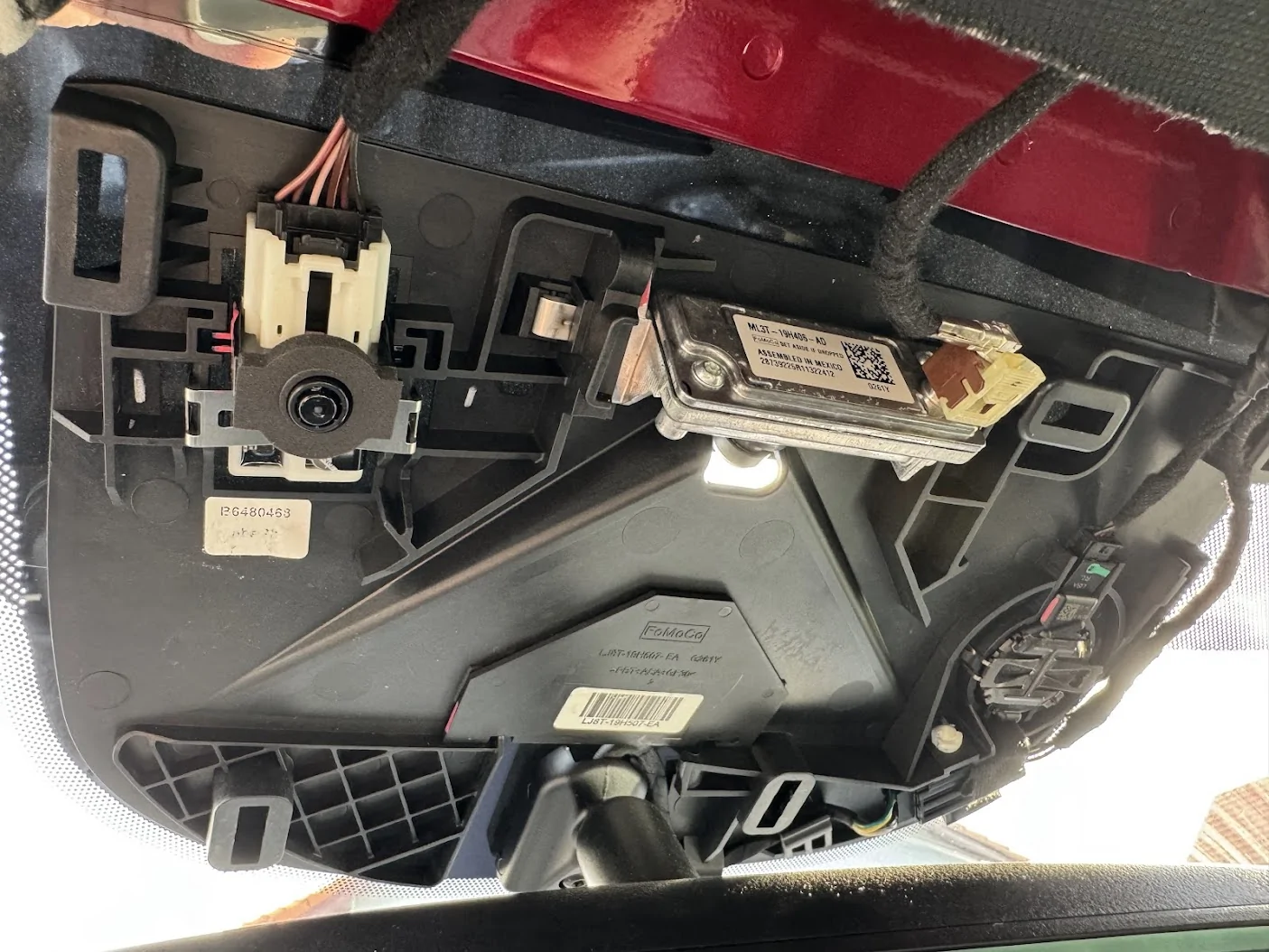
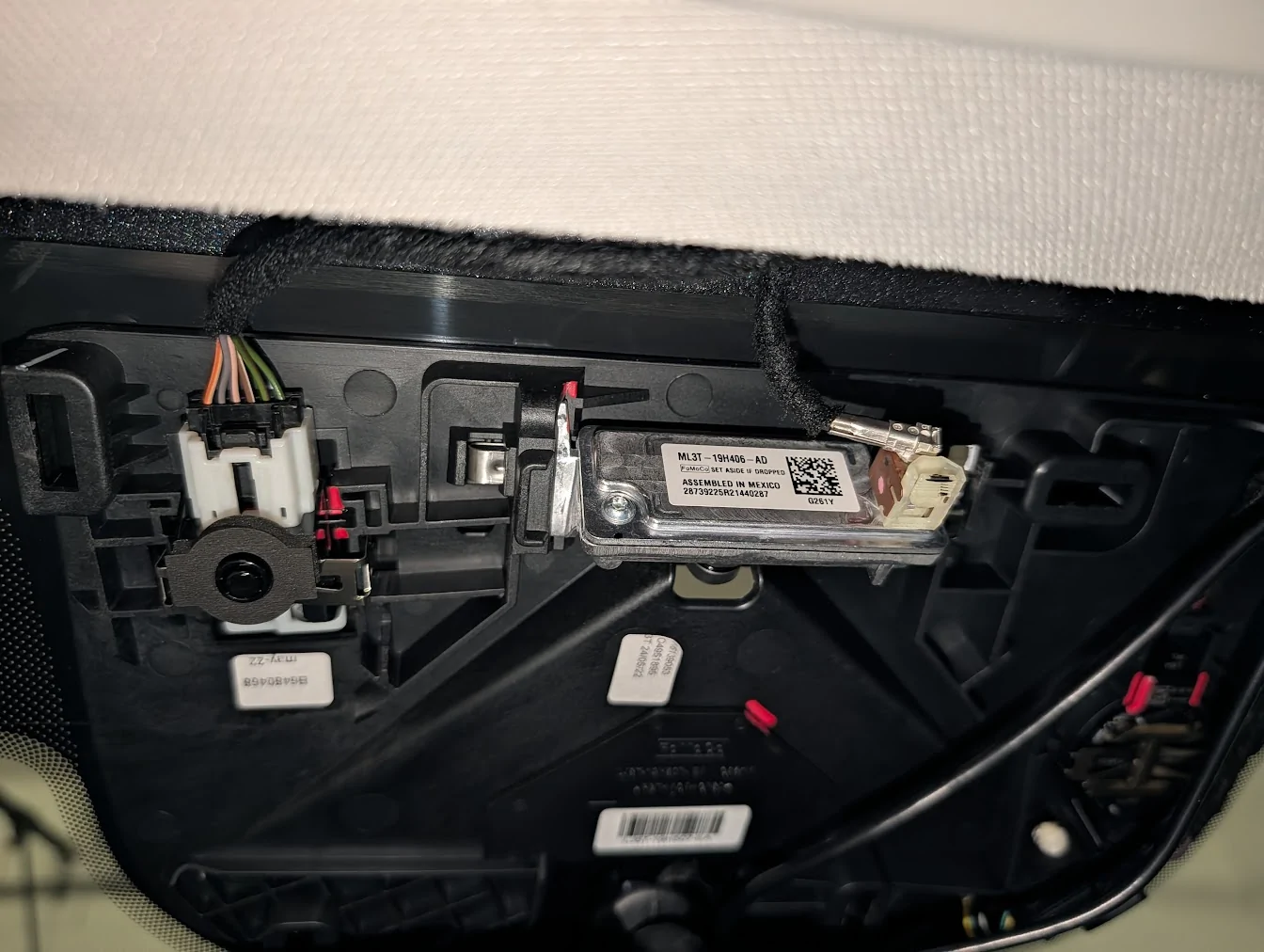
FYI the camera coax should be coming off the connector at about the 9-10 o'clock position, and should not have any sharp bends near the connector. Like this:

Ford Mustang Mach-E 2022 Mach-E Causing Dashcam GPS Interference Near Rearview Mirror? Comparison with 2025 1780761613517-f4


I would keep any dashcam wiring at least 6" away from that front camera.
 
OP
OP
RonOinAZ

RonOinAZ

Well-Known Member
First Name
Ron
Joined
May 13, 2021
Threads
12
Messages
334
Reaction score
324
Location
Phoenix, AZ
Vehicles
2022 Premium 4X & 2025 Premium
Country flag
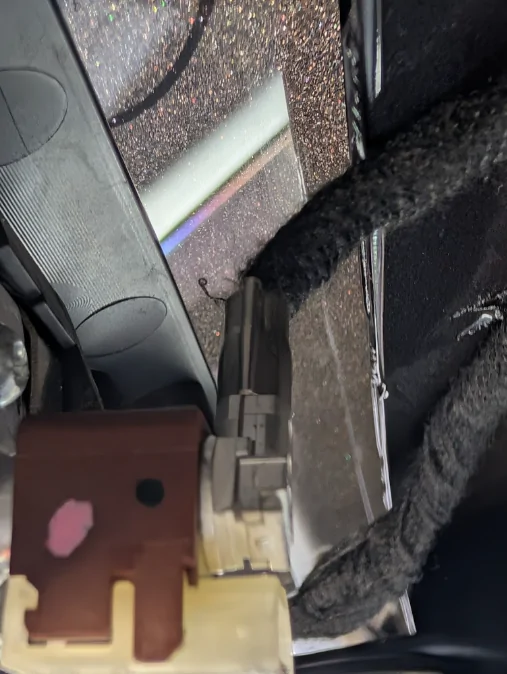
The coax was coming out of the connector at a 12 o'clock position, which resulted in a tighter 90° bend than what you show. It didn't appear to be kinked or damaged in any way, but it did have a fairly sharp curve. I rotated the connector so it now looks much closer to your installation.

Interestingly, I may have stumbled onto something in the process. When I took the car out a little while ago, the dashcam locked onto enough satellites to calculate speed, position, and direction after about 2 miles and 4 minutes of driving. That actually seems pretty reasonable given that it likely didn't have current ephemeris data. Lane-centering and collision avoidance were both enabled during the drive, unlike an earlier test where it appeared that temporarily disabling them allowed the GPS receiver to acquire a lock. At this point I'm not sure whether the connector repositioning helped, whether the receiver simply had enough time to acquire satellites on its own, or whether it was just coincidence. More to come.

Ford Mustang Mach-E 2022 Mach-E Causing Dashcam GPS Interference Near Rearview Mirror? Comparison with 2025 1780857868293-ag
 
OP
OP
RonOinAZ

RonOinAZ

Well-Known Member
First Name
Ron
Joined
May 13, 2021
Threads
12
Messages
334
Reaction score
324
Location
Phoenix, AZ
Vehicles
2022 Premium 4X & 2025 Premium
Country flag
Well, this will probably be my last update because the GPS receiver in my Rove R3 is now working reliably again.

The changes I made were:

  • Rotated the IPMA connector so the coax no longer had to make a sharp 90° bend.
  • Separated the R3's power cable and rear camera cable so they were no longer running side-by-side inside the IPMA/camera housing.
  • Added a ferrite bead to the R3's power cable as close to the dashcam as possible for RFI/EMI suppression.
What I did not do was move the dashcam to the frit area beside the IPMA/camera housing. It remains mounted directly below the rearview mirror. While the GPS receiver would likely receive somewhat stronger satellite signals at the frit, the signals it's receiving in its current location are clearly adequate for it to lock onto the satellites and perform its function.

I'm not certain which change made the difference, or whether it was a combination of all three, but the result is that the GPS receiver now locks onto enough satellites to calculate speed, position, and direction within a few minutes of startup every time I've driven the car. That's all I can ask for.

Thanks to everyone who replied, and especially @Mach-Lee for taking the time and making the effort to help. I doubt I would have gotten to the bottom of this without the assistance.
Sponsored


Top