Anyone else still not getting Wireless Android Auto to work?

Rocky29670

Well-Known Member
Joined
Jun 10, 2020
Threads
26
Messages
416
Reaction score
478
Location
Clemson, SC
Vehicles
2009 Toyota Camry Hybrid (Sold), 2013 Ford Fusion (borrowing until MME gets here), Mustang Mach E Premium ER AWD
Country flag
I don't know what else I need to do to get Android Auto to work between the car and the phone.

I've got the latest version of the Sync software and the latest version of Android Auto app on my phone from the Play Store. I'm running a Samsung Galaxy Note 9 with Android 10. I can connect my phone via bluetooth and wired Android Auto but not wirelessly. I get the we can't connect to your phone pop up on the Infotainment screen every time I drive, letting me know wireless connection still failed.

Is there something I'm doing wrong? I don't have my cars hot spot trial activated is that what's wrong? When I don't have my wifi turned on on my phone it sends me an error message on my phone to turn on wifi. That usually crashes the app after only giving me an option to click cancel or settings.

I'd really like to use wireless Android auto. If I'm alone and it's only not working for me please let me know what I'm doing wrong.
Sponsored


 

WildfireOne

Well-Known Member
Joined
Dec 20, 2019
Threads
2
Messages
103
Reaction score
102
Location
Southern California
Vehicles
First Edition
Country flag
I don't know what else I need to do to get Android Auto to work between the car and the phone.

I've got the latest version of the Sync software and the latest version of Android Auto app on my phone from the Play Store. I'm running a Samsung Galaxy Note 9 with Android 10. I can connect my phone via bluetooth and wired Android Auto but not wirelessly. I get the we can't connect to your phone pop up on the Infotainment screen every time I drive, letting me know wireless connection still failed.

Is there something I'm doing wrong? I don't have my cars hot spot trial activated is that what's wrong? When I don't have my wifi turned on on my phone it sends me an error message on my phone to turn on wifi. That usually crashes the app after only giving me an option to click cancel or settings.

I'd really like to use wireless Android auto. If I'm alone and it's only not working for me please let me know what I'm doing wrong.
This might help you out... (especially the 2nd part)
https://www.macheforum.com/site/threads/paak-on-hold-till-april.3827/post-138977

Or more detailed:
Setup Bluetooth pairing with your phone as you normally would
- then turn the vehicle off completely
- on your phone:
=get into Android Auto app settings (Settings>Apps>See all apps>Android Auto>Advanced>See additional settings)
=scroll down to Version and start tapping version until Developer settings unlocks (takes about 10 taps)
=in the three-dot options menu on the top right of the screen, select Developer settings
=in Developer settings, tap Clear all data, and then be sure to check "Add wireless projection to settings" and go back AA settings
=ensure that there's no previous cars listed in AA
=toggle on Wireless Android Auto
- start your vehicle and watch your phone pair with Bluetooth. Then using Ford Sync, go through AA setup (but don't use a USB cable to connect, tap the Connect icon of your paired phone on Ford Sync) and cross your fingers, your toes, and probably your eyes as well....
 
OP
OP
Rocky29670

Rocky29670

Well-Known Member
Joined
Jun 10, 2020
Threads
26
Messages
416
Reaction score
478
Location
Clemson, SC
Vehicles
2009 Toyota Camry Hybrid (Sold), 2013 Ford Fusion (borrowing until MME gets here), Mustang Mach E Premium ER AWD
Country flag
Well I feel dumb now, I didn't have my phone set to automatically connect to the cars wifi network, so it didn't save the password and it was never connecting even though wifi was on.
 

timbop

Well-Known Member
First Name
Tim
Joined
Jan 3, 2020
Threads
65
Messages
6,832
Reaction score
14,036
Location
New Jersey
Vehicles
Solar powered 2021 MME ER RWD (CA RT1)
Occupation
Software Engineer
Country flag
Well I feel dumb now, I didn't have my phone set to automatically connect to the cars wifi network, so it didn't save the password and it was never connecting even though wifi was on.
As my old boss used to say: "there was a nut loose on the controls"


OP
OP
Rocky29670

Rocky29670

Well-Known Member
Joined
Jun 10, 2020
Threads
26
Messages
416
Reaction score
478
Location
Clemson, SC
Vehicles
2009 Toyota Camry Hybrid (Sold), 2013 Ford Fusion (borrowing until MME gets here), Mustang Mach E Premium ER AWD
Country flag
Okay so here's my new issue. Still not sure about the wireless Android auto thing, it's now connecting my phone to the cars wifi. However that doesn't allow for me use the internet on my phone while it's connected to wifi for Android Auto. Is that common? Is there anything I can do to not choose between wireless Android auto and internet?
 

dbsb3233

Well-Known Member
First Name
TimCO
Joined
Dec 30, 2019
Threads
56
Messages
10,100
Reaction score
11,965
Location
Colorado, USA
Vehicles
2021 Mustang Mach-E FE, 2025 Porche Macan Electric
Occupation
Retired
Country flag
Okay so here's my new issue. Still not sure about the wireless Android auto thing, it's now connecting my phone to the cars wifi. However that doesn't allow for me use the internet on my phone while it's connected to wifi for Android Auto. Is that common? Is there anything I can do to not choose between wireless Android auto and internet?
When Android Auto is in use (effectively projecting certain Google functions to the car instead), those functions lock out on the phone and can only be accessed via the car. Like Maps, and Phone. Probably a few other functions too, but I'm not sure which ones.
 

WildfireOne

Well-Known Member
Joined
Dec 20, 2019
Threads
2
Messages
103
Reaction score
102
Location
Southern California
Vehicles
First Edition
Country flag
Okay so here's my new issue. Still not sure about the wireless Android auto thing, it's now connecting my phone to the cars wifi. However that doesn't allow for me use the internet on my phone while it's connected to wifi for Android Auto. Is that common? Is there anything I can do to not choose between wireless Android auto and internet?
Yes, and you need to allow mobile data when wifi has no internet connection -- then you can use Chrome or whatever non-google app that uses mobile data -- to have wireless AA and your phone.
Here's how to address it in One UI:
Settings>Connections>Wifi>Advanced (from 3-dot menu)
Toggle ON "Switch to mobile data"
You might need to reboot both phone and car UI to take effect.
 

RyZt

Well-Known Member
Joined
Nov 17, 2019
Threads
24
Messages
746
Reaction score
880
Location
San Jose
Vehicles
Mach E4X
Country flag
Is that common? Is there anything I can do to not choose between wireless Android auto and internet?
No, that's not common. I didn't do anything special to set up the WiFi connection on my phone. It's set up automatically when I initially set up Android Auto, and it's set up in such a way that the WiFi connection isn't used for internet. Therefore, I can access Internet as normal through cellular network.

It seems that you somehow had to set up the WiFi manually. That's probably why things got messy. And I don't have a solution for you
 
OP
OP
Rocky29670

Rocky29670

Well-Known Member
Joined
Jun 10, 2020
Threads
26
Messages
416
Reaction score
478
Location
Clemson, SC
Vehicles
2009 Toyota Camry Hybrid (Sold), 2013 Ford Fusion (borrowing until MME gets here), Mustang Mach E Premium ER AWD
Country flag
No, that's not common. I didn't do anything special to set up the WiFi connection on my phone. It's set up automatically when I initially set up Android Auto, and it's set up in such a way that the WiFi connection isn't used for internet. Therefore, I can access Internet as normal through cellular network.

It seems that you somehow had to set up the WiFi manually. That's probably why things got messy. And I don't have a solution for you
I've googled it but can't find a solution, should I try contacting Android auto or Google support for further troubleshooting?
 

mpshizzle

Well-Known Member
Joined
Mar 22, 2021
Threads
65
Messages
1,274
Reaction score
1,605
Location
Utah
Vehicles
Mustang Mach E 4X
Country flag
No, that's not common. I didn't do anything special to set up the WiFi connection on my phone. It's set up automatically when I initially set up Android Auto
I'm going to echo this. On my phone while running wireless AA i get the wifi icon with an "!" Meaning wifi with no internet. But spotify, Google maps, etc all still work fine with mobile data.

The way it went for me is I just paired my phone to bluetooth, the car asked if I wanted to enable wireless projection, then my phone asked me, then it all just magically set up and paired automatically.

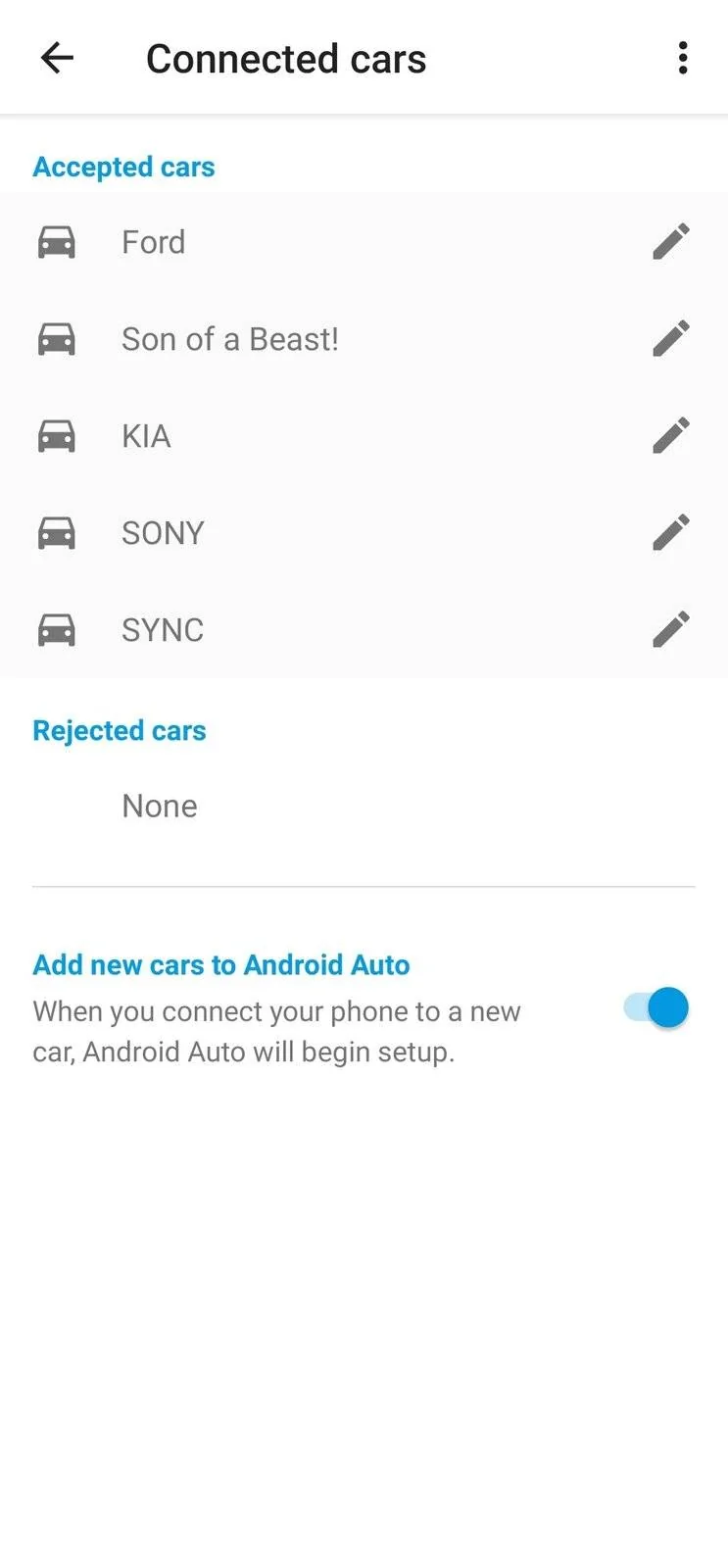
So if I were you I'd remove the mach e from your Android Auto (see the screenshot). Remove the wifi from your saved networks. Unpair bluetooth from both the car and phone, then start fresh

Ford Mustang Mach-E Anyone else still not getting Wireless Android Auto to work? Screenshot_20210422-205541_Android Auto
Sponsored


Top