Failed update, features disabled, stopped communicating

jayadelson

Active Member
First Name
Jay
Joined
Oct 31, 2023
Threads
1
Messages
41
Reaction score
31
Location
Manchester, Michigan, USA
Vehicles
2023 Mach-E Premium
Country flag
My 2023 MME decided to have a seizure a week ago. The last heartbeat to FordPass was at 1:48am on the 23rd.

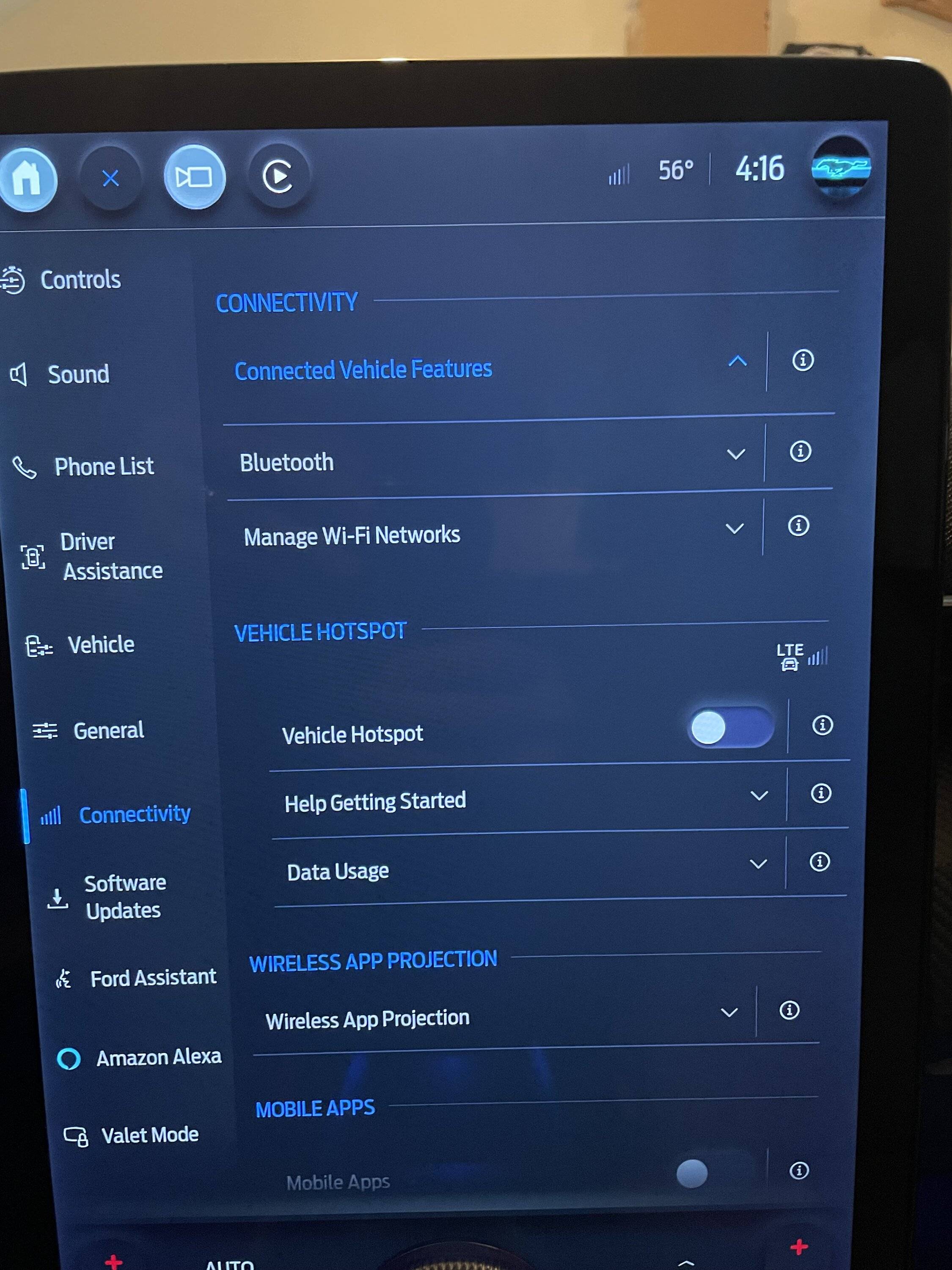
Since that time, FordPass doesn't work, and none of the communication functions that depend on it work either. In the Connectivity tab, the Connected Services says "Please Wait.." then drops into a blank drawer. Sometimes WiFi will scan, sometimes it won't. My local WiFi shows it's connected, but no traffic.

Support sent me to OTA support, that said it had a pending update, but no resets/reboots fixed it, and it made no sense, so I should bring to a dealer.

The dealer has had it for 2 days and all they can say is, "we don't understand it either." They still have the car.

Has anyone seen this sort of thing before?
Sponsored
 

hybrid2bev

Well-Known Member
Joined
Dec 4, 2019
Threads
78
Messages
4,642
Reaction score
12,770
Location
USA
Vehicles
2026 Rally
Country flag
My 2023 MME decided to have a seizure a week ago. The last heartbeat to FordPass was at 1:48am on the 23rd.

Since that time, FordPass doesn't work, and none of the communication functions that depend on it work either. In the Connectivity tab, the Connected Services says "Please Wait.." then drops into a blank drawer. Sometimes WiFi will scan, sometimes it won't. My local WiFi shows it's connected, but no traffic.

Support sent me to OTA support, that said it had a pending update, but no resets/reboots fixed it, and it made no sense, so I should bring to a dealer.

The dealer has had it for 2 days and all they can say is, "we don't understand it either." They still have the car.

Has anyone seen this sort of thing before?
When I had connectivity issues like that I pulled the 11/12 fuse for 10 minutes to reset the TCU module. That worked for me.

https://www.macheforum.com/site/thr...ped-updating-info-on-my-car.27620/post-631955
 

Logal727

Well-Known Member
First Name
C
Joined
Aug 23, 2021
Threads
101
Messages
7,351
Reaction score
11,347
Location
Florida
Vehicles
‘21 Carbonized Gray Mustang Mach-E Premium AWD Ext
Country flag
OP
OP
jayadelson

jayadelson

Active Member
First Name
Jay
Joined
Oct 31, 2023
Threads
1
Messages
41
Reaction score
31
Location
Manchester, Michigan, USA
Vehicles
2023 Mach-E Premium
Country flag
The dealer says, unfortunately, they tried the reset of the TCU and no luck. Ford Engineering is telling them they need to replace the "Gateway Module," whatever that is. They've ordered a new one.

Should I be concerned?


ChasingCoral

Well-Known Member
First Name
Mark
Joined
Feb 3, 2020
Threads
502
Messages
14,316
Reaction score
28,671
Location
Maryland
Vehicles
2021 GB E4X FE, 2022 F-150 Lightning Lariat ER
Occupation
Retired oceanographer
Country flag
The dealer says, unfortunately, they tried the reset of the TCU and no luck. Ford Engineering is telling them they need to replace the "Gateway Module," whatever that is. They've ordered a new one.

Should I be concerned?
Nope. That's an easy replacement.
 
OP
OP
jayadelson

jayadelson

Active Member
First Name
Jay
Joined
Oct 31, 2023
Threads
1
Messages
41
Reaction score
31
Location
Manchester, Michigan, USA
Vehicles
2023 Mach-E Premium
Country flag
@Ford Motor Company My only concern here is that the failure happened during an OTA, at least according to the OTA support. If that's true, I'd hate to see anyone brick their gateway module if downloading under the same conditions.

For what it's worth, I'm on SYNC 4 and the version my car came with (I bought my Premium 2023 two weeks ago) was 4.0.23151.
 

Mach-Lee

Well-Known Member
First Name
Lee
Joined
Jul 16, 2021
Threads
262
Messages
11,362
Reaction score
24,992
Location
Wisconsin
Vehicles
2022 Mach-E Premium AWD
Occupation
Sci/Eng
Country flag
Send me you VIN so I can look at the OTA.

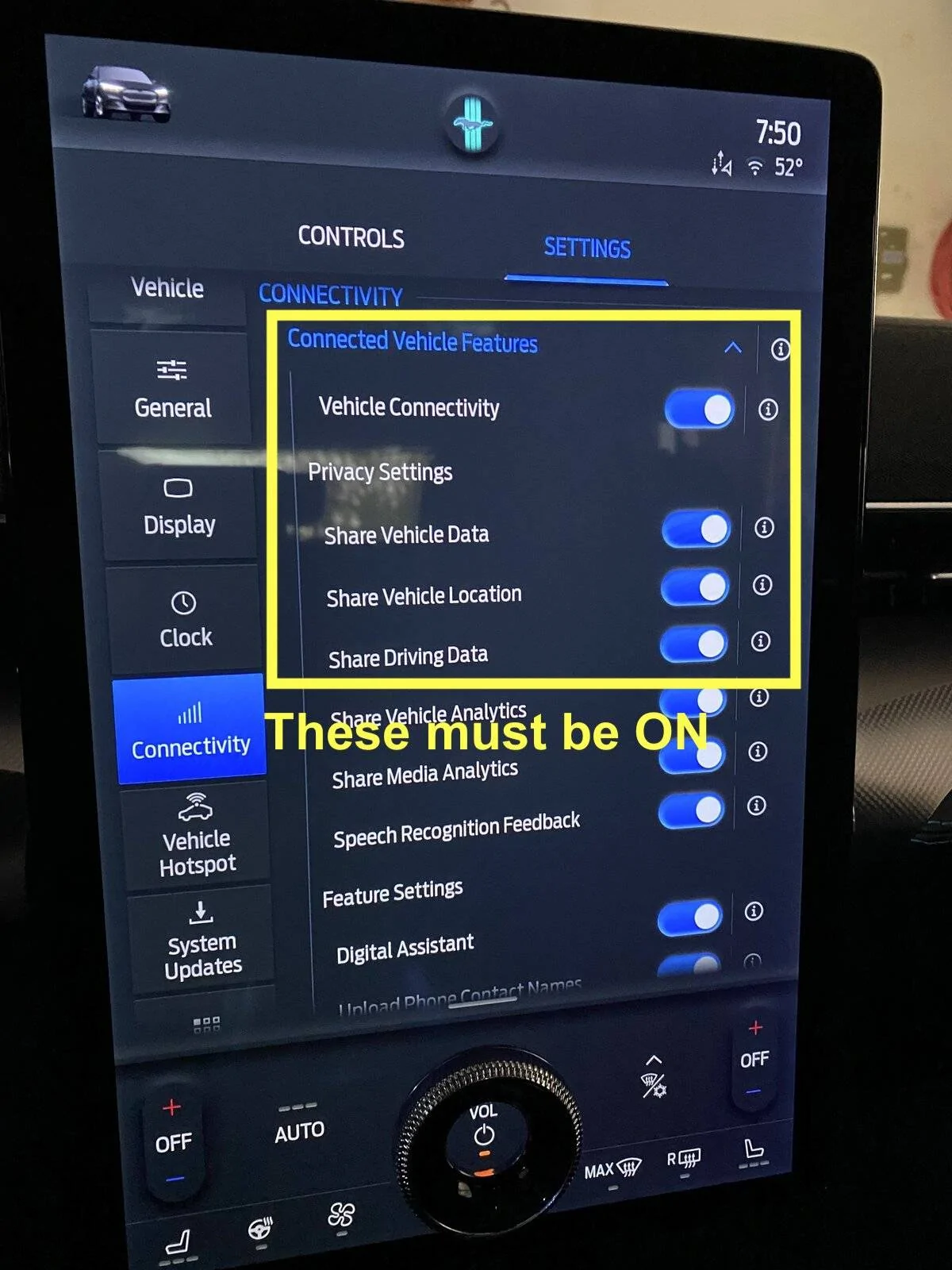
You need to make sure these connectivity settings are turned on. I would verify those are on before you let the dealer replace the GWM. If the menu won't open, keep trying multiple times per day until it eventually works:

Ford Mustang Mach-E Failed update, features disabled, stopped communicating FC4B1FBC-31EF-4A2E-A846-35CC7C072488


GWM should not be replaced for this issue of connected vehicle features not opening. GWM and APIM just need an update.
 

Jbk

Member
First Name
Jeff
Joined
Oct 28, 2023
Threads
1
Messages
13
Reaction score
2
Location
Las Vegas
Vehicles
2023 Space White GT
Country flag
My 2023 MME decided to have a seizure a week ago. The last heartbeat to FordPass was at 1:48am on the 23rd.

Since that time, FordPass doesn't work, and none of the communication functions that depend on it work either. In the Connectivity tab, the Connected Services says "Please Wait.." then drops into a blank drawer. Sometimes WiFi will scan, sometimes it won't. My local WiFi shows it's connected, but no traffic.

Support sent me to OTA support, that said it had a pending update, but no resets/reboots fixed it, and it made no sense, so I should bring to a dealer.

The dealer has had it for 2 days and all they can say is, "we don't understand it either." They still have the car.

Has anyone seen this sort of thing before?
I’m having the exact same problem, mine started Oct 24th at 1:15pm. Support sent me to OTA who said it was an app problem and sent me back to open a case - the case is still open.
 
OP
OP
jayadelson

jayadelson

Active Member
First Name
Jay
Joined
Oct 31, 2023
Threads
1
Messages
41
Reaction score
31
Location
Manchester, Michigan, USA
Vehicles
2023 Mach-E Premium
Country flag
I’m having the exact same problem, mine started Oct 24th at 1:15pm. Support sent me to OTA who said it was an app problem and sent me back to open a case - the case is still open.
I'm 100% confident it is not an app problem. I'm a recovering network engineer, so I checked to see if the car was even trying to talk to FordPass, and the answer is no. The car was connected to the WiFi SSID, but there were no API calls outbound.

There is something specific to the upgrade path. This is speculation, but I think that updates proceed like patches, or in a prescribed order. If you got the OTA update at the same time I did, and it borked your system, it would probably happen to anyone else at the same software revision processing the same update.

You may want to check this URL:

https://www.ford.com/support/sync-maps-updates/

Enter your VIN and see what revision it thinks you're on. I'm curious if it's similar, which is why I think @Ford Motor Company might want to take a look.
 

Jbk

Member
First Name
Jeff
Joined
Oct 28, 2023
Threads
1
Messages
13
Reaction score
2
Location
Las Vegas
Vehicles
2023 Space White GT
Country flag
Send me you VIN so I can look at the OTA.

You need to make sure these connectivity settings are turned on. I would verify those are on before you let the dealer replace the GWM. If the menu won't open, keep trying multiple times per day until it eventually works:

FC4B1FBC-31EF-4A2E-A846-35CC7C072488.webp


GWM should not be replaced for this issue of connected vehicle features not opening. GWM and APIM just need an update.
I’m having the same problem but my “connected vehicle features” won’t open the list. You suggested to keep trying to open it -
I'm 100% confident it is not an app problem. I'm a recovering network engineer, so I checked to see if the car was even trying to talk to FordPass, and the answer is no. The car was connected to the WiFi SSID, but there were no API calls outbound.

There is something specific to the upgrade path. This is speculation, but I think that updates proceed like patches, or in a prescribed order. If you got the OTA update at the same time I did, and it borked your system, it would probably happen to anyone else at the same software revision processing the same update.

You may want to check this URL:

https://www.ford.com/support/sync-maps-updates/

Enter your VIN and see what revision it thinks you're on. I'm curious if it's similar, which is why I think @Ford Motor Company might want to take a look.
VIN3FMTK4SE3PMA67718

SYNC GenerationSYNC 4

SYNC Version4.0.23151
 

Jbk

Member
First Name
Jeff
Joined
Oct 28, 2023
Threads
1
Messages
13
Reaction score
2
Location
Las Vegas
Vehicles
2023 Space White GT
Country flag
I'm 100% confident it is not an app problem. I'm a recovering network engineer, so I checked to see if the car was even trying to talk to FordPass, and the answer is no. The car was connected to the WiFi SSID, but there were no API calls outbound.

There is something specific to the upgrade path. This is speculation, but I think that updates proceed like patches, or in a prescribed order. If you got the OTA update at the same time I did, and it borked your system, it would probably happen to anyone else at the same software revision processing the same update.

You may want to check this URL:

https://www.ford.com/support/sync-maps-updates/

Enter your VIN and see what revision it thinks you're on. I'm curious if it's similar, which is why I think @Ford Motor Company might want to take a look.

VIN3FMTK4SE3PMA67718

SYNC GenerationSYNC 4

SYNC Version4.0.23151
 
OP
OP
jayadelson

jayadelson

Active Member
First Name
Jay
Joined
Oct 31, 2023
Threads
1
Messages
41
Reaction score
31
Location
Manchester, Michigan, USA
Vehicles
2023 Mach-E Premium
Country flag
Send me you VIN so I can look at the OTA.

You need to make sure these connectivity settings are turned on. I would verify those are on before you let the dealer replace the GWM. If the menu won't open, keep trying multiple times per day until it eventually works:

FC4B1FBC-31EF-4A2E-A846-35CC7C072488.jpeg


GWM should not be replaced for this issue of connected vehicle features not opening. GWM and APIM just need an update.
As @Jbk said above, the connectivity drawer will not open.

I'll DM you my VIN number.


Top