FordPass issue-Partial Response

Quack2000

Well-Known Member
Joined
Oct 13, 2020
Threads
4
Messages
51
Reaction score
47
Location
New Jersey
Vehicles
Ford Fusion Energi
Country flag
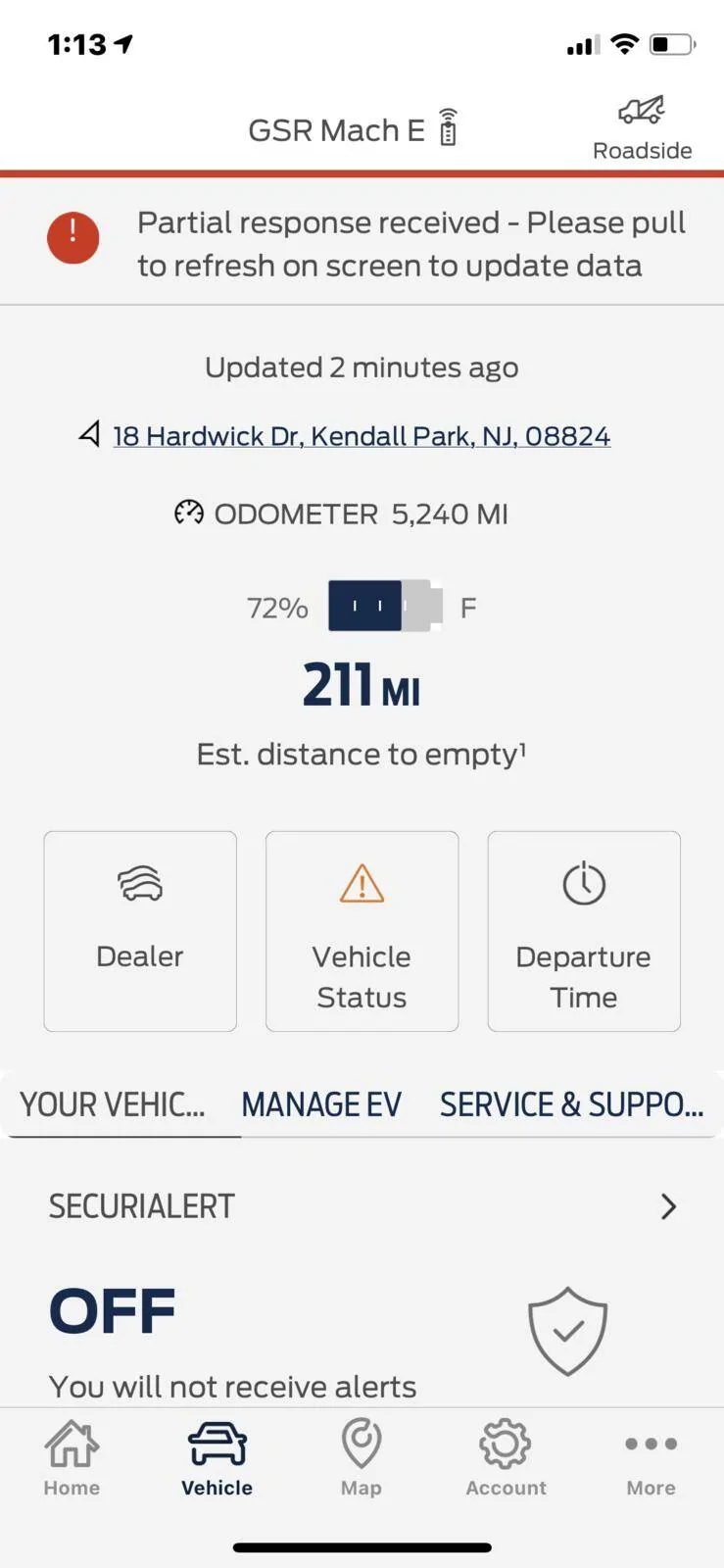
Hey all, anyone else getting this issue in Ford Pass?
It’s been doing it for a few days now after I was away for two weeks. Cars been driving fine otherwise. Thought maybe it would go away on its own but no such luck. Tried reinstalling the FordPass app. No luck there. I’m still on OTA 1.4 so maybe once 1.6 comes in it will go away but thought I’d see if any one else encountered it. Thanks all.

Ford Mustang Mach-E FordPass issue-Partial Response 34981D38-16AE-4803-B2ED-3243EC7A4533
Sponsored


CarboFE

Well-Known Member
First Name
Bill
Joined
Sep 17, 2020
Threads
1
Messages
87
Reaction score
197
Location
Minneapolis, MN
Vehicles
Mustang Mach-E FE Carbonized Grey
Country flag
Getting same message over the last few days. As you said, car is running fine otherwise. FordPass 3.28 and OTA 1.4 (I think).

As FordPass has had these intermittent issues I am ignoring for now. Just want to get the issue out there so it can be addressed.
 

exfordguy

Active Member
First Name
Rick
Joined
Oct 27, 2020
Threads
7
Messages
33
Reaction score
41
Location
Cave Creek, Arizona
Vehicles
2023 Lincoln Aviator. 202Mach-E Premium.
Occupation
Retired from Ford IT
Country flag
Getting same message over the last few days. As you said, car is running fine otherwise. FordPass 3.28 and OTA 1.4 (I think).

As FordPass has had these intermittent issues I am ignoring for now. Just want to get the issue out there so it can be addressed.
I have the same issue going on. Additionally, if you tap on the "Vehicle Status" button on that screen, it says "Something went wrong. Please try again later."

Really helpful....
 

Tim Isa

Well-Known Member
First Name
Tim
Joined
Feb 3, 2021
Threads
0
Messages
47
Reaction score
47
Location
Sandefjord Norway
Vehicles
Mach E
Country flag
Hey all, anyone else getting this issue in Ford Pass?
It’s been doing it for a few days now after I was away for two weeks. Cars been driving fine otherwise. Thought maybe it would go away on its own but no such luck. Tried reinstalling the FordPass app. No luck there. I’m still on OTA 1.4 so maybe once 1.6 comes in it will go away but thought I’d see if any one else encountered it. Thanks all.
34981D38-16AE-4803-B2ED-3243EC7A4533.png
Hei
I’ve had the same issue the last couple days and my navigation is gone. Does anyone have any idea what it could be? I have reset everything but my navigation won’t show up on the main screen .
 

JoeDimwit

Well-Known Member
First Name
Joe
Joined
Mar 1, 2021
Threads
77
Messages
1,831
Reaction score
3,451
Location
Waterford
Vehicles
Grabber Blue First Edition
Occupation
Electrician
Country flag
Just out of curiosity, have any of you signed up for the BlueCruise early access program? I’m asking because it wouldn’t surprise me if there isn’t enough bandwidth to be downloading a significant update and service FordPass at the same time. And I can see Ford downloading FordPass in the background days or even weeks before they let it go live.


JamieGeek

Well-Known Member
Joined
Dec 29, 2019
Threads
82
Messages
3,589
Reaction score
6,823
Location
Southeastern Michigan
Website
spareelectrons.wordpress.com
Vehicles
Escape PHEV, old: Mach-E, Bolt, C-Max Energi, Focus Electric
Country flag
Hei
I’ve had the same issue the last couple days and my navigation is gone. Does anyone have any idea what it could be? I have reset everything but my navigation won’t show up on the main screen .
Did the Navigation "Card" disappear? or the app icon for Navigation? Tap the top center button for profiles you should see a Navigation app icon there. Tap it: Does Navigation load?

The cards that show are for "running" tasks/apps (kind of). Thus you can "close" them (drag the card down and it will go away/close). To open them tap the top center button and select the "app" you want to run.
 

Tim Isa

Well-Known Member
First Name
Tim
Joined
Feb 3, 2021
Threads
0
Messages
47
Reaction score
47
Location
Sandefjord Norway
Vehicles
Mach E
Country flag
Did the Navigation "Card" disappear? or the app icon for Navigation? Tap the top center button for profiles you should see a Navigation app icon there. Tap it: Does Navigation load?

The cards that show are for "running" tasks/apps (kind of). Thus you can "close" them (drag the card down and it will go away/close). To open them tap the top center button and select the "app" you want to run.
The navigation card is not there, basically when I press the top center profile navigation icon doesn’t not exist there anymore. It’s really strange it all started after I got that error message.
 

Kamuelaflyer

Well-Known Member
First Name
Bill
Joined
Feb 18, 2020
Threads
11
Messages
11,311
Reaction score
22,862
Location
Hawaii
Vehicles
2021 Premium Infinite Blue. ER AWD. 2020 Raptor, 2021 Ranger.
Country flag
Just out of curiosity, have any of you signed up for the BlueCruise early access program? I’m asking because it wouldn’t surprise me if there isn’t enough bandwidth to be downloading a significant update and service FordPass at the same time. And I can see Ford downloading FordPass in the background days or even weeks before they let it go live.
I’m in the early access program for BlueCruise. No problems such as those reported here. Also no indication of a download in progress. All of which proves and means absolutely nothing.
 

exfordguy

Active Member
First Name
Rick
Joined
Oct 27, 2020
Threads
7
Messages
33
Reaction score
41
Location
Cave Creek, Arizona
Vehicles
2023 Lincoln Aviator. 202Mach-E Premium.
Occupation
Retired from Ford IT
Country flag
And after a couple of weeks of this, today it automagically cleared itself.
 

Debangor

Well-Known Member
First Name
Debbie
Joined
Aug 26, 2021
Threads
8
Messages
54
Reaction score
25
Location
North Bangor, NY
Vehicles
Mustang Mach-E
Occupation
Retired
Country flag
Just out of curiosity, have any of you signed up for the BlueCruise early access program? I’m asking because it wouldn’t surprise me if there isn’t enough bandwidth to be downloading a significant update and service FordPass at the same time. And I can see Ford downloading FordPass in the background days or even weeks before they let it go live.
How do you sign up?
 

UK-Buyer

Member
First Name
Steve
Joined
Aug 10, 2021
Threads
2
Messages
22
Reaction score
5
Location
UK
Vehicles
Mach-E AWD X
Occupation
IT Manager
Country flag
Nice to see it isn't just mine then that's doing this :mad:
Has any one else with the issue connected their car to their home Wi-Fi as it seemed to go wrong the same day as I did that?
 

exfordguy

Active Member
First Name
Rick
Joined
Oct 27, 2020
Threads
7
Messages
33
Reaction score
41
Location
Cave Creek, Arizona
Vehicles
2023 Lincoln Aviator. 202Mach-E Premium.
Occupation
Retired from Ford IT
Country flag
Nice to see it isn't just mine then that's doing this :mad:
Has any one else with the issue connected their car to their home Wi-Fi as it seemed to go wrong the same day as I did that?
I rather doubt that would be the cause, as I've had mine connected to home WiFi since I got it in March. It also happens regardless of whether it's at home or on the road. It seems to have something to do with the vehicle alerts, because as I indicated in the earlier comments, you'll notice that the vehicle alerts button on the vehicle screen is amber. If you tap on it with an Apple device, it responds "Something went wrong. Please try again later." If you tap on it with an Android device, it responds "Sorry, FordPass isn't responding. Please try again later." When it's not exhibiting the problem, the vehicle alerts button will show green with a check mark.
 

UK-Buyer

Member
First Name
Steve
Joined
Aug 10, 2021
Threads
2
Messages
22
Reaction score
5
Location
UK
Vehicles
Mach-E AWD X
Occupation
IT Manager
Country flag
I rather doubt that would be the cause, as I've had mine connected to home WiFi since I got it in March. It also happens regardless of whether it's at home or on the road. It seems to have something to do with the vehicle alerts, because as I indicated in the earlier comments, you'll notice that the vehicle alerts button on the vehicle screen is amber. If you tap on it with an Apple device, it responds "Something went wrong. Please try again later." If you tap on it with an Android device, it responds "Sorry, FordPass isn't responding. Please try again later." When it's not exhibiting the problem, the vehicle alerts button will show green with a check mark.
I guess not as it hadn't been working for about 4 days, I posted this and it started working again about 30mins later
 
OP
OP

Quack2000

Well-Known Member
Joined
Oct 13, 2020
Threads
4
Messages
51
Reaction score
47
Location
New Jersey
Vehicles
Ford Fusion Energi
Country flag
May just be a coincidence but when I deleted the update schedule this went away. So when I just leave updates on auto without any schedule, I don’t get the partial response or the error notification and I am able to click the update tab in the vehicle information screen. Curious if that makes a difference for anyone else.
Sponsored


Top