Google Maps finally adds the key feature

bbulkow

Well-Known Member
First Name
Brian
Joined
Aug 30, 2022
Threads
24
Messages
889
Reaction score
729
Location
menlo park, california
Vehicles
Honda CRV
Country flag
In Google Maps : Charging Stations, I see nothing but EVGo.

I tried EVGo a few times. Terrible experience. Small number of chargers. Half broken. Bad KW estimations for our MachE's (higher voltage). Google maps has nothing but EVGo, Best suggested reason is only EVGo has real-time busy status in maps.

Still true - I considered a screenshot. 30 mile radius of my house, nothing but EvGO. We have some very nice Superchargers, but also some nice EA stations, very near, within 2 miles.

NOW: there's a new button.

"Charging network"

Search -> Categories -> Charging stations: a select on the left side. It's like a credit card. I guess that means charging network.

You can now select your favorites. I select my favorite, Supercharger, and suddenly I see the 7 stations and probably 100 charging stalls within a short drive.

This "search -> charging stations" is the only interface available in Maps while I'm driving - so previously I had to pull off to do a search (um, yeah).

Now google maps is useful. It bundles together finding chargers, along route, charge estimation on arrival. I haven't tried multi-stop estimates (breaking a destination into stops, does it obey that filter), but we're getting REALLY CLOSE to a system as usable as Tesla Nav.

THANK YOU GOOGLE

THANK YOU FORD FOR CONTINUING TO SUPPORT ANDROID AUTO
Sponsored
 

stellman

Well-Known Member
Joined
Apr 2, 2023
Threads
4
Messages
80
Reaction score
86
Location
Austin, TX
Vehicles
2021 Mustang Mach-E GT
Country flag
I switched from iOS to Android for this very feature, as Google maps does in-car routing on the Mach-E better than iOS (IMO). I've done a couple small-ish (800 mile) road trips and it's flawless that I can tell. Pre-conditions the battery, tells you amenities around charger, and lets you change the charger stop to another brand charger within range.

Make sure to set the option to use a NACS adapter, forum thread here.
 

AZBill

Well-Known Member
First Name
Bill
Joined
May 26, 2021
Threads
12
Messages
1,987
Reaction score
2,314
Location
Arizona
Vehicles
MME CA Route 1, Hummer EV SUT, Escalade IQ
Occupation
Retired
Country flag
My Google maps has always had all charging networks, including Tesla (NACS compatible). You likely had some payment method inadvertently selected if you were only seeing EVGO. Google also has real time status for all networks EXCEPT EA and Tesla, since they do not have a public API for that info. FYI, I use Google maps on iPhone.
 
OP
OP

bbulkow

Well-Known Member
First Name
Brian
Joined
Aug 30, 2022
Threads
24
Messages
889
Reaction score
729
Location
menlo park, california
Vehicles
Honda CRV
Country flag
My Google maps has always had all charging networks, including Tesla (NACS compatible). You likely had some payment method inadvertently selected if you were only seeing EVGO. Google also has real time status for all networks EXCEPT EA and Tesla, since they do not have a public API for that info. FYI, I use Google maps on iPhone.
No, not true. I can toggle back and forth.

When driving, we get about 6 slots. In my very dense area, that's all evgo.

Evgo is preferred, almost certainly because there is live stall integration.

If i am somewhere with fewer chargers it's a mix. I will see ea and whatnot.

Rarely will i ever see a supercharger, even if i am 100 feet from one.
 
OP
OP

bbulkow

Well-Known Member
First Name
Brian
Joined
Aug 30, 2022
Threads
24
Messages
889
Reaction score
729
Location
menlo park, california
Vehicles
Honda CRV
Country flag
In Google Maps : Charging Stations, I see nothing but EVGo.

I tried EVGo a few times. Terrible experience. Small number of chargers. Half broken. Bad KW estimations for our MachE's (higher voltage). Google maps has nothing but EVGo, Best suggested reason is only EVGo has real-time busy status in maps.

Still true - I considered a screenshot. 30 mile radius of my house, nothing but EvGO. We have some very nice Superchargers, but also some nice EA stations, very near, within 2 miles.

NOW: there's a new button.

"Charging network"

Search -> Categories -> Charging stations: a select on the left side. It's like a credit card. I guess that means charging network.

You can now select your favorites. I select my favorite, Supercharger, and suddenly I see the 7 stations and probably 100 charging stalls within a short drive.

This "search -> charging stations" is the only interface available in Maps while I'm driving - so previously I had to pull off to do a search (um, yeah).

Now google maps is useful. It bundles together finding chargers, along route, charge estimation on arrival. I haven't tried multi-stop estimates (breaking a destination into stops, does it obey that filter), but we're getting REALLY CLOSE to a system as usable as Tesla Nav.

THANK YOU GOOGLE

THANK YOU FORD FOR CONTINUING TO SUPPORT ANDROID AUTO
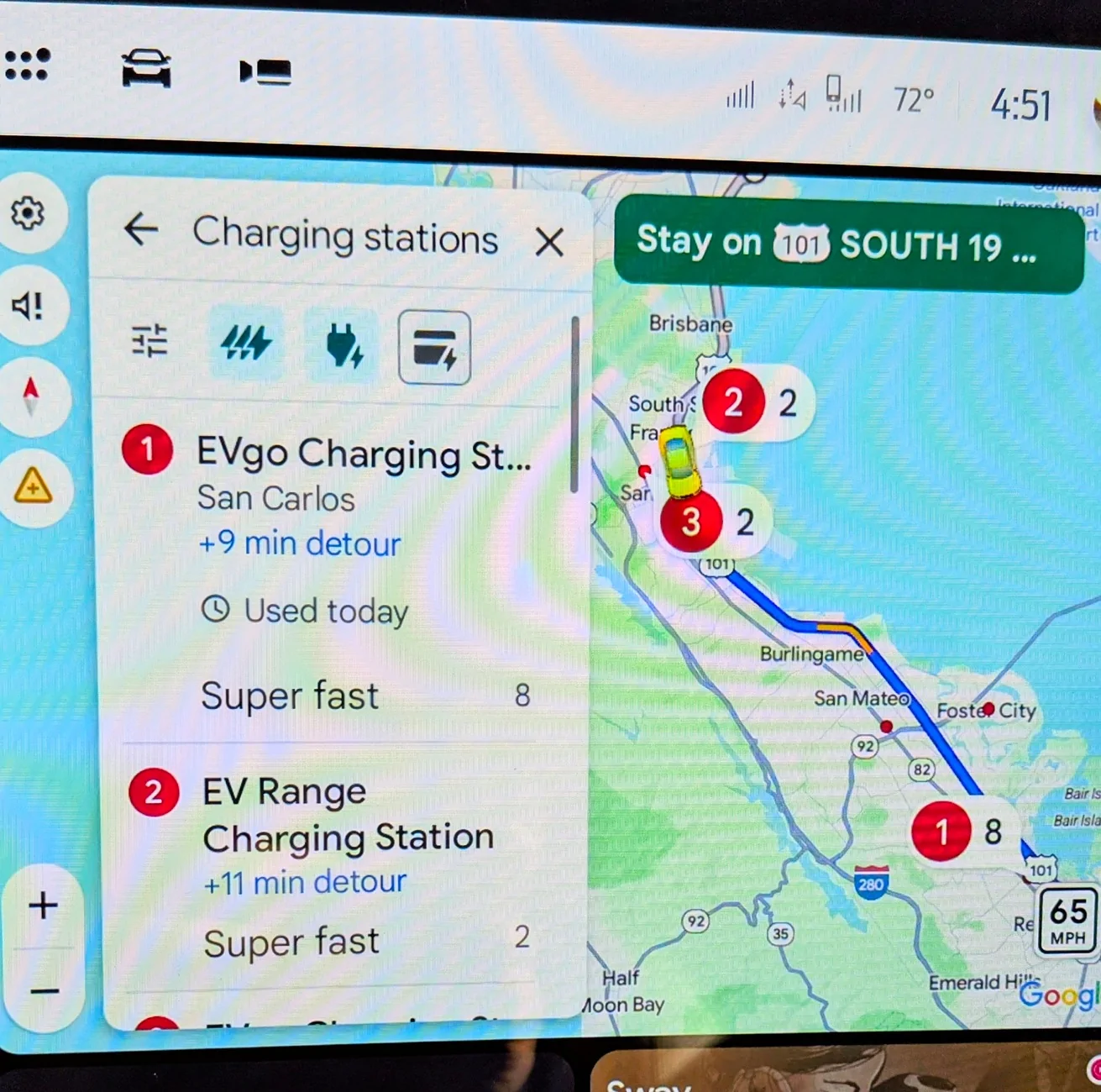
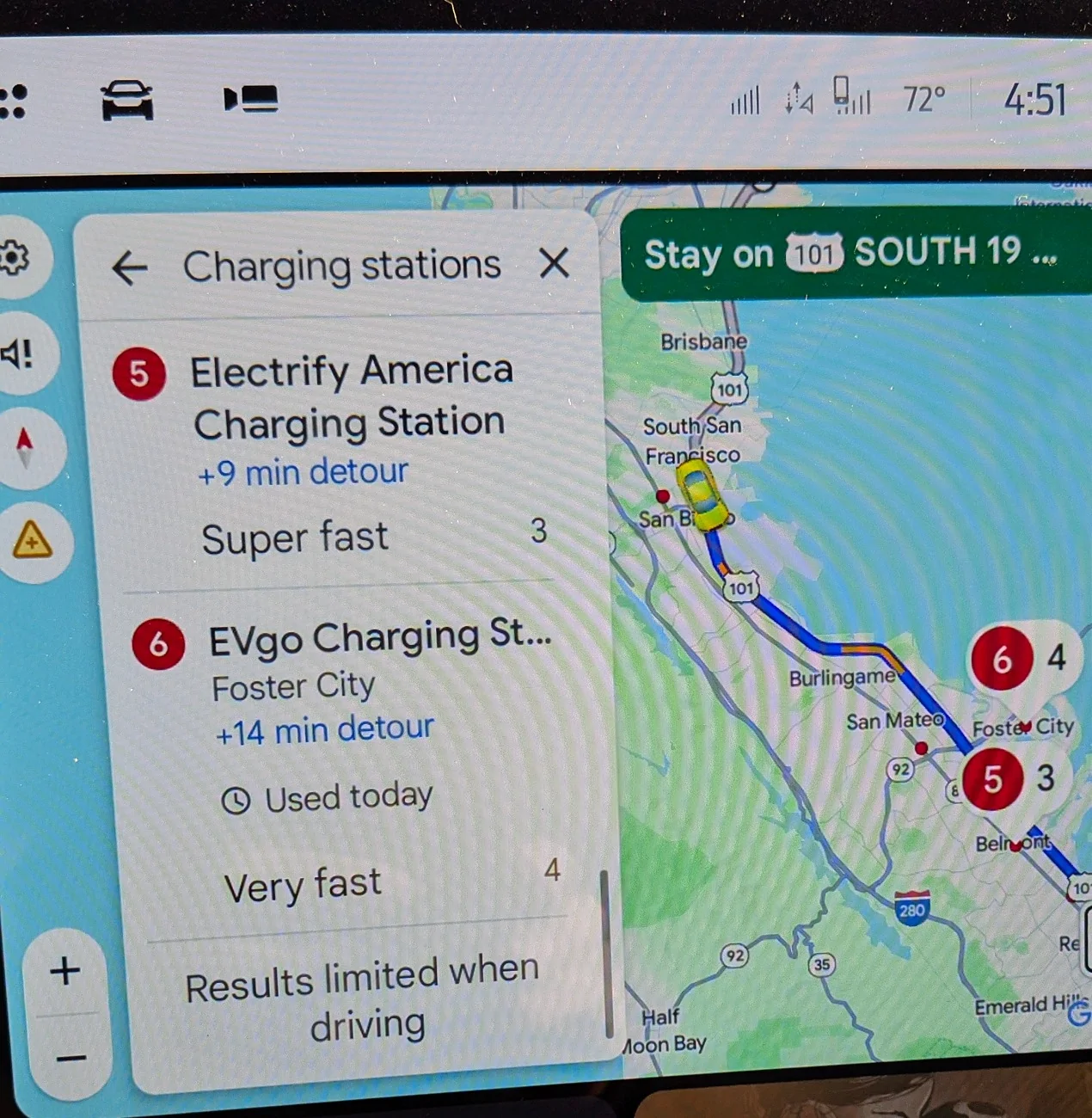
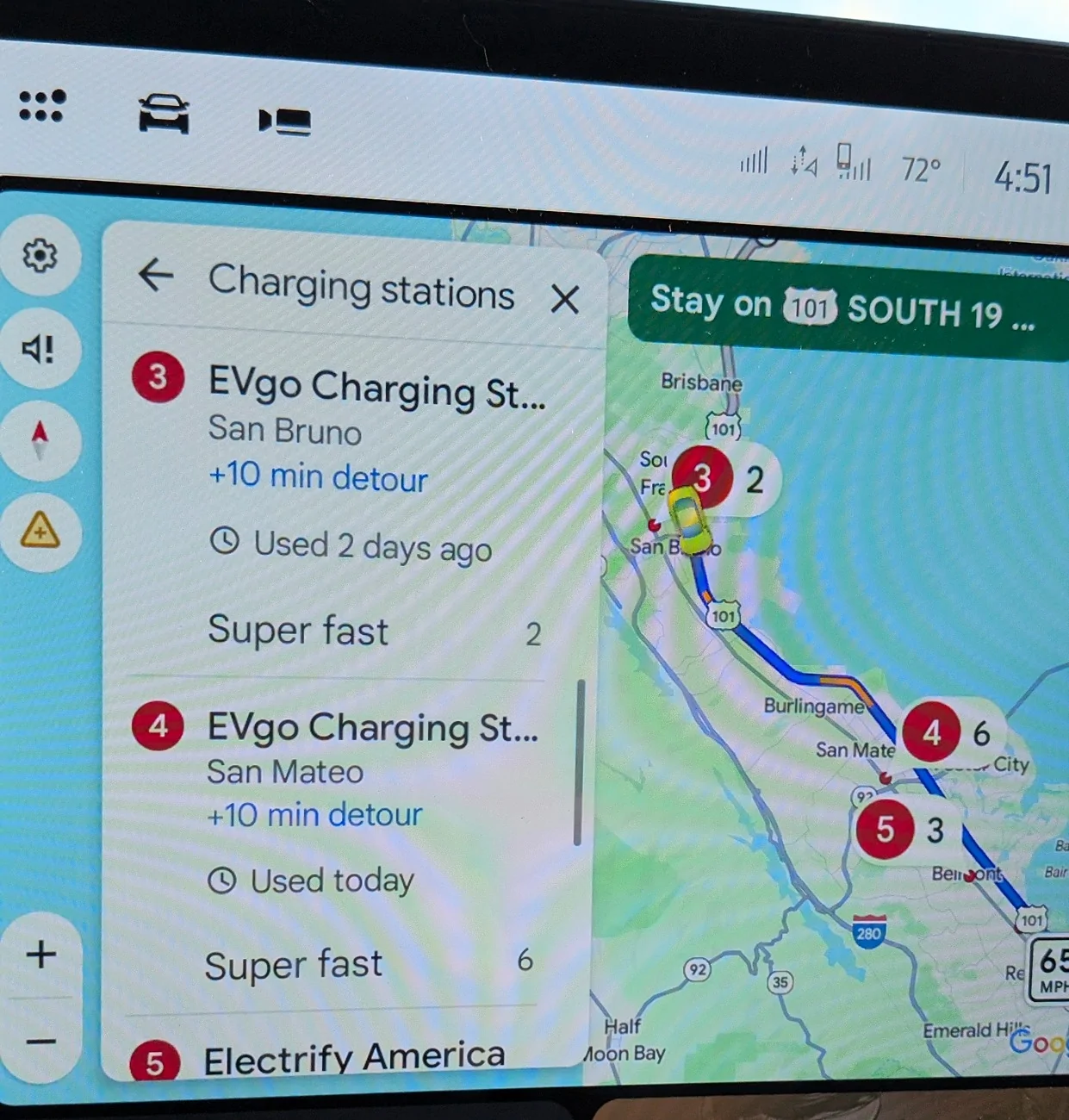
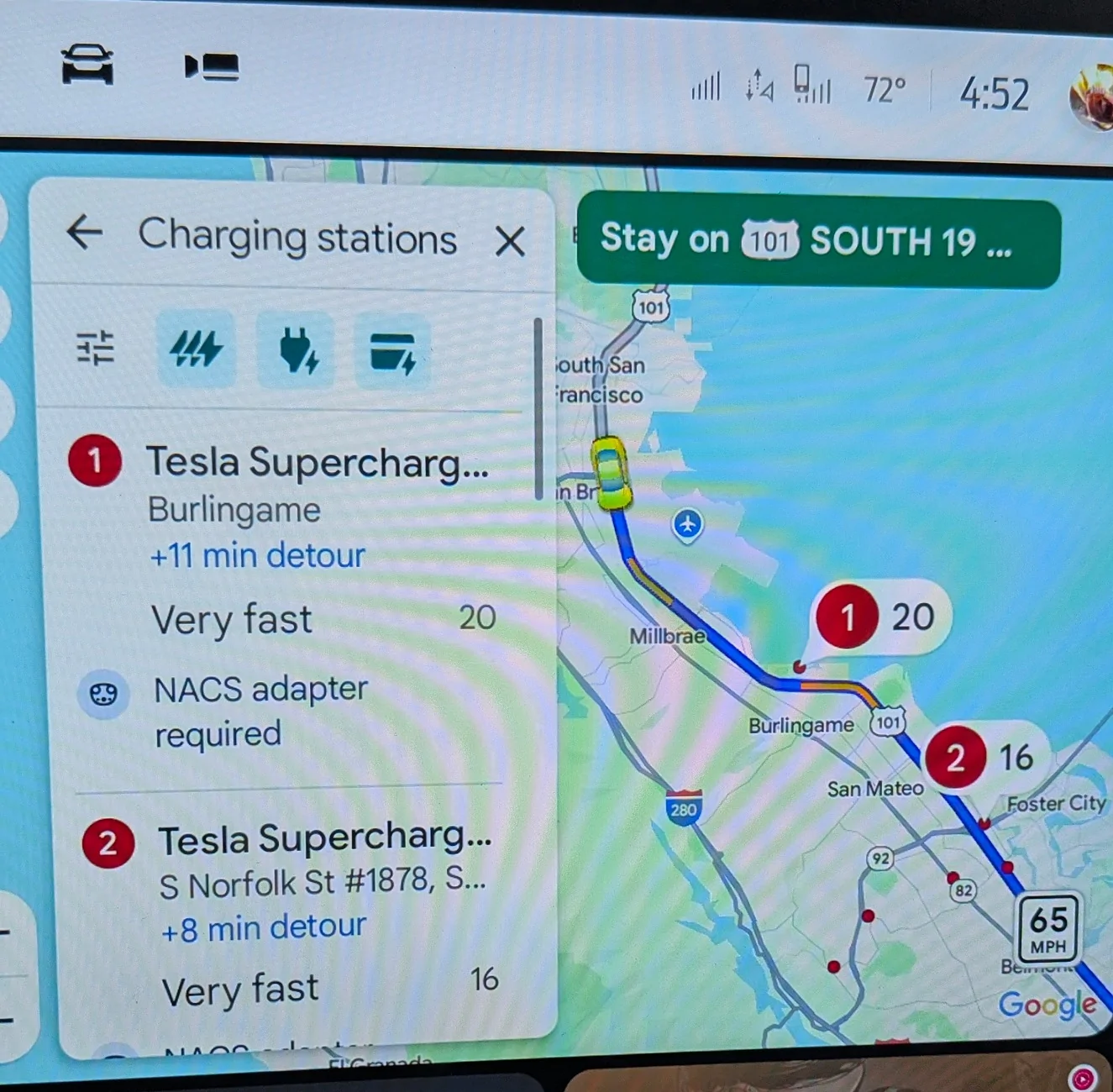
I think people haven't gotten how bad this problem has been. So, when i wasn't at home, i took some photos.

You see my route, you see no superchargers when set to all networks, but with the network forced to supercharger, there are a lot of them, they are closer to the freeway, they have more stalls.

Basically search for charger along route never shows the excellent superchargers, where i am. Google deprioritizes them.

Ford Mustang Mach-E Google Maps finally adds the key feature PXL_20250927_235156069~2


Ford Mustang Mach-E Google Maps finally adds the key feature PXL_20250927_235207060~2


Ford Mustang Mach-E Google Maps finally adds the key feature PXL_20250927_235200648~2


Ford Mustang Mach-E Google Maps finally adds the key feature PXL_20250927_235218466


ChrisO

Well-Known Member
Joined
Jan 11, 2025
Threads
9
Messages
998
Reaction score
992
Location
US
Vehicles
.
I think people haven't gotten how bad this problem has been. So, when i wasn't at home, i took some photos.

You see my route, you see no superchargers when set to all networks, but with the network forced to supercharger, there are a lot of them, they are closer to the freeway, they have more stalls.

Basically search for charger along route never shows the excellent superchargers, where i am. Google deprioritizes them.

PXL_20250927_235156069~2.webp


PXL_20250927_235207060~2.webp


PXL_20250927_235200648~2.webp


PXL_20250927_235218466.webp
I have a feeling it isn't about availability.
One thing that struck me about the numbering in your first screenshot is that 1 wasn't the closest. So, why first? And here is my guess, of the "Super Fast" it has the most stalls.

And that part of "Super fast" is important, I think. Telsa's are "Very fast".

Basically, the Telsa ones are 150 kWh and the Super Fast are 320 kWh.

I have a feeling Googles priorities are:
First, one has to understand as you search farther down the list while stopped, the map expands, so that is its "search area".

Then in that range I think the priorities are:
Charge speed (and it doesn't take into account that your car can't charge at that speed).
Number of stalls
Distance

I tried it in my area, not driving, and the Tesla charge stations did appear with all networks, as soon as I had scrolled down enough for them to be included in the search area, but after the ones that were Super Fast.
 

RickMachE

Well-Known Member
Joined
Jul 1, 2021
Threads
267
Messages
17,897
Reaction score
27,849
Location
SE MI
Vehicles
2022 Mach-E Premium 4X, 2022 Lightning Lariat ER
Country flag
I have a feeling it isn't about availability.
One thing that struck me about the numbering in your first screenshot is that 1 wasn't the closest. So, why first? And here is my guess, of the "Super Fast" it has the most stalls.

And that part of "Super fast" is important, I think. Telsa's are "Very fast".

Basically, the Telsa ones are 150 kWh and the Super Fast are 320 kWh.

I have a feeling Googles priorities are:
First, one has to understand as you search farther down the list while stopped, the map expands, so that is its "search area".

Then in that range I think the priorities are:
Charge speed (and it doesn't take into account that your car can't charge at that speed).
Number of stalls
Distance

I tried it in my area, not driving, and the Tesla charge stations did appear with all networks, as soon as I had scrolled down enough for them to be included in the search area, but after the ones that were Super Fast.
Tesla Superchargers are at least 250kW for non- Teslas. 150kW are not compatible.
 

Makiato

Active Member
First Name
Just bob
Joined
Jul 13, 2025
Threads
2
Messages
43
Reaction score
38
Location
Anacortes Wa
Vehicles
2021 LR AWD
Occupation
Travel Cargo, Guitar Storer, Architect
In Google Maps : Charging Stations, I see nothing but EVGo.

I tried EVGo a few times. Terrible experience. Small number of chargers. Half broken. Bad KW estimations for our MachE's (higher voltage). Google maps has nothing but EVGo, Best suggested reason is only EVGo has real-time busy status in maps.

Still true - I considered a screenshot. 30 mile radius of my house, nothing but EvGO. We have some very nice Superchargers, but also some nice EA stations, very near, within 2 miles.

NOW: there's a new button.

"Charging network"

Search -> Categories -> Charging stations: a select on the left side. It's like a credit card. I guess that means charging network.

You can now select your favorites. I select my favorite, Supercharger, and suddenly I see the 7 stations and probably 100 charging stalls within a short drive.

This "search -> charging stations" is the only interface available in Maps while I'm driving - so previously I had to pull off to do a search (um, yeah).

Now google maps is useful. It bundles together finding chargers, along route, charge estimation on arrival. I haven't tried multi-stop estimates (breaking a destination into stops, does it obey that filter), but we're getting REALLY CLOSE to a system as usable as Tesla Nav.

THANK YOU GOOGLE

THANK YOU FORD FOR CONTINUING TO SUPPORT ANDROID AUTO

Good info & Well presented. thanks.
 

valeriol

Well-Known Member
First Name
Valerio
Joined
Jun 12, 2021
Threads
16
Messages
182
Reaction score
148
Location
Jersey City
Vehicles
2021 Mustang Mach-E Premium RW
Country flag
I switched from iOS to Android for this very feature, as Google maps does in-car routing on the Mach-E better than iOS (IMO).
[…]
You can use Google Maps to navigate in Apple CarPlay.
 

AZBill

Well-Known Member
First Name
Bill
Joined
May 26, 2021
Threads
12
Messages
1,987
Reaction score
2,314
Location
Arizona
Vehicles
MME CA Route 1, Hummer EV SUT, Escalade IQ
Occupation
Retired
Country flag
Tesla Superchargers are at least 250kW for non- Teslas. 150kW are not compatible.
But even the 250kw are not Super Fast in Google, only Very Fast. There is a setting in google maps on my iPhone to sort by relevance or by distance. On my phone it changes the order for local Tesla stations based on that setting.

EVGO and EA with 350kw are Super fast
Tesla at 250kw is Very fast
EV Connect and Circle K near me at 180kw are Very fast
Shell Recharge at 50kw is Fast
Sponsored


Top