
dolvio
Well-Known Member
- Thread starter
- #17
When the battery is pre conditioning what does that really mean? I don’t level 2 charge at home and understand the battery will not do that before I drive to work either. I’m not sure what that all means.Yes, it does. And it will precondition the battery for when you get to the charger, which I don't think happens with Carplay.
markw314
Well-Known Member
- First Name
- Mark
- Joined
- Jun 27, 2023
- Threads
- 11
- Messages
- 127
- Reaction score
- 78
- Location
- Sterling, VA
- Vehicles
- 2023 Mach-E GT

There is generally an ideal temperature for the battery to charge at. Preconditioning preps the battery so that when you get to a DCFC, you can charge at the quickest rate possible for your charge level.When the battery is pre conditioning what does that really mean? I don’t level 2 charge at home and understand the battery will not do that before I drive to work either. I’m not sure what that all means.

HuntingPudel
Well-Known Member
- First Name
- Steve
- Joined
- Mar 23, 2021
- Threads
- 88
- Messages
- 12,927
- Reaction score
- 17,368
- Location
- Bay Area, CA
- Vehicles
- 2024 MME GT with Performance Upgrade, 1979 Fire-Am, 1972 K/5 Blazer
- Occupation
- Engineering
It will not until Ford changes the way they are asking for timing to the next charger. Currently they are asking for location, which Apple views as a privacy concern. If they simply ask "is the next destination a charger" and for ETA and let the phone figure that out based on traffic, there likely would be no issue.I wonder if car play google maps will eventually be able to do that.


HughJazzol
Well-Known Member
RickPosted often. Predictive Navigation.
When my wife drives my car with my key fob, she gets the warnings about a route, and all she does ia select profile button 2 on the door.
Do different seat profiles, pressing 1, 2 or 3, also remember navigation settings?
Mark813
Well-Known Member
It just came up and bothered me again today so I went through the process in the driveway when I got home. (Which it did not predict, it thought I was going to the gym. Maybe it was just nudging me)
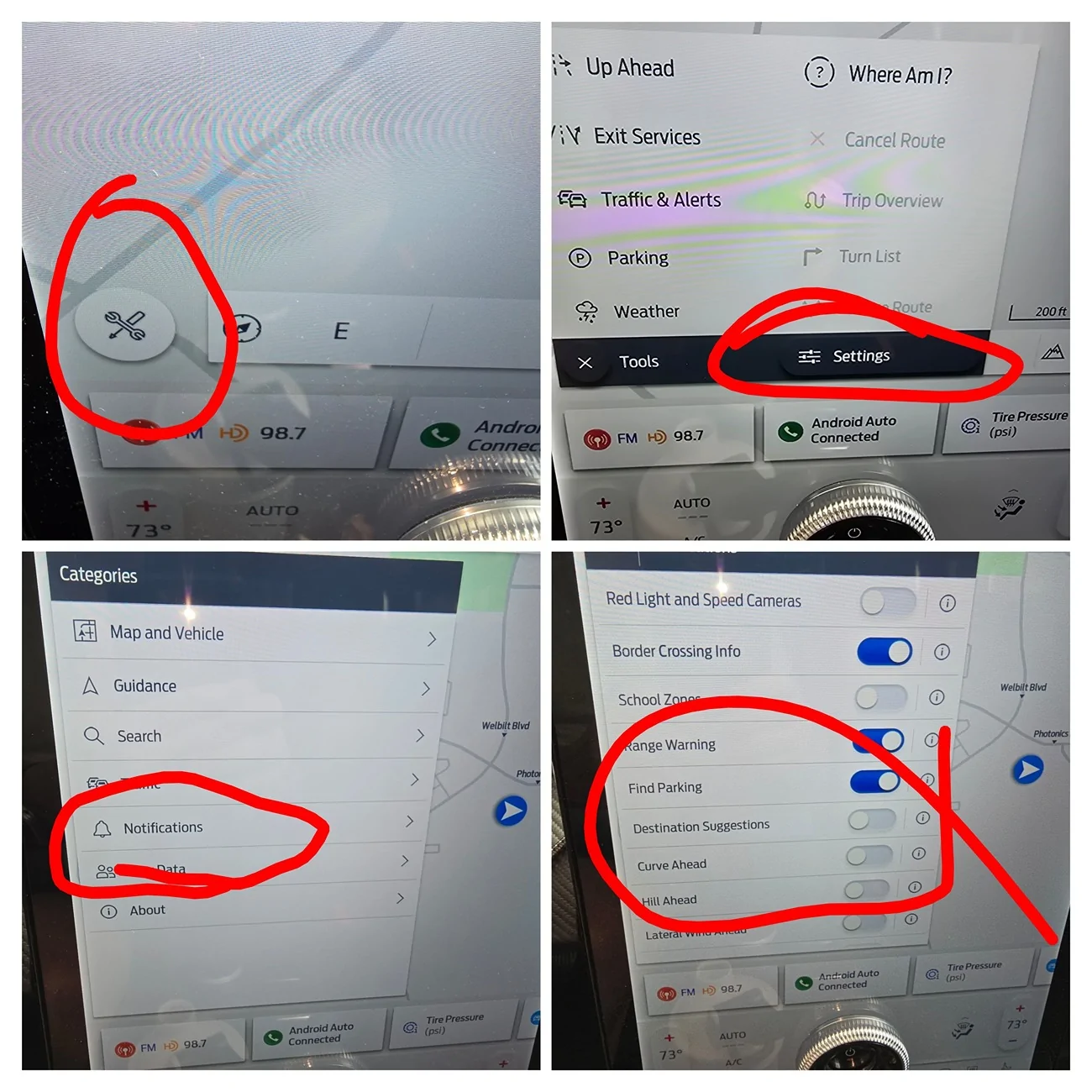
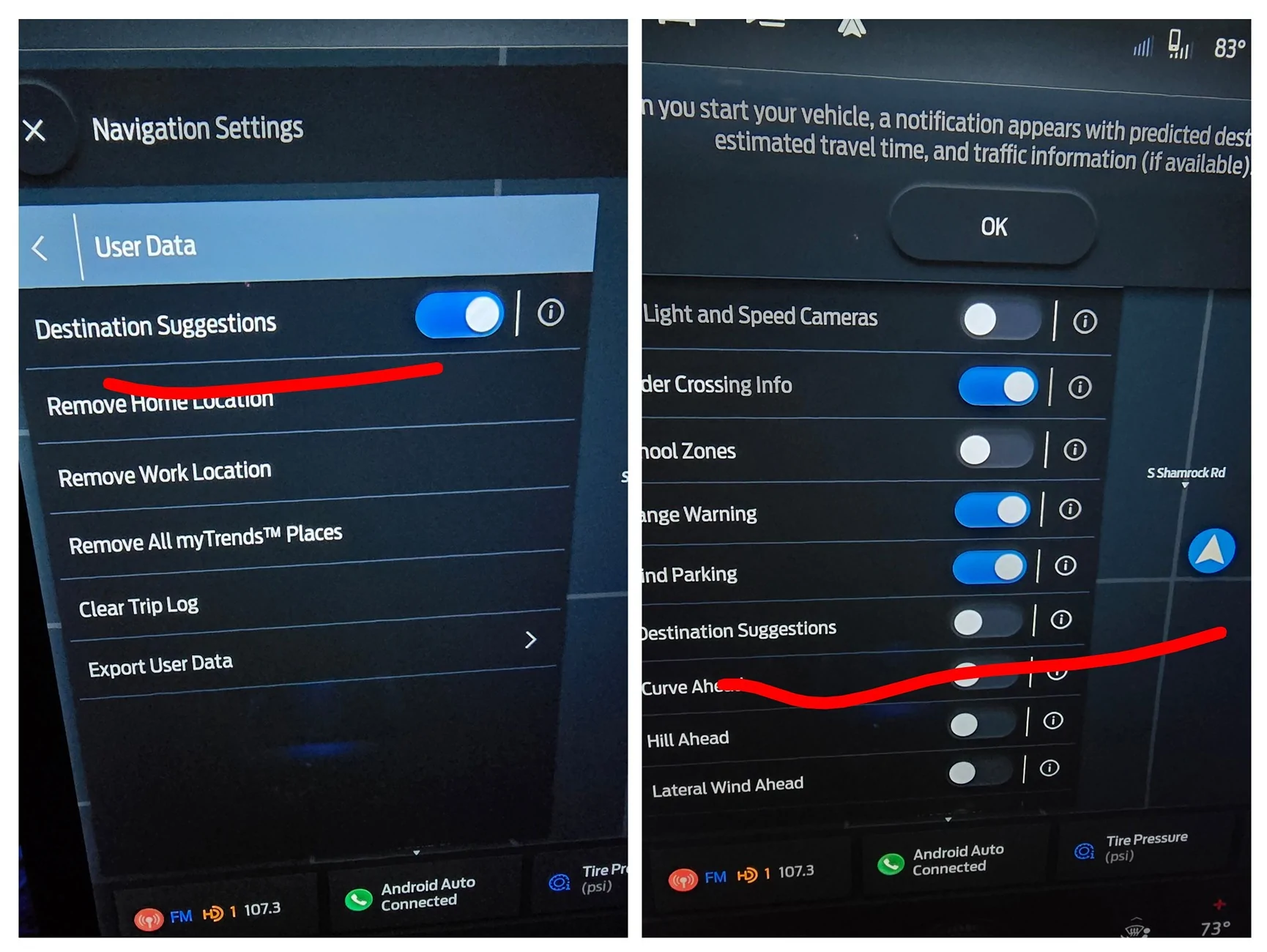
Find that wrench on Ford's navigation map, then look for settings then look for notifications then turn off destination suggestions.
I think if I was talking to one of the programmers I'd tell them it's not a notification. In the sense that if I turned a notification off would it still be predicting and running in the background without showing it.
Thanks for asking the question I finally turned it off LOL
Mark

Find that wrench on Ford's navigation map, then look for settings then look for notifications then turn off destination suggestions.
I think if I was talking to one of the programmers I'd tell them it's not a notification. In the sense that if I turned a notification off would it still be predicting and running in the background without showing it.
Thanks for asking the question I finally turned it off LOL
Mark

RickMachE
Well-Known Member
- Joined
- Jul 1, 2021
- Threads
- 267
- Messages
- 17,897
- Reaction score
- 27,848
- Location
- SE MI
- Vehicles
- 2022 Mach-E Premium 4X, 2022 Lightning Lariat ER
That is not a seat profile, it is a setting profile. Seats, mirrors, drive mode, settings...Rick
When my wife drives my car with my key fob, she gets the warnings about a route, and all she does ia select profile button 2 on the door.
Do different seat profiles, pressing 1, 2 or 3, also remember navigation settings?
dolvio
Well-Known Member
- Thread starter
- #23
It’s actually under user data.It just came up and bothered me again today so I went through the process in the driveway when I got home. (Which it did not predict, it thought I was going to the gym. Maybe it was just nudging me)
Find that wrench on Ford's navigation map, then look for settings then look for notifications then turn off destination suggestions.
I think if I was talking to one of the programmers I'd tell them it's not a notification. In the sense that if I turned a notification off would it still be predicting and running in the background without showing it.
Thanks for asking the question I finally turned it off LOL
Mark
HughJazzol
Well-Known Member
Thank you very much.That is not a seat profile, it is a setting profile. Seats, mirrors, drive mode, settings...
I thought I read that settings and profiles were linked to specific keyfobs??
So does she need to turn on the car, turn off destination suggestions, and then press #3 on the door pad?
And how does it know where one is going to tell you minutes to arrival???
Mark813
Well-Known Member
It’s actually under user data.
Edit: Damn there's two versions of destination predictions
The one under User Data is the collection of all the places you've been and when you start up it will show you possible destinations on the map. So you can click on Grandma's house if you want and start that navigation.
If you turn that off it's going to delete all the places you've been showing at start.
The one under Notifications is the one that pops up thinking where you're going to go and showing the turn-by-turn whether or not you asked for it.
Some of this info is based on a little i in a circle that the navigation
Thanks for your reply, I turned off both
Although from reading other threads on this it appears to turn itself back on periodically
Last edited:
RickMachE
Well-Known Member
- Joined
- Jul 1, 2021
- Threads
- 267
- Messages
- 17,897
- Reaction score
- 27,848
- Location
- SE MI
- Vehicles
- 2022 Mach-E Premium 4X, 2022 Lightning Lariat ER
Settings are tied to button, fob, and phone. Set them, then hold in memory button until it beeps to save them.Thank you very much.
I thought I read that settings and profiles were linked to specific keyfobs??
So does she need to turn on the car, turn off destination suggestions, and then press #3 on the door pad?
And how does it know where one is going to tell you minutes to arrival???
jh2021
Active Member
- First Name
- Jay
- Joined
- Feb 6, 2024
- Threads
- 1
- Messages
- 26
- Reaction score
- 6
- Location
- Illinois
- Vehicles
- 2021 Mustang Mach E
- Occupation
- Retired
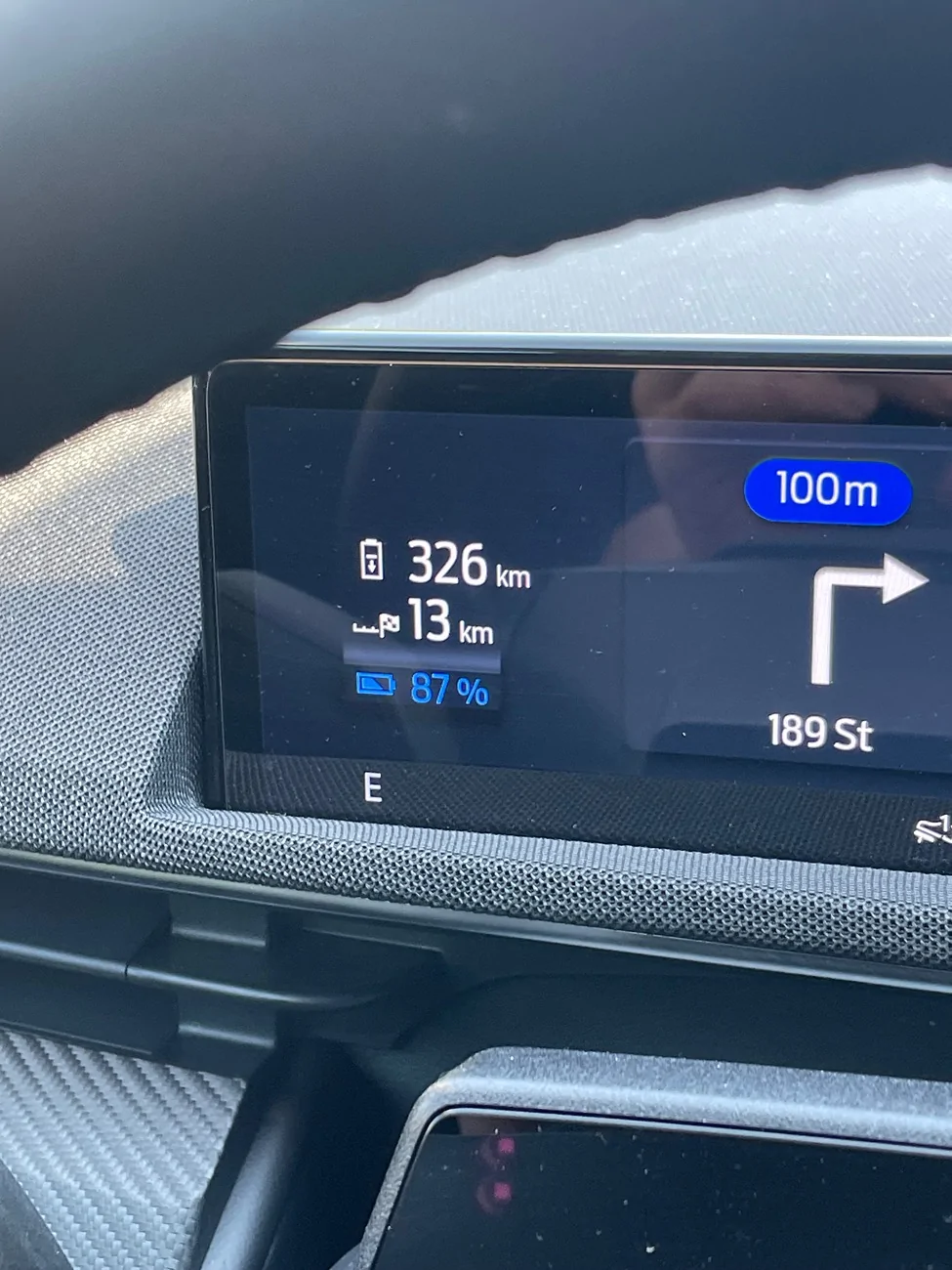
I followed the directions on it once just to see where it though I was planning to go. Took me about 2 miles aways m home and then guided me back home.Okay I’m baffled why this keeps happening. I don’t use any navigation in the car other than google car play. Never the cars own navigation.
More often than not I get in and turn on the car and I’m being navigated someplace. I don’t get it. I have to switch through screens and cancel the route.
Can anyone explain what’s happening here?

Firefly Ship Works
Well-Known Member
Mine ('25 MME GT) turns itself back on every time I turn it off. All I have to do is close the Navigation Settings after turning Destination Suggestions off. I can immediately go back into User Data and it's turned back on again.Edit: Damn there's two versions of destination predictions
The one under User Data is the collection of all the places you've been and when you start up it will show you possible destinations on the map. So you can click on Grandma's house if you want and start that navigation.
If you turn that off it's going to delete all the places you've been showing at start.
The one under Notifications is the one that pops up thinking where you're going to go and showing the turn-by-turn whether or not you asked for it.
Some of this info is based on a little i in a circle that the navigation
Thanks for your reply, I turned off both
Although from reading other threads on this it appears to turn itself back on periodically


Sponsored


