How to add multiple stops to trip planner? ?

DaMeatMan

Well-Known Member
First Name
Joe
Joined
Feb 26, 2021
Threads
46
Messages
497
Reaction score
1,191
Location
Toronto, ON, Canada
Vehicles
Mustang Mach-E Premium AWD Extended Range Battery
Country flag
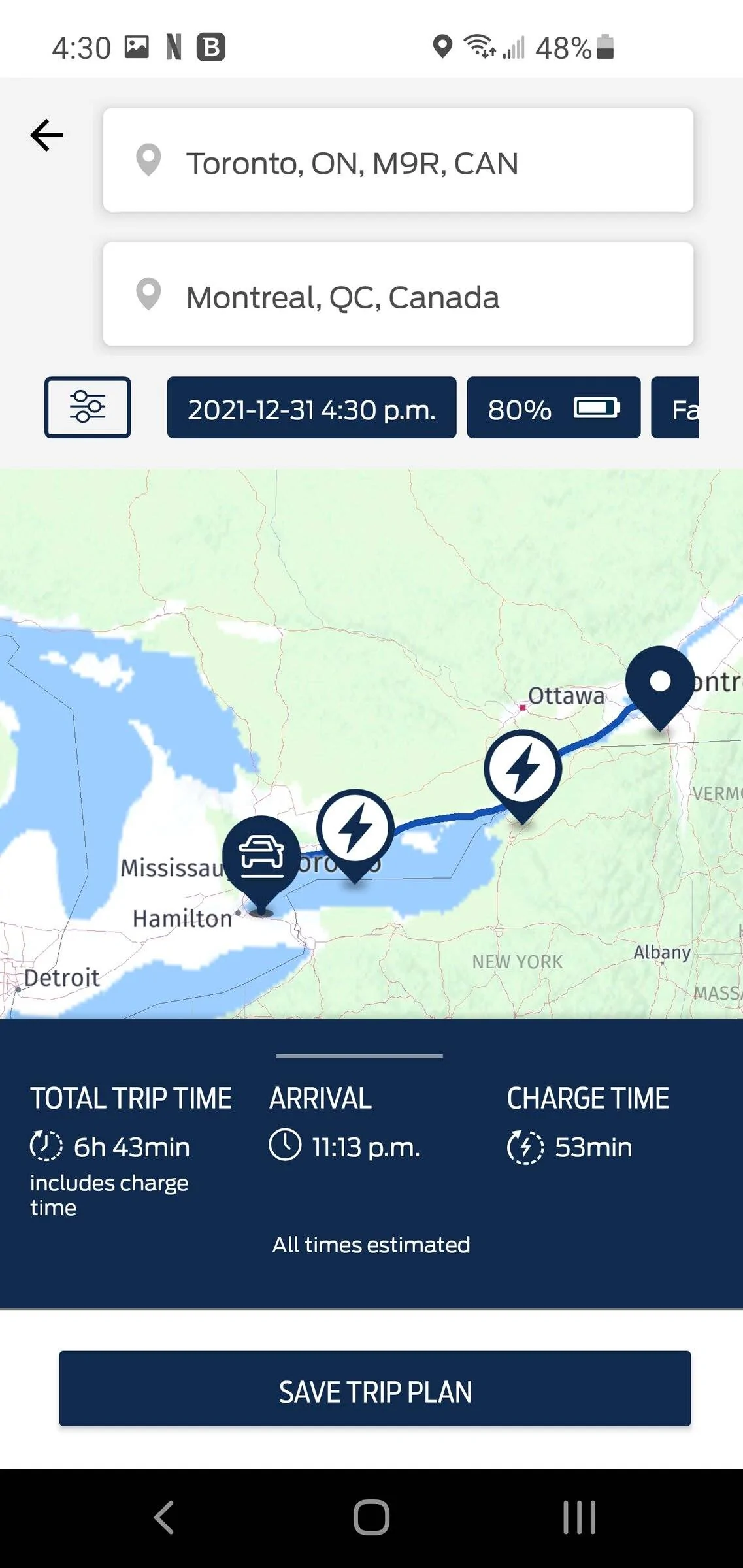
Maybe I'm missing something incredibly silly and obvious, but is there a way to add multiple stops to the trip planner on the Ford Pass app?

Right now as far as I can tell, you can basically supply only two inputs, your start point, and your end point. But what if I was on longer journey and wanted to plan out multiple stops along the way based on estimated energy consumption to plan ideal charging stops based on nearby amenities?

As it stands right now, it's not very useful to me as a "trip planner" when I am limited to basically a single destination.

I do see that if I add a destination outside the range of the vehicle it auto adds pit stops for charging, but I would like to add multiple stops manually and upload to vehicle rather than just having it randomly select stops based on charging alone without concern for nearby amenities etc..

Also, yes I'm fully aware I can use ABRP to do the same. But I would like to know if I can do it on Ford Pass app, because I like the ability to upload the trip to vehicle ahead of time in case Android Auto goes wonky, as it sometimes does.

Ford Mustang Mach-E How to add multiple stops to trip planner? ? Screenshot_20211231-163053_FordPass


Ford Mustang Mach-E How to add multiple stops to trip planner? ? Screenshot_20211231-163043_FordPass
Sponsored


ChasingCoral

Well-Known Member
First Name
Mark
Joined
Feb 3, 2020
Threads
502
Messages
14,306
Reaction score
28,655
Location
Maryland
Vehicles
2021 GB E4X FE, 2022 F-150 Lightning Lariat ER
Occupation
Retired oceanographer
Country flag
Maybe I'm missing something incredibly silly and obvious, but is there a way to add multiple stops to the trip planner on the Ford Pass app?

Right now as far as I can tell, you can basically supply only two inputs, your start point, and your end point. But what if I was on longer journey and wanted to plan out multiple stops along the way based on estimated energy consumption to plan ideal charging stops based on nearby amenities?

As it stands right now, it's not very useful to me as a "trip planner" when I am limited to basically a single destination.

I do see that if I add a destination outside the range of the vehicle it auto adds pit stops for charging, but I would like to add multiple stops manually and upload to vehicle rather than just having it randomly select stops based on charging alone without concern for nearby amenities etc..

Also, yes I'm fully aware I can use ABRP to do the same. But I would like to know if I can do it on Ford Pass app, because I like the ability to upload the trip to vehicle ahead of time in case Android Auto goes wonky, as it sometimes does.
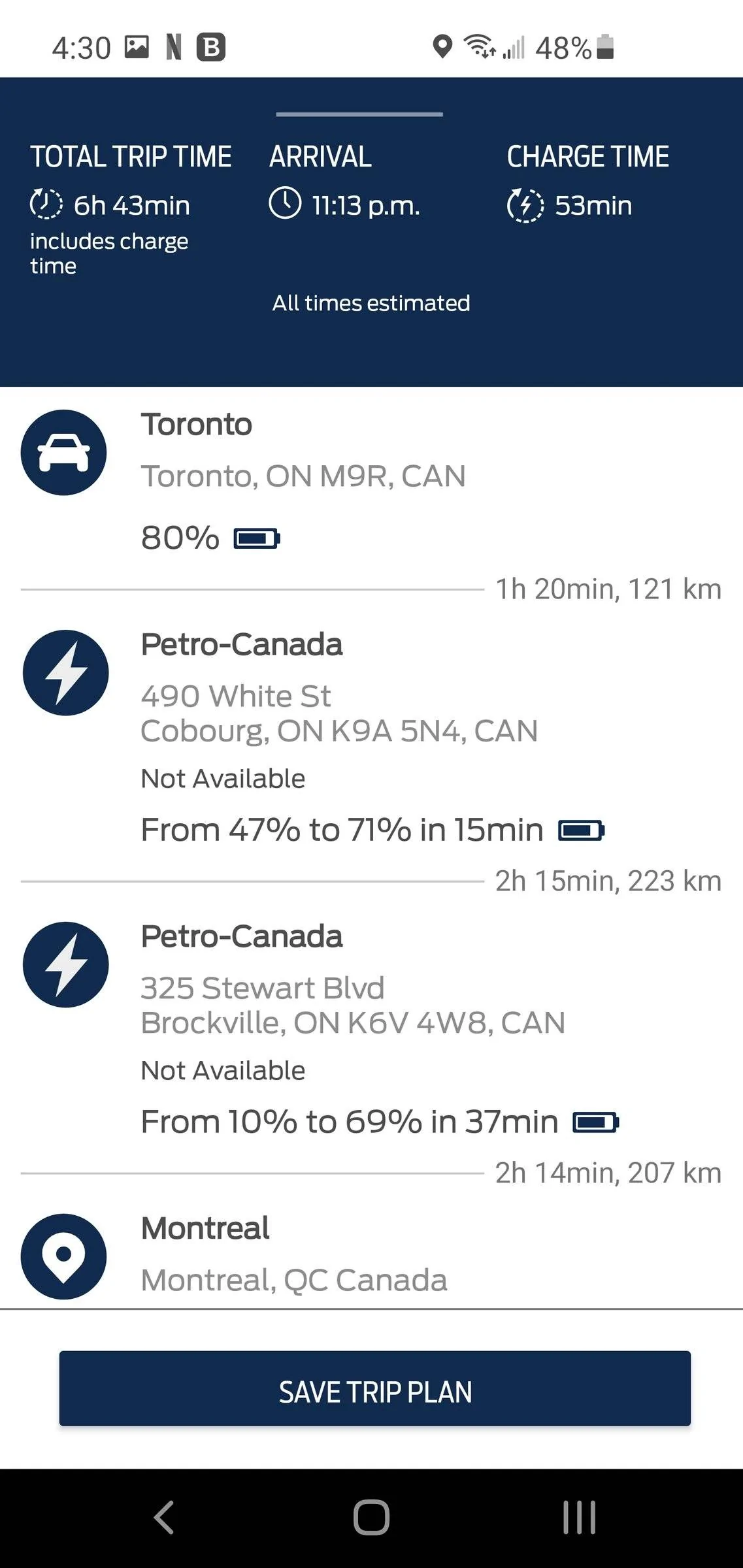
Screenshot_20211231-163053_FordPass.jpg


Screenshot_20211231-163043_FordPass.jpg
You are absolutely right. If you want multiple stops, you can plan each one as a separate leg. Otherwise, use something else like ABRP.


ChasingCoral

Well-Known Member
First Name
Mark
Joined
Feb 3, 2020
Threads
502
Messages
14,306
Reaction score
28,655
Location
Maryland
Vehicles
2021 GB E4X FE, 2022 F-150 Lightning Lariat ER
Occupation
Retired oceanographer
Country flag

timbop

Well-Known Member
First Name
Tim
Joined
Jan 3, 2020
Threads
65
Messages
6,832
Reaction score
14,036
Location
New Jersey
Vehicles
Solar powered 2021 MME ER RWD (CA RT1)
Occupation
Software Engineer
Country flag
Yeah, the video will show you how to add multiple destinations. @timbop and @ChasingCoral must be new here :p
Nope, just pointing him to the best tool for the job! Ford's NAV doesn't distinguish DCFC power levels, so will send you to a 50kw charger instead of a 150kw one that might be 2 miles further.

ABRP has much more comprehensive capabilities.
 

RickMachE

Well-Known Member
Joined
Jul 1, 2021
Threads
267
Messages
17,912
Reaction score
27,889
Location
SE MI
Vehicles
2022 Mach-E Premium 4X, 2022 Lightning Lariat ER
Country flag
The fact that this can be done in the vehicle, but not in the app, is a failing. I don't plan my trips in my car, I plan them in my home office. For the holidays (took our F-150), I used the GasBuddy Heat Map to see where the low prices were on my route, then put the route into Google Maps, then sent it to my phone. If I had Android Auto and Ford Navigation, it would have then been on my car's screen.
 
OP
OP
DaMeatMan

DaMeatMan

Well-Known Member
First Name
Joe
Joined
Feb 26, 2021
Threads
46
Messages
497
Reaction score
1,191
Location
Toronto, ON, Canada
Vehicles
Mustang Mach-E Premium AWD Extended Range Battery
Country flag
The fact that this can be done in the vehicle, but not in the app, is a failing. I don't plan my trips in my car, I plan them in my home office. For the holidays (took our F-150), I used the GasBuddy Heat Map to see where the low prices were on my route, then put the route into Google Maps, then sent it to my phone. If I had Android Auto and Ford Navigation, it would have then been on my car's screen.
I was thinking exactly the same thing. The fact that the mobile app has a more crippled version of what's available in the car sounds pretty counterintuitive. The whole value proposition of a mobile app should be that you are able to do this sort of planning from outside the vehicle, or the comfort of your home and then easily upload to vehicle.

And again to those suggesting ABRP, as i pointed out in the opening post I'm fully aware of ABRP and it's capabilities.

What I was trying to asses is what the Ford Pass app is actually capable of, particularly when you have the very convenient ability to upload a plan to the vehicle ahead of time without actually being in the vehicle. I like this particularly as a backup.

I primarily use Google maps for navigation because nothing else comes close, and for longer trips I will plan with ABRP and then share and export the trip to Google maps on my phone and then navigate via Android Auto. However Android Auto on the MME has a tendency to be a bit flaky and craps out at times when you least expect it. With that said, firing up the internal navigation with a preloaded trip is just a few clicks away and can be done easily even while driving instead of pulling over and screwing around with an infotainment reboot.
 

TheVirtualTim

Well-Known Member
First Name
Tim
Joined
Oct 11, 2020
Threads
26
Messages
1,366
Reaction score
2,469
Location
Dearborn, MI
Vehicles
‘21 Mach-E First Edition, ‘23 Mach-E GT Performance
Country flag
FordPass -> Map -> Trip Planner (aka "Power my Trip") -> Create New Trip Plan

Enter start & destination. It will AUTOMATICALLY add charging stops (If needed) based state of charge when you start the trip and predicted consumption ... and it's actually pretty good at this.

Once it calculates the trip, you'll see a map overview of the route with charge stops. Below the map it will show "Total Trip Time", "Arrival Time" (that's based on the departure date & time which defaults to the current time but you can set it for a future date & time) and the total amount of "Charge Time" on the trip.

If you don't like any of the selected stops, expand the details by tapping the up-arrow (where it showed the trip summary). Pick a charge stop. It'll expand to show details of that stop. Then pick "Change Charge station" and this opens a map (you can zoom out) to show other charging stations that might be nearby.

You can do the same thing from the car. I did a write-up about it as well as a video. You can find it here: https://www.macheforum.com/site/thr...d-loving-the-sync-4a-navigation-system.12688/

What it does NOT do ... is let you filter for chargers near food, shopping, lodging, etc. The best app for that is PlugShare ... and while PlugShare has a trip-planner ... it's not the best at trip planning.

My strategy for my road-trip -- Michigan to Florida and back (I'm still in Florida) is to let it plan the whole trip (as if I were going to drive straight through without stopping to sleep) but then use PlugShare to locate hotels with Level 2 charging along the route. Then I edit the route to add the hotel as a stop.

Since the car wont necessarily know the hotel is also a charging stop ... it will automatically offer to recalculate charge stops the following morning -- based on the updated state of charge you gave it overnight at the hotel.

I really was pretty impressed with the built-in trip-planner. I did not expect it to be this good.

I see that ABRP updated their app. Their app was fine for me UNTIL I opted in to pay for 1 month of "Premium" and use the real-time vehicle data. The app had terrible performance problems and ate through the phone battery life crazy fast (clearly it needed some performance optimization). ABRP is another app that's great for planning the route based on origin/destination but not the best for working out overnight lodging stops that have Level 2 chargers. I'll have to download the update and give it another try to see if they've improved the performance & phone-battery power consumption issues.
Sponsored


Top