NH_Pony_Boy
Well-Known Member
- First Name
- Michael
- Joined
- Feb 7, 2025
- Threads
- 6
- Messages
- 51
- Reaction score
- 69
- Location
- New Boston
- Vehicles
- 2024 Mustang Mach-E GT
- Occupation
- Retired Air Traffic Controller
- Thread starter
- #1
Coming from a Model S, it was so easy to open the app and slide the charge limit left and right.
You could do the same from the car screen.
I have my Mach E set to charge at 10 PM to 80%.
I wanted to charge it this afternoon to 90% and I could not find the best way to do so.
I tried hitting start on the main screen of the Ford Pass app. That didn't seem to take.
Then it looked from inside the car like it was charging but the limit line was still at 80%. There is no feedback inside the car as to what is going on.
I finally deleted the scheduled charging at home.
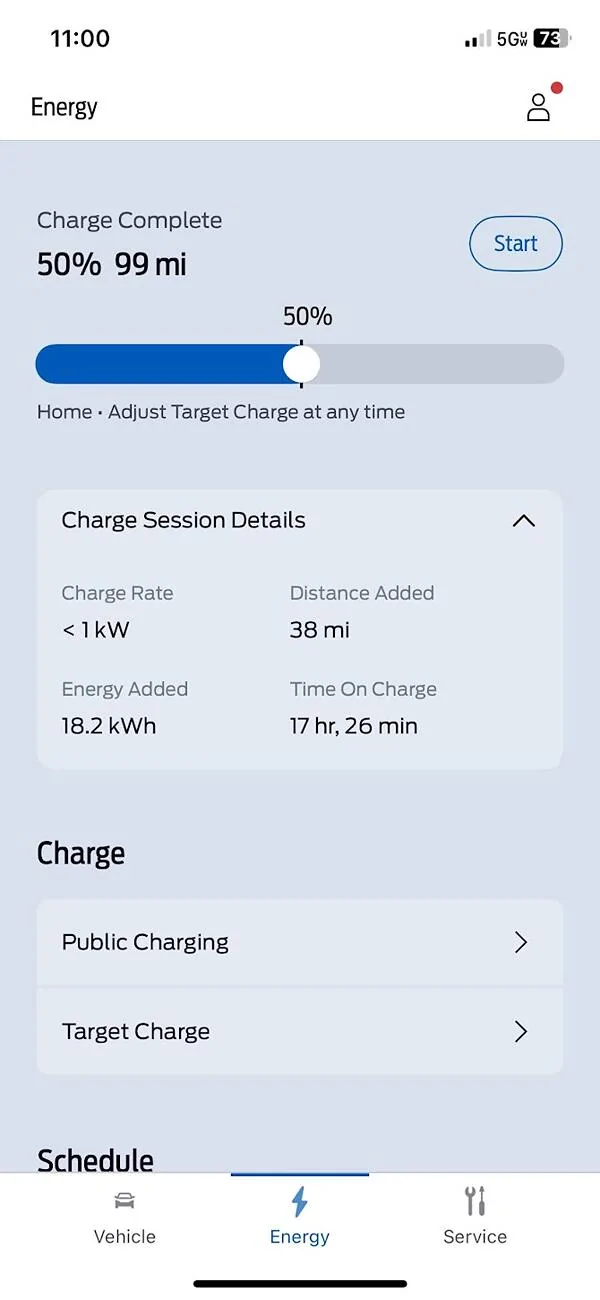
It shows, in the app, it is charging to 90% at 6.5 kW. Only 4 miles in 21 minutes. I am using the same 30 amp level two charger I used with my Tesla.
That seems slow.
Any tips on changing charging on the fly?
What about the slow charging?
You could do the same from the car screen.
I have my Mach E set to charge at 10 PM to 80%.
I wanted to charge it this afternoon to 90% and I could not find the best way to do so.
I tried hitting start on the main screen of the Ford Pass app. That didn't seem to take.
Then it looked from inside the car like it was charging but the limit line was still at 80%. There is no feedback inside the car as to what is going on.
I finally deleted the scheduled charging at home.
It shows, in the app, it is charging to 90% at 6.5 kW. Only 4 miles in 21 minutes. I am using the same 30 amp level two charger I used with my Tesla.
That seems slow.
Any tips on changing charging on the fly?
What about the slow charging?
Sponsored