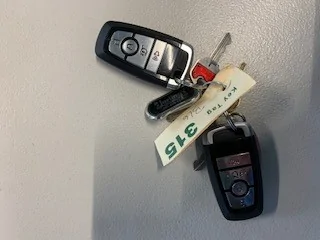
I now have 2 programmed Fobs. Can I program my Own for additional?

mfb

Member
First Name
Mike
Joined
Sep 25, 2020
Threads
1
Messages
9
Reaction score
14
Location
Wisconsin
Vehicles
2017 C-Max Energi (2), Red Premium ER RWD MME
Country flag
I used the procedure to successfully program a third fob (from carsandtrucksremotes.com) for my Premium ER RWD. It took me many tries to get it right. The timing has to be precise. I used a stopwatch.
Sponsored
 
OP
OP
Nklem

Nklem

Well-Known Member
First Name
Norm
Joined
May 20, 2021
Threads
105
Messages
1,318
Reaction score
1,699
Location
Coast of Maine
Vehicles
Subaru Solterra
Occupation
Mechanical Engineer
Country flag
Please keep me posted on your programming, hopefully you see the door code and you are just one button press away!
Here is the procedure in Video. Just add the third step.


and they three step method, this is what I did…..

 
OP
OP
Nklem

Nklem

Well-Known Member
First Name
Norm
Joined
May 20, 2021
Threads
105
Messages
1,318
Reaction score
1,699
Location
Coast of Maine
Vehicles
Subaru Solterra
Occupation
Mechanical Engineer
Country flag
I just programmed a third fob (the one from the previous ebay link for $31) with no issues. Worked on the first try!
Awesome!
 

Scarpia

Well-Known Member
First Name
Mike
Joined
Jan 5, 2021
Threads
3
Messages
566
Reaction score
918
Location
US
Vehicles
Infinite Blue Premium, Standard Range, RWD
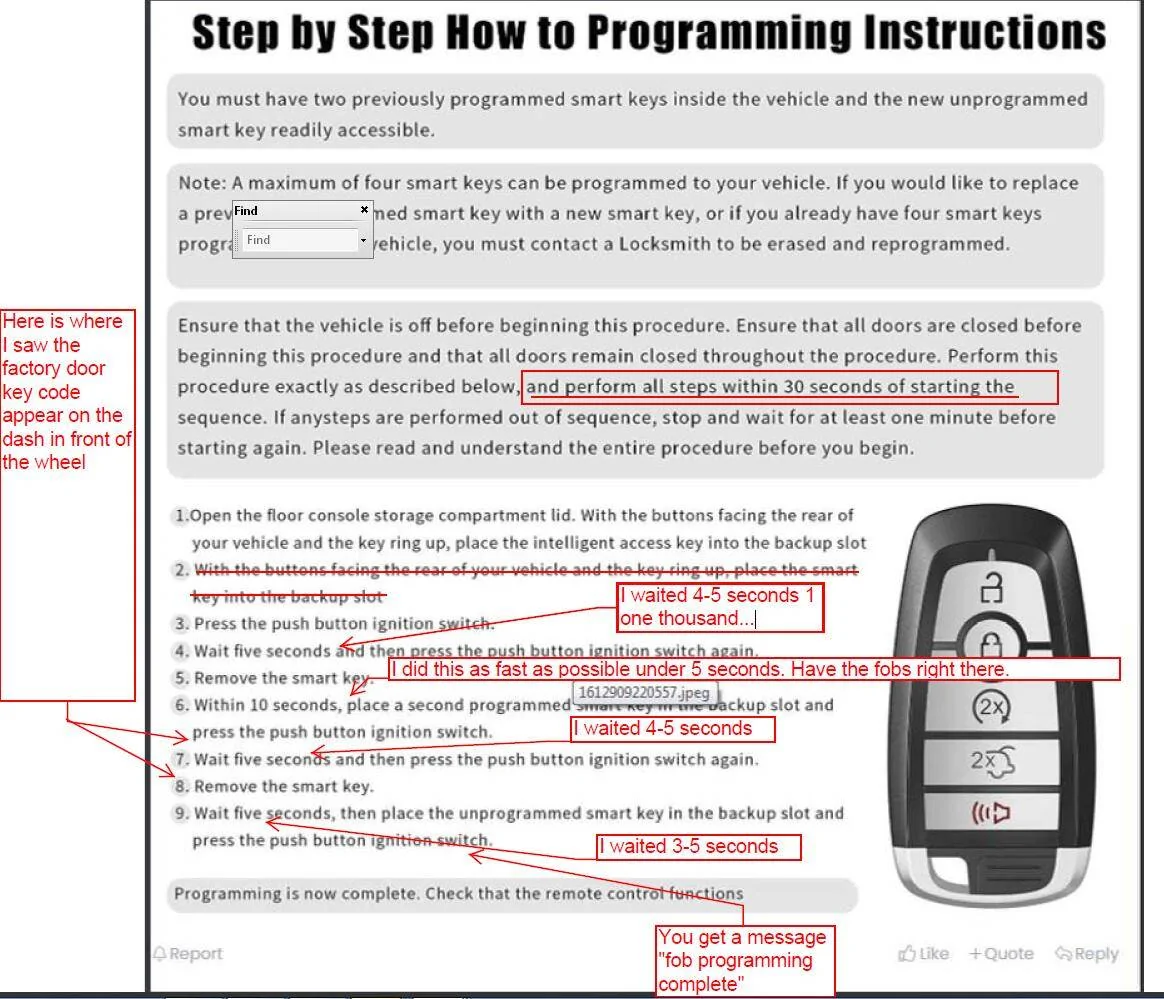
I was finally able to get my third key programmed, thanks to the second video posted by @Nklem in Post #33 above.

The problem was one thing that was not clear to me in the written instructions that was made crystal clear in the video.
Ford Mustang Mach-E I now have 2 programmed Fobs.  Can I program my Own for additional? 1626632633557

Step 1: "...place the intelligent access key into the backup slot." (emphasis mine)

This was the problem for me. There are three "intelligent access keys". To be very clear, Step 1 should say "place one of the programmed intelligent access keys into the backup slot".
The next step should say, "place the second programmed intelligent access key into the backup slot".
The final step correctly says, "place the unprogrammed smart key in the backup slot".

For step one, I was putting the unprogrammed key in the slot. That step was not specific enough about which of the three keys to be using.

As I said in a previous post, I also thought it odd that the instructions call the keys "intelligent access keys" and "smart keys" interchangeably. Pick one term and use it consistently. Primary rule in writing instructions is to be very precise in terminology.

Many thanks to @Nklem and others in the thread for their help!! I was almost ready to give up.


OP
OP
Nklem

Nklem

Well-Known Member
First Name
Norm
Joined
May 20, 2021
Threads
105
Messages
1,318
Reaction score
1,699
Location
Coast of Maine
Vehicles
Subaru Solterra
Occupation
Mechanical Engineer
Country flag
I am glad it worked out. $32 For a third Key fob fully programmed.
 

jnthn98

Well-Known Member
Joined
Apr 28, 2021
Threads
19
Messages
79
Reaction score
33
Location
California
Vehicles
2021 Mustang Mach-E
Country flag
I was finally able to get my third key programmed, thanks to the second video posted by @Nklem in Post #33 above.

The problem was one thing that was not clear to me in the written instructions that was made crystal clear in the video.
1626632633557.png

Step 1: "...place the intelligent access key into the backup slot." (emphasis mine)

This was the problem for me. There are three "intelligent access keys". To be very clear, Step 1 should say "place one of the programmed intelligent access keys into the backup slot".
The next step should say, "place the second programmed intelligent access key into the backup slot".
The final step correctly says, "place the unprogrammed smart key in the backup slot".

For step one, I was putting the unprogrammed key in the slot. That step was not specific enough about which of the three keys to be using.

As I said in a previous post, I also thought it odd that the instructions call the keys "intelligent access keys" and "smart keys" interchangeably. Pick one term and use it consistently. Primary rule in writing instructions is to be very precise in terminology.

Many thanks to @Nklem and others in the thread for their help!! I was almost ready to give up.
Thanks @Scarpia for elaboration on the instructions and @Nklem for the Ebay link. I was able program the ~$30 ebay fob on first try. Too bad the second fob had to go through the dealership, which costed a whole lot more.
 

SWO

Well-Known Member
Joined
Aug 28, 2021
Threads
21
Messages
2,222
Reaction score
2,802
Location
MD, USA
Vehicles
2022 Mach E GT, 2021 Escape PHEV, 2019 F-150
Country flag
Probably stating the obvious here, but those cheap keyfobs are chinese knock-offs. If you're fine with that, great. Otherwise, I've found genuine ones for less than $100 if you search.
 

EELinneman

Well-Known Member
First Name
Eric
Joined
May 4, 2021
Threads
96
Messages
1,482
Reaction score
2,423
Location
Littleton, CO
Vehicles
Mustang Mach-E GT Performance Edition
Occupation
Sr. Dir Cloud & Projects
Country flag
I now have two fobs. The OEM and the Ebay one that was programmed by my dealer today. Now that I have two, can I program my own from within the car? Everyone says you need two Admin fobs to add an additional. I do not know if that is true for the Mach E. Any experience? Let me know. Thank you in advance...

fobs.jpg
Yes, you can. You have a limit of 4 fobs that can be tied to the car at a time. Car & Trucks remote has genuine Ford fobs a lot cheaper than from your dealer. Someone here has posted instructions which were helpful. I have 4 programmed for my car.
 

bruceski88

Well-Known Member
First Name
Bruce
Joined
Aug 12, 2020
Threads
6
Messages
279
Reaction score
321
Location
CA
Vehicles
Mach e
Occupation
Retired Engineer
Country flag
I now have two fobs. The OEM and the Ebay one that was programmed by my dealer today. Now that I have two, can I program my own from within the car? Everyone says you need two Admin fobs to add an additional. I do not know if that is true for the Mach E. Any experience? Let me know. Thank you in advance...

fobs.webp
I did, instructions were posted somewhere on the forum. Read instructions for last steps carefully as I had to try several times.
 

Caulk-E

Well-Known Member
First Name
Tommy
Joined
Mar 27, 2022
Threads
3
Messages
147
Reaction score
167
Location
Bay Area
Vehicles
2022 Mustang Mach-E Premium ER RWD
Country flag
What a great thread! I’ve reviewed the procedure to program a third FOB when you have two original keys. My question is what if the FOB is already programmed? I have an extra factory programmed fob from a new Mach-E I’d like to transfer to another Mach-E. The instructions say new unprogrammed fob. Can I follow this procedure to program an already programmed FOB?
 

SummerlinBob

Active Member
First Name
Robert
Joined
Jul 14, 2022
Threads
1
Messages
33
Reaction score
45
Location
Las Vegas, NV
Vehicles
2023 Nite Pony Premium RWD ER
Occupation
Retired
Country flag
I followed the instructions and had several "Key Not Programmed" notifications. I removed the inserted metal "key" blanks from the fobs, and the reprogramming was successful. Thanks to everyone for their input and valuable instructions.
Happy 2026
 

SteveMach-ee

Well-Known Member
First Name
Steve
Joined
Nov 6, 2024
Threads
1
Messages
126
Reaction score
169
Location
Mass
Vehicles
2021 MME Select AWD, 2023 Ariya Venture+
I followed the instructions and had several "Key Not Programmed" notifications. I removed the inserted metal "key" blanks from the fobs, and the reprogramming was successful. Thanks to everyone for their input and valuable instructions.
Happy 2026
I had no problem programing a third $39 FOB for my '21 without removing the blanks. From the other FOB thread: https://www.macheforum.com/site/threads/purchasing-and-programming-another-fob.3285/post-1051969. For others trying the procedure, do a quick 1 to 5 count. I think counting too slow between FOBs is messing it up.
 

SummerlinBob

Active Member
First Name
Robert
Joined
Jul 14, 2022
Threads
1
Messages
33
Reaction score
45
Location
Las Vegas, NV
Vehicles
2023 Nite Pony Premium RWD ER
Occupation
Retired
Country flag


Top