Initial experiences from a new Mach-E owner

kdryden99

Well-Known Member
First Name
Richard
Joined
Sep 25, 2020
Threads
34
Messages
1,644
Reaction score
1,426
Location
Montreal Canada
Vehicles
Nissan Sentra Spec-V, Infinite Blue Mach E4X Prem
Country flag
Good news. I finally got my Mach-E connected to my Wi-Fi.

My suspicion was correct. It was the DHCP server that the Mach-E didn't like. It appears as though there is an incompatibility between the Sync 4 software and the DHCP software that is running on the Synology NAS (Synology uses Dnsmasq for its DHCP server).

I disabled the DHCP server on my NAS and configured the DHCP server on my Ubiquity EdgeRouter X. Once I did that the Mach-E connected right away.

While I was troubleshooting the issue last night, I discovered in the Synology DHCP server's log files that it was assigning an address to the car (i.e. an ACK was being sent), but for some reason the Mach-E just wasn't accepting it.

Now I just need to figure out how to let Ford know about the incompatibility. Not that it matters to me anymore. I'll just keep using the DHCP server on my router, but it would be great if Ford could fix it so that nobody else runs into the same issue.
Glad you figured it out. It was the only possibility with everything you tried.
Sponsored


Illinibird

Well-Known Member
First Name
Mike
Joined
Oct 13, 2020
Threads
40
Messages
1,563
Reaction score
1,451
Location
Frankfort Illinois
Vehicles
2015 Acura MDX Adv; 2016 Titanium Fusion Hybrid
Occupation
retired Endodontist (root canal specialist) and Clinical Assistant Professor
Country flag
Good news. I finally got my Mach-E connected to my Wi-Fi.

My suspicion was correct. It was the DHCP server that the Mach-E didn't like. It appears as though there is an incompatibility between the Sync 4 software and the DHCP software that is running on the Synology NAS (Synology uses Dnsmasq for its DHCP server).

I disabled the DHCP server on my NAS and configured the DHCP server on my Ubiquity EdgeRouter X. Once I did that the Mach-E connected right away.

While I was troubleshooting the issue last night, I discovered in the Synology DHCP server's log files that it was assigning an address to the car (i.e. an ACK was being sent), but for some reason the Mach-E just wasn't accepting it.

Now I just need to figure out how to let Ford know about the incompatibility. Not that it matters to me anymore. I'll just keep using the DHCP server on my router, but it would be great if Ford could fix it so that nobody else runs into the same issue.
I’m concerned that when my Mach E arrives (whenever that will be) that I may have trouble with connecting Wi-Fi. I switched a month or so from AT&T DSL to Comcast cable and have trouble connecting devices to the Gateway. I often get messages that they (device) cannot connect because there is no Internet connection when all the devices that are connected and use the Internet are fine. I have to reboot the gateway and that usually works but not always. I don’t know if it is a DHCP problem or a DNS problem but I truly don’t understand networks and these things. What would I do to correct a DHCP problem? For DNS problems I have tried switching from automatically getting DNS to manual and that doesn’t work. Maybe it is a DHCP problem? Any advice?
 

Illinibird

Well-Known Member
First Name
Mike
Joined
Oct 13, 2020
Threads
40
Messages
1,563
Reaction score
1,451
Location
Frankfort Illinois
Vehicles
2015 Acura MDX Adv; 2016 Titanium Fusion Hybrid
Occupation
retired Endodontist (root canal specialist) and Clinical Assistant Professor
Country flag
My advice is to wait until you get the car and see if it’s even a problem.
That’s true but I also want the advice because I have trouble connecting devices now. For example, I’m trying to connect an Amazon Echo and it cannot connect to the gateway (says no Internet connection when all my other devices work fine). If I knew what o do I wouldn’t have these problems. My TV says to check the DNS server and like I said, I’ve tried setting it manually with no luck. I don’t know what to do at this point.
 

eltonlin

Well-Known Member
Joined
Oct 4, 2020
Threads
8
Messages
1,184
Reaction score
1,503
Location
NorCal
Vehicles
FE Gray
Country flag
I’m concerned that when my Mach E arrives (whenever that will be) that I may have trouble with connecting Wi-Fi. I switched a month or so from AT&T DSL to Comcast cable and have trouble connecting devices to the Gateway. I often get messages that they (device) cannot connect because there is no Internet connection when all the devices that are connected and use the Internet are fine. I have to reboot the gateway and that usually works but not always. I don’t know if it is a DHCP problem or a DNS problem but I truly don’t understand networks and these things. What would I do to correct a DHCP problem? For DNS problems I have tried switching from automatically getting DNS to manual and that doesn’t work. Maybe it is a DHCP problem? Any advice?
Sounds like a buggy gateway. You should double check the primary and secondary DNS, but that wouldn't impact a device's ability to connect to your network. In that scenario, I woudl check the DHCP settings and see if there some "default" setting you can revert to.

Personally, I never use the all in one devices. I just switched to cable and used my own cable modem and installed an Eero system to get wifi across the house.
 
  • Like
Reactions: ARK


Illinibird

Well-Known Member
First Name
Mike
Joined
Oct 13, 2020
Threads
40
Messages
1,563
Reaction score
1,451
Location
Frankfort Illinois
Vehicles
2015 Acura MDX Adv; 2016 Titanium Fusion Hybrid
Occupation
retired Endodontist (root canal specialist) and Clinical Assistant Professor
Country flag
Sounds like a buggy gateway. You should double check the primary and secondary DNS, but that wouldn't impact a device's ability to connect to your network. In that scenario, I woudl check the DHCP settings and see if there some "default" setting you can revert to.

Personally, I never use the all in one devices. I just switched to cable and used my own cable modem and installed an Eero system to get wifi across the house.
What is DHCP and how do I correct a problem with it?
 

Woeo

Well-Known Member
First Name
Woeo
Joined
Feb 2, 2020
Threads
31
Messages
1,019
Reaction score
1,008
Location
Maryland
Vehicles
Fusion Energi
Country flag
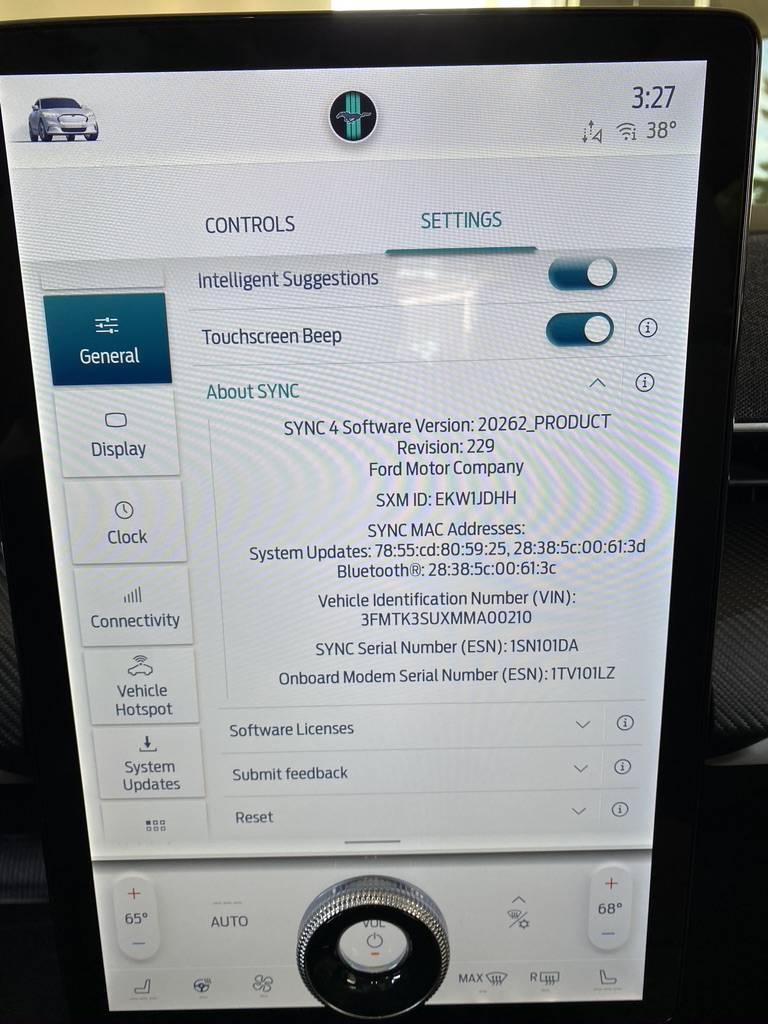
Glad to see it resolved - the Nav part. i am wondering if i will have same issues with wifi - i have a "not so simple" wifi setup as well. I usually run into dhcp issues of not connecting new devices until i add the macID into the reservation pool. I wonder if the macID of the car is easy to see.
This screen from a Dealer visit in November seems to show the MAC address

Ford Mustang Mach-E Initial experiences from a new Mach-E owner 1612046999665
 

JellyBelly

Well-Known Member
First Name
Kris
Joined
Jun 27, 2020
Threads
14
Messages
2,489
Reaction score
1,944
Location
San Diego
Vehicles
MME RR FE
Country flag
What is DHCP and how do I correct a problem with it?
DHCP is the process by which your router (built into your gateway box provided by the internet provider) assigns unique Ids to each device that connects wireless or wired. Now if you already have WIFI connectivity issues you need to get those resolved anyway. You dont seem to have any complicated setups and you should start with the internet provider to see if they can replace the gateway and see if that resolves your issues. If your other devices are working Ok then it should not be a problem with MME connecting (I am assuming here). If you have troubles with current wifi adding MME into the mix is one more issue to tackle.

There are many ways to set up networks at home and I would not venture too much advice as I am not an expert either. Most common set up is to use your own wireless router that connects to the gateway and all wireless /wired connectivity is managed by your own router. You turn off wifi and DHCP on the gateway and just use your own router like say netgear to manage the network including DHCP assignment. Lots of ways to do this but my 2cents is to see if your current issues can be resolved with your provided box. If your needs are simple no need to complicate it if you are not comfortable with it.
 

Illinibird

Well-Known Member
First Name
Mike
Joined
Oct 13, 2020
Threads
40
Messages
1,563
Reaction score
1,451
Location
Frankfort Illinois
Vehicles
2015 Acura MDX Adv; 2016 Titanium Fusion Hybrid
Occupation
retired Endodontist (root canal specialist) and Clinical Assistant Professor
Country flag
DHCP is the process by which your router (built into your gateway box provided by the internet provider) assigns unique Ids to each device that connects wireless or wired. Now if you already have WIFI connectivity issues you need to get those resolved anyway. You dont seem to have any complicated setups and you should start with the internet provider to see if they can replace the gateway and see if that resolves your issues. If your other devices are working Ok then it should not be a problem with MME connecting (I am assuming here). If you have troubles with current wifi adding MME into the mix is one more issue to tackle.

There are many ways to set up networks at home and I would not venture too much advice as I am not an expert either. Most common set up is to use your own wireless router that connects to the gateway and all wireless /wired connectivity is managed by your own router. You turn off wifi and DHCP on the gateway and just use your own router like say netgear to manage the network including DHCP assignment. Lots of ways to do this but my 2cents is to see if your current issues can be resolved with your provided box. If your needs are simple no need to complicate it if you are not comfortable with it.
Thank you. I had my own routers before Comcast came out and told me to only use their gateway. I can connect them again and see if this alleviates the problem but Comcast said having additional routers would "confuse" the gateway (Wi-Fi). I have an Apple Airport router and a Linksys router. Maybe I should reconnect one or both of these? I would still plug the ethernet cord to the gateway though as that is where the internet comes in. There is also a button in the software where I can turn off the Wi-Fi on the gateway. This network stuff has me going crazy.
 

scoopman

Well-Known Member
Joined
Jan 30, 2021
Threads
60
Messages
2,771
Reaction score
5,816
Location
Bay Area
Vehicles
2023 KIA EV6 GT, 20214 Hyundai Ioniq 5 Ltd AWD
Occupation
former electric pony jockey, flatbed towing expert
Country flag
Android Auto
Apparently there is an issue with Android Auto that hopefully will be fixed in the next OTA update.
I've got a GT reservation and was on the Android Auto team early on for several years at Google (not there anymore). I let my buddies know of this thread to investigate further. Hope it's all debugged by summertime for me :cool:
 

TheSeg

Well-Known Member
First Name
Seg
Joined
Oct 5, 2020
Threads
9
Messages
330
Reaction score
731
Location
San Francisco Bay Area, CA
Website
seg.fyi
Vehicles
2021 Mach-E Premium EB-RWD (Built: Feb 2021)
Country flag
Wi-Fi
They connected it to the Wi-Fi at the dealer and concluded that it was working fine. It still refused to connect to my Wi-Fi when I got home.

I'll be spending the weekend to see if I can get the Wi-Fi working. I'm pretty sure it is an DHCP issue. I'll update the thread as I find out more.
I'm glad you finally got everything working! Including the WiFi you posted later confirming.

I realized I don't know what WiFi radio they're using on the car, and couldn't immediately find any documentation yet searching for it. Can anyone point to the specs for me?

The same code would run perfectly on some Android phones ... but not work on others. It turned out to be differences in OS levels and (to my surprise) hardware level differences.
In my previous career in video games, I was tasked with porting the proprietary game engine to Android tablets (pre-release status at the time). We ended up abandoning the project as the Z-buffer (depth buffer) was so underpowered, we couldn't display much of anything. Even though the rest of the specs technically would work, they cut corners in ways that made 3D engines unusable. Backed out of the otherwise lucrative contract because of it.

There are well made devices on the Android platform, but that quality is not consistent. It's very difficult to QA Android because of this.
 

Jako607

Well-Known Member
Joined
Jan 26, 2021
Threads
14
Messages
186
Reaction score
354
Location
92104
Vehicles
2019 Bolt
Country flag
I'm glad you finally got everything working! Including the WiFi you posted later confirming.

I realized I don't know what WiFi radio they're using on the car, and couldn't immediately find any documentation yet searching for it. Can anyone point to the specs for me?


In my previous career in video games, I was tasked with porting the proprietary game engine to Android tablets (pre-release status at the time). We ended up abandoning the project as the Z-buffer (depth buffer) was so underpowered, we couldn't display much of anything. Even though the rest of the specs technically would work, they cut corners in ways that made 3D engines unusable. Backed out of the otherwise lucrative contract because of it.

There are well made devices on the Android platform, but that quality is not consistent. It's very difficult to QA Android because of this.
I love my Android phone but Android Auto has had so many issues over the years, it stinks that this will continue to be a problem. Over the years with my various Samsung phones AA has broken every so often on every car I've owned. Sometimes a random AA update will break it and all I can do is wait for Google to push an update. Last time it stopped working on my Bolt for 4 months before it started again randomly. I spent so much time trying different cables, troubleshooting in online Google forums, etc. Even if or when they fix it for the MME, when our phones upgrade to a new version of the AA app, or to Android 12, it'll start all over again. It's one of the reasons why I originally ordered a Volvo XC40 Recharge...the built in Google OS. No Android Auto needed. No fussing with connections to the phone etc. Too bad the darn car has such bad range and efficiency else I might've gone through with buying it.
 

TheSteelRider

Well-Known Member
Joined
Dec 31, 2019
Threads
57
Messages
1,296
Reaction score
2,309
Location
United States
Vehicles
'21 Premium RWD
Country flag
Problem #3 - Android Auto

When I connected my Google Pixel 3 to the car, the phone immediately recognized that the car had Android Auto, and told me to finish setting it up on the car. When I open Android Auto on the car, the car says to go to the phone list, select a phone, then select Connect Android Auto. I did that, but there was no "Connect Android Auto" to be found. Lots of options for setting up my phone, but nothing related to Android Auto at all.

The Android Auto app in the car also suggested connecting the phone to the car with a USB cable. My wife has a Nissan Murano with Android Auto that only works through a USB cable. I've used it on my wife's car many times. In her car it works perfectly. I tried plugging my phone into the Mach-E with a USB cable. As soon as I plugged in the cable, my phone immediately crashed and restarted the operating system. I tried it numerous times with different cables (to test both ports in the car). Same thing every time. As soon as I plug in the phone, the phone crashes.

I realize that in this case it is the phone that is crashing, but like I said, I've used it in my wife's car with no issues. Clearly the Mach-E is doing something that the phone REALLY doesn't like.
@CP-Mach-E, could you add your telemetry data about this issue to this tracking thread?

https://www.macheforum.com/site/threads/android-auto-rebooting-phones.3043/


Top