
Instrument Cluster new layout?
- Thread starter LuckyBudd
- Start date
- Watchers 10
-
- Tags
- instrumentcluster

generaltso
Well-Known Member
- Joined
- Jun 24, 2020
- Threads
- 76
- Messages
- 15,389
- Reaction score
- 28,696
- Location
- Vermont
- Vehicles
- 2024 Kia EV9 GT-Line

Can you post a pic?My ‘23 premium awd sr built in may has always looked like that. No matter what safety features are enabled or disabled.
crl
Well-Known Member
- Joined
- Jun 15, 2023
- Threads
- 1
- Messages
- 49
- Reaction score
- 57
- Location
- VT
- Vehicles
- 2023 Mustang Mach-E Premium AWD
- Occupation
- IT
Well don’t I feel dumb now…Can you post a pic?
Went out to take a pic and as it turns out, if active cruise control is enabled, you never seen any of the alternate screens. Mine has been enabled ever since I test drove it and I never gave it a second thought til right now, thinking things are just enabled/disabled via steering wheel controls. Duh.
settings/driver assistance/cruise control: adaptive cruise control means you’ll never see any of the alternate screens based on drive mode.
ALSO you have to have cruise control enabled / lane keep assist disabled to see the mode specific screens. Turning off cc moves the Speedo back to the right side.
OP
OP
LuckyBudd
Well-Known Member

- Thread starter
- #49
Don't feel dumb! Learning is what this forum is for. The car I am looking at isn't working right because I can't make it go to the middle... but this thread is awesome because it helped someone!Well don’t I feel dumb now…
Went out to take a pic and as it turns out, if active cruise control is enabled, you never seen any of the alternate screens. Mine has been enabled ever since I test drove it and I never gave it a second thought til right now, thinking things are just enabled/disabled via steering wheel controls. Duh.
settings/driver assistance/cruise control: adaptive cruise control means you’ll never see any of the alternate screens based on drive mode.
ALSO you have to have cruise control enabled / lane keep assist disabled to see the mode specific screens. Turning off cc moves the Speedo back to the right side.
Sweet! Let's hope there is a solution out there for mine

TsunmiBob
Member
- Joined
- Oct 15, 2022
- Threads
- 1
- Messages
- 12
- Reaction score
- 4
- Location
- Scottsdale, AZ
- Vehicles
- 2022 Mach E Premium AWD Ext Triple White
Speedometer is always on the right on my center dash. If anyone has a different layout, can you post a photo? Curious what other options look like!

Jimrpa
Well-Known Member
- First Name
- Jim
- Joined
- Sep 10, 2020
- Threads
- 297
- Messages
- 9,541
- Reaction score
- 12,871
- Location
- Wayne, PA
- Vehicles
- 2021 Infinite Blue Premium Mustang Mach E ER AWD
- Occupation
- Retied (formerly tried to herd highly technical, independent cats)
? see the photos I posted earlier, along with directions to have a center speedometer.Speedometer is always on the right on my center dash. If anyone has a different layout, can you post a photo? Curious what other options look like!
Jimrpa
Well-Known Member
- First Name
- Jim
- Joined
- Sep 10, 2020
- Threads
- 297
- Messages
- 9,541
- Reaction score
- 12,871
- Location
- Wayne, PA
- Vehicles
- 2021 Infinite Blue Premium Mustang Mach E ER AWD
- Occupation
- Retied (formerly tried to herd highly technical, independent cats)
See the pictures I posted.Based on @generaltso response it is possible I missed turning off an assistant setting. When I’m home from my current trip I can check again. But I have a tendency to trust the “older” forum members.
hawkeye3point1
Well-Known Member
- Joined
- Nov 13, 2021
- Threads
- 0
- Messages
- 480
- Reaction score
- 460
- Location
- NH
- Vehicles
- Space White ER RWD, Born on 12 Aug. '21
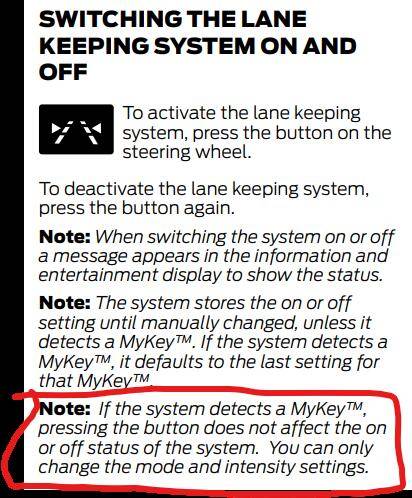
Seems like the My Key feature may be why you can not change the display.

dj_stang
Well-Known Member
- Joined
- May 3, 2021
- Threads
- 4
- Messages
- 414
- Reaction score
- 427
- Location
- {None}
- Vehicles
- 2022 MME Premium -> 2023 GTPE
They really put a lot of effort into these animations. Shame that most people including myself won’t get to see them since we like to have the safety features on. Would like to see them enable it while safety features are working.Also, here is a video showing how to change the displays:
OP
OP
LuckyBudd
Well-Known Member
- Thread starter
- #56
Wow! The dealership is closed until Tuesday (Canadian holiday), but this makes sense to me! First thing I did was program my key to my phone. IF this works (I am optimistic!) I owe you a beer my friend! I will report back on TuesdaySeems like the My Key feature may be why you can not change the display.
To delete the My Key, I suppose I just open the app, and delete the phone as key? Thank you!
OP
OP
LuckyBudd
Well-Known Member
- Thread starter
- #57
I am interested to know what features you keep on and how your display looks on a city drive. In my old Mach e, I only ever had the speedometer in the centre.They really put a lot of effort into these animations. Shame that most people including myself won’t get to see them since we like to have the safety features on. Would like to see them enable it while safety features are working.
Does it show you graphics of other cars nearby or does the display highlight anything? Thanks.
dj_stang
Well-Known Member
- Joined
- May 3, 2021
- Threads
- 4
- Messages
- 414
- Reaction score
- 427
- Location
- {None}
- Vehicles
- 2022 MME Premium -> 2023 GTPE
It looks like 0:41 of the previous video except I also have distance indication on. So it shows a car icon in front when the radar detects an object in view. Then depending on speed and distance it shows green, orange, red, pretty standard stuff. As for graphics no, not like Tesla anyway. The car icon kind of shifts when BC1.2 moves you over in the lane, its not very noticeable (the graphic nor the feature) so not missing much there.I am interested to know what features you keep on and how your display looks on a city drive. In my old Mach e, I only ever had the speedometer in the centre.
Does it show you graphics of other cars nearby or does the display highlight anything? Thanks.
I hope I don’t ruin everyone’s day here but the car icon is offset to the side (not centered) when you have lane keep assist on.

SashaLondon
Well-Known Member
- First Name
- Sasha
- Joined
- Sep 11, 2020
- Threads
- 32
- Messages
- 1,393
- Reaction score
- 1,500
- Location
- London
- Vehicles
- MME AWD SR

I have had the lane guidance graphic in the center of my screen from day 1, there is no setting to remove it. I have had the car since 2021.
I even contacted Ford about it and they said that it is supposed to be like that if you have a key with your profile on it and it cannot be removed.
I even contacted Ford about it and they said that it is supposed to be like that if you have a key with your profile on it and it cannot be removed.
generaltso
Well-Known Member
- Joined
- Jun 24, 2020
- Threads
- 76
- Messages
- 15,389
- Reaction score
- 28,696
- Location
- Vermont
- Vehicles
- 2024 Kia EV9 GT-Line
Either that’s a Europe thing, or you‘ve always had at least one driver assistance feature enabled.I have had the lane guidance graphic in the center of my screen from day 1, there is no setting to remove it. I have had the car since 2021.
I even contacted Ford about it and they said that it is supposed to be like that if you have a key with your profile on it and it cannot be removed.
Sponsored


