Latest Software Version

J&S K

Well-Known Member
First Name
Joe
Joined
Apr 28, 2023
Threads
19
Messages
80
Reaction score
24
Location
85298
Vehicles
2021 Ford Mach-e
Country flag
A few days ago my MME completed a software update and yesterday the dealer is calling me to schedule an update to my MME at my home. I dont see a version number in the MME software update menu. How can I see what version my MME is at ? Also, does Ford post somewhere the latest version number that has been released?

Seems based on the Forum it is release 4.6.0 and it improves DC charging. Going on long trip, so if the latest version provides a significant improvement in charging, I'd like to make sure I have the latest update installed and working.

Thx, Joe
Sponsored

 

Gullwingdmc

Well-Known Member
First Name
Chip
Joined
May 15, 2021
Threads
85
Messages
2,943
Reaction score
4,110
Location
Boston, MA
Vehicles
2022 Mustang Mach E GT AWD ER - Grabber Blue
Country flag
Hi there, unfortunately there is no One software update. The car is made up of dozens of modules, each has their own software. The numbers you see mentioned in relation to the OTA updates are not version numbers, they are just reference numbers to each update and can be delivered out of order or multiple times with changes between each one.

The most recent PowerUp OTA update was number 4.2.6, but even if you received that it doesn’t mean that your car is 100% up to date as not all updates are pushed out OTA, some require the car to be taken to the dealership. The only way to tell if your car is 100% up to date is to use Ford’s diagnostic software FDRS which is available (for a price) to anyone and is what the dealer uses.

If your dealer is offering to come to your house to do updates for free that’s a really good deal. I’d pay for that rather than wasting time waiting at a dealer. Some module updates can take 4+ hours for just one.
 

Jskish3

New Member
First Name
Joe
Joined
Apr 20, 2023
Threads
2
Messages
4
Reaction score
2
Location
85298
Vehicles
Ford Mach-e
Occupation
Retired
Country flag
Hi there, unfortunately there is no One software update. The car is made up of dozens of modules, each has their own software. The numbers you see mentioned in relation to the OTA updates are not version numbers, they are just reference numbers to each update and can be delivered out of order or multiple times with changes between each one.

The most recent PowerUp OTA update was number 4.2.6, but even if you received that it doesn’t mean that your car is 100% up to date as not all updates are pushed out OTA, some require the car to be taken to the dealership. The only way to tell if your car is 100% up to date is to use Ford’s diagnostic software FDRS which is available (for a price) to anyone and is what the dealer uses.

If your dealer is offering to come to your house to do updates for free that’s a really good deal. I’d pay for that rather than wasting time waiting at a dealer. Some module updates can take 4+ hours for just one.
Thank you!
 

Teleks

Well-Known Member
Joined
Feb 25, 2023
Threads
10
Messages
84
Reaction score
74
Location
USA
Vehicles
2021 Mach-E GT Performance Ed, 2014 Fiesta ST
Country flag
I dont see a version number in the MME software update menu. How can I see what version my MME is at ?
Going back to this above question... is there a way to see a version number though? Is there anywhere to actually find out what version my Power-Up is at right now? Neither in the car, nor in the app is see it displayed in any menu.

In the "software update" menu it usually shows the last installed udpate. But for example right now for me it doesn't tell me a version number there, because it seems that my last update wasn't one with a specific number. So do I really have no way of knowing what Power-Up I'm at?
 

Gullwingdmc

Well-Known Member
First Name
Chip
Joined
May 15, 2021
Threads
85
Messages
2,943
Reaction score
4,110
Location
Boston, MA
Vehicles
2022 Mustang Mach E GT AWD ER - Grabber Blue
Country flag
is there a way to actually find out what version my Power-Up is at right now?
Important note. The power up numbers are not version numbers, just reference numbers. While they do normally come in order, they can be delivered out of order.

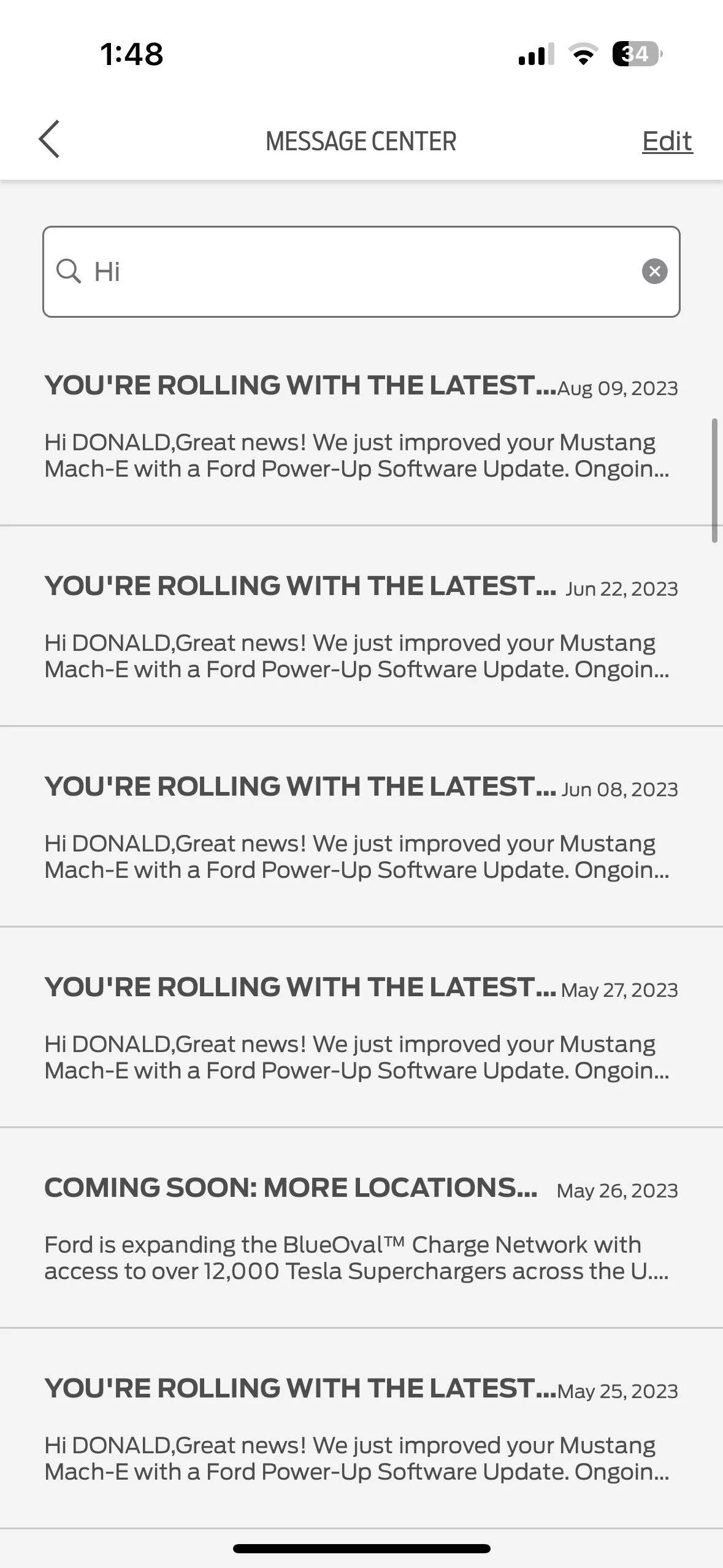
In the car you can only see the last OTA update the car received. There is an update section in the app, but that only shows the last update too. The best way to see what updates have been installed is to go to the messages section and look back through the “you’re rolling with the latest” messages.
Ford Mustang Mach-E Latest Software Version 1692640256492


hybrid2bev

Well-Known Member
Joined
Dec 4, 2019
Threads
78
Messages
4,641
Reaction score
12,765
Location
USA
Vehicles
2026 Rally
Country flag
Going back to this above question... is there a way to see a version number though? Is there anywhere to actually find out what version my Power-Up is at right now? Neither in the car, nor in the app is see it displayed in any menu.

In the "software update" menu it usually shows the last installed udpate. But for example right now for me it doesn't tell me a version number there, because it seems that my last update wasn't one with a specific number. So do I really have no way of knowing what Power-Up I'm at?
Or you can cross check what you see on your screen with the GitHub list of updates.

https://github.com/elmedico27/fordpowerup
 

Teleks

Well-Known Member
Joined
Feb 25, 2023
Threads
10
Messages
84
Reaction score
74
Location
USA
Vehicles
2021 Mach-E GT Performance Ed, 2014 Fiesta ST
Country flag
Ok, I guess I get it now. They're not software version numbers, but software update numbers. That's why Ford doesn't really want to tell me a "version" in any of the menus ...still a little frustrating and silly.

Thanks for clarifying.
Sponsored


Top