Road Trips EV locations and GPS Choices

Unclevic64

New Member
First Name
Victor Pascali
Joined
Feb 24, 2025
Threads
1
Messages
1
Reaction score
0
Location
685 Barrett Ave Morgan Hill, Ca 95037
Vehicles
2023 Mach E Premium
Occupation
Salesman
Hello,
So this weekend, I took a road trip from Morgan Hill to Sonora California and I mapped out EV Chargers along my route for the two different freeways and highways I could take. My sister and I drove up through the back roads up Highway 152 and 99 to make it to our intended location. I typically use WAZE for my GPS as it seems more detailed than the Ford GPS on the screen. While this may be a fluke, Verizon Wireless had a major outage Saturday the 30th and I was worried I was going to possibly get lost. To make it a bit more weird, my sister's phone also on Verizon, worked just fine so we used hers. I researched the previous week, my route to the location and the EV Chargers along the way, even going so far as to screenshot my laptop screen for the address vs looking them up on my GPS in the car. Is there a better way to map out a Road Trip or am I just not familiar enough with the Ford GPS controls in my Mustang? Can anyone shed some light on this? Thanks a heap!!!!!! Victor in California
Sponsored
 

ChrisO

Well-Known Member
Joined
Jan 11, 2025
Threads
9
Messages
998
Reaction score
992
Location
US
Vehicles
.
Other than sitting in the car and putting in a destination into the Ford navigation and it pick a route that is about it. You have some flexibility on rejecting the chargers it selects and can add multiple destinations some of which could be a charger to force that route.

The really isn’t a way to plan multiple routes.
 

IgorKl

Well-Known Member
Joined
Mar 22, 2022
Threads
37
Messages
757
Reaction score
725
Location
Pacifica, ca
Vehicles
'22 MME CaliRoute 1 AWD and '25 MME Premium RWD Ext
Country flag
Plan your road trip by ABRP (a better route planner).

I usually plan road in ABRP, use google maps for navigation during road trips. I bought OBD dangle so I could connect ABRP with real time car data for long trips or when I’m trying to push my charging points :). Surprisingly, Google maps and ABRP can be run simultaneously in CarPlay.

 

Fremont Kid

Well-Known Member
First Name
Steve
Joined
Oct 8, 2022
Threads
12
Messages
773
Reaction score
667
Location
Colorado Springs, CO
Vehicles
2022 Mustang Mach e Premium AWD
Occupation
Retired IT
Country flag
I think you are planning well. Whatever route planner you use, think about backup or alternate chargers. Also, while driving I look at the chargers along the route using the Ford navigation system. It allows you to select a charger along the way, then set that as an interim destination so it will navigate you to it. I like that feature.

A feature I would like added to the Ford navigation system: Do not show chargers in the opposite direction of the route. I don't care that a charger is available only 10 miles away if it is a charger I already passed and not along the route I'm traveling. Not filtering out such chargers just adds clutter to the navigation list.
 

Tampamike

Well-Known Member
First Name
Mike
Joined
Feb 19, 2021
Threads
24
Messages
2,069
Reaction score
2,806
Location
Tampa, FL
Vehicles
‘24 Mach E Premium RWD
Country flag
A feature I would like added to the Ford navigation system: Do not show chargers in the opposite direction of the route. I don't care that a charger is available only 10 miles away if it is a charger I already passed and not along the route I'm traveling. Not filtering out such chargers just adds clutter to the navigation list.
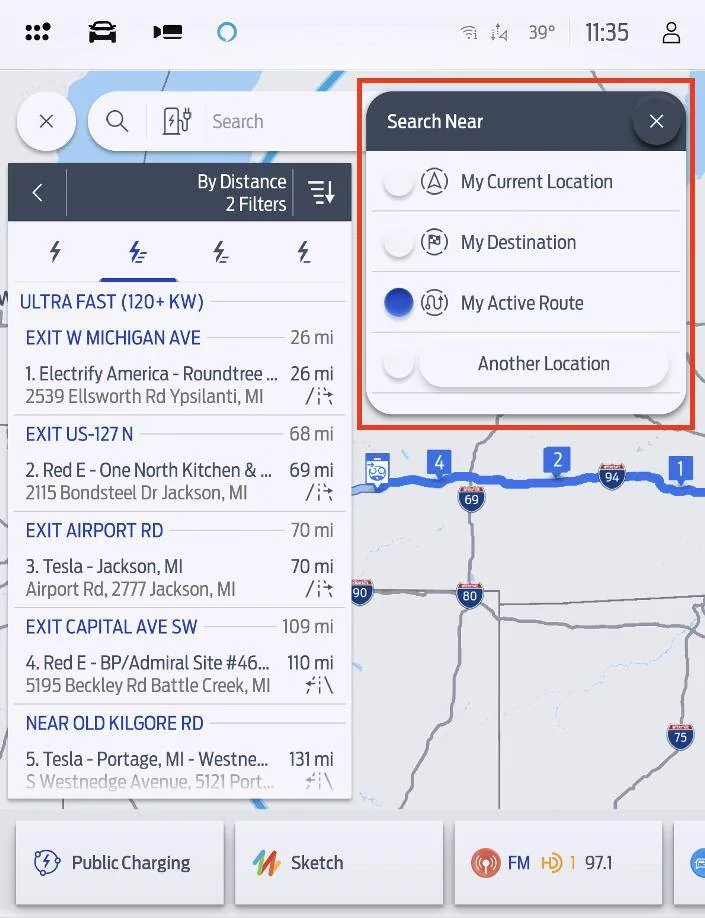
So, there is a filter when looking for chargers. While you’re navigating, tap on the horizontal bar at the top of the map that shows your next turn. You’ll then get a drop down list of turns. The first item at the top of that list should be the next charger. Tap on that and you will get a new box about the charger. There will be a button that you can tap that says “Replace.” When you tap that, you will get a list and a map of any chargers near you at the moment. There is a symbol at the top right of that box that looks like a segmented circle. Tap that and you will get more options - 3 IIRC, “near me,” “along route,” and “at destination.” If you tap “along route,” you will get destinations progressively farther along your route. Also remember to tap the high power symbol at the top on the left.


Fremont Kid

Well-Known Member
First Name
Steve
Joined
Oct 8, 2022
Threads
12
Messages
773
Reaction score
667
Location
Colorado Springs, CO
Vehicles
2022 Mustang Mach e Premium AWD
Occupation
Retired IT
Country flag
So, there is a filter when looking for chargers. While you’re navigating, tap on the horizontal bar at the top of the map that shows your next turn. You’ll then get a drop down list of turns. The first item at the top of that list should be the next charger. Tap on that and you will get a new box about the charger. There will be a button that you can tap that says “Replace.” When you tap that, you will get a list and a map of any chargers near you at the moment. There is a symbol at the top right of that box that looks like a segmented circle. Tap that and you will get more options - 3 IIRC, “near me,” “along route,” and “at destination.” If you tap “along route,” you will get destinations progressively farther along your route. Also remember to tap the high power symbol at the top on the left.
Thanks, I'll try those steps. However, if the next turn is 100+ miles away - driving on interstate freeways - your instructions don't seem like the system will prevent displaying chargers that I've already passed. Not faulting you. Just that the system is designed different than what I find most valuable.

All the best.
 

Charge_Rob

Well-Known Member
Joined
Nov 25, 2024
Threads
1
Messages
232
Reaction score
426
Location
Dearborn, MI
Vehicles
2024 Ford F-150 Lightning (2025 Mustang Mach-E Rally on the way!)
Occupation
Charging Nerd
Hello,
So this weekend, I took a road trip from Morgan Hill to Sonora California and I mapped out EV Chargers along my route for the two different freeways and highways I could take. My sister and I drove up through the back roads up Highway 152 and 99 to make it to our intended location. I typically use WAZE for my GPS as it seems more detailed than the Ford GPS on the screen. While this may be a fluke, Verizon Wireless had a major outage Saturday the 30th and I was worried I was going to possibly get lost. To make it a bit more weird, my sister's phone also on Verizon, worked just fine so we used hers. I researched the previous week, my route to the location and the EV Chargers along the way, even going so far as to screenshot my laptop screen for the address vs looking them up on my GPS in the car. Is there a better way to map out a Road Trip or am I just not familiar enough with the Ford GPS controls in my Mustang? Can anyone shed some light on this? Thanks a heap!!!!!! Victor in California
Connected Navigation is connected, yes, but it does work without a cell signal - and unlike Waze it also automatically adds chargers to your route, and also unlike Waze it triggers Ford Intelligent Range which dynamically updates your distance to empty based on temperature, speed, traffic, elevation, and more - for a more accurate road trip experience.

Just hit "Where to?" in Connected Navigation, and then type in the destination - it figures out chargers for you. When you get to the charger, if it's one of the 21 networks in the BlueOval Charge Network you can simply use FordPass to pay - no downloading additional apps.

There's an overview of all these tools at go.ford/evroadtrip
 

Charge_Rob

Well-Known Member
Joined
Nov 25, 2024
Threads
1
Messages
232
Reaction score
426
Location
Dearborn, MI
Vehicles
2024 Ford F-150 Lightning (2025 Mustang Mach-E Rally on the way!)
Occupation
Charging Nerd
Thanks, I'll try those steps. However, if the next turn is 100+ miles away - driving on interstate freeways - your instructions don't seem like the system will prevent displaying chargers that I've already passed. Not faulting you. Just that the system is designed different than what I find most valuable.

All the best.
Change the filter to "My Active Route" instead of My Current Location which is the radius around you - because My Current Location does as the flight attendants say in the brefing - "keeping in mind the closest one may be behind you"
Ford Mustang Mach-E Road Trips EV locations and GPS Choices 1756912466030-mc
Sponsored


Top