drg1012
Active Member
- First Name
- Dave
- Joined
- Mar 10, 2022
- Threads
- 3
- Messages
- 42
- Reaction score
- 59
- Location
- Colorado
- Vehicles
- 2022 MME Premium
- Occupation
- Mechanical Engineer

- Thread starter
- #1
I decided to use my FordPass points to order the Thinkware Dashcam from Ford. Dashcam with Rear Facing Camera Bundle ~ VHL3Z19G490K (ford.com) After points and the SPRING15 discount code, it was $28 including tax and shipping. The kit came with installation instructions - for gas and electric cars - but they don't work (or at least now without far more effort than I was willing to give and even then, it's a stupid way to do it, since the car doesn't know to switch to parking mode until 32.5 minutes after your park....) There are several resources on the web - a very excellent posting on how to install this dashcam with the Thinkware hardwire kit is below: DIY Tutorial for Hardwiring a Dashcam and Radar Detector | MachEforum - Ford Mustang Mach-E Forum, News, Owners, Discussions
That link is a FANTASTIC resource on how to install the dashcam, but it needs to be modified ot use the OBDII install kit supplied by Ford. Instructions below:
https://echomaster.com/content/uploads/sites/4/IUG-19G490-X.pdf
Well, at least right up to the part below:

Clearly, we use 8b - but how the heck am I supposed to get to the back of the only cigarette lighter plug in the car - buried in the center console. I'm sure it can be done, but that seemed like major surgery to me. So I searched the internet and found this:
Installing A Dashcam In My Ford Mustang Mach-E | Ford's Recommended Dashcam | Thinkware DC-M1-FG - YouTube
Now, this is an excellent resource also - especially for running the wires down the left A column to the OBDII plug. I suggest you watch this video after reading the forum posting link above. But there is one BIG problem - he used option 8a - for gas cars. I decided it must work since it was from a video posted on YouTube, so I tried that. It worked great - for exactly 2.5 minutes. Then it started beeping - loudly, annoyingly, and every 15 seconds for remaining 35 minutes of my commute to work. What the heck? When I checked the settings on the camera, I found that the camera had switched back to parking mode - even though I was driving. And it kept sensing impacts/motion and beeping to let me know about the trauma. Others have posted on the forum about this exact problem. Clearly 8a doesn't work. But why?
Well, the problem is obvious (if you're an engineer geek). The camera expects three inputs - ground, battery (constant power), and switched power (power only on when the car is on). When it sees power in the always on cable but not in the switched power, it assumes it is parked. If it sees power from the switched power, the car must be on. Well, the OBDII port provides ground and battery, but does not have switched power. But it does have lots of information that it puts out that are indicative of a car that is on. For example, engine RPM. So the IGN-3F module in 8a, as far as I can tell, reads the OBD port for something (I don't know exactly what, but let's assume RPM) and when it detects RPM>0, it determines that the car is on and sends power from the OBD battery connection through the switched power lead. Voila! In fact, to account for cars with automatic stop/start function, it waits 2.5 minutes after it detects a loss of engine RPM (or whatever it is looking for) before switching to parking mode - just to see if the engine starts up again. Guess what electric cars don't have - engine RPM. Now, it might be something other than RPM - I do know that when you first turn on your mache, the camera knows the car is on, but 2.5 minutes later it switches to parking mode. Either way, doesn't work for us…. So, for an electric car, we need to provide a separate source of switched power - enter the cigarette lighter option in 8b above. Now, besides the fact that it's a PITA to get to, it takes 30 minutes to power off after the car is turned off - SO, it takes the camera 32.5 minutes to switch to parking mode. Certainly less than optimal. Having figured out what the camera needed and how to fix it, I made my own instructions and found a different source of switched power.
First, I cut the single red wire from the cigarette lighter in-line wire adapter. I didn't take a picture but it should be obvious. The single red wire terminates in a 10 pin connector - just cut it where it attaches to the 3-prong male and female connectors for the cigarette lighter - as far away as you can from the 10 pin connector.
Next, remove the panels on either side of the center instrument panel (next to the accelerator) and to the left of the passenger leg area. Also remove the panel from the interior fuse panel as described in:
DIY Tutorial for Hardwiring a Dashcam and Radar Detector | MachEforum - Ford Mustang Mach-E Forum, News, Owners, Discussions
It will look like this:


Next, connect a fuse tap to switched power (fuse location 15,16) using a micro3 fuse tap and described very well in DIY Tutorial for Hardwiring a Dashcam and Radar Detector | MachEforum - Ford Mustang Mach-E Forum, News, Owners, Discussions
The finished fuse panel looks like:

It took me about 10 minutes to remove the three panels (either side of the instrument panel and the fuse cover) and run the wire from the OBDII connector to the fuse panel. Much easier than trying to get to the cigarette lighter. And best of all - the moment your turn off the car, it switches to parking mode (well at least I think so - it takes about 20 seconds for the camera to announce it is in parking mode, but I think it's just thinking about its life choices during that time)… Works great now. Hope this helps!
That link is a FANTASTIC resource on how to install the dashcam, but it needs to be modified ot use the OBDII install kit supplied by Ford. Instructions below:
https://echomaster.com/content/uploads/sites/4/IUG-19G490-X.pdf
Well, at least right up to the part below:
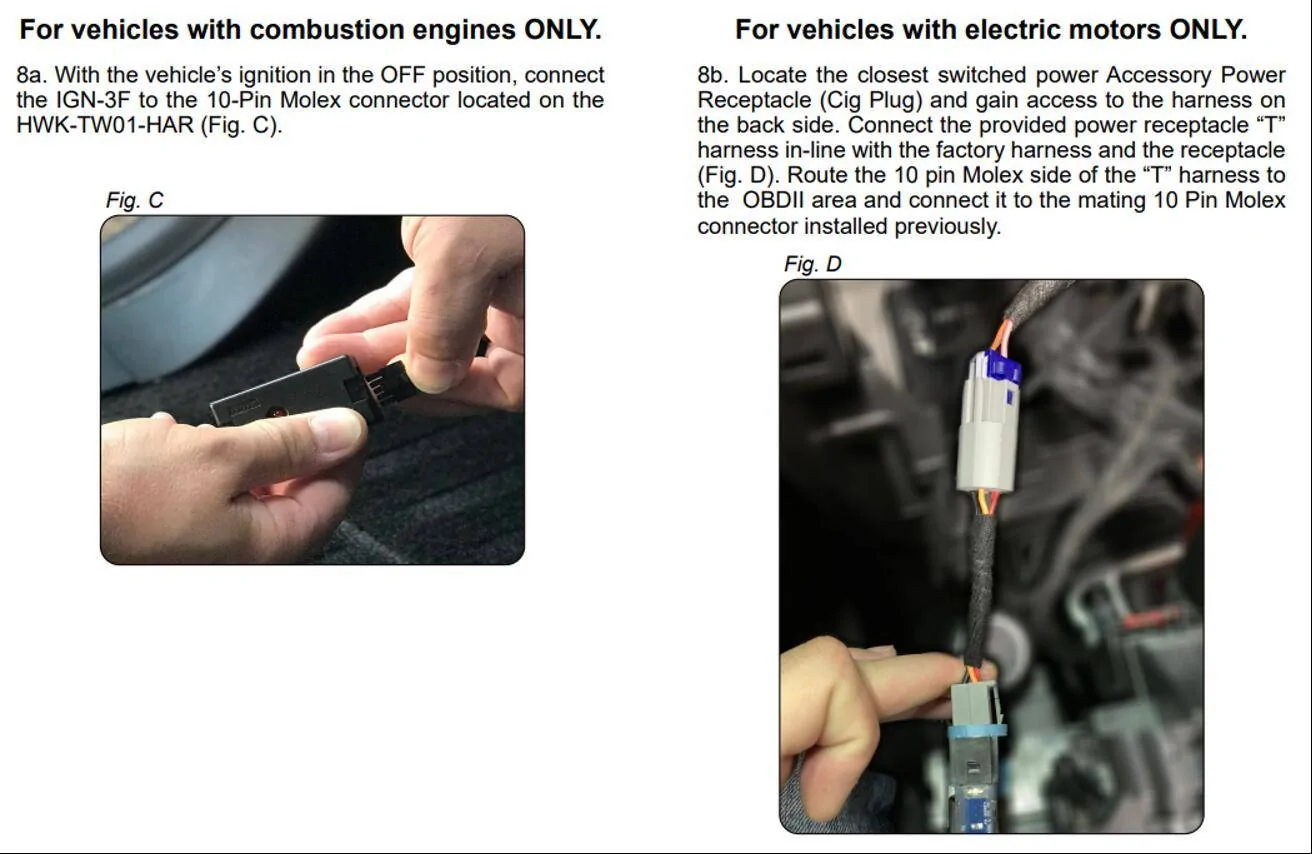
Clearly, we use 8b - but how the heck am I supposed to get to the back of the only cigarette lighter plug in the car - buried in the center console. I'm sure it can be done, but that seemed like major surgery to me. So I searched the internet and found this:
Installing A Dashcam In My Ford Mustang Mach-E | Ford's Recommended Dashcam | Thinkware DC-M1-FG - YouTube
Now, this is an excellent resource also - especially for running the wires down the left A column to the OBDII plug. I suggest you watch this video after reading the forum posting link above. But there is one BIG problem - he used option 8a - for gas cars. I decided it must work since it was from a video posted on YouTube, so I tried that. It worked great - for exactly 2.5 minutes. Then it started beeping - loudly, annoyingly, and every 15 seconds for remaining 35 minutes of my commute to work. What the heck? When I checked the settings on the camera, I found that the camera had switched back to parking mode - even though I was driving. And it kept sensing impacts/motion and beeping to let me know about the trauma. Others have posted on the forum about this exact problem. Clearly 8a doesn't work. But why?
Well, the problem is obvious (if you're an engineer geek). The camera expects three inputs - ground, battery (constant power), and switched power (power only on when the car is on). When it sees power in the always on cable but not in the switched power, it assumes it is parked. If it sees power from the switched power, the car must be on. Well, the OBDII port provides ground and battery, but does not have switched power. But it does have lots of information that it puts out that are indicative of a car that is on. For example, engine RPM. So the IGN-3F module in 8a, as far as I can tell, reads the OBD port for something (I don't know exactly what, but let's assume RPM) and when it detects RPM>0, it determines that the car is on and sends power from the OBD battery connection through the switched power lead. Voila! In fact, to account for cars with automatic stop/start function, it waits 2.5 minutes after it detects a loss of engine RPM (or whatever it is looking for) before switching to parking mode - just to see if the engine starts up again. Guess what electric cars don't have - engine RPM. Now, it might be something other than RPM - I do know that when you first turn on your mache, the camera knows the car is on, but 2.5 minutes later it switches to parking mode. Either way, doesn't work for us…. So, for an electric car, we need to provide a separate source of switched power - enter the cigarette lighter option in 8b above. Now, besides the fact that it's a PITA to get to, it takes 30 minutes to power off after the car is turned off - SO, it takes the camera 32.5 minutes to switch to parking mode. Certainly less than optimal. Having figured out what the camera needed and how to fix it, I made my own instructions and found a different source of switched power.
First, I cut the single red wire from the cigarette lighter in-line wire adapter. I didn't take a picture but it should be obvious. The single red wire terminates in a 10 pin connector - just cut it where it attaches to the 3-prong male and female connectors for the cigarette lighter - as far away as you can from the 10 pin connector.
Next, remove the panels on either side of the center instrument panel (next to the accelerator) and to the left of the passenger leg area. Also remove the panel from the interior fuse panel as described in:
DIY Tutorial for Hardwiring a Dashcam and Radar Detector | MachEforum - Ford Mustang Mach-E Forum, News, Owners, Discussions
It will look like this:
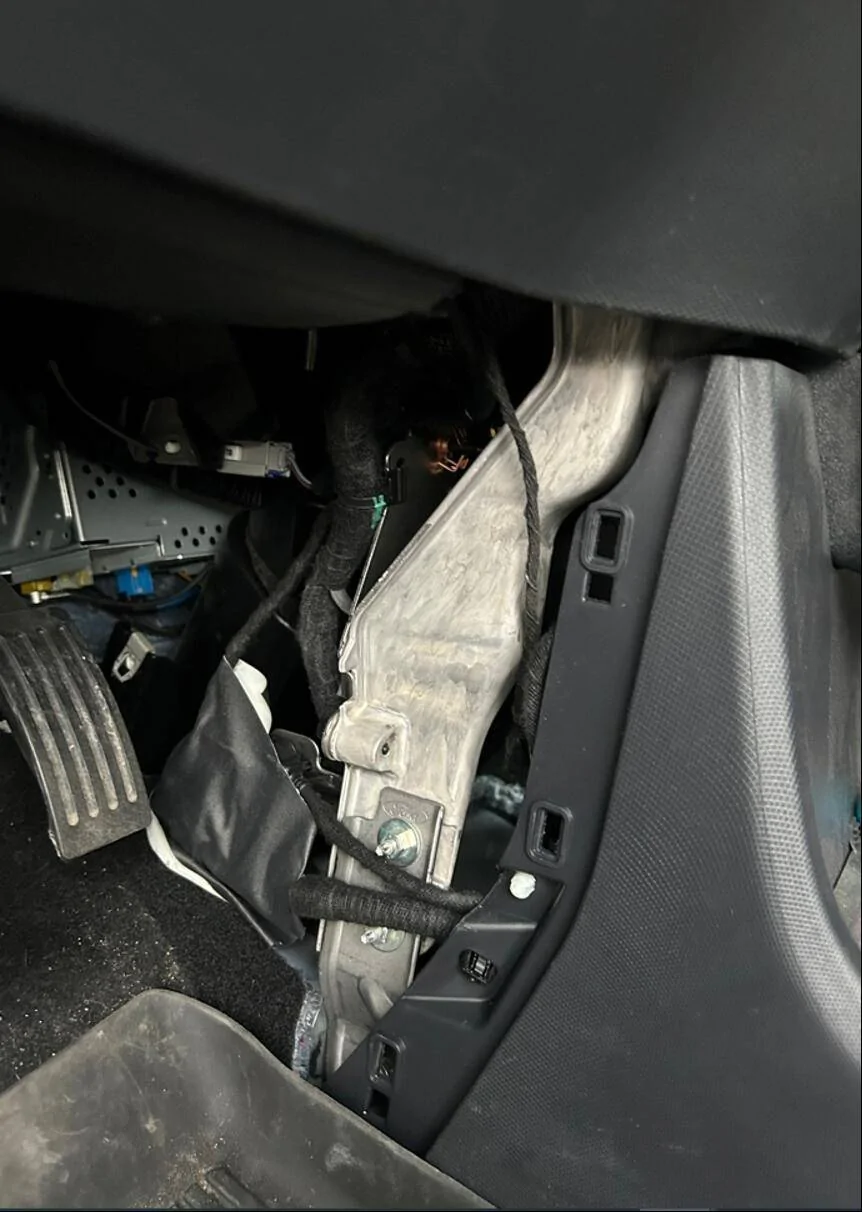
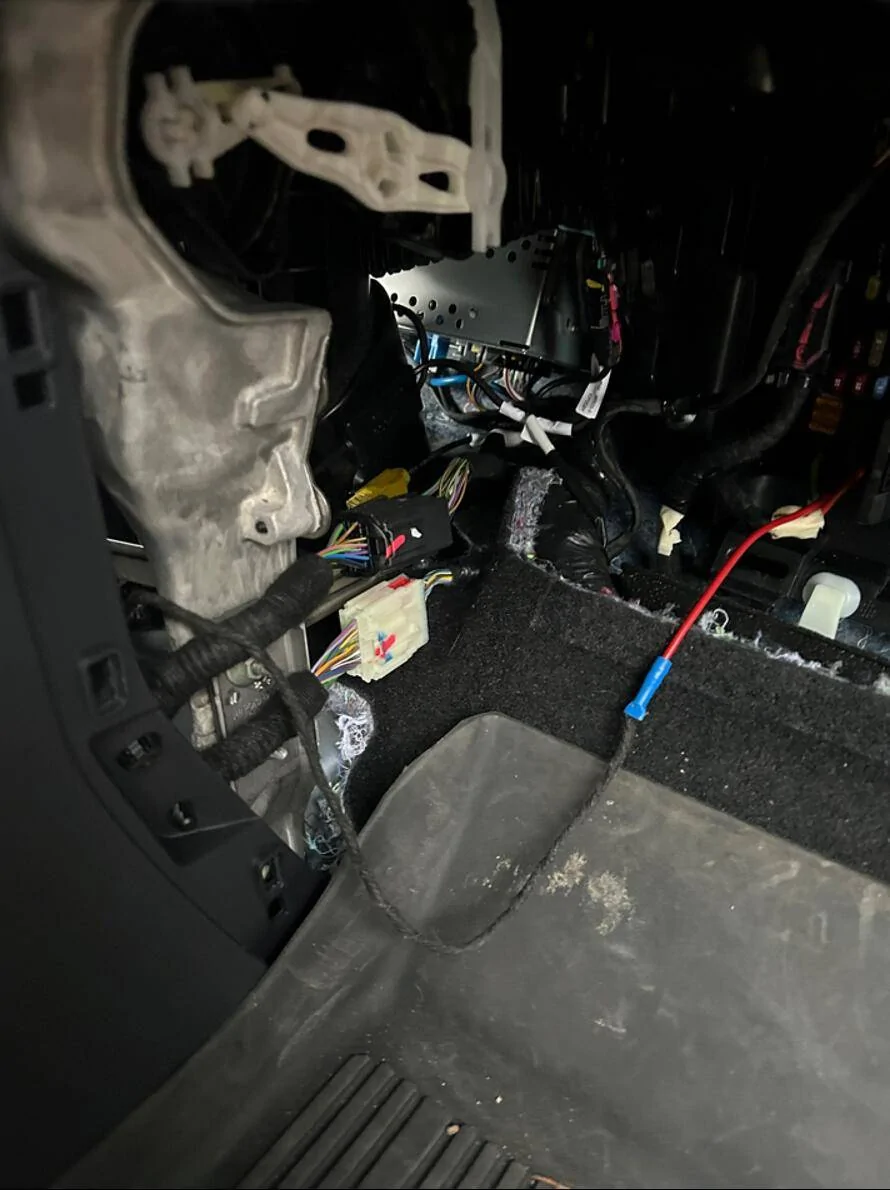
Next, connect a fuse tap to switched power (fuse location 15,16) using a micro3 fuse tap and described very well in DIY Tutorial for Hardwiring a Dashcam and Radar Detector | MachEforum - Ford Mustang Mach-E Forum, News, Owners, Discussions
The finished fuse panel looks like:
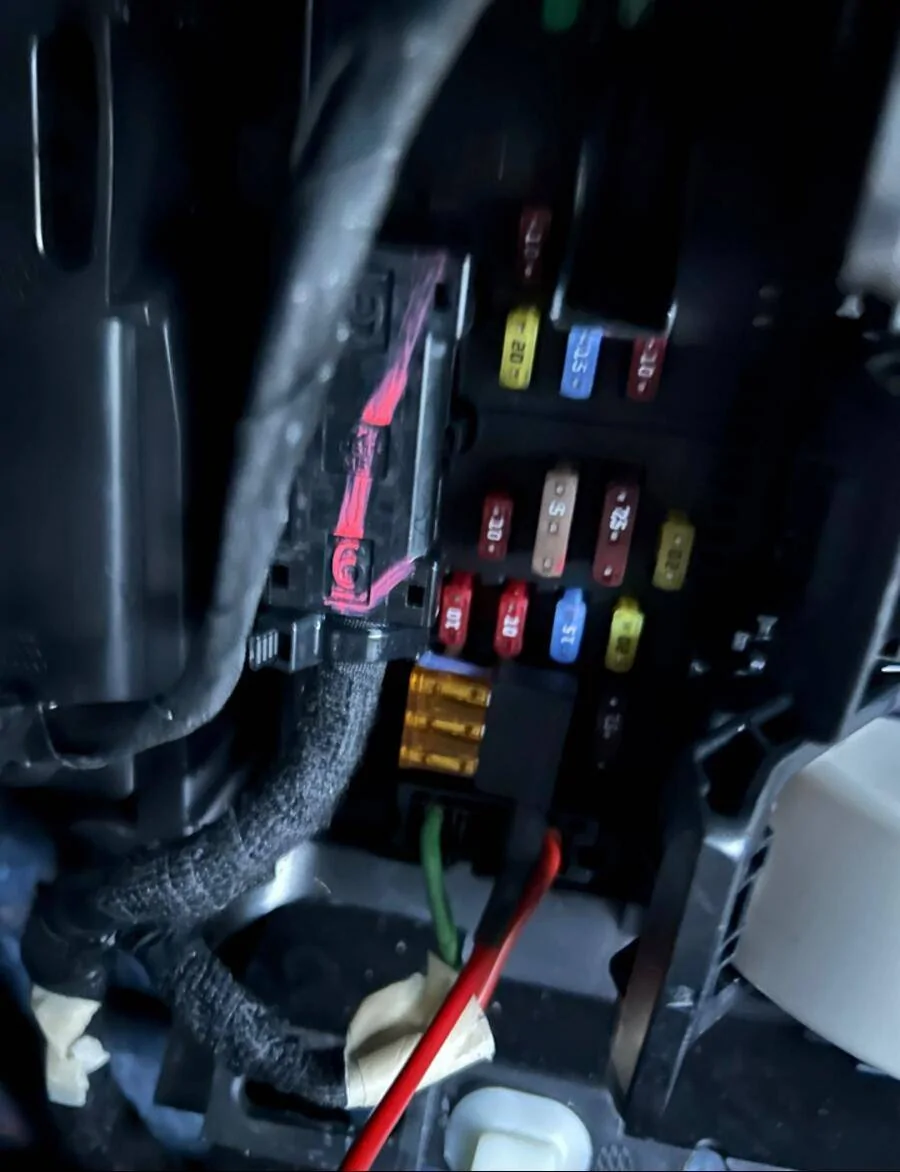
It took me about 10 minutes to remove the three panels (either side of the instrument panel and the fuse cover) and run the wire from the OBDII connector to the fuse panel. Much easier than trying to get to the cigarette lighter. And best of all - the moment your turn off the car, it switches to parking mode (well at least I think so - it takes about 20 seconds for the camera to announce it is in parking mode, but I think it's just thinking about its life choices during that time)… Works great now. Hope this helps!
Sponsored