Wallbox Pulsar Plus

quitepossibly

Active Member
First Name
Stephen
Joined
Jan 6, 2021
Threads
0
Messages
37
Reaction score
33
Location
California
Vehicles
Model 3
Country flag
Alrighty - So due to some ice and snow yesterday, I didn't have to work, so I took the time to install my two Wallbox's!

Will immediately say that it all went very well. Very easy to install and setup, even when doing power sharing.

Note that folks should have a licensed electrician do all of their electrical work, including installing these.

The Wallbox Pulsar Plus is packaged very well, my 2 units came shipped inside a larger box with plenty of packing material to keep them from shifting. Each unit was then double boxed itself (brown box with the actual retail white box inside). So kudos to Wallbox for attempting to ensure they make it safely.

Packing is great, and well thought-out, though I'm not one to care too much about this.

IMG_0572.jpg


Each unit comes with the Wallbox itself, with 14-50 plug already attached, a holster/wire management bracket, and mounting screws with anchors.

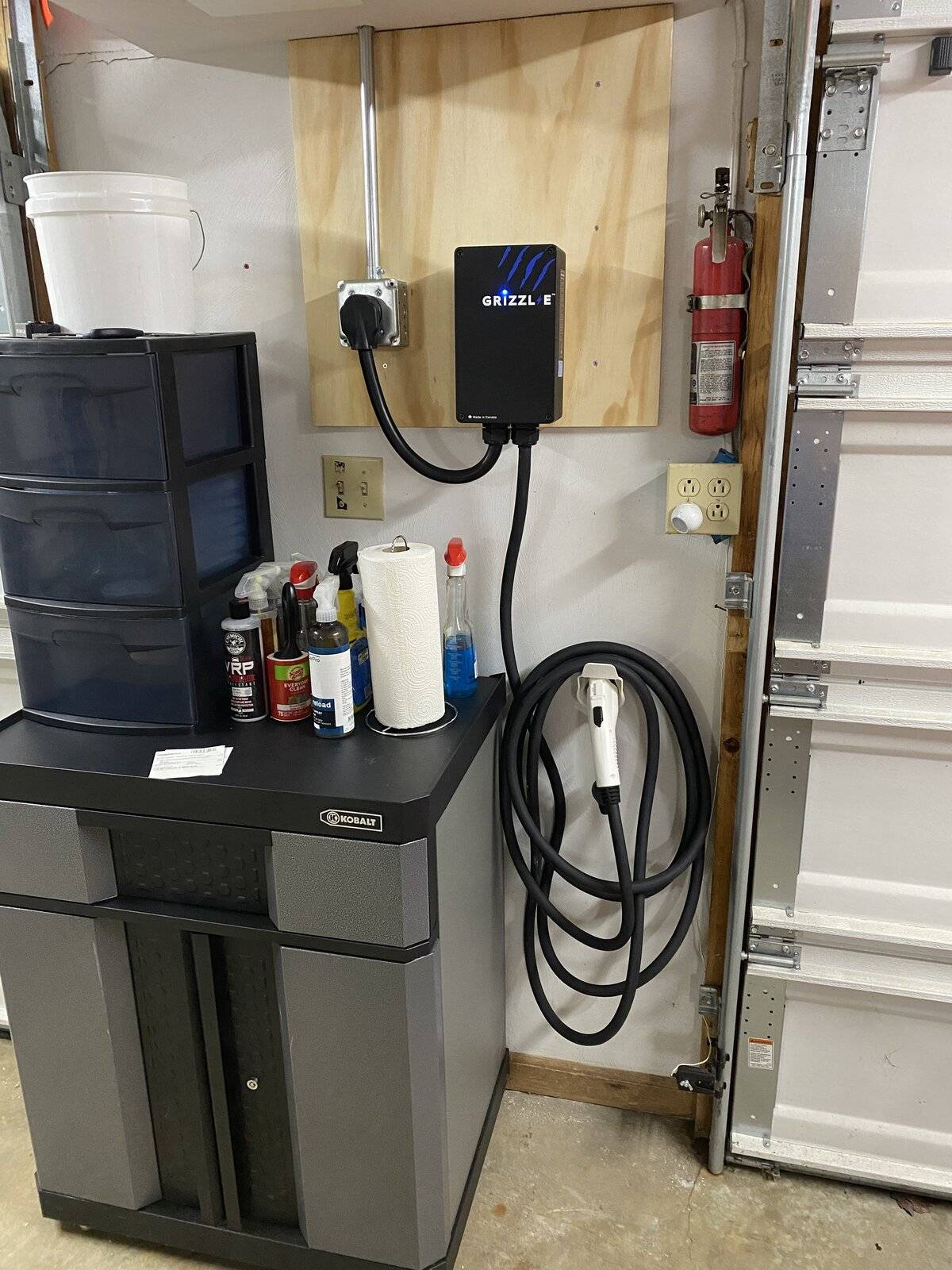
I had an existing 14-50 receptacle that I installed in my garage with a Grizzl-E 40A EVSE.

IMG_0246.jpg


The plan was to remove that 14-50, put in a junction box, and use multi-tap connectors to run lines to each of the wallboxes (hardwire them).

I also ran a piece of CAT5E between the 2 wallboxes to let them communicate for power-sharing. You can daisy chain I believe up to 24 for power sharing from a single circuit.

IMG_0577.jpg


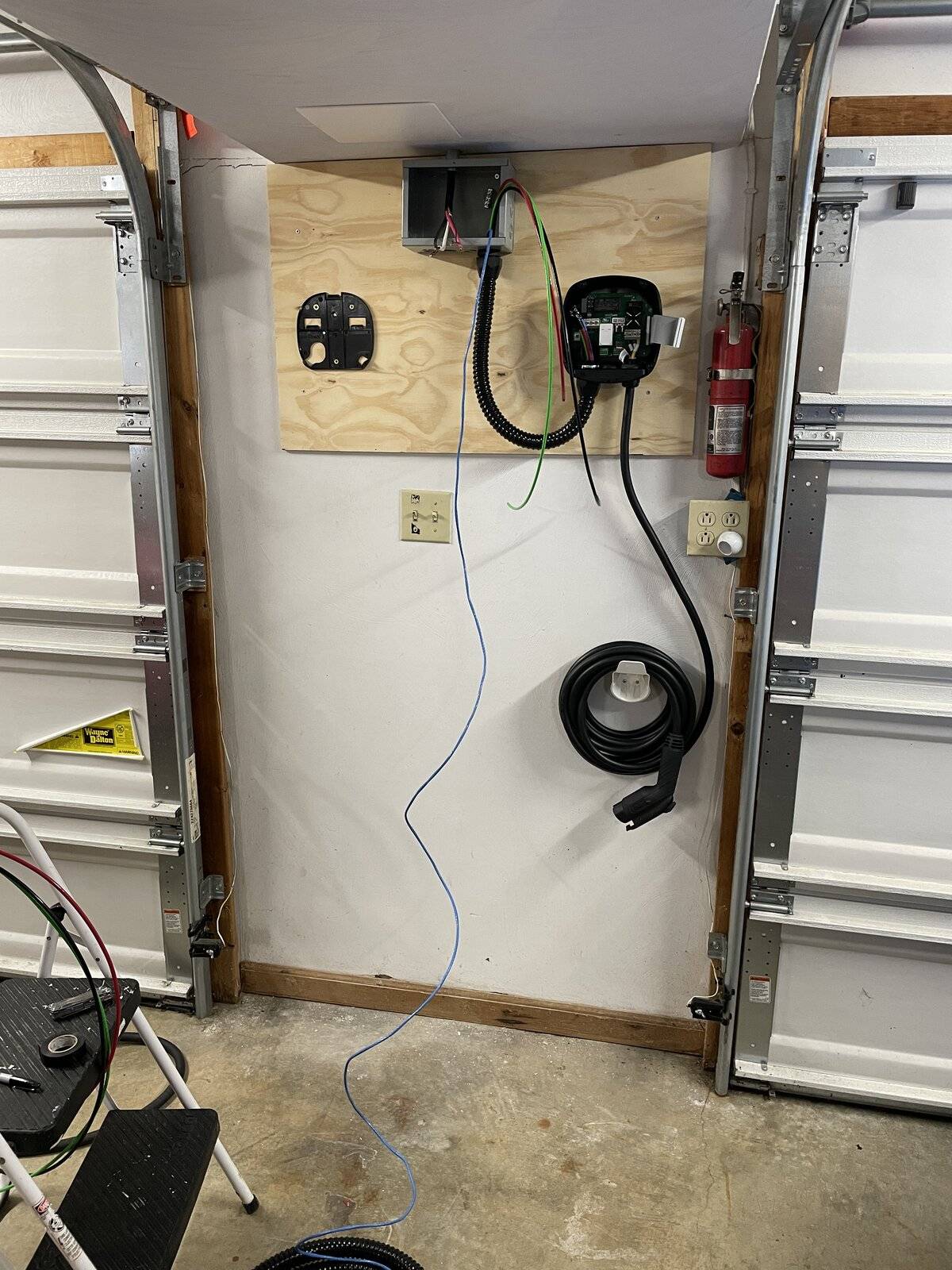
Here I had the mounting plates for each Wallbox mounted on a backing board (so that I didn't have to worry about stud placement, at some point in the next few years the garage will be reno'd so I'm not super concerned about aesthetics at the moment). I ran some 6GA THHN from the junction box to the Wallbox (2 hots and a ground), and the CAT5E. Used some non-metallic flexible conduit since it's very easy to work with. Note that the Wallbox has 1" knockout, so I used 1" conduit/connectors.

IMG_0580.jpg


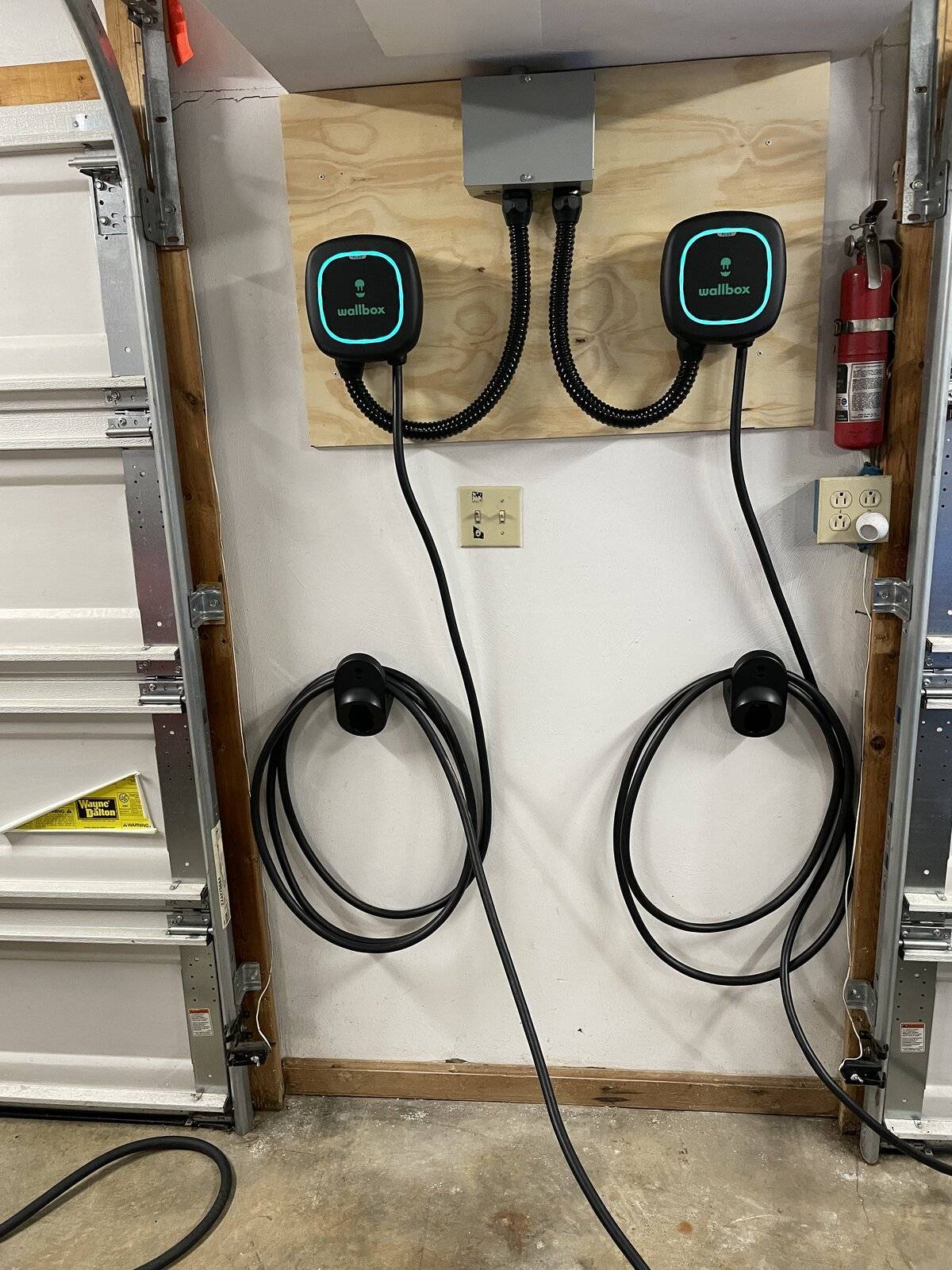
Here's both Wallboxes mounted with conduit and wire ran.

IMG_0583.jpg


Screw terminals make easy install of the THHN. Only need one twisted pair for the CAN connections, so just used the green pair in my CAT5E. Power sharing installation instructions make it easy to understand how to wire.

IMG_0590.jpg


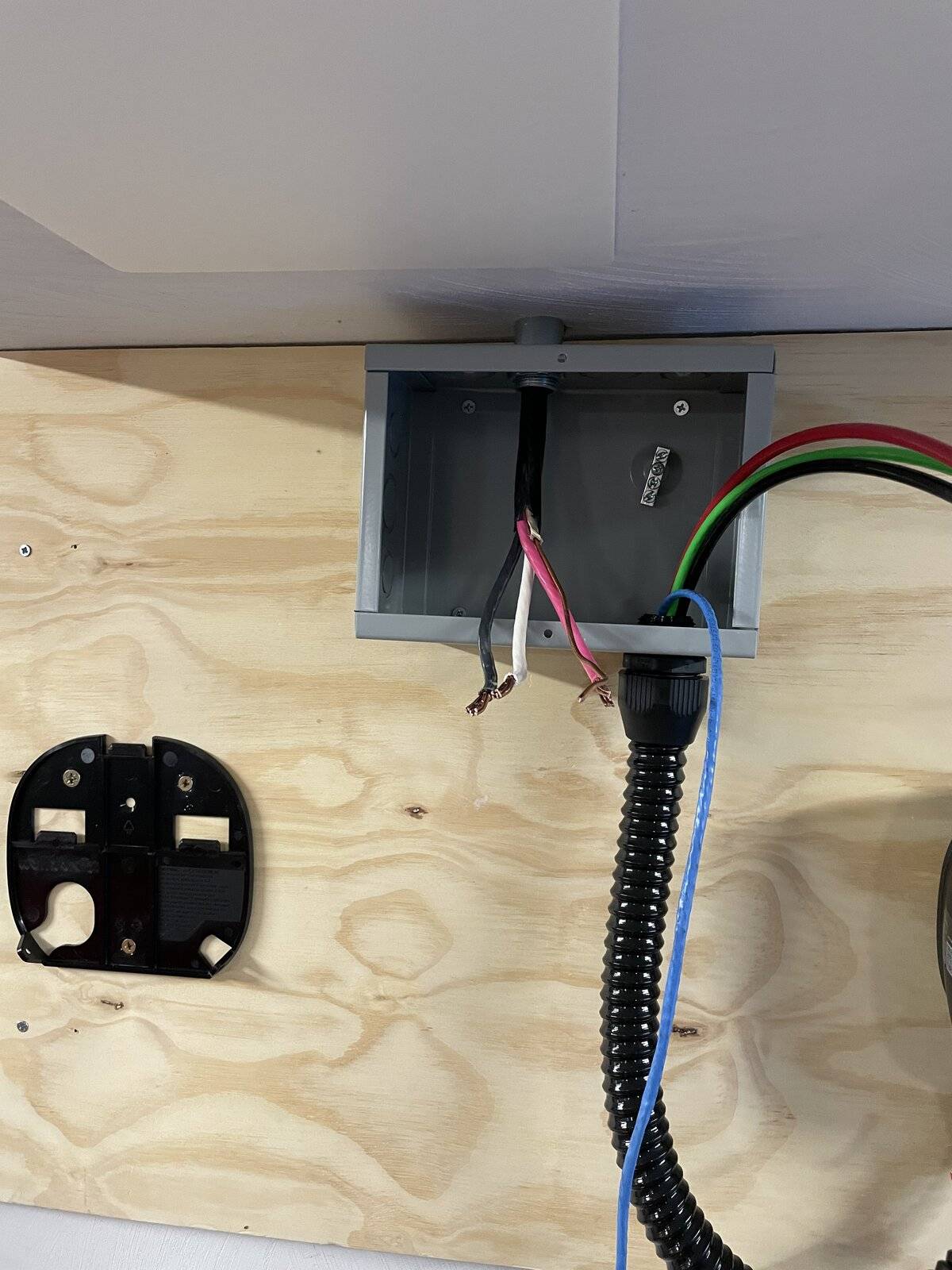
Here's the junction box looking a little sloppy after terminating everything. I had 6/3 Romex coming in from my panel, so I capped off the neutral since it isn't necessary in a hardwire situation. Used multi-tap connectors to connect up two hots, and a grounding block to ground it all.

IMG_0589.jpg


On restoring power via the breaker both units lit up....

IMG_0592.jpg


Loaded up the Wallbox app, which I had already created an account for.

Added both units to the app very easily. It asks for two unique identifiers present on the side of the unit to add, then uses local Bluetooth communication to connect. Once both were added I went into the primary units settings and configured the Power Sharing function. After that they connected up and looked good to go.

IMG_0597.jpg


I then connected each unit to Wifi. Note that this is not at all necessary, you can choose to use local Bluetooth communication for setup/monitoring when you're near them. Wifi is only required for Software Updates and remote management.

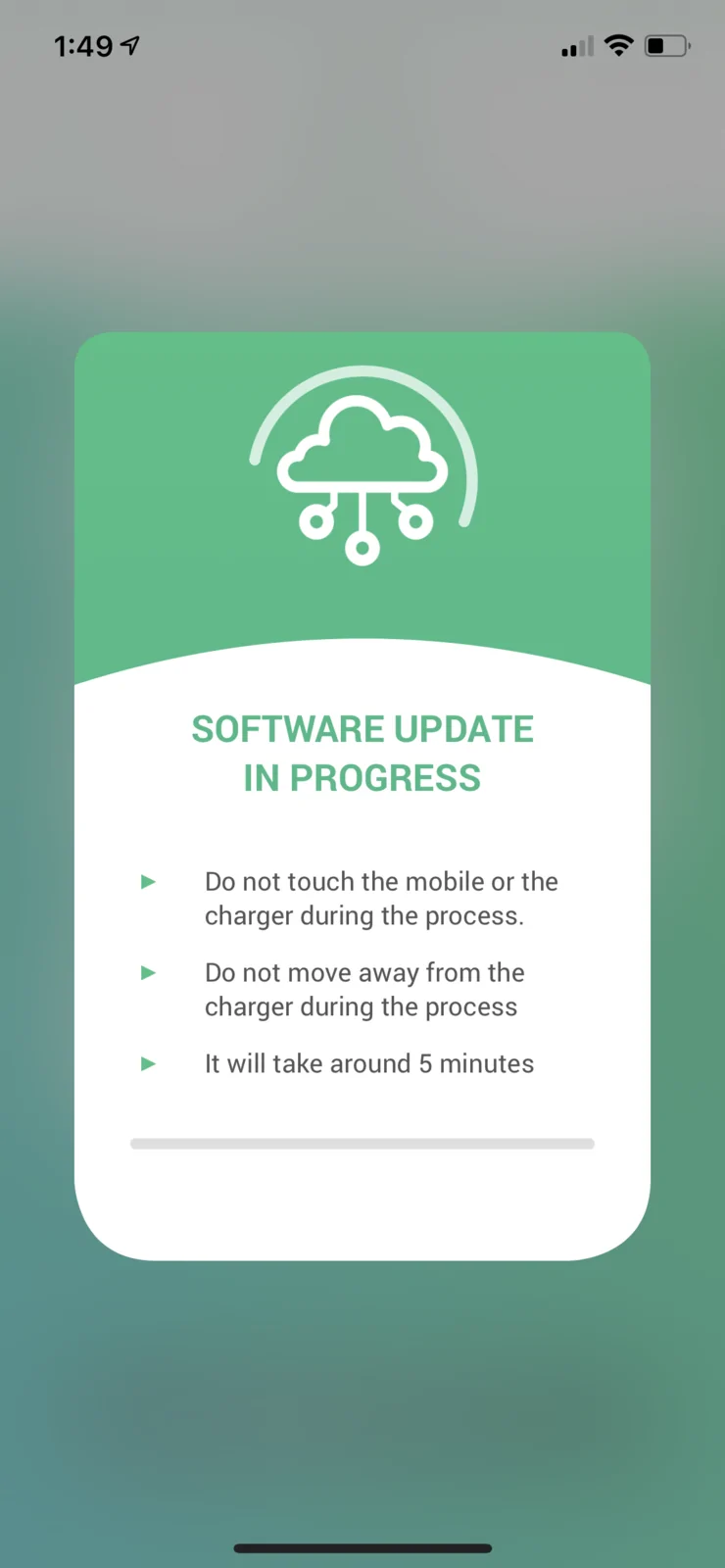
Once connected to Wifi they each had a software update available, which was a breeze to install.

IMG_0596.png


After both were updated and all seemed well, I plugged them into my i3 and Mach-E. The i3 was already fully charged so not much happened there. The Mach-E started charging up immediately.

IMG_0605.png


Note that even with power sharing, each Wallbox is listed separately within the app. So you can tracking charging history on each unit separately.

So far I am impressed. I haven't been able to fully test power sharing since neither EV had very depleted batteries. Once I can drain them a bit and get them both plugged in, I'll comment on power sharing functionality/etc.

Also sorry for the mess of a "review". Really just a quick and dirty for now. Feel free to shoot me any questions you may have.

IMG_0606.jpg


IMG_0609.jpg
Great install! I hope you'll share your experiences with the power sharing, since this is one of the few EVSE on the market with that feature.
 

kennelh

Well-Known Member
First Name
Louise and Ken
Joined
Nov 28, 2019
Threads
13
Messages
1,182
Reaction score
1,374
Location
Northern California
Vehicles
J1 '21 Premium Ex RWD (Rapid Red)
Country flag
Alrighty - So due to some ice and snow yesterday, I didn't have to work, so I took the time to install my two Wallbox's!

Will immediately say that it all went very well. Very easy to install and setup, even when doing power sharing.

Note that folks should have a licensed electrician do all of their electrical work, including installing these.

The Wallbox Pulsar Plus is packaged very well, my 2 units came shipped inside a larger box with plenty of packing material to keep them from shifting. Each unit was then double boxed itself (brown box with the actual retail white box inside). So kudos to Wallbox for attempting to ensure they make it safely.

Packing is great, and well thought-out, though I'm not one to care too much about this.

IMG_0572.jpg


Each unit comes with the Wallbox itself, with 14-50 plug already attached, a holster/wire management bracket, and mounting screws with anchors.

I had an existing 14-50 receptacle that I installed in my garage with a Grizzl-E 40A EVSE.

IMG_0246.jpg


The plan was to remove that 14-50, put in a junction box, and use multi-tap connectors to run lines to each of the wallboxes (hardwire them).

I also ran a piece of CAT5E between the 2 wallboxes to let them communicate for power-sharing. You can daisy chain I believe up to 24 for power sharing from a single circuit.

IMG_0577.jpg


Here I had the mounting plates for each Wallbox mounted on a backing board (so that I didn't have to worry about stud placement, at some point in the next few years the garage will be reno'd so I'm not super concerned about aesthetics at the moment). I ran some 6GA THHN from the junction box to the Wallbox (2 hots and a ground), and the CAT5E. Used some non-metallic flexible conduit since it's very easy to work with. Note that the Wallbox has 1" knockout, so I used 1" conduit/connectors.

IMG_0580.jpg


Here's both Wallboxes mounted with conduit and wire ran.

IMG_0583.jpg


Screw terminals make easy install of the THHN. Only need one twisted pair for the CAN connections, so just used the green pair in my CAT5E. Power sharing installation instructions make it easy to understand how to wire.

IMG_0590.jpg


Here's the junction box looking a little sloppy after terminating everything. I had 6/3 Romex coming in from my panel, so I capped off the neutral since it isn't necessary in a hardwire situation. Used multi-tap connectors to connect up two hots, and a grounding block to ground it all.

IMG_0589.jpg


On restoring power via the breaker both units lit up....

IMG_0592.jpg


Loaded up the Wallbox app, which I had already created an account for.

Added both units to the app very easily. It asks for two unique identifiers present on the side of the unit to add, then uses local Bluetooth communication to connect. Once both were added I went into the primary units settings and configured the Power Sharing function. After that they connected up and looked good to go.

IMG_0597.jpg


I then connected each unit to Wifi. Note that this is not at all necessary, you can choose to use local Bluetooth communication for setup/monitoring when you're near them. Wifi is only required for Software Updates and remote management.

Once connected to Wifi they each had a software update available, which was a breeze to install.

IMG_0596.png


After both were updated and all seemed well, I plugged them into my i3 and Mach-E. The i3 was already fully charged so not much happened there. The Mach-E started charging up immediately.

IMG_0605.png


Note that even with power sharing, each Wallbox is listed separately within the app. So you can tracking charging history on each unit separately.

So far I am impressed. I haven't been able to fully test power sharing since neither EV had very depleted batteries. Once I can drain them a bit and get them both plugged in, I'll comment on power sharing functionality/etc.

Also sorry for the mess of a "review". Really just a quick and dirty for now. Feel free to shoot me any questions you may have.

IMG_0606.jpg


IMG_0609.jpg
Great write up. I had a question about the mounting plates; they look like plastic. Is that correct and if so how rugged do they appear? Thank.
 

methorian

Well-Known Member
Joined
Nov 18, 2019
Threads
17
Messages
1,557
Reaction score
2,437
Location
Roanoke, VA
Vehicles
2021 Mach-E First Edition, 2025 Kia EV6 GT-Line
Occupation
IT Admin
Country flag
Great write up. I had a question about the mounting plates; they look like plastic. Is that correct and if so how rugged do they appear? Thank.
They are indeed plastic, but seem sturdy enough. The unit's themselves are all plastic and thus aren't very heavy.

They include pretty hefty screws for the mounting plates. I have no worries about them personally. There's two small screws that then keep the units planted onto the wallmounts (bottom right and left).

Great install! I hope you'll share your experiences with the power sharing, since this is one of the few EVSE on the market with that feature.
So far so good! Haven't really driven the Mach-E much to get it's battery lower to really test, but I can watch it limit power to my i3 (which is normally charging around 7kW) when I told the Mach-E to charge to 100% (keep it at 90% max normally) and sit in it with heat blasting/etc. The Mach-E charger would go to around 3-4kW and the i3 would go down to around 5kW.
 

quitepossibly

Active Member
First Name
Stephen
Joined
Jan 6, 2021
Threads
0
Messages
37
Reaction score
33
Location
California
Vehicles
Model 3
Country flag
They are indeed plastic, but seem sturdy enough. The unit's themselves are all plastic and thus aren't very heavy.

They include pretty hefty screws for the mounting plates. I have no worries about them personally. There's two small screws that then keep the units planted onto the wallmounts (bottom right and left).


So far so good! Haven't really driven the Mach-E much to get it's battery lower to really test, but I can watch it limit power to my i3 (which is normally charging around 7kW) when I told the Mach-E to charge to 100% (keep it at 90% max normally) and sit in it with heat blasting/etc. The Mach-E charger would go to around 3-4kW and the i3 would go down to around 5kW.
If this is the case, it will make the Pulsar Plus much smarter than the Clipper Creek Share2 EVSE. The Clipper Creek EVSE just split the power in half if any vehicle is using the EVSE. If the Wallbox Pulsar Plus can intelligently load share, then EVs will charge faster with the Wallbox.


methorian

Well-Known Member
Joined
Nov 18, 2019
Threads
17
Messages
1,557
Reaction score
2,437
Location
Roanoke, VA
Vehicles
2021 Mach-E First Edition, 2025 Kia EV6 GT-Line
Occupation
IT Admin
Country flag
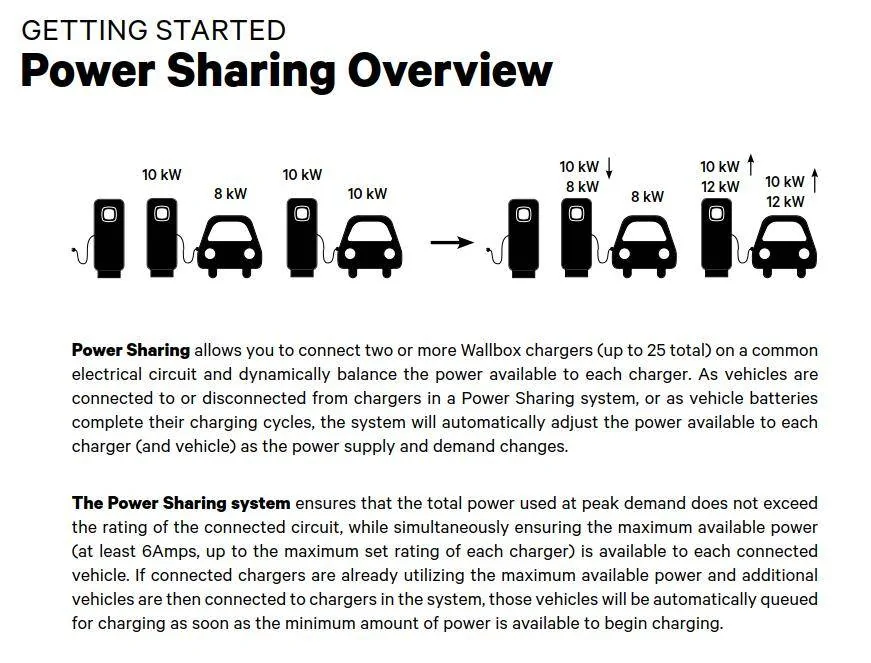
Just wanted to give a small update in regards to Power Sharing - It does seem to evenly split power to each unit, when both are requesting "full" power.

With my i3 and Mach-E both charging, they each get around 4.35kW of power from the Pulsar Pluses. As one tapers off that power is opened up to the other, so far as I can tell.

Still really liking them with no issues so far.
 

quitepossibly

Active Member
First Name
Stephen
Joined
Jan 6, 2021
Threads
0
Messages
37
Reaction score
33
Location
California
Vehicles
Model 3
Country flag
With my i3 and Mach-E both charging, they each get around 4.35kW of power from the Pulsar Pluses. As one tapers off that power is opened up to the other, so far as I can tell.

Still really liking them with no issues so far.
What happens when the one car finishes charging, but is still plugged in? I have two Juicebox EVSEs setup in a similar configuration and when one car finishes charging but is still plugged in, it reserves 7 amps for that car and the other car that is still charging gets the remainder.
 

generaltso

Well-Known Member
Joined
Jun 24, 2020
Threads
76
Messages
15,389
Reaction score
28,694
Location
Vermont
Vehicles
2024 Kia EV9 GT-Line
Country flag
I decided to add a Pulsar Plus to my garage. I already have a ChargePoint Home Flex for the MME that's hardwired, but my wife is getting a RAV4 Prime and the charging port will be on the opposite side of the garage. I was originally going to get another ChargePoint, but you can only add one home unit to a single ChargePoint account, which is really dumb. You'd think ChargePoint would want people to buy multiple units. I know I could create another account for the other unit, but then I'd constantly be logging in and out of the CharePoint app with different accounts which would just add confusion. That's okay, the ChargePoint units have been hard to come by lately anyway.

I hooked up the Pulsar Plus and tested it with the MME. It was charging fine, but the app reported 0kW and 0kWh. I opened a ticket with Wallbox, and they looked at the logs and determine that the unit was defective. They sent out a replacement unit, which I received today. The new unit seems to report its power usage in the app just fine, so it's good to know that Wallbox's support is good.

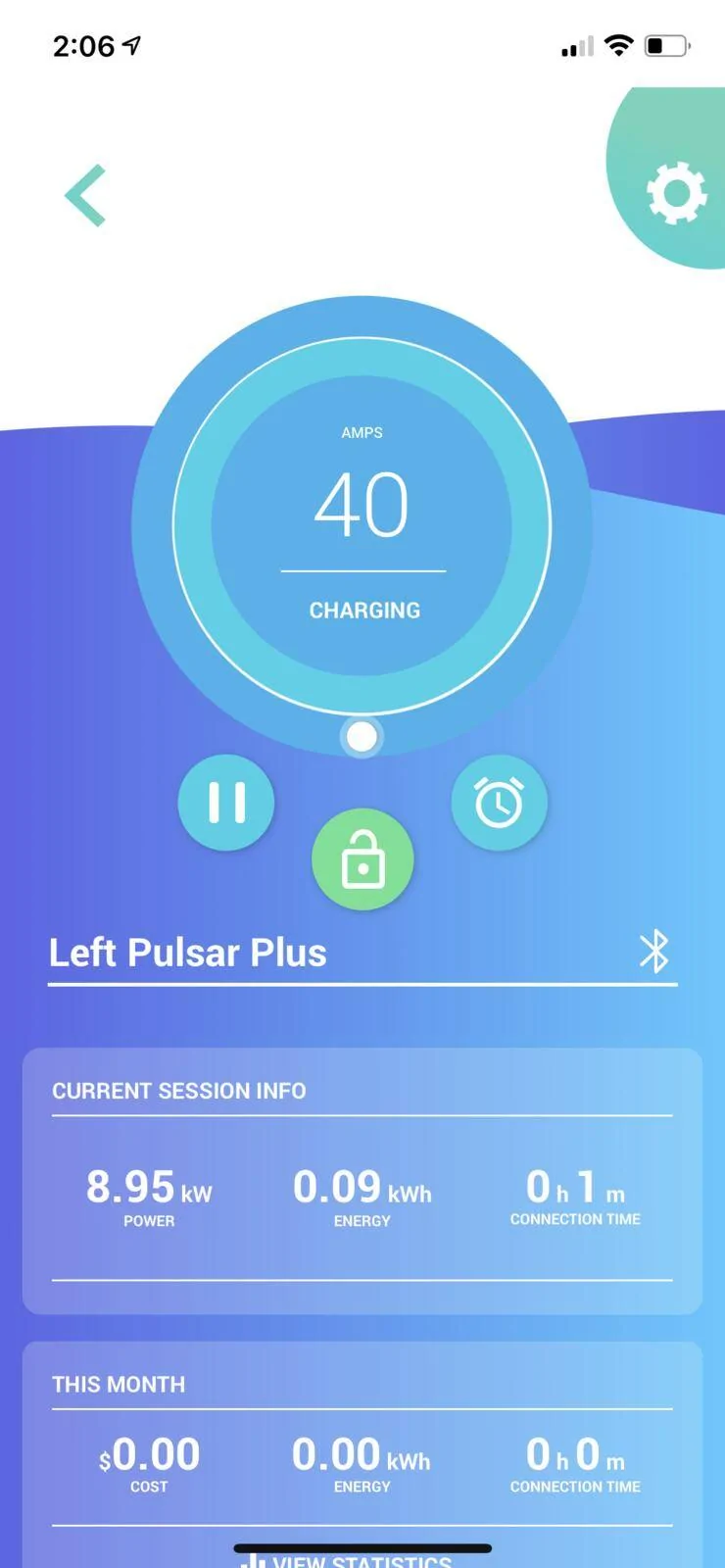
I will say that I like the real-time charging screen in the ChargePoint app a lot better than the in the Wallbox app. ChargePoint shows a graph of the power draw throughout the session, so you can see if the power dipped at all while it was charging or exactly when it starts to taper at the end. The Wallbox app shows kW draw and total kWh, but no kW graph of the entire session, so if there was a power dip while you weren't looking at it, you'd never know. It's not really a huge deal, but we'll see how it goes.
 

SnBGC

Well-Known Member
First Name
Greg
Joined
Apr 20, 2020
Threads
46
Messages
5,962
Reaction score
9,778
Location
Phoenix
Vehicles
2021 Mach-E FE, 2021 Wrangler 4xe High Altitude
Occupation
Manager
Country flag
Just wanted to give a small update in regards to Power Sharing - It does seem to evenly split power to each unit, when both are requesting "full" power.

With my i3 and Mach-E both charging, they each get around 4.35kW of power from the Pulsar Pluses. As one tapers off that power is opened up to the other, so far as I can tell.

Still really liking them with no issues so far.
It depends on what size circuit they are on and the power ceiling of each unit. Sounds like you installed your 'straight up' on a 50A circuit?

We recently installed three on a 70A circuit and then set one unit at 32 amps and the other two at 24A max (even though they were 48A units). This was per the customer's request. When we tested, I think we got 6.6kW from the first unit (customer's PHEV), Just under 6kW from the second unit (Mach-E) and the third machine appeared to be waiting until one of the other cars finished charging. We didn't stick around long enough to verify so I just unplugged from #2 and #3 started charging around 24A if I remember correctly (Focus Electric).

I don't know why the customer wanted the different amp settings since the machines are able to control all that themselves but we just satisfied their request and moved onto the next project. :)

So far, they have been pretty good units. I would recommend an installation location that is protected from direct sunlight and excessive heat exposure. Otherwise, no issues so far. (knock on wood....)

What happens when the one car finishes charging, but is still plugged in? I have two Juicebox EVSEs setup in a similar configuration and when one car finishes charging but is still plugged in, it reserves 7 amps for that car and the other car that is still charging gets the remainder.
The wallbox units dynamically adjust.

Ford Mustang Mach-E Wallbox Pulsar Plus 1628641502843

I decided to add a Pulsar Plus to my garage. I already have a ChargePoint Home Flex for the MME that's hardwired, but my wife is getting a RAV4 Prime and the charging port will be on the opposite side of the garage. I was originally going to get another ChargePoint, but you can only add one home unit to a single ChargePoint account, which is really dumb. You'd think ChargePoint would want people to buy multiple units. I know I could create another account for the other unit, but then I'd constantly be logging in and out of the CharePoint app with different accounts which would just add confusion. That's okay, the ChargePoint units have been hard to come by lately anyway.

I hooked up the Pulsar Plus and tested it with the MME. It was charging fine, but the app reported 0kW and 0kWh. I opened a ticket with Wallbox, and they looked at the logs and determine that the unit was defective. They sent out a replacement unit, which I received today. The new unit seems to report its power usage in the app just fine, so it's good to know that Wallbox's support is good.

I will say that I like the real-time charging screen in the ChargePoint app a lot better than the in the Wallbox app. ChargePoint shows a graph of the power draw throughout the session, so you can see if the power dipped at all while it was charging or exactly when it starts to taper at the end. The Wallbox app shows kW draw and total kWh, but no kW graph of the entire session, so if there was a power dip while you weren't looking at it, you'd never know. It's not really a huge deal, but we'll see how it goes.
Did you check out the web version of their control interface? Much more detail in there.....
 

generaltso

Well-Known Member
Joined
Jun 24, 2020
Threads
76
Messages
15,389
Reaction score
28,694
Location
Vermont
Vehicles
2024 Kia EV9 GT-Line
Country flag
Did you check out the web version of their control interface? Much more detail in there.....
I did, but still didn’t see any way to view a graph of kW by charging session. You can see a graph of kWh per day, but not the actual charging speed of a session.
 

SnBGC

Well-Known Member
First Name
Greg
Joined
Apr 20, 2020
Threads
46
Messages
5,962
Reaction score
9,778
Location
Phoenix
Vehicles
2021 Mach-E FE, 2021 Wrangler 4xe High Altitude
Occupation
Manager
Country flag
I did, but still didn’t see any way to view a graph of kW by charging session. You can see a graph of kWh per day, but not the actual charging speed of a session.
Okay. I will have to go back and look. I could have sworn I saw the detail somewhere. Too many EVSEs.....I get them mixed up sometimes. :)
 

methorian

Well-Known Member
Joined
Nov 18, 2019
Threads
17
Messages
1,557
Reaction score
2,437
Location
Roanoke, VA
Vehicles
2021 Mach-E First Edition, 2025 Kia EV6 GT-Line
Occupation
IT Admin
Country flag
I did, but still didn’t see any way to view a graph of kW by charging session. You can see a graph of kWh per day, but not the actual charging speed of a session.
This was part of my feedback to Wallbox, as I had seen the Chargepoint graphs and thought they would be nice.

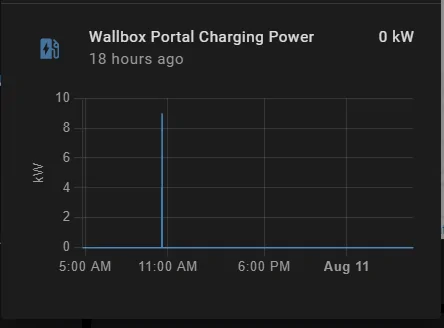
There is a HomeAssistant integration for Wallbox, and it has charging power data, so you could maybe do some fun stuff with that (graphs/etc). I haven't messed with it too much myself yet.

Here it showed my Mach-E requesting a charge yesterday around 11AM, at 4kWh (it had been plugged in for a day, was just topping off the 12V or something)... Didn't charge very long.
Ford Mustang Mach-E Wallbox Pulsar Plus 1628671843838
 

Mach-Lee

Well-Known Member
First Name
Lee
Joined
Jul 16, 2021
Threads
262
Messages
11,344
Reaction score
24,964
Location
Wisconsin
Vehicles
2022 Mach-E Premium AWD
Occupation
Sci/Eng
Country flag
We recently installed three on a 70A circuit and then set one unit at 32 amps and the other two at 24A max (even though they were 48A units). This was per the customer's request. When we tested, I think we got 6.6kW from the first unit (customer's PHEV), Just under 6kW from the second unit (Mach-E) and the third machine appeared to be waiting until one of the other cars finished charging. We didn't stick around long enough to verify so I just unplugged from #2 and #3 started charging around 24A if I remember correctly (Focus Electric).

I don't know why the customer wanted the different amp settings since the machines are able to control all that themselves but we just satisfied their request and moved onto the next project. :)
Obviously the person that parks in stall #1 was more important than #2 and #3, so they had to have a higher rate. Can't be having a Mach-E charge faster than their PHEV now. ?
 
Last edited:

Godawgs

Well-Known Member
First Name
Mike
Joined
Mar 5, 2022
Threads
2
Messages
106
Reaction score
58
Location
Lawrenceville
Vehicles
2022 Mach E4X Ordered
Occupation
Purchasing
Country flag
Just want to bump this to ask how y’all are liking this? I was looking at getting a ChargePoint or a Juicebox as Georgia Power offers them at a $200-250 discount but they’re currently out of the ChargePoint and just added the Wallbox today
Sponsored


Top