

iNeedANameHere
Well-Known Member
- Joined
- May 19, 2021
- Threads
- 12
- Messages
- 80
- Reaction score
- 178
- Location
- US
- Vehicles
- 2024 Mustang Mach E Premium

- Thread starter
- #1
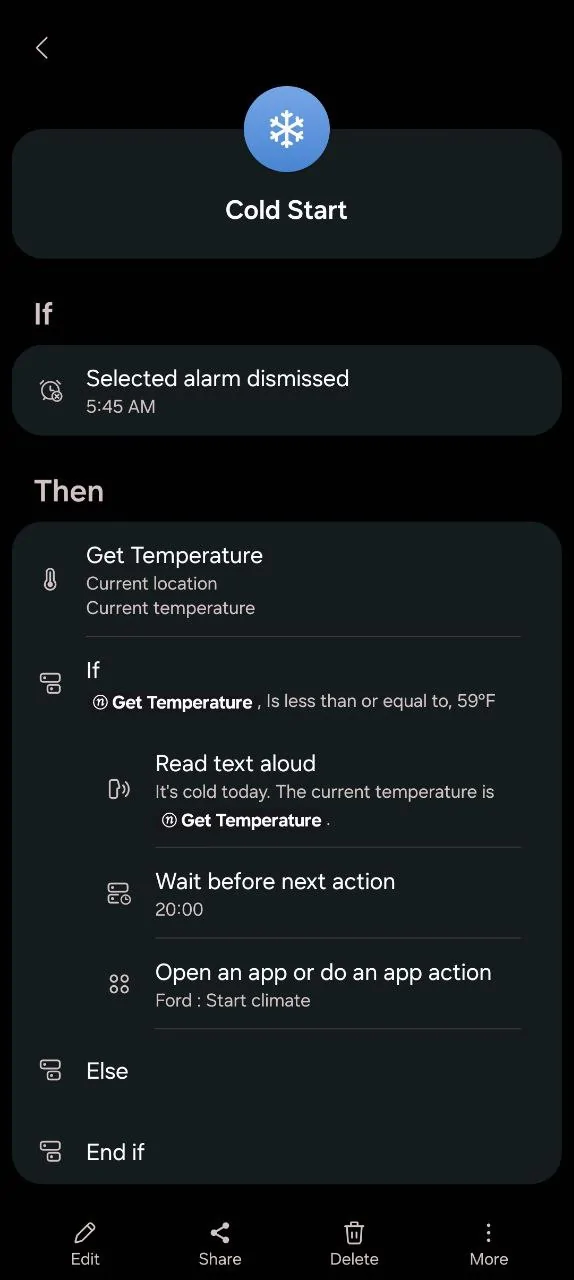
With the addition of Climate app shortcuts being added to the new FordPass App I have successfully gotten a routine with Samsung Routines+ working to automatically start the climate based on outdoor temperature. The car will automatically start based on triggers that can be user defined. In my case I have set the following.
1. Set a defined alarm to go off last in my series of wake up alarms.
2. Based the routine to trigger off the dismissal of that alarm.
3. Routine checks my location and the temperature of that location.
4. If the outdoor temperature is less than a user defined temp (in my case 59 degrees F) the routine will then trigger reading the temp out loud (this can be skipped if desired) and then starting a 20 minute pause for the next action. (my get ready period)
5. After the 20 minute delay period set by me, the routine triggers the launch of the Climate shortcut in the new update.
6. Car will now run for the remote start / climate session.
Tested this morning and it worked 100% automatically with no input from me after setup.
Toggling the defined alarm OFF in the alarms app will prevent the remote start routine from triggering. This way if I do not need to be up and about I just turn that alarm off before bed and the car will not start the next morning on its own.
Hope this helps someone! Tested with a Galaxy Z Fold 7 on OneUI 8 and the latest redesigned Ford app. This is untested on iOS so chime in if you're able to get something similar working on iPhone!

1. Set a defined alarm to go off last in my series of wake up alarms.
2. Based the routine to trigger off the dismissal of that alarm.
3. Routine checks my location and the temperature of that location.
4. If the outdoor temperature is less than a user defined temp (in my case 59 degrees F) the routine will then trigger reading the temp out loud (this can be skipped if desired) and then starting a 20 minute pause for the next action. (my get ready period)
5. After the 20 minute delay period set by me, the routine triggers the launch of the Climate shortcut in the new update.
6. Car will now run for the remote start / climate session.
Tested this morning and it worked 100% automatically with no input from me after setup.
Toggling the defined alarm OFF in the alarms app will prevent the remote start routine from triggering. This way if I do not need to be up and about I just turn that alarm off before bed and the car will not start the next morning on its own.
Hope this helps someone! Tested with a Galaxy Z Fold 7 on OneUI 8 and the latest redesigned Ford app. This is untested on iOS so chime in if you're able to get something similar working on iPhone!
Sponsored
Last edited:


