- First Name
- Brian
- Joined
- May 10, 2021
- Threads
- 68
- Messages
- 3,461
- Reaction score
- 6,544
- Location
- Michigan
- Vehicles
- Mustang Mach-E
- Occupation
- Real Human & Community Manager

- Thread starter
- #1
Hi Mustang Mach-E owners,
We’re excited to announce that launching with the 2025 Mustang Mach-E is an expanded Charge Settings app on the touchscreen and other improvements to allow you to take better control of your vehicle’s charging, including many improvements based on suggestions from our customers and owners (including many within this group!) – thank you.

Here’s how it works:
Live Charging
With the addition of Live Charging, you will be able to view your Mustang Mach-E’s charging speed in real time within the Charge Settings app.
When you’re charging on a Level 1 or Level 2 AC charger, you’ll see both your charge rate in Amps as well as kW:

And when you’re DC Fast Charging, you’ll see your charge rate displayed in kW:

Global Target Charge
With the updated Charge Settings app, your Target Charge limit can be set with one simple slider, and the target will apply everywhere – no need to save a location first. To change it, just drag and release the slider. This target charge level will apply to all Level 1 and Level 2 AC charging as well as DC Fast Charging.

There are two different versions of the slider, depending on what type of battery you have.
If you have an Extended Range battery, you will see a “Daily” portion of the slider from 50% to 90% and a “Trip” section between 90% and 100%. Ford recommends charging your battery to a limit within the Daily range for day-to-day driving and frequent charging, and using the Trip range when you need extra range.
If you have a Standard Range battery, you will see a recommendation to charge to 100% on a day-to-day basis. When the charge limit is selected below 100%, a reminder will display to charge to 100% at least once per month to maintain battery health.
Preferred Charge Times allow you to save charging locations you’ve previously visited and schedule your charging at those locations individually.
AC Charge Rate Control
With the addition of charge rate control for AC charging, you can adjust your vehicle’s maximum charging speed on a Level 1 or Level 2 charger.
This feature is designed to help make life easier if you wish to slow your charging down, for example to time the completion of charging to align with when you will return to your vehicle, or if you’ve experienced circuit breaker trips at a certain charger.
By default, this value will be set at maximum AC charge rate for your vehicle. To reduce this rate, tap the Advanced option from the Charge Settings screen, and an AC Charge Rate slider will appear.

Charge Port Locking
To improve Fast Charging Adapter security and reduce the chance of your vehicle being unexpectedly unplugged when fast charging, your vehicle’s charge port will no longer automatically unlock when fast charging is completed.
To unlock the charge port, you will use the unlock button in the middle of the Charge Status Indicator light located next to charge port:

When pressing this button with your vehicle’s key (or your phone with Phone as a Key (if equipped)) near the charge port or with vehicle doors unlocked, charging will stop and the charge port will unlock.
If the unlock button is pressed without the vehicle’s key present,the charge port will remain locked and charging will continue. If a press of the charge port unlock button does not unlock the charge port, ensure a key is positioned near the charge port, or press the door unlock button inside the vehicle.
Charge port locking applies to DC Fast Charging only. Level 1 and Level 2 AC charging can be unplugged without pressing the unlock button.
Thank you for your feedback which we used to develop these features.
Robert and Brian
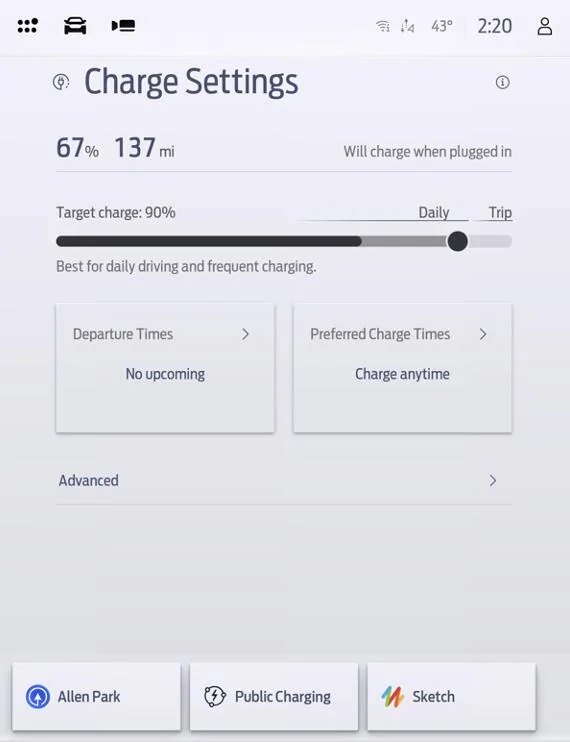
We’re excited to announce that launching with the 2025 Mustang Mach-E is an expanded Charge Settings app on the touchscreen and other improvements to allow you to take better control of your vehicle’s charging, including many improvements based on suggestions from our customers and owners (including many within this group!) – thank you.
Here’s how it works:
Live Charging
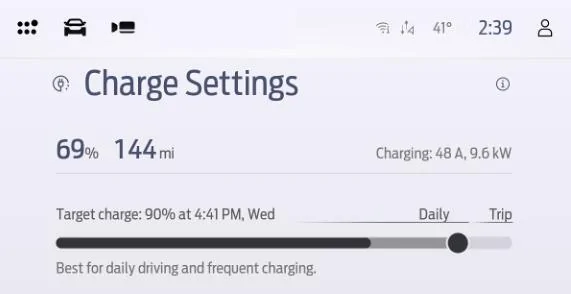
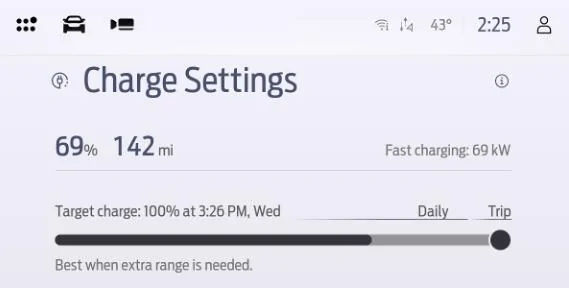
With the addition of Live Charging, you will be able to view your Mustang Mach-E’s charging speed in real time within the Charge Settings app.
When you’re charging on a Level 1 or Level 2 AC charger, you’ll see both your charge rate in Amps as well as kW:
And when you’re DC Fast Charging, you’ll see your charge rate displayed in kW:
Global Target Charge
With the updated Charge Settings app, your Target Charge limit can be set with one simple slider, and the target will apply everywhere – no need to save a location first. To change it, just drag and release the slider. This target charge level will apply to all Level 1 and Level 2 AC charging as well as DC Fast Charging.

There are two different versions of the slider, depending on what type of battery you have.
If you have an Extended Range battery, you will see a “Daily” portion of the slider from 50% to 90% and a “Trip” section between 90% and 100%. Ford recommends charging your battery to a limit within the Daily range for day-to-day driving and frequent charging, and using the Trip range when you need extra range.
If you have a Standard Range battery, you will see a recommendation to charge to 100% on a day-to-day basis. When the charge limit is selected below 100%, a reminder will display to charge to 100% at least once per month to maintain battery health.
Preferred Charge Times allow you to save charging locations you’ve previously visited and schedule your charging at those locations individually.
AC Charge Rate Control
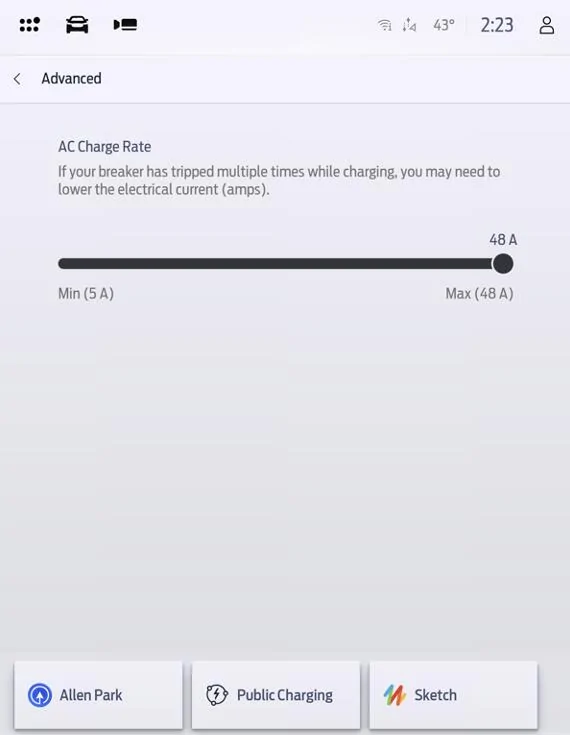
With the addition of charge rate control for AC charging, you can adjust your vehicle’s maximum charging speed on a Level 1 or Level 2 charger.
This feature is designed to help make life easier if you wish to slow your charging down, for example to time the completion of charging to align with when you will return to your vehicle, or if you’ve experienced circuit breaker trips at a certain charger.
By default, this value will be set at maximum AC charge rate for your vehicle. To reduce this rate, tap the Advanced option from the Charge Settings screen, and an AC Charge Rate slider will appear.
Charge Port Locking
To improve Fast Charging Adapter security and reduce the chance of your vehicle being unexpectedly unplugged when fast charging, your vehicle’s charge port will no longer automatically unlock when fast charging is completed.
To unlock the charge port, you will use the unlock button in the middle of the Charge Status Indicator light located next to charge port:
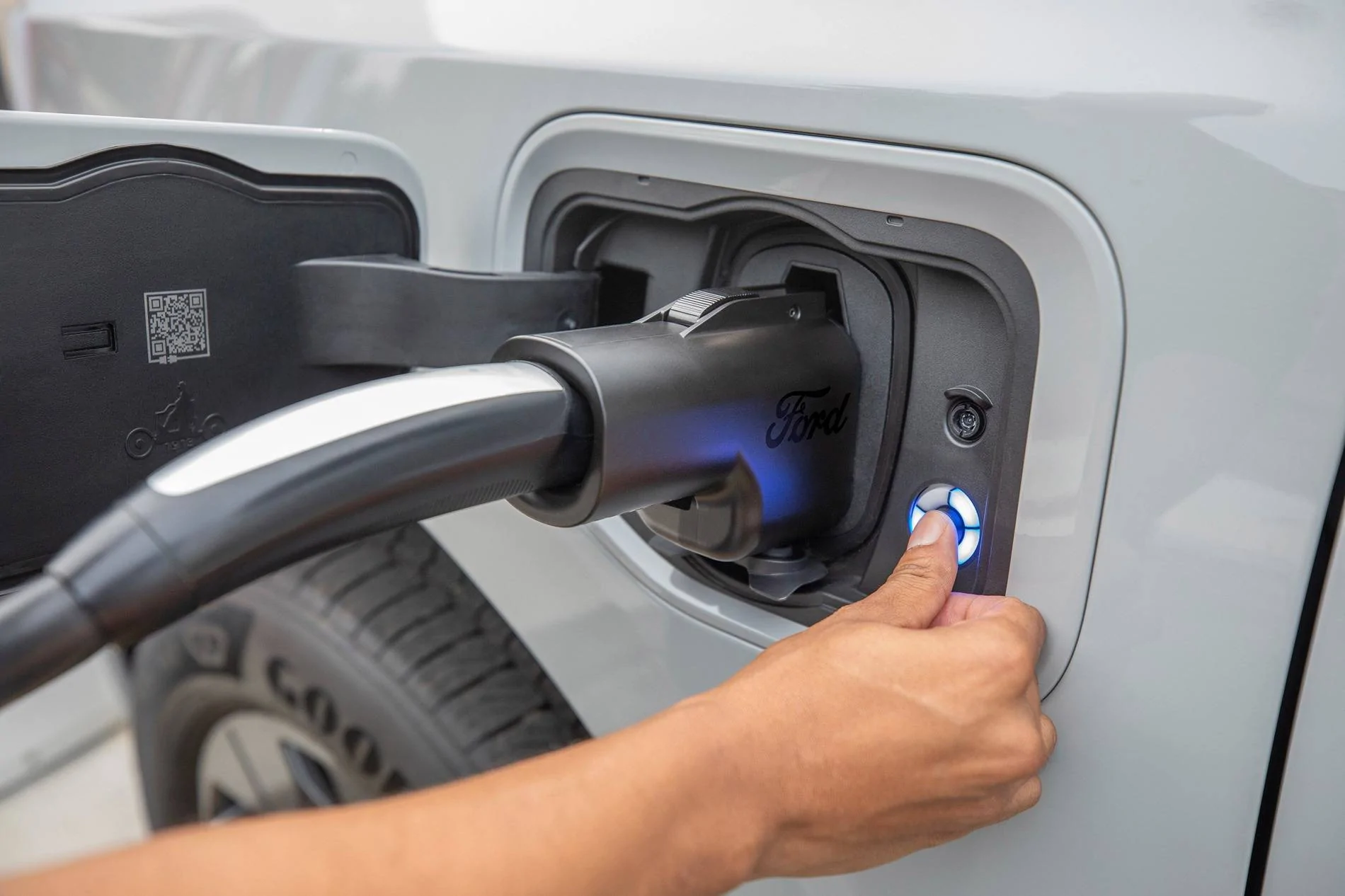
When pressing this button with your vehicle’s key (or your phone with Phone as a Key (if equipped)) near the charge port or with vehicle doors unlocked, charging will stop and the charge port will unlock.
If the unlock button is pressed without the vehicle’s key present,the charge port will remain locked and charging will continue. If a press of the charge port unlock button does not unlock the charge port, ensure a key is positioned near the charge port, or press the door unlock button inside the vehicle.
Charge port locking applies to DC Fast Charging only. Level 1 and Level 2 AC charging can be unplugged without pressing the unlock button.
Thank you for your feedback which we used to develop these features.
Robert and Brian
Sponsored