I want the default volume to be off

limbery

Member
First Name
Len
Joined
Mar 31, 2025
Threads
1
Messages
9
Reaction score
9
Location
Nanaimo
Vehicles
‘24 Mach-e xp
Occupation
retired
I've tried re-installing my CarPlay and sync to no avail. I have my audio off whether in radio or CarPlay mode when I turn off the car but when I start the car again, the radio will be on until CarPlay loads, then the music app in it starts playing again. I turn it off before I shut down the car but it always comes on again when I start the car. How can I make the default setting to be volume off without it starting up? (I understand that Android users have a switch for this in their phone settings but I don't in my IOS settings)
Sponsored

 

Tomm

Well-Known Member
First Name
Tom
Joined
Apr 20, 2024
Threads
5
Messages
249
Reaction score
221
Location
Davis Ca
Vehicles
2023 Premium
Occupation
Surgeon
Country flag
Could it be the profile linked to your FOB or PAAK? Try setting the profile with the radio off.
I use Car Play and mine does not do this, and I don’t recall doing anything special.
 

d_k_g

Member
First Name
Dan
Joined
Aug 14, 2024
Threads
2
Messages
23
Reaction score
44
Location
Wisconsin
Vehicles
2014 Mach-E premium AWD extended battery
Country flag
It’s most likely a setting in iOS. Some sort of “auto play” setting.

I have never had this happen unless I was previously listening to something in the car, stopped the car, and then got back in without messing with the music app on my phone.
 

AliRafiee

Well-Known Member
First Name
Ali
Joined
Jan 20, 2023
Threads
103
Messages
3,267
Reaction score
4,192
Location
Seattle WA
Vehicles
2022 Mach E GT - Grabber Blue
Occupation
Software Eng.
Country flag
Load radio, the press the off button. Turn off car. See if it comes on again.


ReverendPete

Well-Known Member
First Name
Pete
Joined
Jul 19, 2023
Threads
6
Messages
411
Reaction score
609
Location
Denver, CO
Vehicles
2023 MME Premium, 2018 Toyota Highlander Hybrid
Occupation
Software Developer
Country flag
It looks like that "stop auto play" link above is referring to keeping it from automatically inserting similar music into your stream.

I think the way to keep it from starting the music when it connects is to use the Shortcuts app on your iPhone, and create a little automation that detects when CarPlay connects, and have it pause any playing media.

(Edited) Steps to create this automation:
(this is shown in the beta version of iOS 26, on an iPhone 16 Pro Max)

1. Select the Shortcuts app on your phone

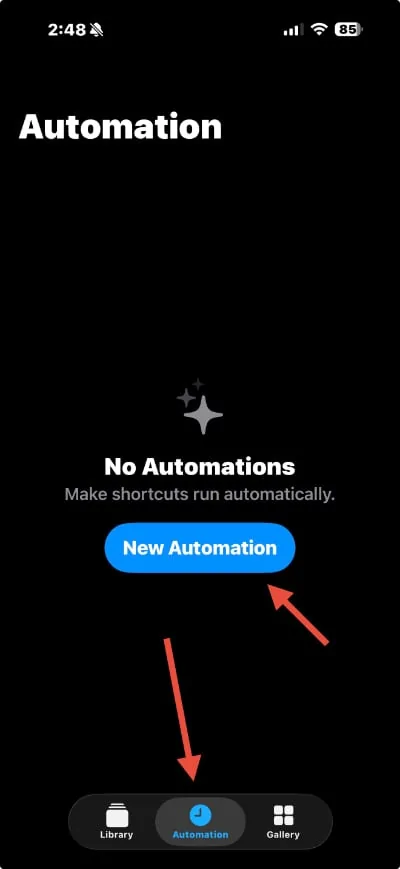
2. Select 'Automation' at the bottom, and then click 'New Automation'
Ford Mustang Mach-E I want the default volume to be off IMG_0694


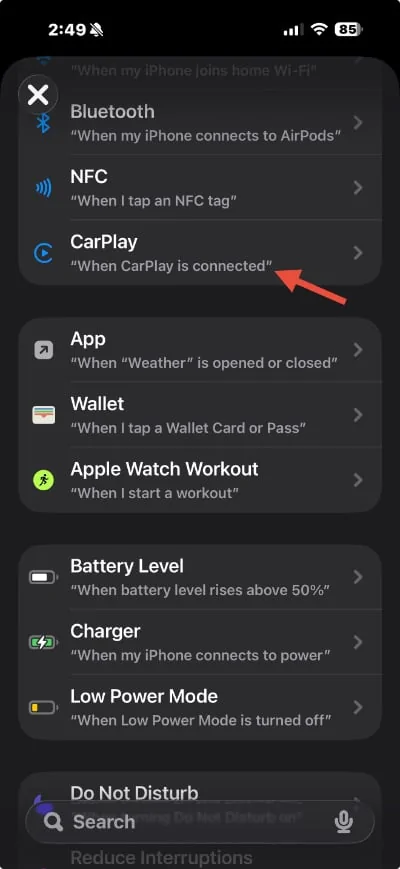
3. Scroll down the list and find 'Carplay' and select it.
Ford Mustang Mach-E I want the default volume to be off IMG_0695


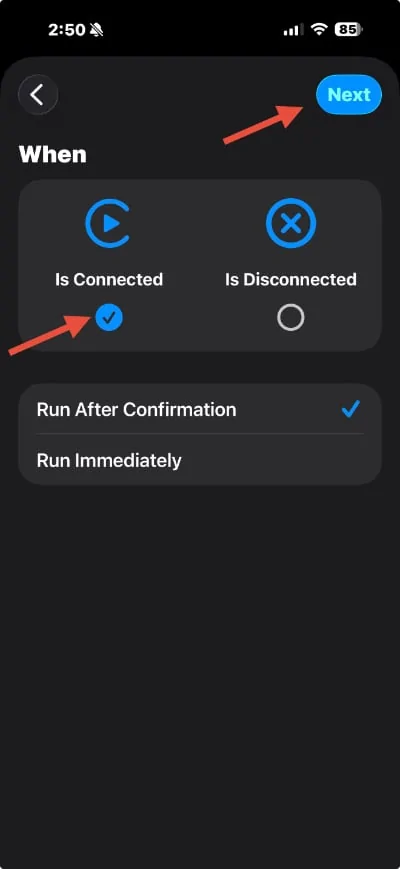
4. Make sure it has "When Is Connected' checked, and hit the 'Next' button.
Ford Mustang Mach-E I want the default volume to be off IMG_0696


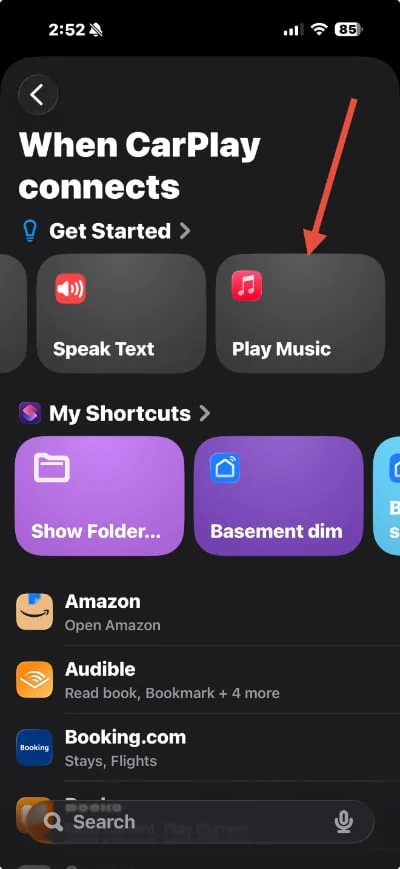
5. Then Select the 'Play Music' item under the 'Get Started' menu.
Ford Mustang Mach-E I want the default volume to be off IMG_0697


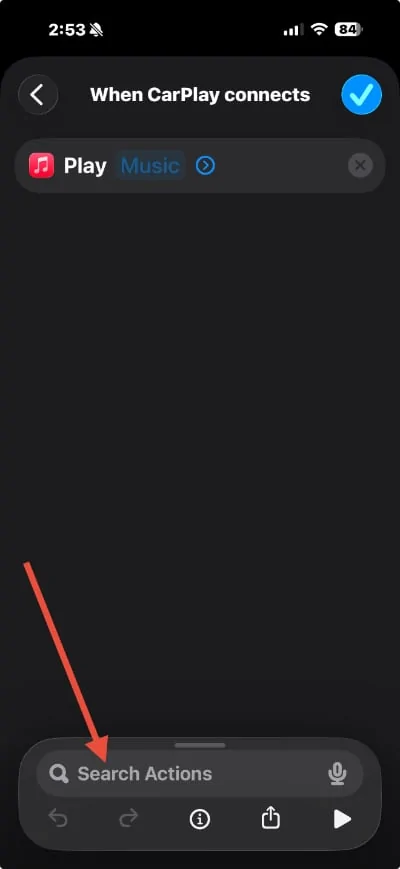
6. From the Play Music screen, you can use the 'Search Actions' input at the bottom to search for 'pause'
Ford Mustang Mach-E I want the default volume to be off IMG_0698


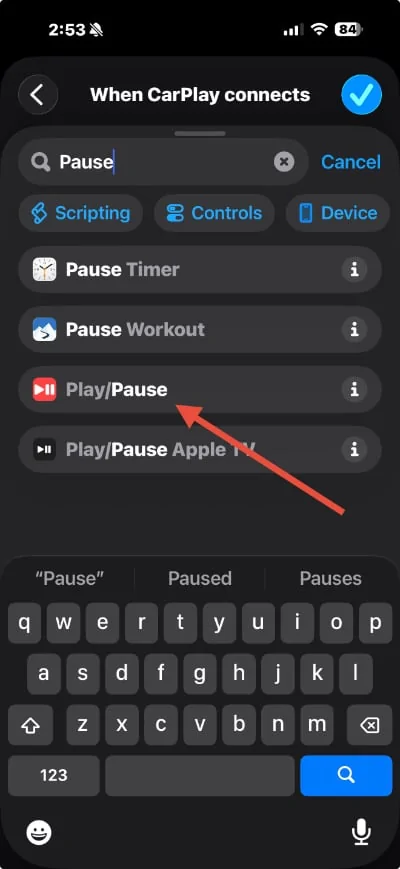
7. Select the 'Play/Pause' controls from the results
Ford Mustang Mach-E I want the default volume to be off IMG_0699


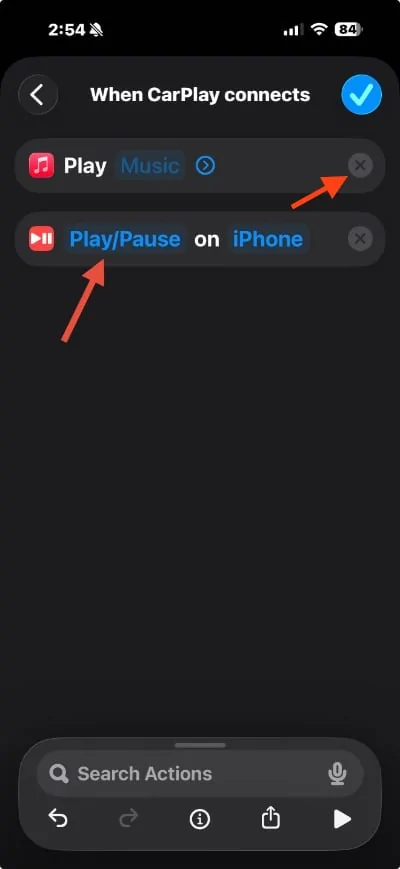
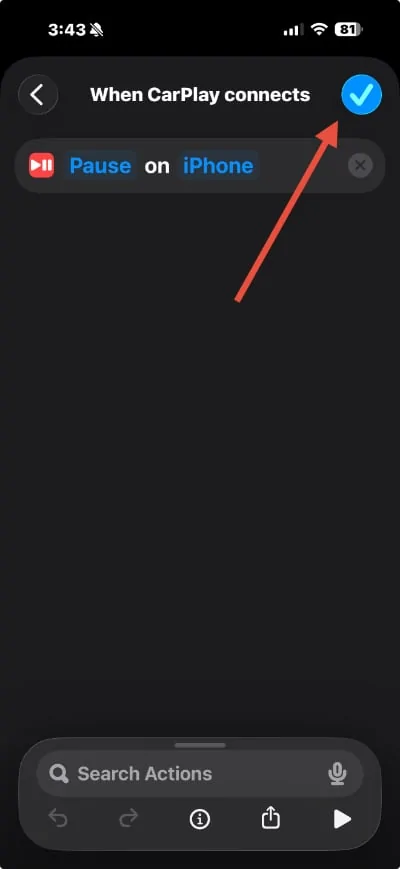
8. Click the 'x' button to get rid of the Play Music (I couldn't figure out another way to get to the search for pause...), and then click on 'Play/Pause'

Ford Mustang Mach-E I want the default volume to be off IMG_0700-2


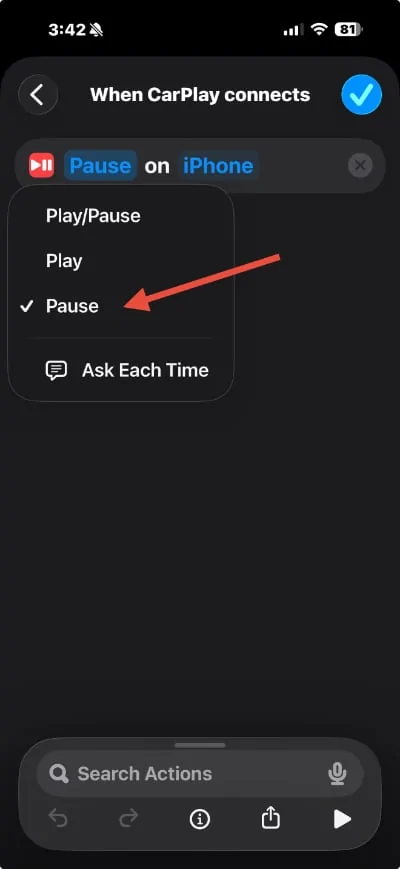
9. Select 'Pause' from the list
Ford Mustang Mach-E I want the default volume to be off IMG_0701-2


10. Then click the Checkbox button to say that you're done.
Ford Mustang Mach-E I want the default volume to be off IMG_0702-2


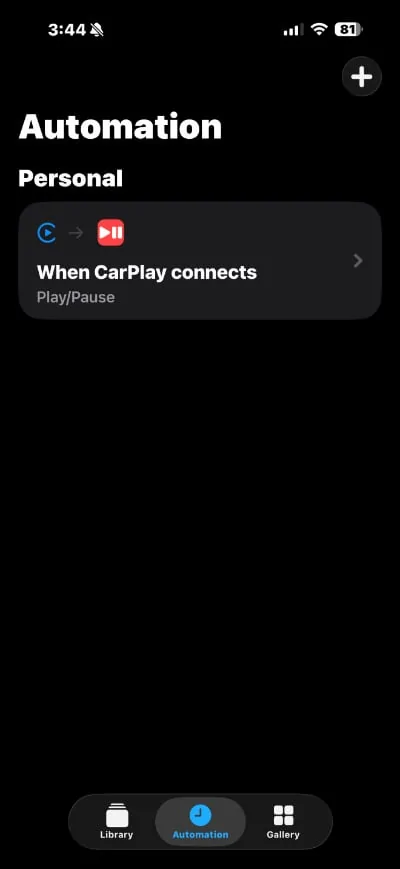
11. You should then have the Automation showing in your list, and it should just stop audio every time you connect to CarPlay!
Ford Mustang Mach-E I want the default volume to be off IMG_0703-2


I have the opposite problem. I expect it to start up the music automatically, if it was playing the last time I shut off the car, but about 20% of the time, I have to hit the play button. So I actually wrote my own shortcut to play the audio when connected!

Hope that helps!
 
Last edited:

jav_eee

Well-Known Member
First Name
Javi
Joined
Jul 30, 2025
Threads
3
Messages
162
Reaction score
120
Location
Edinburg, TX
Vehicles
2025 Mach-E Select
Occupation
Energy Industry
and it might be easier if OP just turns the radio down before turning off the vehicle. When I turn my car on my stereo is always in the previous state it was in when powered off.
 

JohnFoxeSheets

Well-Known Member
First Name
John
Joined
Jan 29, 2022
Threads
28
Messages
3,415
Reaction score
5,514
Location
San Francisco
Website
johnfoxesheets.com
Vehicles
2022 Iced Blue Silver Mach E GT
Occupation
Retired Engineer
Country flag
I’ve found that if I stop music in the Apple Music app, rather than silencing the music using the “button” in the middle of the Sync volume dial, that will work.
 

markboris

Well-Known Member
First Name
Mark
Joined
Nov 13, 2019
Threads
44
Messages
5,763
Reaction score
16,479
Location
Sonora, CA
Vehicles
Currently: '20 Shelby GT500 FPB '24 Mach-E GTP GGM
Occupation
Retired
Country flag
Agree with Javi. If I turn down the volume on the Sync display, when I restart the car, there is no audio until I turn it back up. Sync remembers the last volume setting when I turned off the car. At least that is how mine works.
 

PharaohHound138

Well-Known Member
First Name
Dave
Joined
Apr 29, 2022
Threads
5
Messages
187
Reaction score
237
Location
Ohio
Vehicles
2022 Mach-E premium
Occupation
Railroad
Country flag
It looks like that "stop auto play" link above is referring to keeping it from automatically inserting similar music into your stream.

I think the way to keep it from starting the music when it connects is to use the Shortcuts app on your iPhone, and create a little automation that detects when CarPlay connects, and have it pause any playing media.

(Edited) Steps to create this automation:
(this is shown in the beta version of iOS 26, on an iPhone 16 Pro Max)

1. Select the Shortcuts app on your phone

2. Select 'Automation' at the bottom, and then click 'New Automation'
IMG_0694.jpg


3. Scroll down the list and find 'Carplay' and select it.
IMG_0695.jpg


4. Make sure it has "When Is Connected' checked, and hit the 'Next' button.
IMG_0696.jpg


5. Then Select the 'Play Music' item under the 'Get Started' menu.
IMG_0697.jpg


6. From the Play Music screen, you can use the 'Search Actions' input at the bottom to search for 'pause'
IMG_0698.jpg


7. Select the 'Play/Pause' controls from the results
IMG_0699.jpg


8. Click the 'x' button to get rid of the Play Music (I couldn't figure out another way to get to the search for pause...), and then click on 'Play/Pause'

IMG_0700-2.jpg


9. Select 'Pause' from the list
IMG_0701-2.jpg


10. Then click the Checkbox button to say that you're done.
IMG_0702-2.jpg


11. You should then have the Automation showing in your list, and it should just stop audio every time you connect to CarPlay!
IMG_0703-2.jpg


I have the opposite problem. I expect it to start up the music automatically, if it was playing the last time I shut off the car, but about 20% of the time, I have to hit the play button. So I actually wrote my own shortcut to play the audio when connected!

Hope that helps!
Jesus!!!
 
OP
OP

limbery

Member
First Name
Len
Joined
Mar 31, 2025
Threads
1
Messages
9
Reaction score
9
Location
Nanaimo
Vehicles
‘24 Mach-e xp
Occupation
retired
Load radio, the press the off button. Turn off car. See if it comes on again.
Tried that multiple times and the radio doesn't come on, but the CarPlay turns the sound on with the last track that was playing


Top