Issue - "Unable to connect" when connecting to WiFi (SOLVED)

Illinibird

Well-Known Member
First Name
Mike
Joined
Oct 13, 2020
Threads
40
Messages
1,563
Reaction score
1,451
Location
Frankfort Illinois
Vehicles
2015 Acura MDX Adv; 2016 Titanium Fusion Hybrid
Occupation
retired Endodontist (root canal specialist) and Clinical Assistant Professor
Country flag
I don't have my car yet (seems like it never will happen) so I don't know if I'll have Wi-Fi connectivity issues or not. I have an Xfinity gateway that uses 2.4 and 5 giga hertz. I'll probably put a "Pod" in the garage to improve the Wi-Fi signal. As far as troubleshooting the problems you all are having, I feel like the worlds biggest dumb ass after reading these posts and not really knowing what the he$* you're all talking about. ? I hope when the time comes where I do have a MachE I can get the help I'll need here if needs be. From what I am hearing, Ford would be of little help with issues such as these so it's good to have people in our forum who can help.

PS - I do have connectivity issues with my three 4kUHD tv's that use Wi-Fi to connect to the Internet. Sometimes I am able to connect but a lot of times the error message says TV's can connect to the gateway but not the Internet. I think it's a problem with my gateway but I'm not sure. The error message does talk about the DNS servers and they are now configured automatically but even when I do it manually and set them to the DNS setting in my Apple System Preferences - Network, it doesn't seem to help. I'm afraid it will be the same problem connecting to the car. It's really baffling because my two iMacs, two iPhones, and my iPad all connect fine to the gateway and Internet (as does the other electronics in the house - Ring door bells, Echo, Harmony, etc).
Sponsored
 

Colorado Native

Active Member
Joined
Dec 20, 2020
Threads
1
Messages
30
Reaction score
24
Location
Littleton, CO
Vehicles
2007 BMW 530xi, 2005 Toyota 4Runner
Country flag
I have no experience with Ubiquiti APs, so I'm shooting in the dark.

I run OpenWRT on a Linksys router using dnsmasq as the DHCP and DNS servers. Dnsmasq offers detailed control over the DHCP offer and the DNS behavior. Hopefully the USG offers similar settings, and you can tweak some of the values in the DHCP offer. I would definitely start with offering a public DNS server like 8.8.8.8 (Google) or 1.1.1.1 (Cloudflare).

Cheers!
 
OP
OP
TheSteelRider

TheSteelRider

Well-Known Member
Joined
Dec 31, 2019
Threads
57
Messages
1,296
Reaction score
2,309
Location
United States
Vehicles
'21 Premium RWD
Country flag
I have my USG set up as my DNS server and have not been able to connect my MachE. No hyphens in my SSID, and I tried separating the SSIDs between 2.4 & 5 GHz with no luck. I haven't had time to do much troubleshooting, so I added a spare AirportExpress router to create a separate network for my car in the meantime.
ok, so that's two users with their USG as their DHCP server who cannot connect. And, there is a user with a UDM-Pro as his DHCP server and can connect.

I guess I can setup a test by creating a new LAN profile, and setup the USG as a DHCP relay, and setup some other device as a DHCP server and verify that works. If so, I can take a tcpdump again in that setup and compare the DHCP Discover / Offer contents to see what might be making the Mach E angry. What a poo tonne of work, geez.
 
OP
OP
TheSteelRider

TheSteelRider

Well-Known Member
Joined
Dec 31, 2019
Threads
57
Messages
1,296
Reaction score
2,309
Location
United States
Vehicles
'21 Premium RWD
Country flag
I have no experience with Ubiquiti APs, so I'm shooting in the dark.

I run OpenWRT on a Linksys router using dnsmasq as the DHCP and DNS servers. Dnsmasq offers detailed control over the DHCP offer and the DNS behavior. Hopefully the USG offers similar settings, and you can tweak some of the values in the DHCP offer. I would definitely start with offering a public DNS server like 8.8.8.8 (Google) or 1.1.1.1 (Cloud flare).

Cheers!
It does, yes although I've never tried. I'll only do that if I can get a packet trace from a DHCP server that works, though. If you have the skillz would you be able to provide a dump of the Discover / Offer sequence from your OpenWRT?
 

Colorado Native

Active Member
Joined
Dec 20, 2020
Threads
1
Messages
30
Reaction score
24
Location
Littleton, CO
Vehicles
2007 BMW 530xi, 2005 Toyota 4Runner
Country flag
...would you be able to provide a dump of the Discover / Offer sequence from your OpenWRT?
Sadly, I don't have a Mach-E to use for testing :(

You said you have a Netgear device. If you don't want to mess with the USG configuration, I'd recommend placing the Netgear on your LAN and configuring it as a router so it offers and manages it's own subnet under a different SSID. You can then mess with the Netgear's DHCP and DNS behavior to your heart's content, including providing a different value for the DNS server. Who knows, the MME might be happy with the stock DHCP offer.

Here's the dnsmasq logs showing what happens when my Yamaha Receiver connects:

Code:
Mar 16 07:23:10 dnsmasq-dhcp[3174]: 361849404 vendor class: udhcp 1.25.1
Mar 16 07:23:10 dnsmasq-dhcp[3174]: 361849404 DHCPDISCOVER(br-lan) 64:cc:22:8d:d5:9e
Mar 16 07:23:10 dnsmasq-dhcp[3174]: 361849404 tags: lan, known, br-lan
Mar 16 07:23:10 dnsmasq-dhcp[3174]: 361849404 DHCPOFFER(br-lan) 192.168.0.39 64:cc:22:8d:d5:9e
Mar 16 07:23:10 dnsmasq-dhcp[3174]: 361849404 requested options: 1:netmask, 3:router, 6:dns-server, 12:hostname,
Mar 16 07:23:10 dnsmasq-dhcp[3174]: 361849404 requested options: 15:domain-name, 28:broadcast, 42:ntp-server
Mar 16 07:23:10 dnsmasq-dhcp[3174]: 361849404 next server: 192.168.0.100
Mar 16 07:23:10 dnsmasq-dhcp[3174]: 361849404 sent size:  1 option: 53 message-type  2
Mar 16 07:23:10 dnsmasq-dhcp[3174]: 361849404 sent size:  4 option: 54 server-identifier  192.168.0.100
Mar 16 07:23:10 dnsmasq-dhcp[3174]: 361849404 sent size:  4 option: 51 lease-time  1d
Mar 16 07:23:10 dnsmasq-dhcp[3174]: 361849404 sent size:  4 option: 58 T1  12h
Mar 16 07:23:10 dnsmasq-dhcp[3174]: 361849404 sent size:  4 option: 59 T2  21h
Mar 16 07:23:10 dnsmasq-dhcp[3174]: 361849404 sent size:  4 option:  1 netmask  255.255.255.0
Mar 16 07:23:10 dnsmasq-dhcp[3174]: 361849404 sent size:  4 option: 28 broadcast  192.168.0.255
Mar 16 07:23:10 dnsmasq-dhcp[3174]: 361849404 sent size:  4 option:  3 router  192.168.0.100
Mar 16 07:23:10 dnsmasq-dhcp[3174]: 361849404 sent size:  4 option:  6 dns-server  192.168.0.100
Mar 16 07:23:10 dnsmasq-dhcp[3174]: 361849404 sent size:  8 option: 15 domain-name  home.net
Mar 16 07:23:10 dnsmasq-dhcp[3174]: 361849404 sent size: 11 option: 12 hostname  hometheater
Mar 16 07:23:10 dnsmasq-dhcp[3174]: 361849404 sent size:  4 option: 42 ntp-server  192.168.0.100
Mar 16 07:23:10 dnsmasq-dhcp[3174]: 361849404 available DHCP range: 192.168.0.127 -- 192.168.0.253


Colorado Native

Active Member
Joined
Dec 20, 2020
Threads
1
Messages
30
Reaction score
24
Location
Littleton, CO
Vehicles
2007 BMW 530xi, 2005 Toyota 4Runner
Country flag
PS - I do have connectivity issues with my three 4kUHD tv's that use Wi-Fi to connect to the Internet.
There's plenty of things that could be the issue. I would expect the stock DCHP settings to be fine, so I would not recommend overriding DNS servers or such. Some Smart TV's are too smart, and will bypass the DNS Server offered by your gateway. Hard to say.

That said, if you are renting your cable modem from Xfinity and have had it for a few years, you should take it in and swap it for their latest and greatest model (it's free.) The newer X1 modems are much improved.
 
OP
OP
TheSteelRider

TheSteelRider

Well-Known Member
Joined
Dec 31, 2019
Threads
57
Messages
1,296
Reaction score
2,309
Location
United States
Vehicles
'21 Premium RWD
Country flag

Colorado Native

Active Member
Joined
Dec 20, 2020
Threads
1
Messages
30
Reaction score
24
Location
Littleton, CO
Vehicles
2007 BMW 530xi, 2005 Toyota 4Runner
Country flag
I'm also on a USG. I have public DNS (8.8.8.8/1.1.1.1) so that's not the problem.
Are you sure the USG is offering 8.8.8.8 to the Mach-e? I would expect it is offering itself as the DNS server to the Mach-e, then using its own forwarding policies (which could be the problem.)
 

Illinibird

Well-Known Member
First Name
Mike
Joined
Oct 13, 2020
Threads
40
Messages
1,563
Reaction score
1,451
Location
Frankfort Illinois
Vehicles
2015 Acura MDX Adv; 2016 Titanium Fusion Hybrid
Occupation
retired Endodontist (root canal specialist) and Clinical Assistant Professor
Country flag
There's plenty of things that could be the issue. I would expect the stock DCHP settings to be fine, so I would not recommend overriding DNS servers or such. Some Smart TV's are too smart, and will bypass the DNS Server offered by your gateway. Hard to say.

That said, if you are renting your cable modem from Xfinity and have had it for a few years, you should take it in and swap it for their latest and greatest model (it's free.) The newer X1 modems are much improved.
Thanks. I just installed Comcast in my house (after being with AT&T/Directv for many years) so I have the new Xfinity gateway you're talking about. I must say the Xfinity gateway has A LOT more problems than the AT&T DSL Gateway/U-Verse system I had. The DSL wasn't as fast as Xfinity's cable gateway but it never had the connectivity issues I'm dealing with now. The picture on my 65" Samsung SUHD HDR TV was better with Direct TV too. We changed because of the monthly rates but when the 2 years are up and the rates go up I'm going to check out Directv again.
 

Colorado Native

Active Member
Joined
Dec 20, 2020
Threads
1
Messages
30
Reaction score
24
Location
Littleton, CO
Vehicles
2007 BMW 530xi, 2005 Toyota 4Runner
Country flag
One more thing and then I'll bow out...

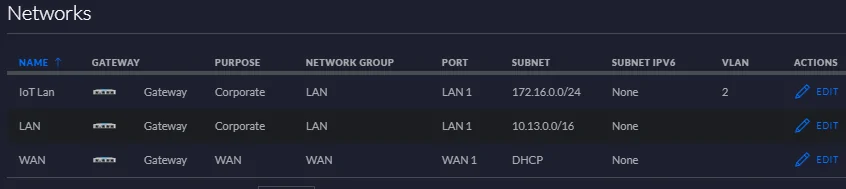
I'm surprised to see that the USG is offering a net mask of 255.255.0.0. Unless it's driving an office building, that's too big. It's not wrong, and should work within the 10.0.0.0 subnet, but the Mach-e might be confused.

For a normal home network I would expect it to be 255.255.255.0, and all IPs to be in the 10.13.0.0 to 10.13.0.254 range.
 
OP
OP
TheSteelRider

TheSteelRider

Well-Known Member
Joined
Dec 31, 2019
Threads
57
Messages
1,296
Reaction score
2,309
Location
United States
Vehicles
'21 Premium RWD
Country flag
One more thing and then I'll bow out...

I'm surprised to see that the USG is offering a net mask of 255.255.0.0. Unless it's driving an office building, that's too big. It's not wrong, and should work within the 10.0.0.0 subnet, but the Mach-e might be confused.

For a normal home network I would expect it to be 255.255.255.0, and all IPs to be in the 10.13.0.0 to 10.13.0.254 range.
It is offering it, because I have it set that way. I also have a 172.0.0.255 network that I tried (my IoT network) and it also didn't work. So, it's not a network IP range issue. One note is that my IoT network is is VLAN-configured, but again encourage you to look at my packet trace, it's not far enough along to care much about VLANs. The packet capture *from the AP itself* (e.g., before any VLAN tags are added) shows the Mach E does nothing after getting the DHCP offer response.

Ford Mustang Mach-E Issue - "Unable to connect" when connecting to WiFi (SOLVED) 1615906555842
 

Finkerton

Well-Known Member
Joined
Mar 11, 2021
Threads
11
Messages
153
Reaction score
88
Location
Boston, MA
Vehicles
MME FE
Country flag
Note that we suspect DHCP, not DNS. The connection doesn't get far enough (in my case) to make any nameserver queries.

See the packet trace in this comment: https://www.macheforum.com/site/thr...en-connecting-to-wifi-solved.3044/post-122313
Correct, but it seems the ME doesn't like something about the DHCP offer. Someone suggested that maybe it's the offered DNS servers in the DHCP response and public ones might be accepted. I'm simply offering a counterpoint.
 

Colorado Native

Active Member
Joined
Dec 20, 2020
Threads
1
Messages
30
Reaction score
24
Location
Littleton, CO
Vehicles
2007 BMW 530xi, 2005 Toyota 4Runner
Country flag
It is offering it, because I have it set that way. I also have a 172.0.0.255 network that I tried (my IoT network) and it also didn't work. So, it's not a network IP range issue.
...
The packet capture *from the AP itself* (e.g., before any VLAN tags are added) shows the Mach E does nothing after getting the DHCP offer response.
I see it - the IoT network has a typical netmask, so I agree that's not likely the problem.

I also see that there is no traffic after the DHCP offer, and a few seconds later the MME tries again. So it seems clear that in your case the DHCP offer itself is unacceptable to the MME.

It's asking for it's host name, maybe you can setup a static IP entry in the USG so you can provide a hostname and possibly other requested values.

Short term, I like inserting the Netgear router into the pathway. If this works, you'll want to find a way to see the Netgear's offer so you can compare it to the USG. Depending on the model, you could also install OpenWRT on your Netgear Router to gain full visibility and control over the process (although the USG seems pretty powerful too!)
 
Last edited:

cmtaylor963

Well-Known Member
First Name
Charles
Joined
Jun 19, 2020
Threads
4
Messages
239
Reaction score
346
Location
Springfield, MO
Vehicles
Mach E 1st Ed
Occupation
Engineer
Country flag
I could see the MAC addresses in the Client List each time I tried to connect. I tried assigning a static IP, but that didn't work either. Most of my settings are stock as I only know enough to be dangerous.
Sponsored


Top