More Glitches Every Day: Charging, GPS, Headlights, PAAK...

Engelbert

Well-Known Member
First Name
Engelbert
Joined
Aug 20, 2021
Threads
4
Messages
72
Reaction score
153
Location
Philadelphia
Vehicles
2021 Mustang Mach E Premium XR AWD
Country flag
Here is my glitch log, just in the past 2 weeks, in reverse chrono order with pics. Ford support has been unhelpful with any of this stuff.

None of this amounts to "Stop Safely Now." Still, problems are compounding. Is anyone else seeing a rapidly escalating slate of issues with their Mach-E?

WTF is happening to this car?

Today Part 1:
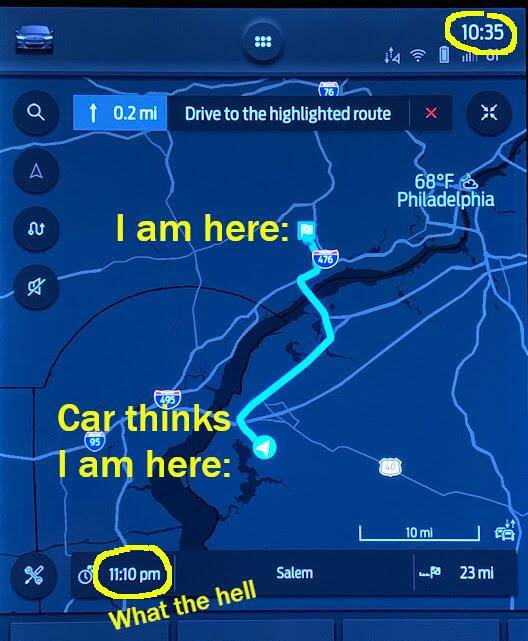
Driving on the highway (I-95 in PA) to visit family in the metro Philly area. GPS location indicator arrow starts deviating off the highway, as if it believes I am driving off-road at 70mph through marshlands, crashing through (or rocketing over?) industrial buildings, and pounding across rail yards. Nav constantly tries to tell me to turn onto some increasingly far-away side road to return to the highway, but of course I AM ON THE HIGHWAY RIGHT NOW.

Error gets progressively worse, at one point placing my apparent location on the New Jersey Turnpike, 20 miles and one state away. By the time I reach my destination, GPS is so far off that it thinks I am more than 30 minutes from my destination. It tells me this while I am sitting in the driveway of that destination.

All the while, Waze on my phone (no CarPlay, I keep that off) remains rock solid and knows exactly where I am the entire time.

Occasional GPS glitches are normal. This is not. Turning the car off/on, stopping and restarting nav, etc. do nothing. At this moment, long after arriving, the Mach-E still firmly believes it is in New Jersey.

Status: Presently still an issue

Ford Mustang Mach-E More Glitches Every Day: Charging, GPS, Headlights, PAAK... wth


Today Part 2:
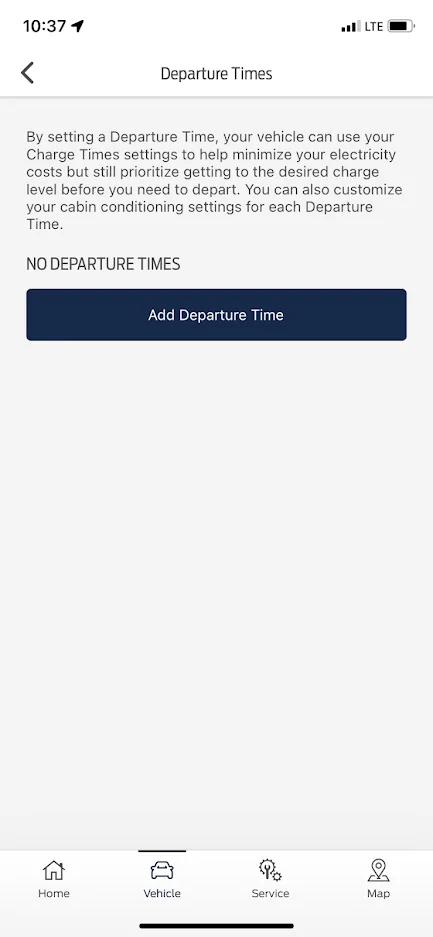
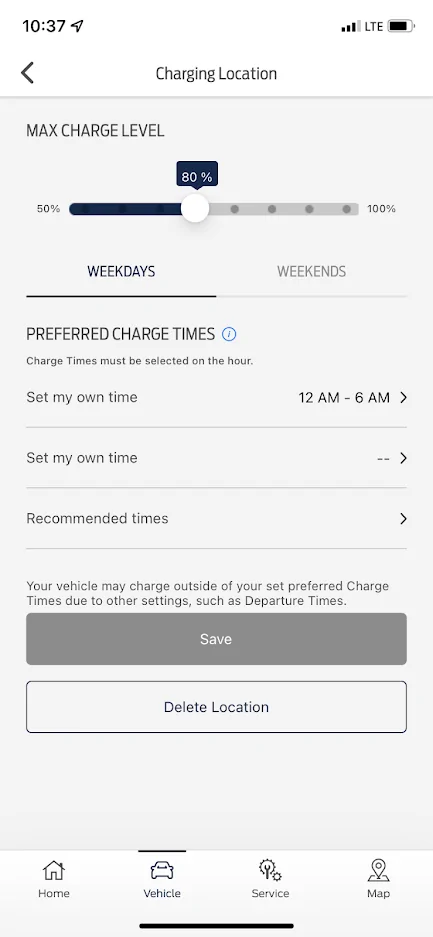
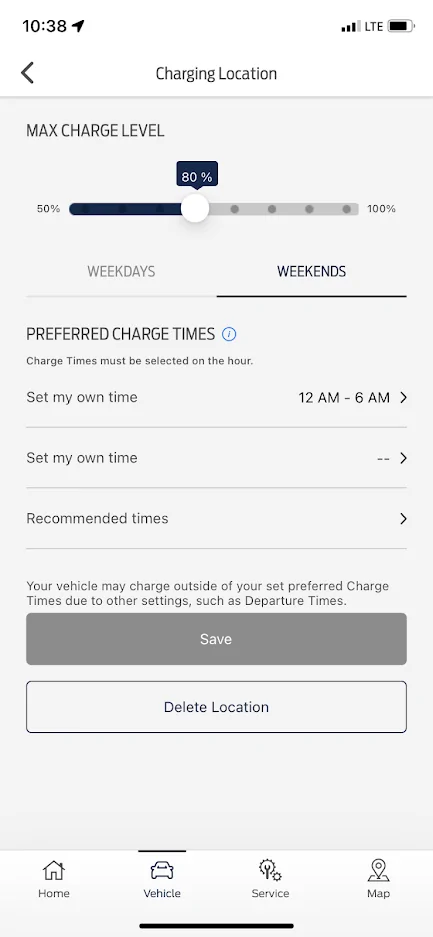
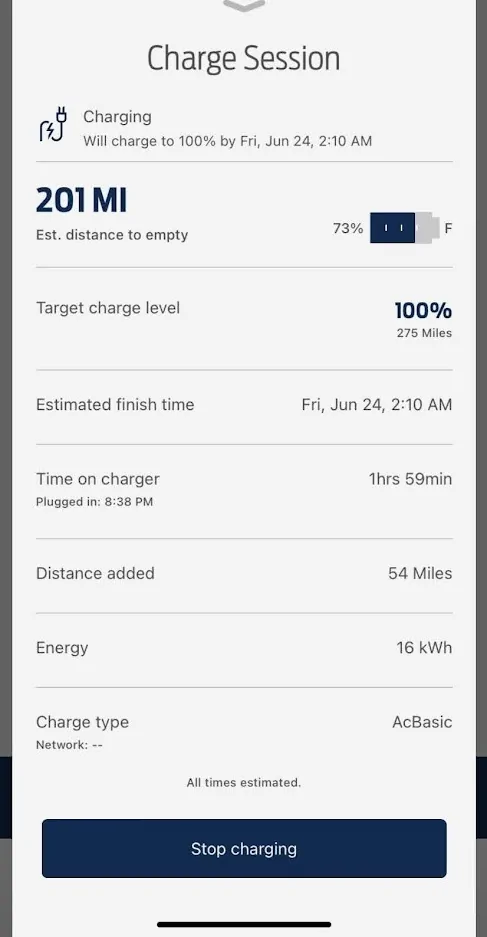
Plug the Mach-E in to charge at destination (family has L2 wall mount EVSE in garage, yay). EVSE is programmed to supply juice whenever the car wants it. Mach-E is programmed to charge to 80%, only between midnight-6am on both weekends and weekdays at this location. All of this has worked perfectly in the past at this location. No departure times are set. All clocks (car, apps) show proper date/time.

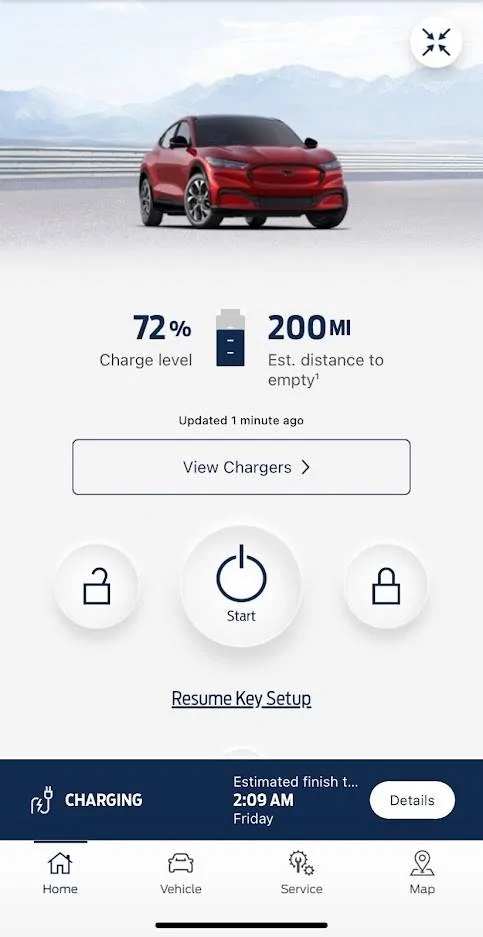
Yet the Mach-E starts charging immediately, aiming for 100%, well outside those time ranges. Stopping/starting the charge, restarting app and/or turning car off/on, deleting and re-creating preferred charge times and location, etc. do nothing. It just wants to charge Right. Now. And that's a problem when time-of-use utility pricing drives a more than 5x different in electrical generation price between peak demand times and dead-of-night lows!

Status: Presently still an issue

Ford Mustang Mach-E More Glitches Every Day: Charging, GPS, Headlights, PAAK... au7qc6sT9nn5TtBTd549yoGMcc=w483-h937-no?authuser=0
Ford Mustang Mach-E More Glitches Every Day: Charging, GPS, Headlights, PAAK... LI2HpfZp6HqGDvVr0oL-rRwsdQ=w433-h937-no?authuser=0


Ford Mustang Mach-E More Glitches Every Day: Charging, GPS, Headlights, PAAK... xGnDYUGafwSwxTk-5gM9NpeX5U=w433-h937-no?authuser=0
Ford Mustang Mach-E More Glitches Every Day: Charging, GPS, Headlights, PAAK... 0P0XnRFzUTenfTVse5_vFrtXi0=w433-h937-no?authuser=0


Ford Mustang Mach-E More Glitches Every Day: Charging, GPS, Headlights, PAAK... FnrpS1hr2YuOzUzyxmccriKhvo=w488-h937-no?authuser=0


One week ago:
Headlights remain on (persistent, not just for a few moments) when I lock and leave the car. Happens sporadically when the headlight switch is on Auto. Car also sporadically chimes upon turning it off and opening the driver door, as if headlights are on manual On instead of Auto. Fix seems to be to reset switch to off and then back to Auto. Super annoying when I'm already outside the car, walking away, and need to get back in to fiddle with the switch. Now I have to stop everything when the chimes act up upon parking, and screw with the headlight switch to prevent the lights from draining the 12V battery all night.
I have seen this issue, or something very close to it, documented elsewhere on this forum

Status: Presently still an issue

Two weeks ago:
Frunk and trunk buttons disappear suddenly from the app, as PAAK is suddenly gone. Try to set it up again. Fails 20 times in a row at the "Connecting to your Ford" stage, always with the message "Connection Trouble." Yet all wifi, Bluetooth, etc. connections look good, strong signal, no issues.
Create this thread to document the issue. Try all suggestions, nothing works. Ford chat support is not helpful to solve the issue.

Status: Presently still an issue
Sponsored


Kamuelaflyer

Well-Known Member
First Name
Bill
Joined
Feb 18, 2020
Threads
11
Messages
11,365
Reaction score
22,961
Location
Hawaii
Vehicles
2021 Premium Infinite Blue. ER AWD. 2020 Raptor, 2021 Ranger.
Country flag
1. GPS. This happens upon occasion. Reboot sync. Press and hold the next track button and volume down button until the main screen starts its reboot. That will usually clear the GPS issues as well as other annoying little things.

2. Charging. See #1. If GPS is off the car will think it’s somewhere else. Also, if you keep a fob in the car “just in case,” check the faraday bag or foil you’re wrapping it in. A detected key in the car can cause all sorts of bizarre behavioral issues.
 
Last edited:

Logal727

Well-Known Member
First Name
C
Joined
Aug 23, 2021
Threads
101
Messages
7,351
Reaction score
11,347
Location
Florida
Vehicles
‘21 Carbonized Gray Mustang Mach-E Premium AWD Ext
Country flag
Yes first couple issues including charging are due to your car not knowing where it is, doing the sync reset trick should fix it.

the FordPass app is known bug right nowthat started a week or so ago, apparently they are working on it. I’m always able to resolve it though by force quitting the app.
 

Mach-Lee

Well-Known Member
First Name
Lee
Joined
Jul 16, 2021
Threads
262
Messages
11,373
Reaction score
25,047
Location
Wisconsin
Vehicles
2022 Mach-E Premium AWD
Occupation
Sci/Eng
Country flag
Issue 1 - GPS inaccuracy:

See if SiriusXM radio still works when you have GPS issues.

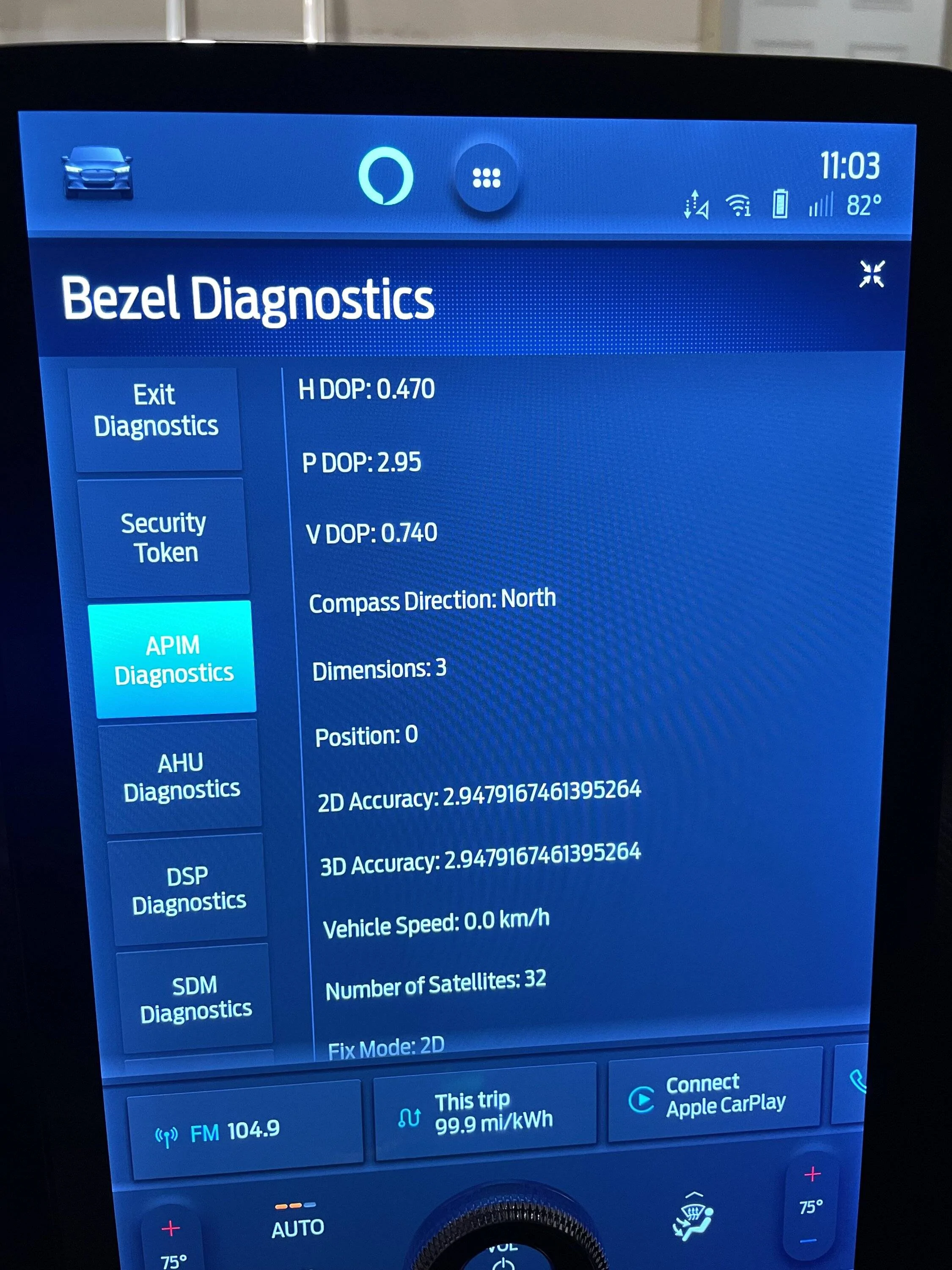
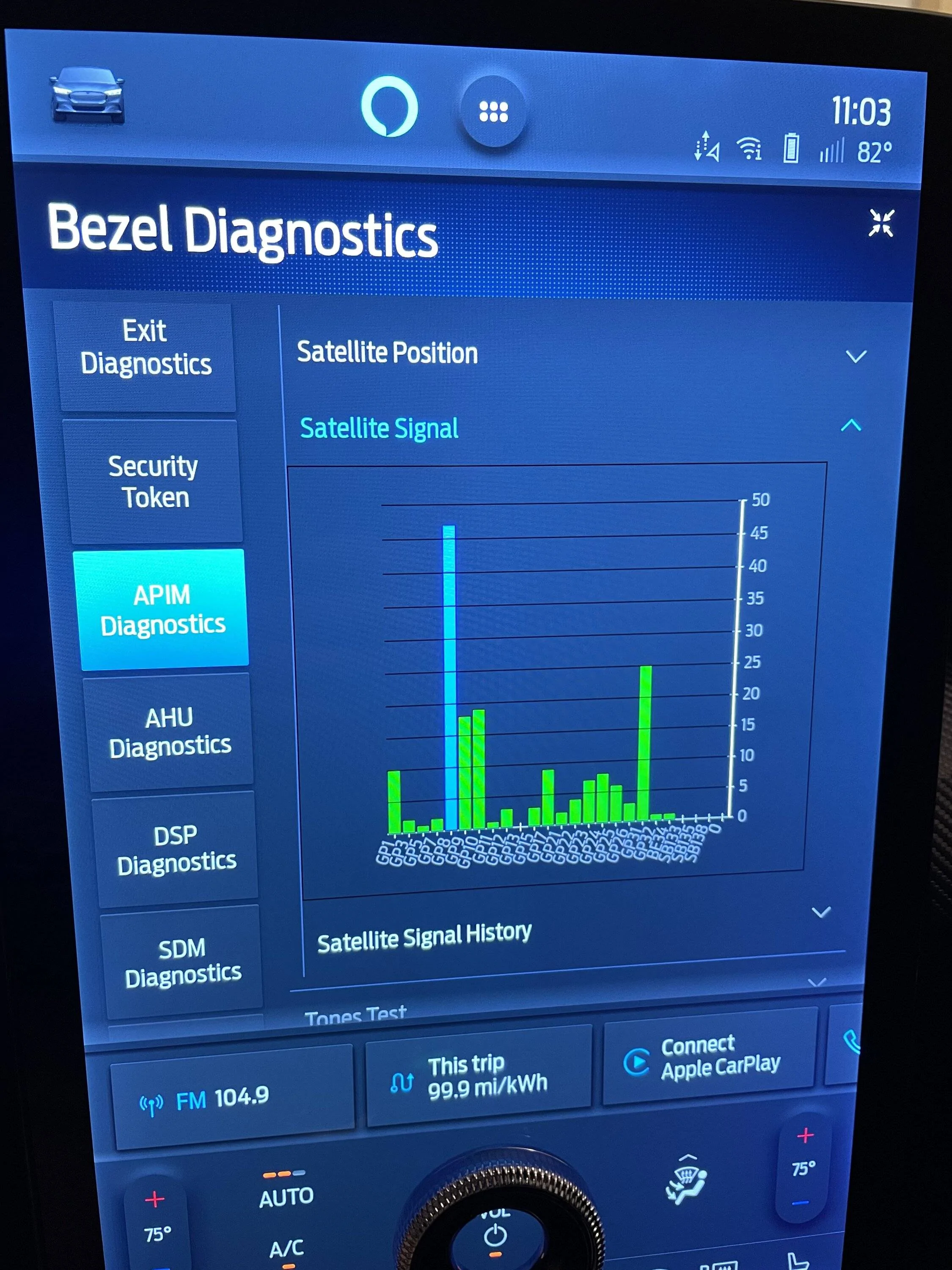
Next perform a SYNC reset to see if that solves the problem. You can also enter bezel diagnostics from the FM radio screen by holding down Vol - and left arrow. Go into the location information and you can see the satellite status and signal strength:

Ford Mustang Mach-E More Glitches Every Day: Charging, GPS, Headlights, PAAK... IMG_0853


Look for position accuracy less than 5 meters. This is in my garage so outside it should be more accurate.

Ford Mustang Mach-E More Glitches Every Day: Charging, GPS, Headlights, PAAK... IMG_0852


Again in my garage so signal strength levels should be higher outside.

If you have poor reception you might have an issue with your GPS cable or the APIM (satellite receiver). This will affect your charging locations.

Issue 2 - Headlights Stay On:

This is addressed in SSM 50869. The headlight switch will need to be replaced with a new part, which won't be available until November. Occasionally rotating the knob back one setting may prevent it from happening for a while.

Issue 3 - Poor Bluetooth connection:

This was addressed in SSM 50873 and SSM 50845. Update your FordPass app to version 4.17 that came out yesterday. Kill the app and reboot your phone afterwards. Use recommended settings. If issues persist, update the RFA module in the vehicle.
 
Last edited:


OP
OP
Engelbert

Engelbert

Well-Known Member
First Name
Engelbert
Joined
Aug 20, 2021
Threads
4
Messages
72
Reaction score
153
Location
Philadelphia
Vehicles
2021 Mustang Mach E Premium XR AWD
Country flag
Thanks all, for the speedy and reassuring advice here.

I'll try it all, see if it resolves or at least manages the issues for now. Much appreciated!
 

RonTCat

Well-Known Member
First Name
Ron
Joined
Jul 21, 2020
Threads
27
Messages
1,137
Reaction score
2,982
Location
USA
Vehicles
Mach-E wannabuy
Country flag
Thanks all, for the speedy and reassuring advice here.

I'll try it all, see if it resolves or at least manages the issues for now. Much appreciated!
Update to FordPass 4.17.0. FordPass 4.16.x was buggy.
 

AZBill

Well-Known Member
First Name
Bill
Joined
May 26, 2021
Threads
12
Messages
1,993
Reaction score
2,321
Location
Arizona
Vehicles
MME CA Route 1, Hummer EV SUT, Escalade IQ
Occupation
Retired
Country flag
Issue 1 - GPS inaccuracy:

See if SiriusXM radio still works when you have GPS issues.

Next perform a SYNC reset to see if that solves the problem. You can also enter bezel diagnostics from the FM radio screen by holding down Vol - and left arrow. Go into the location information and you can see the satellite status and signal strength:
The first few times I had GPS issues, Sirius XM was working fine. Those occurrences all happened back in March for me, right after the 21P22 update. Then my car went until the middle of June without seeing it again. Suddenly, two weeks ago I started the car and XM would not work, indicating a hardware fault on the screen. The car had been parked in the hot Phoenix sun for a few hours when this happened. I switched to FM and drove on a BC freeway, but BC Hand Free would not engage, it had engaged going the other direction on that trip. I opened the NAV and GPS appeared to be correct on I-10 in the right place. As I exited I-10 and on to the Loop 101 in Phoenix, the GPS decided to get lost and show me several hundred yards to the west, the speed limit sign in the car went to 5mph and cruise control completely disengaged, with sudden hard braking because one-pedal was on.

I decided to reboot Sync with the steering wheel buttons at that point and then XM came back and BC Hands Free started working again. I guess this is the Ford version of the famous Tesla phantom braking.
 
OP
OP
Engelbert

Engelbert

Well-Known Member
First Name
Engelbert
Joined
Aug 20, 2021
Threads
4
Messages
72
Reaction score
153
Location
Philadelphia
Vehicles
2021 Mustang Mach E Premium XR AWD
Country flag
Where can I find my FordPass version?

I can't find it in the app, nor in phone Settings.
 
OP
OP
Engelbert

Engelbert

Well-Known Member
First Name
Engelbert
Joined
Aug 20, 2021
Threads
4
Messages
72
Reaction score
153
Location
Philadelphia
Vehicles
2021 Mustang Mach E Premium XR AWD
Country flag
Upper right corner... "Account". Then "Settings". Scroll to the bottom of the page. So obvious :rolleyes:?‍♂
Ah, and there it is, in tiny 4-point text tucked below the big “Delete Account” button. How could I have missed it? ?

Thanks for the tip. I could have stared at the app all day and never seen that.

Apparently I’m on 4.17.0 already.
 
OP
OP
Engelbert

Engelbert

Well-Known Member
First Name
Engelbert
Joined
Aug 20, 2021
Threads
4
Messages
72
Reaction score
153
Location
Philadelphia
Vehicles
2021 Mustang Mach E Premium XR AWD
Country flag
Pardon the double post. I was happy to share complaints, so I should be sure to share resolutions as well.

✅ GPS:
Self resolved overnight. I would have tried the Sync reset otherwise, and I'll probably still take a look at diagnostics just for fun.

✅ Charging:
Resolved with the GPS issue. Makes complete sense.

⛔ Headlights:
Sounds like this is going to require a capital-F Fix to resolve. Will wait...

⛔ PAAK / trunk & frunk buttons gone / can't connect to car to create new PAAK:
This issue persists. Nothing seems to fix it, including making sure I'm on the new version of FordPass, force stopping and restarting the app, and so forth. Looks like the fix would require a dealer sojourn...?
 

SnBGC

Well-Known Member
First Name
Greg
Joined
Apr 20, 2020
Threads
46
Messages
5,962
Reaction score
9,778
Location
Phoenix
Vehicles
2021 Mach-E FE, 2021 Wrangler 4xe High Altitude
Occupation
Manager
Country flag
Here is my glitch log, just in the past 2 weeks, in reverse chrono order with pics. Ford support has been unhelpful with any of this stuff.

None of this amounts to "Stop Safely Now." Still, problems are compounding. Is anyone else seeing a rapidly escalating slate of issues with their Mach-E?

WTF is happening to this car?

Today Part 1:
Driving on the highway (I-95 in PA) to visit family in the metro Philly area. GPS location indicator arrow starts deviating off the highway, as if it believes I am driving off-road at 70mph through marshlands, crashing through (or rocketing over?) industrial buildings, and pounding across rail yards. Nav constantly tries to tell me to turn onto some increasingly far-away side road to return to the highway, but of course I AM ON THE HIGHWAY RIGHT NOW.

Error gets progressively worse, at one point placing my apparent location on the New Jersey Turnpike, 20 miles and one state away. By the time I reach my destination, GPS is so far off that it thinks I am more than 30 minutes from my destination. It tells me this while I am sitting in the driveway of that destination.

All the while, Waze on my phone (no CarPlay, I keep that off) remains rock solid and knows exactly where I am the entire time.

Occasional GPS glitches are normal. This is not. Turning the car off/on, stopping and restarting nav, etc. do nothing. At this moment, long after arriving, the Mach-E still firmly believes it is in New Jersey.

Status: Presently still an issue

wth.png


Today Part 2:
Plug the Mach-E in to charge at destination (family has L2 wall mount EVSE in garage, yay). EVSE is programmed to supply juice whenever the car wants it. Mach-E is programmed to charge to 80%, only between midnight-6am on both weekends and weekdays at this location. All of this has worked perfectly in the past at this location. No departure times are set. All clocks (car, apps) show proper date/time.

Yet the Mach-E starts charging immediately, aiming for 100%, well outside those time ranges. Stopping/starting the charge, restarting app and/or turning car off/on, deleting and re-creating preferred charge times and location, etc. do nothing. It just wants to charge Right. Now. And that's a problem when time-of-use utility pricing drives a more than 5x different in electrical generation price between peak demand times and dead-of-night lows!

Status: Presently still an issue

au7qc6sT9nn5TtBTd549yoGMcc=w483-h937-no?authuser=0.jpg
LI2HpfZp6HqGDvVr0oL-rRwsdQ=w433-h937-no?authuser=0.png


xGnDYUGafwSwxTk-5gM9NpeX5U=w433-h937-no?authuser=0.png
0P0XnRFzUTenfTVse5_vFrtXi0=w433-h937-no?authuser=0.png


FnrpS1hr2YuOzUzyxmccriKhvo=w488-h937-no?authuser=0.jpg


One week ago:
Headlights remain on (persistent, not just for a few moments) when I lock and leave the car. Happens sporadically when the headlight switch is on Auto. Car also sporadically chimes upon turning it off and opening the driver door, as if headlights are on manual On instead of Auto. Fix seems to be to reset switch to off and then back to Auto. Super annoying when I'm already outside the car, walking away, and need to get back in to fiddle with the switch. Now I have to stop everything when the chimes act up upon parking, and screw with the headlight switch to prevent the lights from draining the 12V battery all night.
I have seen this issue, or something very close to it, documented elsewhere on this forum

Status: Presently still an issue

Two weeks ago:
Frunk and trunk buttons disappear suddenly from the app, as PAAK is suddenly gone. Try to set it up again. Fails 20 times in a row at the "Connecting to your Ford" stage, always with the message "Connection Trouble." Yet all wifi, Bluetooth, etc. connections look good, strong signal, no issues.
Create this thread to document the issue. Try all suggestions, nothing works. Ford chat support is not helpful to solve the issue.

Status: Presently still an issue
I have all the same issues as you except the headlights thing. Maybe I am behind on updates?
 

Mach-Lee

Well-Known Member
First Name
Lee
Joined
Jul 16, 2021
Threads
262
Messages
11,373
Reaction score
25,047
Location
Wisconsin
Vehicles
2022 Mach-E Premium AWD
Occupation
Sci/Eng
Country flag
⛔ PAAK / trunk & frunk buttons gone / can't connect to car to create new PAAK:
This issue persists. Nothing seems to fix it, including making sure I'm on the new version of FordPass, force stopping and restarting the app, and so forth. Looks like the fix would require a dealer sojourn...?
Yes, I'd recommend a trip to the dealer for an RFA module update, mention that SSM 50845 so they can take a look. Get 21P22 updates done too if you qualify (RFA is part of the 21P22 suite).

I have the latest RFA software and my buttons always show up within 10 seconds of opening the app even when I'm on the opposite side of the house from the garage (iPhone 12 iOS 15.5).

A lot of progress has been made in the PAAK department since the introduction of the vehicle with software updates. It's still not perfect, but works pretty reliably now compared to the early software which was horrible. Unfortunately these updates are not made available via OTA in a timely fashion, so you have to make a dealer trip or invest in the equipment to update yourself if you want recent software fixes.
Sponsored


Top