CommittotheIndian

Well-Known Member
First Name
Travis
Joined
Jun 28, 2022
Threads
7
Messages
110
Reaction score
28
Location
Indiana
Vehicles
2022 Ford Mach-E Select eAWD Star White
Occupation
Indiana Supreme Court - IT
Country flag
Yeah I was sure that it was more than 100. So if you're hitting more than 1k something is wrong.
I am still getting emails for using 1000 api calls a day. I have removed all api keys and only have an openweather api key for this automation. The sensor is only requesting the api every 20 minutes at this point.

The only thing I can think of is I'm using a different api then what your sensor is using. Any other ideas?

I am using:

WeatherCurrent weather and forecastFree planHourly forecast: unavailable
Daily forecast: unavailable
Calls per minute: 60
3 hour forecast: 5 days
Sponsored

 
OP
OP
DevSecOps

DevSecOps

Well-Known Member
First Name
Todd
Joined
Sep 22, 2021
Threads
69
Messages
4,764
Reaction score
11,624
Location
Sacramento, CA
Vehicles
'21 Audi SQ5 / '23 Rivian R1T / '23 M3P
Occupation
CISO
Country flag
I am still getting emails for using 1000 api calls a day. I have removed all api keys and only have an openweather api key for this automation. The sensor is only requesting the api every 20 minutes at this point.

The only thing I can think of is I'm using a different api then what your sensor is using. Any other ideas?

I am using:

WeatherCurrent weather and forecastFree planHourly forecast: unavailable
Daily forecast: unavailable
Calls per minute: 60
3 hour forecast: 5 days
Place this in your config and check the logs to see if it's actually making that many calls

YAML:
logger:
  default: info
  logs:
    homeassistant.components.rest: debug
 

CommittotheIndian

Well-Known Member
First Name
Travis
Joined
Jun 28, 2022
Threads
7
Messages
110
Reaction score
28
Location
Indiana
Vehicles
2022 Ford Mach-E Select eAWD Star White
Occupation
Indiana Supreme Court - IT
Country flag
Place this in your config and check the logs to see if it's actually making that many calls

YAML:
logger:
  default: info
  logs:
    homeassistant.components.rest: debug

Well not quite 24hrs later my log is showing 120 entries to that URL API. That's more than every 20 minutes but also no where close to 1000. Now if I search the error message for my account being temporarily blocked as well, I'm at 1,530 entries. Maybe they are counting the error message as an API request (which would be weird and wrong). Otherwise I have no idea.
 
OP
OP
DevSecOps

DevSecOps

Well-Known Member
First Name
Todd
Joined
Sep 22, 2021
Threads
69
Messages
4,764
Reaction score
11,624
Location
Sacramento, CA
Vehicles
'21 Audi SQ5 / '23 Rivian R1T / '23 M3P
Occupation
CISO
Country flag
Well not quite 24hrs later my log is showing 120 entries to that URL API. That's more than every 20 minutes but also no where close to 1000. Now if I search the error message for my account being temporarily blocked as well, I'm at 1,530 entries. Maybe they are counting the error message as an API request (which would be weird and wrong). Otherwise I have no idea.
You have something really strange going on. I'm kinda stumped. Not sure why you don't have fewer calls and not sure why they think 100 = 1000. The blocked messages shouldn't count but how often do those occur? Why did it try 1530 times?

Are you on an old version of HA?
 

CommittotheIndian

Well-Known Member
First Name
Travis
Joined
Jun 28, 2022
Threads
7
Messages
110
Reaction score
28
Location
Indiana
Vehicles
2022 Ford Mach-E Select eAWD Star White
Occupation
Indiana Supreme Court - IT
Country flag
You have something really strange going on. I'm kinda stumped. Not sure why you don't have fewer calls and not sure why they think 100 = 1000. The blocked messages shouldn't count but how often do those occur? Why did it try 1530 times?

Are you on an old version of HA?
I have 120 calls to the URL.
If I just search openweather (which includes the blocked messages) + the URL, I have 1530 entries in the log.

I am on 2022.8.7, which I think came out yesterday. I've reached out to openweather to see what they say.


minders

Well-Known Member
First Name
Mindee
Joined
Aug 31, 2022
Threads
11
Messages
395
Reaction score
634
Location
Newnan, GA
Website
mindersdesigns.etsy.com
Vehicles
25 GTPE Velocity Blue Metallic, 24 M3 Performance
Occupation
Housewife & Student
Country flag
@DevSecOps Thank you for your amazing work!!

I just put in my order for a 2023 Premium on Tuesday so I'll be waiting a loooooong time, but already have HA going with our Tesla Model 3LR and my BMW X1 along with tons of other things around the house. I was hoping to see that someone already had the same idea of getting it to work with the MME. Super excited to try this out when the time comes!
 

HandleWithKerr

Well-Known Member
First Name
Kerry
Joined
Nov 2, 2022
Threads
1
Messages
52
Reaction score
39
Location
Florissant, MO
Vehicles
2023 Vapor Blue Premium Mach E
Country flag
So glad this thread exists. I knew I wouldn’t be alone but wasn’t hopeful on finding others. Lol I just ordered my 2023 Premium on 10/25. I saw a few of the not plugged in notifications, is anyone tracking electricity usage from a charger? That’s one that I’m going to start planning on so seeing what chargers work with EVSE is really helpful!
 
OP
OP
DevSecOps

DevSecOps

Well-Known Member
First Name
Todd
Joined
Sep 22, 2021
Threads
69
Messages
4,764
Reaction score
11,624
Location
Sacramento, CA
Vehicles
'21 Audi SQ5 / '23 Rivian R1T / '23 M3P
Occupation
CISO
Country flag
I saw a few of the not plugged in notifications, is anyone tracking electricity usage from a charger? That’s one that I’m going to start planning on so seeing what chargers work with EVSE is really helpful!
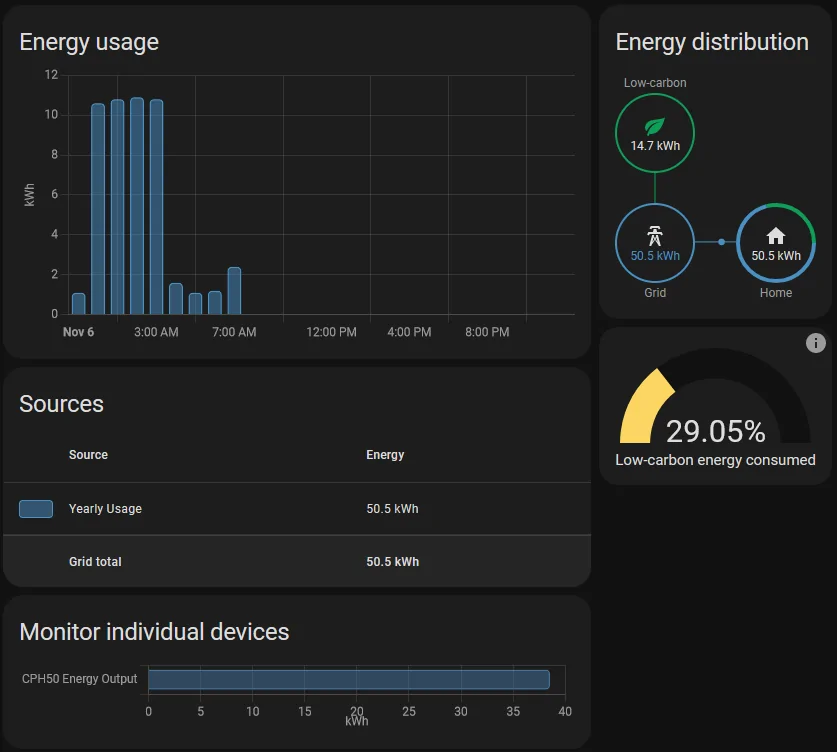
I track energy usage with my ChargePoint EVSE and also with Sense (home energy monitor), both in HA. I have a dedicated circuit monitor on the Sense side, which I just use to reflect the total consumption in the top part "Energy Usage" combined with the rest of the house. The bottom "Individual Devices" pulls the data from Chargepoint. In this example, 38.5 kW of my total 50.5 kW consumed today was for EV charging. If I wanted to just use sense I could by creating a custom sensor and just using the data from Sense alone. This would allow you to use any EVSE without it even being a "smart" or "connected" one as long as you can slap a dedicated circuit monitor on it.

Disclaimer - I am a forum moderator for Sense, but any home monitor solution that integrates with HA would work the same.

PS - Ignore the language "Yearly Usage". That's the sensor it tracks. In this example, it's just the daily being represented and it's only pulling the label of the yearly sensor data for the time frame selected.

Ford Mustang Mach-E Home Assistant Automations - Show them off!!! 1667752768061
 

phidauex

Well-Known Member
First Name
Sam
Joined
Dec 8, 2020
Threads
17
Messages
969
Reaction score
1,846
Location
Colorado
Vehicles
2021 MachE 4EX, 2006 Prius, 1997 Tacoma
Occupation
Renewable Energy Engineer
Country flag
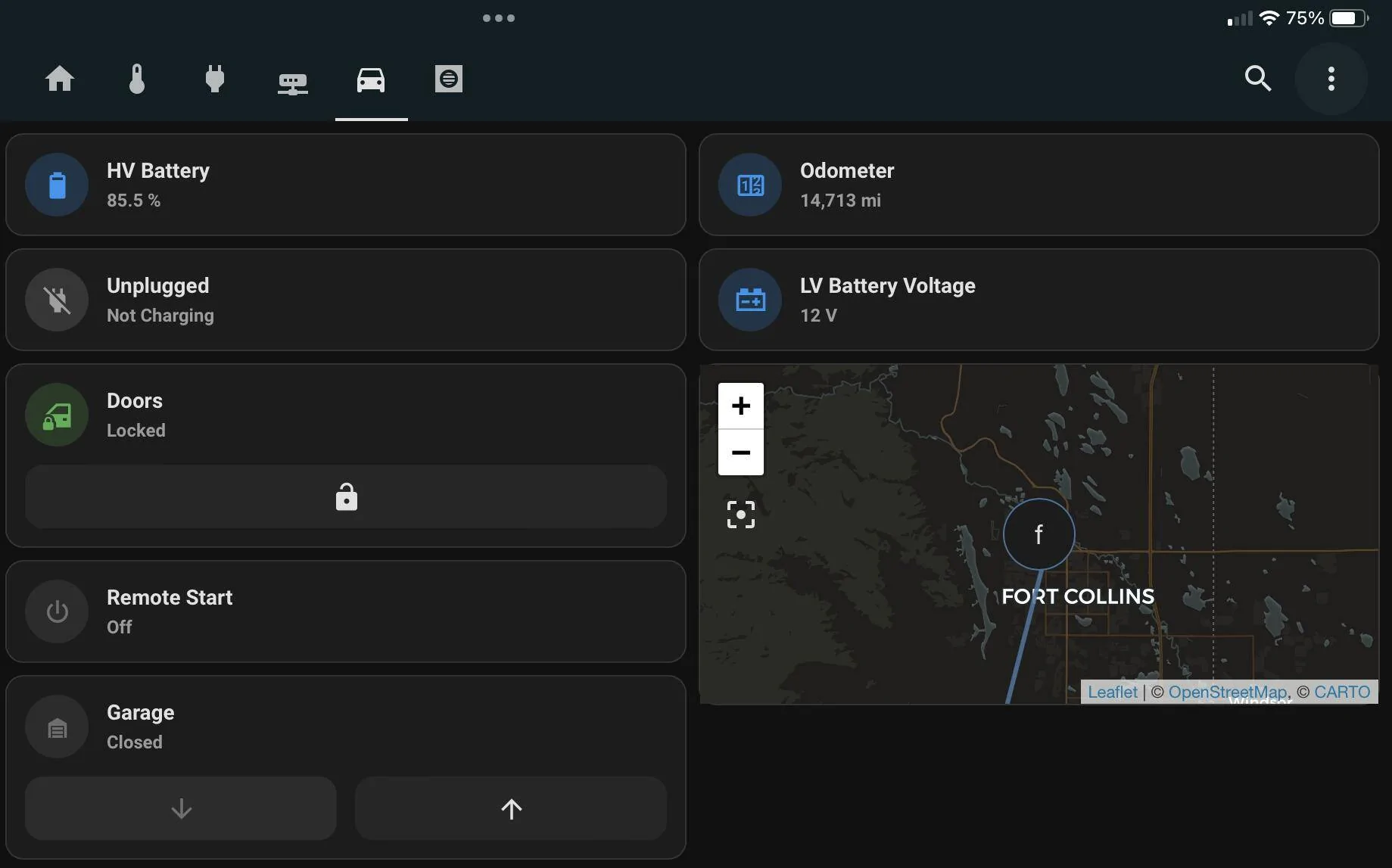
Thought I’d share a bit of my current dashboard - always a work in progress, but recently cleaned up a bit.

Ford Mustang Mach-E Home Assistant Automations - Show them off!!! 1667771601238


These are common Mushroom cards provided by the Mushroom HACS integration, which has some nice options for common controls like door switches and the ignition switch.

The only fancy trickery here is the “Unplugged” card, which uses a Mushroom Template card and a few templates to determine if the car is plugged or unplugged, and if so, if it is charging or not, and at what power. Depending on the state you get different icons, colors, and an indication of charging power.

The plugged/unplugged is pulled from one of the FordPass entities, and the charging power from a power sensor on the circuit (eGauge in my case, but any power/energy sensor would work the same way).

YAML:
type: custom:mushroom-template-card
primary: |-
  {% set mode = state_attr('sensor.fordpass_elveh', 'Plug Status') %}
  {% if mode == 0 %}
  Unplugged
  {% elif mode == 1 %}
  Plugged In
  {% else %}
  Unknown
  {% endif %}
secondary: |-
  {% set power = states('sensor.egauge_ev_charger')|float|round(0)|abs %}
  {% if power < 5 %}
  Not Charging
  {% elif power >= 5 %}
  Charging at {{power}} W
  {% else %}
  Unknown
  {% endif %}
icon: |-
  {% set mode = state_attr('sensor.fordpass_elveh', 'Plug Status') %}
  {% if mode == 0 %}
  mdi:power-plug-off
  {% elif mode == 1 %}
  mdi:power-plug
  {% else %}
  mdi:connection
  {% endif %}
icon_color: |-
  {% set mode = state_attr('sensor.fordpass_elveh', 'Plug Status') %}
  {% if mode == 0 %}
  grey
  {% elif mode == 1 %}
  green
  {% else %}
  red
  {% endif %}
tap_action:
  action: none
I don’t use a lot of true “automations” in HA, I mostly use it to supervise and collect data, but I’m curious what interesting automations people have put together.
 
OP
OP
DevSecOps

DevSecOps

Well-Known Member
First Name
Todd
Joined
Sep 22, 2021
Threads
69
Messages
4,764
Reaction score
11,624
Location
Sacramento, CA
Vehicles
'21 Audi SQ5 / '23 Rivian R1T / '23 M3P
Occupation
CISO
Country flag
I don’t use a lot of true “automations” in HA, I mostly use it to supervise and collect data, but I’m curious what interesting automations people have put together.
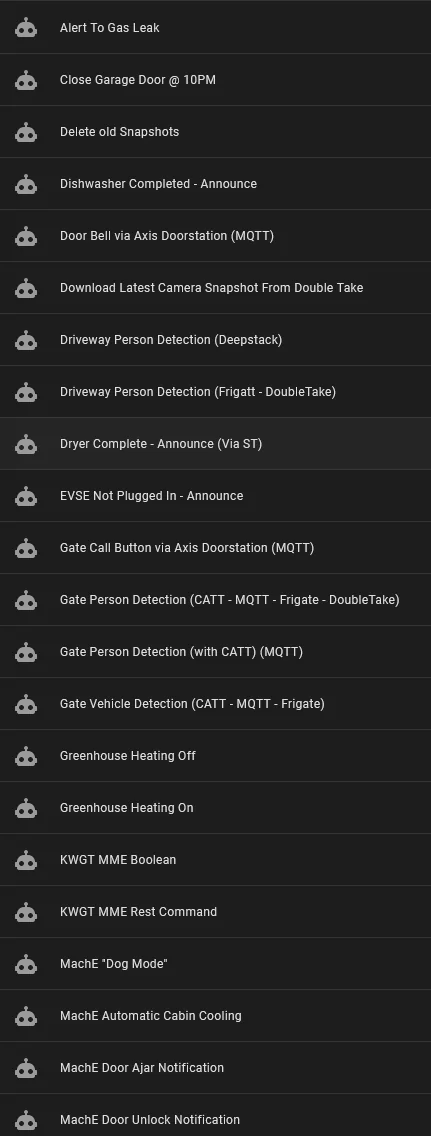
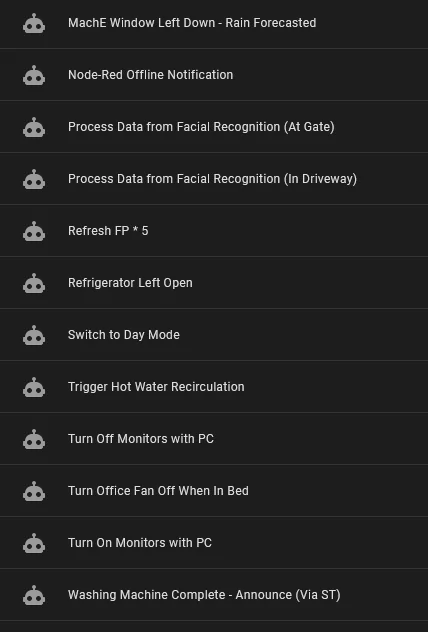
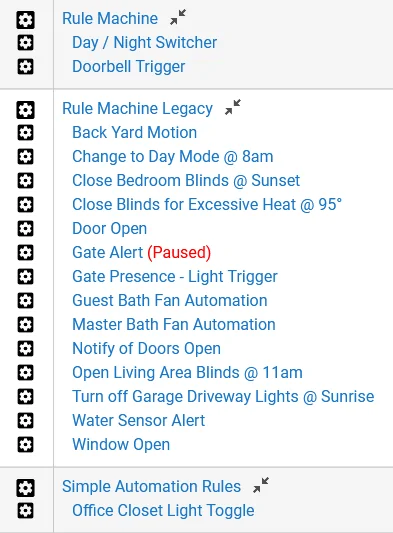
Automations with the car, all of the ones in this thread are the only ones that I have. Automations with other things I have a few of them. I could post some if interested so here's the list:

Ford Mustang Mach-E Home Assistant Automations - Show them off!!! 1667783568990

Ford Mustang Mach-E Home Assistant Automations - Show them off!!! 1667783589635


I also use Hubitat automations for much simpler things that don't require complexity. Such as closing the blinds when it's over 95 outside, triggering different lights on motion detection etc.

Ford Mustang Mach-E Home Assistant Automations - Show them off!!! 1667783893988
 
Last edited:

SashaLondon

Well-Known Member
First Name
Sasha
Joined
Sep 11, 2020
Threads
32
Messages
1,393
Reaction score
1,500
Location
London
Vehicles
MME AWD SR
Country flag
Thought I’d share a bit of my current dashboard - always a work in progress, but recently cleaned up a bit.

1667771601238.png


These are common Mushroom cards provided by the Mushroom HACS integration, which has some nice options for common controls like door switches and the ignition switch.

The only fancy trickery here is the “Unplugged” card, which uses a Mushroom Template card and a few templates to determine if the car is plugged or unplugged, and if so, if it is charging or not, and at what power. Depending on the state you get different icons, colors, and an indication of charging power.

The plugged/unplugged is pulled from one of the FordPass entities, and the charging power from a power sensor on the circuit (eGauge in my case, but any power/energy sensor would work the same way).

YAML:
type: custom:mushroom-template-card
primary: |-
  {% set mode = state_attr('sensor.fordpass_elveh', 'Plug Status') %}
  {% if mode == 0 %}
  Unplugged
  {% elif mode == 1 %}
  Plugged In
  {% else %}
  Unknown
  {% endif %}
secondary: |-
  {% set power = states('sensor.egauge_ev_charger')|float|round(0)|abs %}
  {% if power < 5 %}
  Not Charging
  {% elif power >= 5 %}
  Charging at {{power}} W
  {% else %}
  Unknown
  {% endif %}
icon: |-
  {% set mode = state_attr('sensor.fordpass_elveh', 'Plug Status') %}
  {% if mode == 0 %}
  mdi:power-plug-off
  {% elif mode == 1 %}
  mdi:power-plug
  {% else %}
  mdi:connection
  {% endif %}
icon_color: |-
  {% set mode = state_attr('sensor.fordpass_elveh', 'Plug Status') %}
  {% if mode == 0 %}
  grey
  {% elif mode == 1 %}
  green
  {% else %}
  red
  {% endif %}
tap_action:
  action: none
I don’t use a lot of true “automations” in HA, I mostly use it to supervise and collect data, but I’m curious what interesting automations people have put together.
I didnt see Plug Status, I will look for that. Any clues about where it is so I can make a template sensor for it, please?
 

CommittotheIndian

Well-Known Member
First Name
Travis
Joined
Jun 28, 2022
Threads
7
Messages
110
Reaction score
28
Location
Indiana
Vehicles
2022 Ford Mach-E Select eAWD Star White
Occupation
Indiana Supreme Court - IT
Country flag
Disclaimer - I am a forum moderator for Sense, but any home monitor solution that integrates with HA would work the same.
Todd,

This is probably a loaded question since you are a moderator for Sense but what do you think of Sense? I've been looking at adding more power consumption monitoring and seen mixed reviews for Sense. It's been awhile since I looked at Sense so maybe they've improved.

And since I haven't used the word since enough times in this reply while referring to Sense, here's my two cents. o_O
 

Gimme_my_MME

Well-Known Member
Joined
Oct 12, 2020
Threads
12
Messages
1,951
Reaction score
6,490
Location
Dearborn
Vehicles
Grabber Blue First Edition Mustang Mach-E
Occupation
Engineer
Country flag
Todd,

This is probably a loaded question since you are a moderator for Sense but what do you think of Sense? I've been looking at adding more power consumption monitoring and seen mixed reviews for Sense. It's been awhile since I looked at Sense so maybe they've improved.

And since I haven't used the word since enough times in this reply while referring to Sense, here's my two cents. o_O
I'm not Todd, nor did I stay in a holiday inn last night, but I do have a Sense.

It's ok, I don't love it. The machine learning is very slow if it works, it can't pick up a ton of things. I was hoping it would help identify some phantom draws or trends that I could address but nothing.

It might be better if I had a ton of smart outlets that they worked with but I don't. I almost think I would be better off with the Emporia Vue that allowed me to break it down by breaker vs relying on machine learning. It doesn't integrate with many other devices that could drastically improve it's capabilities
 

mkhuffman

Well-Known Member
First Name
Mike
Joined
Nov 19, 2020
Threads
29
Messages
6,879
Reaction score
9,516
Location
Virginia
Vehicles
2025 Rivian R1T Tri-Max, Jeep GC-L, VW Jetta
Country flag
OP
OP
DevSecOps

DevSecOps

Well-Known Member
First Name
Todd
Joined
Sep 22, 2021
Threads
69
Messages
4,764
Reaction score
11,624
Location
Sacramento, CA
Vehicles
'21 Audi SQ5 / '23 Rivian R1T / '23 M3P
Occupation
CISO
Country flag
Todd,

This is probably a loaded question since you are a moderator for Sense but what do you think of Sense? I've been looking at adding more power consumption monitoring and seen mixed reviews for Sense. It's been awhile since I looked at Sense so maybe they've improved.

And since I haven't used the word since enough times in this reply while referring to Sense, here's my two cents. o_O
I don't sugar coat things. I have my opinions and I'm honest about them. I've always told the Sense team that the biggest problem is the marketing of the product. Setting expectations for potential buyers is something they need to work on.

Sense uses AI to determine electrical patterns in electrical loads. Those patterns are what are analyzed by the AI engines and then predicted in the app.

The problem is with variable motors, some types of lights and other devices that don't have predictable wave patterns. EVs for example are not easy to detect because the pattern is different for each mfg and also depends on what EVSE you have. I would recommend a dedicated circuit monitor for any EVSE to eliminate that problem.

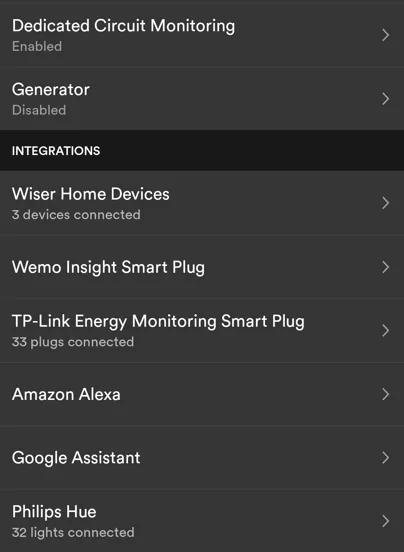
In my case, I have 69 devices, including the DCM, connected to Sense for it to pull in data. See the below image. This makes my Sense usage pretty accurate.

@Gimme_my_MME shares a sentiment with many people who use Sense. For many people that expect it to pick up their bed side lamp and other things like their laptop charger, for example, might be disappointed. At least if they expect the AI to do it.

Over time Sense will only improve as it has more data to analyze. It will also continue to be challenged by new devices and modern appliances with variable speed motors. Like Gimme mentioned there are a lot of other monitors out there. What it comes down to is granularity. With many of the other monitors they monitor the entire circuit, and are unable to monitor the individual devices, except in the cases where the circuit is dedicated to a singular device. Circuits dedicated to a singular device are the ones that Sense doesn't routinely have issue with. Water heaters, heat pumps, stoves etc. Resistance heating devices have very predictable and discoverable patterns and this covers almost all major appliances.

If you are willing to invest in Hue, TP-Link or Wiser branded devices, or if you already have these devices then Sense will work well to give you granular energy usage and patterns. If you don't have those devices and you're looking for something more high level and circuit based then another solution might be better.

I talk about a lot of this on the Sense forum in this post from last year.

@mkhuffman you are correct. Marriott it is.

Ford Mustang Mach-E Home Assistant Automations - Show them off!!! 1667883383186
Sponsored

 
Last edited:


Top