FirstPony
Well-Known Member
- Joined
- Feb 20, 2022
- Threads
- 12
- Messages
- 198
- Reaction score
- 111
- Location
- North Suburbia of Chicago
- Vehicles
- '22 AWD ER Prem red/black, '22 Kia Sorento PHEV

- Thread starter
- #1
I tried Googling this, and searched the forum, but nothing quite matched up. So I apologize if this has been asked before.
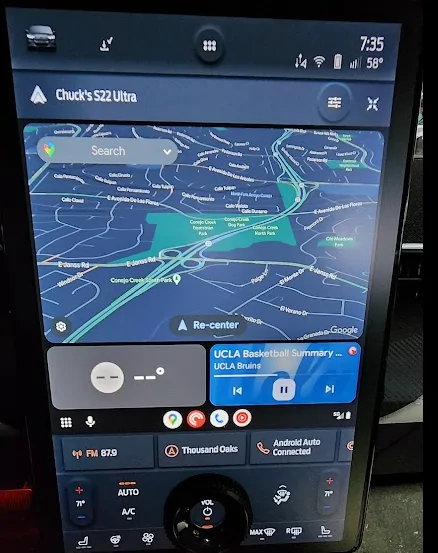
I just got my new MME yesterday. I am using Android Auto. It plays the music from my device just fine, and shows the big map. But what I want to do (with that hugantic screen) is be able to see the big map *and* actually see what music is playing. Right now I just get a thin black band with play/pause/skip and nothing else for the music, when the map is up.
Is there not a way to do this? I feel like the big grey boxes along the mid-bottom of the screen would be ideal, just make one of them show the music.
I just got my new MME yesterday. I am using Android Auto. It plays the music from my device just fine, and shows the big map. But what I want to do (with that hugantic screen) is be able to see the big map *and* actually see what music is playing. Right now I just get a thin black band with play/pause/skip and nothing else for the music, when the map is up.
Is there not a way to do this? I feel like the big grey boxes along the mid-bottom of the screen would be ideal, just make one of them show the music.
Sponsored