FDRS SYNCH MODULE [APIM] 6 GB USB DRIVE TAKING FOREVER

Navyjoe

Active Member
First Name
Joseph
Joined
Dec 22, 2022
Threads
8
Messages
34
Reaction score
50
Location
San Diego
Vehicles
GT 2022
Country flag
I setup a FDRS system yesterday for the first time and downloaded/installed a couple of updates. FDRS then wanted me to use a thumb drive to download a series of files and it has been running for 15+ hours. Is this normal?
Sponsored


MellowJohnny

Well-Known Member
First Name
Christian
Joined
Nov 16, 2021
Threads
95
Messages
1,683
Reaction score
2,835
Location
YYZ
Vehicles
2022 Mach-E Premium AWD
Occupation
Solution Architect
Country flag
I know nothing about FDRS, but can you download the files to the PC first? USB drives can be notoriously slow when downloading directly to them.

Where are the files being downloaded from? If the connection to the server is slow, there's not much you can do about it
 
OP
OP

Navyjoe

Active Member
First Name
Joseph
Joined
Dec 22, 2022
Threads
8
Messages
34
Reaction score
50
Location
San Diego
Vehicles
GT 2022
Country flag
no the system in this case forces you to download a series of files to a usb only. It will not allow you to download to the pc harddrive. You later take the usb drive and plug it into the car's usb port and it updates that way.
 

RyZt

Well-Known Member
Joined
Nov 17, 2019
Threads
24
Messages
747
Reaction score
880
Location
San Jose
Vehicles
Mach E4X
Country flag
Is your USB drive cheaply made or damaged?

Have you tried writing 6GB of data to your USB drive yourself? Does that work? How long does it take?


generaltso

Well-Known Member
Joined
Jun 24, 2020
Threads
76
Messages
15,389
Reaction score
28,696
Location
Vermont
Vehicles
2024 Kia EV9 GT-Line
Country flag
I setup a FDRS system yesterday for the first time and downloaded/installed a couple of updates. FDRS then wanted me to use a thumb drive to download a series of files and it has been running for 15+ hours. Is this normal?
FDRS is very slow at writing to USB. But not 15+ hours slow.

Others have reported saving a lot of time by manually copying the files to USB after FDRS downloads them, but I haven't tried that myself.
 

RyZt

Well-Known Member
Joined
Nov 17, 2019
Threads
24
Messages
747
Reaction score
880
Location
San Jose
Vehicles
Mach E4X
Country flag
I have no knowledge of FDRS implementation details. But I suspect that FDRS is doing many small writes, when it should do a few big writes.

Generally speaking, larger writes are faster than many smaller writes. Good USB drives are generally 10X-30X slower when doing smaller writes. However, some cheap USB drives are extremely bad at small writes (10000X).

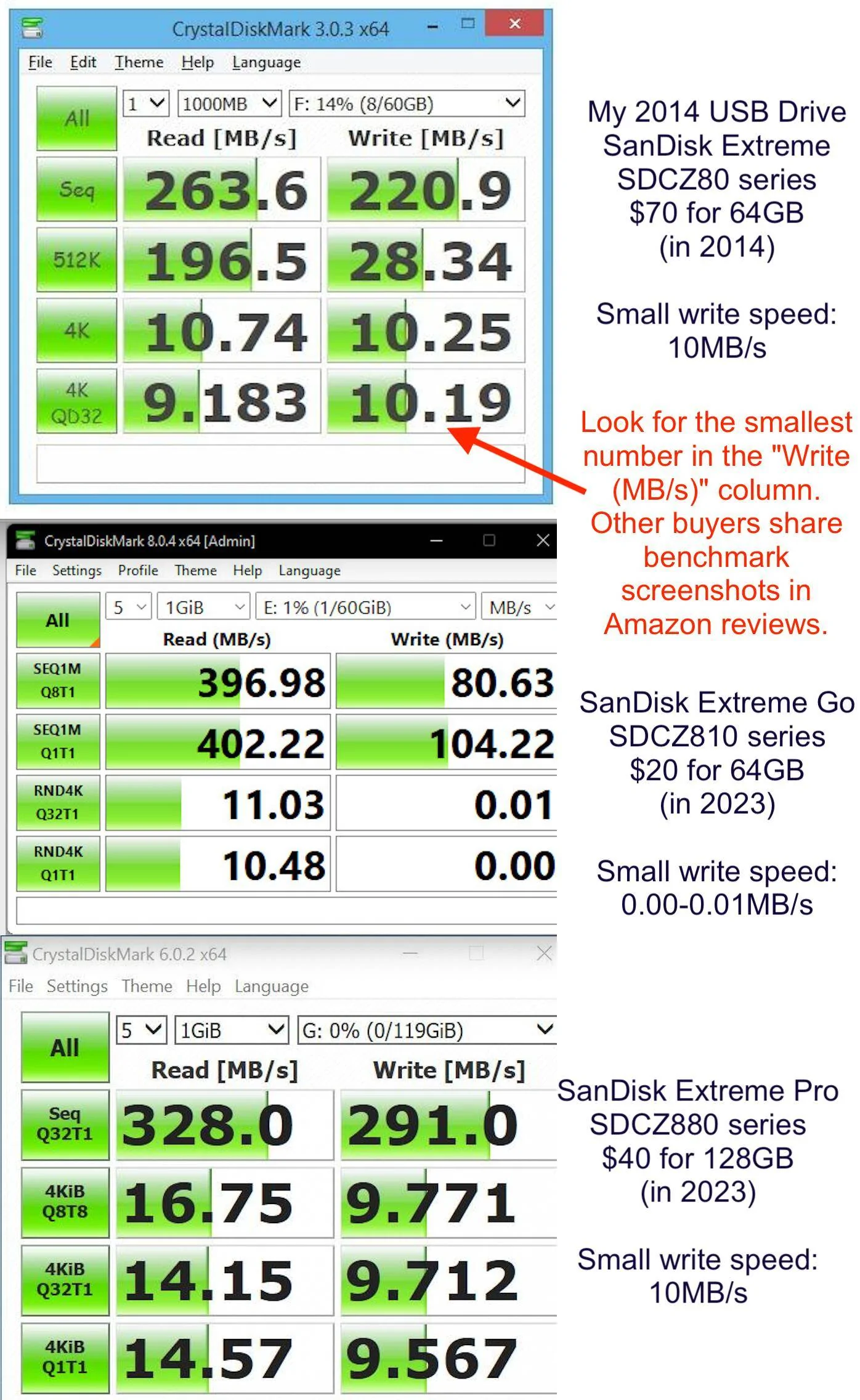
When I did my FDRS updates, I used SanDisk Extreme 64GB (SDCZ80 series) that I bought in 2014. It was a high-performance expensive model back then ($70 for 64GB, 200MB/s large writes, 11MB/s small 4K random writes). During my FDRS attempt, download and disk write were very fast. I was aware of forum complaints about download and disk write speed back then, and I remember feeling glad that it was a non issue for me.

Fast forward to 2023. A cheap USB drive (e.g. $20 SanDisk Extreme Go 64GB SDCZ810 series) has an embarrassing small random write performance of 0.01MB/s, a whopping 1000X slower than my 2014 $70 model. A proper USB drive (e.g. $40 SanDisk Extreme Pro 128GB, SDCZ880 series) can do 9MB/s, that’s comparable to my 2014 $70 model.

Don’t save $20 and get a model that’s 1000X slower at small random writes.

Now, FDRS shouldn’t be doing small random writes. But to us the users, it’s a problem that we can fix by ourselves for $20, so I don’t see a reason to get Ford to prioritize a fix. I wonder, how many dealers are using cheap USB drives and complaining about long labor time.

Note: all 4K random write number I quoted above are from screenshot of CrystalDiskMark (the de facto standard benchmark software for USB drives) in Amazon reviews.
 
Last edited:

benk016

Well-Known Member
First Name
Ben
Joined
Nov 12, 2020
Threads
39
Messages
3,274
Reaction score
5,118
Location
Tulsa, Oklahoma
Vehicles
2021 Mustang Mach-E GT
Country flag
FDRS downloads them to the PC in a cache folder and then copies it to USB. That USB copy is painfully slow. An older laptop and older USB drive will make it even slower.

Manually copying files takes just a few minutes but FDRS can take 30-60 minutes for the same copy job on my laptop.
 
OP
OP

Navyjoe

Active Member
First Name
Joseph
Joined
Dec 22, 2022
Threads
8
Messages
34
Reaction score
50
Location
San Diego
Vehicles
GT 2022
Country flag
it finally worked. I guess I have a very slow thumb drive. I now have a new interface, camera button, and I think couple of silly new games (Bridge Battle and Parking lot). I like the new interface especially the better use of the wheel. I guess this is what makes up the 15 hour 6+gb downloads. I suspect the need for a USB drive is that the cam convection is even slower than USB and cannot handle files of this size. It took a long time. I was worried my two day license would end before all the files were downloaded but I made it with 10 hours to spare. I think it would be a whole lot cheaper if Ford or dealers would just mailout out thumb drives with updates on them for a nominal fee.

Ford Mustang Mach-E FDRS SYNCH MODULE [APIM] 6 GB USB DRIVE TAKING FOREVER 1673203853016
 
OP
OP

Navyjoe

Active Member
First Name
Joseph
Joined
Dec 22, 2022
Threads
8
Messages
34
Reaction score
50
Location
San Diego
Vehicles
GT 2022
Country flag
I am new FDRS. I installed all the options under the SW Upadtes. Under the Multi-mode tab there are unstarred items. What does the yellow versus white star mean? Should I install the white star items are those item not for my configuration?

Ford Mustang Mach-E FDRS SYNCH MODULE [APIM] 6 GB USB DRIVE TAKING FOREVER 1673204579235


The same issue also showed up in the Guided routine tab (Yellow vs White Star)

Ford Mustang Mach-E FDRS SYNCH MODULE [APIM] 6 GB USB DRIVE TAKING FOREVER 1673204860009
 
OP
OP

Navyjoe

Active Member
First Name
Joseph
Joined
Dec 22, 2022
Threads
8
Messages
34
Reaction score
50
Location
San Diego
Vehicles
GT 2022
Country flag
I have no knowledge of FDRS implementation details. But I suspect that FDRS is doing many small writes, when it should do a few big writes.

Generally speaking, larger writes are faster than many smaller writes. Good USB drives are generally 10X-30X slower when doing smaller writes. However, some cheap USB drives are extremely bad at small writes (10000X).

When I did my FDRS updates, I used SanDisk Extreme 64GB (SDCZ80 series) that I bought in 2014. It was a high-performance expensive model back then ($70 for 64GB, 200MB/s large writes, 11MB/s small 4K random writes). During my FDRS attempt, download and disk write were very fast. I was aware of forum complaints about download and disk write speed back then, and I remember feeling glad that it was a non issue for me.

Fast forward to 2023. A cheap USB drive (e.g. $20 SanDisk Extreme Go 64GB SDCZ810 series) has an embarrassing small random write performance of 0.01MB/s, a whopping 1000X slower than my 2014 $70 model. A proper USB drive (e.g. $40 SanDisk Extreme Pro 128GB, SDCZ880 series) can do 9MB/s, that’s comparable to my 2014 $70 model.

Don’t save $20 and get a model that’s 1000X slower at small random writes.

Now, FDRS shouldn’t be doing small random writes. But to us the users, it’s a problem that we can fix by ourselves for $20, so I don’t see a reason to get Ford to prioritize a fix. I wonder, how many dealers are using cheap USB drives and complaining about long labor time.

Note: all 4K random write number I quoted above are from screenshot of CrystalDiskMark (the de facto standard benchmark software for USB drives) in Amazon reviews.
Good advice, Thanks
 

RyZt

Well-Known Member
Joined
Nov 17, 2019
Threads
24
Messages
747
Reaction score
880
Location
San Jose
Vehicles
Mach E4X
Country flag
I made a picture and posted it in the FDRS thread. I think that picture is much easier to read and make my point more clear.

I've seen complaints about USB writing speed in this thread and elsewhere in this forum from time to time. For example, https://www.macheforum.com/site/threads/fdrs-synch-module-apim-6-gb-usb-drive-taking-forever.24978/

I have no knowledge of FDRS implementation. But the only plausible explanation is that FDRS is doing many small writes when it should do a few big writes.

I think it is worthwhile to update the top post in this thread to call out the importance of having a proper USB drive so that people don't spend 10 extra hours doing APIM update. They may not know that saving $20 could cost them 12 hours of anxiety. Or they may had bad luck and paid good money for a cheap product.

The picture below says it all.

Screen Shot 2023-01-08 at 11.08.07 AM.png
 

Neil4Real

Well-Known Member
Joined
Jul 8, 2021
Threads
17
Messages
3,385
Reaction score
3,073
Location
Southern California
Vehicles
Mach-E GT Performance Edition - Shadow Black
Country flag
I am new FDRS. I installed all the options under the SW Upadtes. Under the Multi-mode tab there are unstarred items. What does the yellow versus white star mean? Should I install the white star items are those item not for my configuration?

1673204579235.png


The same issue also showed up in the Guided routine tab (Yellow vs White Star)

1673204860009.png
The yellow starts are just favorites. Don’t mess around with anything not in software updates without reason. Self test is good to run after all updates are done and then clearing all the DTCs.
 

JohnnyForensic

Well-Known Member
First Name
John
Joined
Apr 14, 2021
Threads
44
Messages
1,208
Reaction score
2,191
Location
VA, US
Vehicles
'21 Infinite Blue MME 4X Premium
Occupation
Digital Forensics
Country flag
it finally worked. I guess I have a very slow thumb drive. I now have a new interface, camera button, and I think couple of silly new games (Bridge Battle and Parking lot). I like the new interface especially the better use of the wheel. I guess this is what makes up the 15 hour 6+gb downloads. I suspect the need for a USB drive is that the cam convection is even slower than USB and cannot handle files of this size. It took a long time. I was worried my two day license would end before all the files were downloaded but I made it with 10 hours to spare. I think it would be a whole lot cheaper if Ford or dealers would just mailout out thumb drives with updates on them for a nominal fee.

1673203853016.png
You definitely want a USB 3.0 thumb drive with plenty of space. Also, during this phase, you might even want to move your Internet access point as close as possible to your laptop to ensure that downloads are moving as quickly as they can. If you have a slow Internet connection, this will hurt you a lot here.

I think you’ll find a good USB 3.0 thumb drive will work wonders here for you.
 

Neil4Real

Well-Known Member
Joined
Jul 8, 2021
Threads
17
Messages
3,385
Reaction score
3,073
Location
Southern California
Vehicles
Mach-E GT Performance Edition - Shadow Black
Country flag
FDRS downloads them to the PC in a cache folder and then copies it to USB. That USB copy is painfully slow. An older laptop and older USB drive will make it even slower.

Manually copying files takes just a few minutes but FDRS can take 30-60 minutes for the same copy job on my laptop.
Ben, what's the folder you copy over to the USB to speed up the process?
Sponsored


Top