Carplay Not Showing on Bottom Row of Buttons

AllenS

Member
First Name
Allen
Joined
May 8, 2021
Threads
6
Messages
17
Reaction score
7
Location
Maryland
Vehicles
2021 Mach-E Premium RWD in Star White
Occupation
Computer Scientist
Country flag
I know, I know, just what we don't need is another post about Apple Carplay issues. :-0 I searched on this forum and google (well, duck duck go, to be precise), and I didn't find an issue quite like this one.

I've mostly had few problems with Carplay since buying the Mach-E a couple years back—just the occasional refusal to connect wirelessly—but for the past few days Carplay has come up fine when starting the car, but it never shows up on that bottom row of, what are we calling them, shortcut buttons? The ones that used to be taller and provided more information, but after some update are shorter and provide very little information...but they still are the quickest way to access other open "apps." (Wait, are we calling them apps?)

Has anyone else seen this issue? If so, did you figure out a way to fix it?

I have rebooted Sync, restarted the car several times since the problems been occurring for a few days, and rebooted the iPhone, of course.

I have no way of telling whether I have the latest Mach-E software, but my iPhone 15 is up to date.

Thanks!
Sponsored

 

bshaw

Well-Known Member
Joined
May 18, 2020
Threads
14
Messages
1,562
Reaction score
2,181
Location
Boston, MA
Vehicles
2021 Mustang Mach E 4X (Job 1)
Country flag
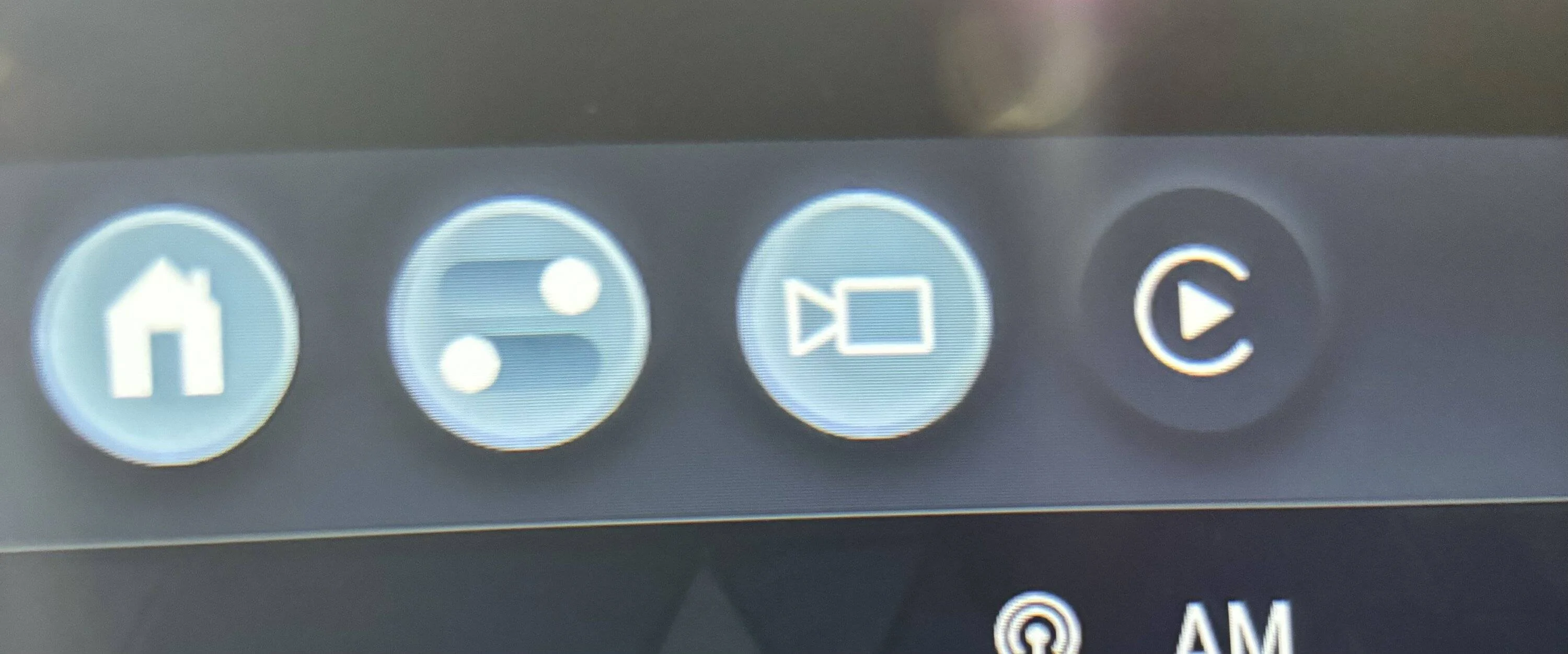
Carplay should have an icon in the top of the screen when you are connected. It's a triangle with a circle around it with a white background. If you're connected with Carplay, hitting this icon with switch to carplay.
 
OP
OP
AllenS

AllenS

Member
First Name
Allen
Joined
May 8, 2021
Threads
6
Messages
17
Reaction score
7
Location
Maryland
Vehicles
2021 Mach-E Premium RWD in Star White
Occupation
Computer Scientist
Country flag
Is it a tiny icon? I'm not sure my old eyes and fat fingers will have as easy a time with that, but it'll have to do until the problem fixes itself, I guess. (There's always hitting the home icon and selecting it from there too, but you know us software users: We like as few steps as possible. :) )

Thanks, that'll solve the problem for now.
 

Maquis

Well-Known Member
First Name
Dave
Joined
Dec 21, 2020
Threads
34
Messages
5,696
Reaction score
8,082
Location
Illinois
Vehicles
2021 Mach E4X, 2023 Lightning Lariat ER
Country flag
Is it a tiny icon? I'm not sure my old eyes and fat fingers will have as easy a time with that, but it'll have to do until the problem fixes itself, I guess. (There's always hitting the home icon and selecting it from there too, but you know us software users: We like as few steps as possible. :) )

Thanks, that'll solve the problem for now.
At the top. The one on the right.

Ford Mustang Mach-E Carplay Not Showing on Bottom Row of Buttons IMG_0045
 
OP
OP
AllenS

AllenS

Member
First Name
Allen
Joined
May 8, 2021
Threads
6
Messages
17
Reaction score
7
Location
Maryland
Vehicles
2021 Mach-E Premium RWD in Star White
Occupation
Computer Scientist
Country flag
Thanks, bshaw and Maquis!


AliRafiee

Well-Known Member
First Name
Ali
Joined
Jan 20, 2023
Threads
103
Messages
3,267
Reaction score
4,192
Location
Seattle WA
Vehicles
2022 Mach E GT - Grabber Blue
Occupation
Software Eng.
Country flag
I have seen it at the bottom from time to time, but I close it every time.
Try opening the main drawer and tapping the CarPlay app. Maybe that’s how it showed up.
 

GatorJ_MME

Well-Known Member
First Name
Jeff
Joined
Oct 24, 2022
Threads
8
Messages
257
Reaction score
214
Location
Raleigh, NC
Vehicles
2023 Mach E Premium
Occupation
Electrical Engineer
Country flag
I think the one on the bottom show up after I make a call.
 

Jimrpa

Well-Known Member
First Name
Jim
Joined
Sep 10, 2020
Threads
297
Messages
9,546
Reaction score
12,872
Location
Wayne, PA
Vehicles
2021 Infinite Blue Premium Mustang Mach E ER AWD
Occupation
Retied (formerly tried to herd highly technical, independent cats)
Country flag
CarPlay is weird - Ford decided to add a second button on the top which shows up sometimes. I haven’t figured out the pattern for when it shows up and doesn’t show up. The same is true for the CarPlay “card” at the bottom. Sometimes it is there, and other times it’s not ?‍♂
Yet more inconsistency in the Ford UI.
 

AllenXS

Well-Known Member
First Name
Allen
Joined
Jan 11, 2021
Threads
13
Messages
1,339
Reaction score
1,706
Location
Richmond, BC, Canada
Vehicles
Premium Blue ER AWD
Country flag
When you go in to some items then an X will appear. Hit the X and it shoul;d go back to what you are expecting.
 

HuntingPudel

Well-Known Member
First Name
Steve
Joined
Mar 23, 2021
Threads
88
Messages
12,941
Reaction score
17,390
Location
Bay Area, CA
Vehicles
2024 MME GT with Performance Upgrade, 1979 Fire-Am, 1972 K/5 Blazer
Occupation
Engineering
Country flag
The tile below the major portion of the screen has been sporadically there and then missing for me for the last 8-10 months. I just use the button at the top of the screen now since it is always there when the car and phone are paired with CarPlay. Just informational: The tile near the bottom has been visible for the last 4 weeks or so and hasn’t gone away in that time. My last Power-Up was in December (2-1/2 months ago) and I haven’t FDRS-updated since before that. ?‍♂?
 

NewGuy

Well-Known Member
Joined
Sep 30, 2021
Threads
31
Messages
494
Reaction score
633
Location
NJ
Vehicles
Ready to order
Country flag
I think when the carplay card appears at the bottom, that's actually just the car's "phone" card. If you're connected via carplay, the phone card takes you to carplay, but more specifically it takes you to your phone app within carplay. If you're just connected via bluetooth, you could still have that phone card.

I do miss having a proper carplay card at the bottom. They got rid of it when they added the carplay button up top. The new carplay button is too small, and quickly popping over to the trip efficiency card and then right back to carplay is much easier when they are adjacent cards.
 

CTZ

Well-Known Member
First Name
Greg
Joined
Jan 19, 2024
Threads
3
Messages
158
Reaction score
210
Location
Canada
Vehicles
2022 Mach-E
I believe the cards at the bottom are more of a recent app row more than anything, whereas the button on the top row is active app switching.
 

tlhoush

New Member
First Name
Tori
Joined
Jan 7, 2024
Threads
0
Messages
4
Reaction score
0
Location
CA
Vehicles
MME
Country flag
the row with the app “cards” fills up with open apps and only a few appear at a time. I think of them more as a tab. to find my carplay tab, I slide the row of tabs to the left and the tabs on the right will come onto the screen, pushing the first few to the left and off the screen. Close all your visible tabs by pulling them down and off the screen and those to the left will take over the visible part of the screen.
 

Jimrpa

Well-Known Member
First Name
Jim
Joined
Sep 10, 2020
Threads
297
Messages
9,546
Reaction score
12,872
Location
Wayne, PA
Vehicles
2021 Infinite Blue Premium Mustang Mach E ER AWD
Occupation
Retied (formerly tried to herd highly technical, independent cats)
Country flag
When you go in to some items then an X will appear. Hit the X and it shoul;d go back to what you are expecting.
Huh? ?‍♂
Sponsored


Top