Mach-Lee

Well-Known Member
First Name
Lee
Joined
Jul 16, 2021
Threads
262
Messages
11,366
Reaction score
25,029
Location
Wisconsin
Vehicles
2022 Mach-E Premium AWD
Occupation
Sci/Eng
Country flag
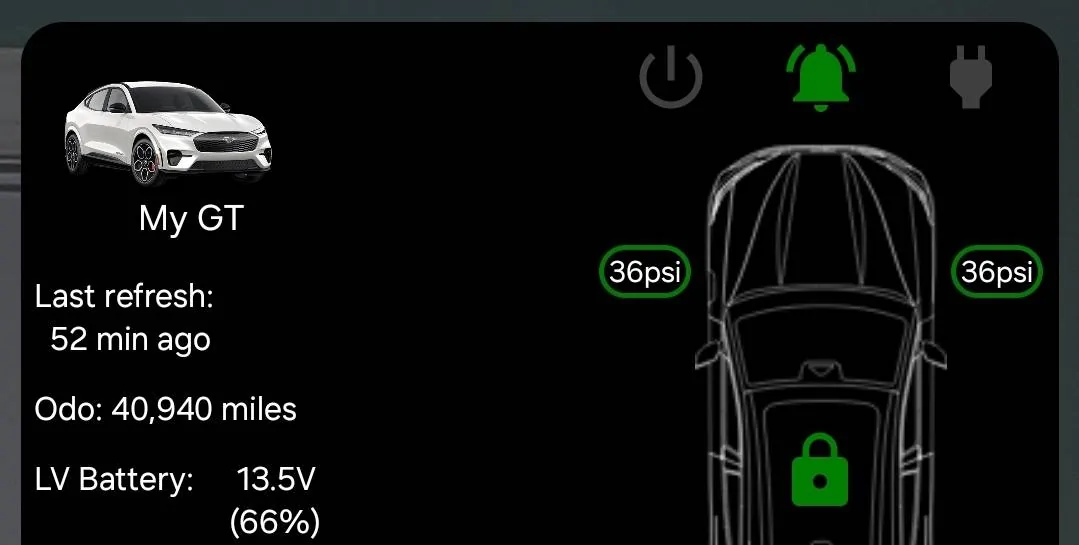
I am not sure these theories are correct. I just received this update and the SoC of my LVB was well below 90%:

1000009238.webp
12V battery is still going to drain down to about 50% after the update. It will not be kept at a set level. As long as it's above 50% that's normal.
Sponsored


mkhuffman

Well-Known Member
First Name
Mike
Joined
Nov 19, 2020
Threads
29
Messages
6,878
Reaction score
9,512
Location
Virginia
Vehicles
2025 Rivian R1T Tri-Max, Jeep GC-L, VW Jetta
Country flag
12V battery is still going to drain down to about 50% after the update. It will not be kept at a set level. As long as it's above 50% that's normal.
Understood. I was pointing out that the LVB was well below 80% and the update worked.

Edit: @Mach-Lee I was thinking about this some more, and maybe the LVB was higher than I thought. All week when I was in the OBX the LVB never got up to 80% every time I checked. I was not checking by forcing a refresh, I was just looking at what came up in the Android widget without manually refreshing it. So the data was not hourly for sure.

Anyway, when I got home, it is very likely the LVB SoC was low, as it was low in the previous LVB widget update. But I did drive the car for a 10 minute trip to the grocery store. So a total of around 20-25 minutes of power on time. I assumed that would not be enough time to charge the LVB to above 80%, but maybe it was. I started the update immediately after I returned from the store. I expected it to fail, based on everyone else's experience, but it worked.

Assuming isn't very scientific, so I apologize. I may have been incorrect. Maybe the LVB was higher than I thought when I got home, and maybe that 20 minutes of driving was enough to get the LVB above 80%.

To reiterate, it's failing because of poor BMS data quality, not because the 12V battery is low. The vehicle must enter undistributed sleep with no loads for a 6+ hour continuous period for the BMS learning to complete. There is a different procedure to correct this:
  1. Unplug all dashcams and accessories (including any OBD port scanners or hardwired accessories)
  2. Remove all key fobs from the vehicle
  3. Place all key fobs at least 25' away from the vehicle
  4. Disable Bluetooth on your phone(s) so PAAK connection is not possible
  5. Disable any apps or widgets that ping the car for data
  6. Unplug the car (no charging of any kind including 12V)
  7. Close all windows and doors fully
  8. Park the vehicle undisturbed for 6+ hours (8 hours recommended)
    1. Do not open, lock, or unlock any doors during this sleep period, ping the vehicle, refresh FordPass status, or cause any lights or screens to activate
  9. After the sleep period, you may turn on the car for 30 minutes and proceed with the update.
If the above doesn't work, you have an unresolved 12V drain issue that needs additional diagnosis.
This could be why. My car was sitting for 7 days while I was at the beach this week. It was unplugged, and since I was away from home, the car was not waking as I moved about the house or near the car with my PaaK.

So it had undisturbed sleep for 7 days. I did drive it a few miles before I started the update, but it wasn't long enough to fully recharge the LVB.
 
Last edited:

AFVolt

Well-Known Member
First Name
Gene
Joined
Dec 29, 2019
Threads
19
Messages
113
Reaction score
95
Location
Winter Haven, FL
Vehicles
Volt
Country flag
To reiterate, it's failing because of poor BMS data quality, not because the 12V battery is low. The vehicle must enter undistributed sleep with no loads for a 6+ hour continuous period for the BMS learning to complete. There is a different procedure to correct this:
  1. Unplug all dashcams and accessories (including any OBD port scanners or hardwired accessories)
  2. Remove all key fobs from the vehicle
  3. Place all key fobs at least 25' away from the vehicle
  4. Disable Bluetooth on your phone(s) so PAAK connection is not possible
  5. Disable any apps or widgets that ping the car for data
  6. Unplug the car (no charging of any kind including 12V)
  7. Close all windows and doors fully
  8. Park the vehicle undisturbed for 6+ hours (8 hours recommended)
    1. Do not open, lock, or unlock any doors during this sleep period, ping the vehicle, refresh FordPass status, or cause any lights or screens to activate
  9. After the sleep period, you may turn on the car for 30 minutes and proceed with the update.
If the above doesn't work, you have an unresolved 12V drain issue that needs additional diagnosis.
Wow, reading that last step “BMS Reset Method” in how to get OTAs to Install looks very ominous if needed.

“poor BMS data quality” doesn’t seem like it should be in my wheelhouse to understand, diagnosis, or correct.

As a user, (read consumer/customer) those 9 steps seems to be a lot of requirements outside a normal daily user experience to get something that was expected.

I need to disable Bluetooth on multiple phones, and loose functionality needed for other electronic devices for 8 hours?

Outside of the official Ford App, what else need to be killed on my devices to ensure they aren’t pinging my vehicle?

It seems to be a lot of hoops and conditions a driver/consumer needs to be aware of. And if after all steps followed, will Ford do the necessary updates without cost for me? I have met all the conditions that was displayed on the screen for the update.

Still frustrated, as I understand there is more to it than I understand, but updates shouldn’t be this difficult. Especially for an update, that’s supposed to make other updates easier.
 

Mach-Lee

Well-Known Member
First Name
Lee
Joined
Jul 16, 2021
Threads
262
Messages
11,366
Reaction score
25,029
Location
Wisconsin
Vehicles
2022 Mach-E Premium AWD
Occupation
Sci/Eng
Country flag
Wow, reading that last step “BMS Reset Method” in how to get OTAs to Install looks very ominous if needed.

“poor BMS data quality” doesn’t seem like it should be in my wheelhouse to understand, diagnosis, or correct.

As a user, (read consumer/customer) those 9 steps seems to be a lot of requirements outside a normal daily user experience to get something that was expected.

I need to disable Bluetooth on multiple phones, and loose functionality needed for other electronic devices for 8 hours?

Outside of the official Ford App, what else need to be killed on my devices to ensure they aren’t pinging my vehicle?

It seems to be a lot of hoops and conditions a driver/consumer needs to be aware of. And if after all steps followed, will Ford do the necessary updates without cost for me? I have met all the conditions that was displayed on the screen for the update.

Still frustrated, as I understand there is more to it than I understand, but updates shouldn’t be this difficult. Especially for an update, that’s supposed to make other updates easier.
To minimize impacts, I'd suggest disabling Bluetooth before going to bed and then turning it back on the next morning. As an alternative to shutting off Bluetooth, you can temporarily revoke location permissions when the app is not open and fully quit the FordPass app (so it can't run in the background). Or park the car 100' away from your house down the street so you can leave Bluetooth on.

The BMS data quality issue is rare so most people don't have to worry about it. With normal usage, the BMS will function just fine. But the issue is present in your case. Hard to say why, but most commonly due to excessive wake events or high key-off 12V drain.

The steps are thorough to cover all known edge cases that prevent success.
 

Mach-Lee

Well-Known Member
First Name
Lee
Joined
Jul 16, 2021
Threads
262
Messages
11,366
Reaction score
25,029
Location
Wisconsin
Vehicles
2022 Mach-E Premium AWD
Occupation
Sci/Eng
Country flag
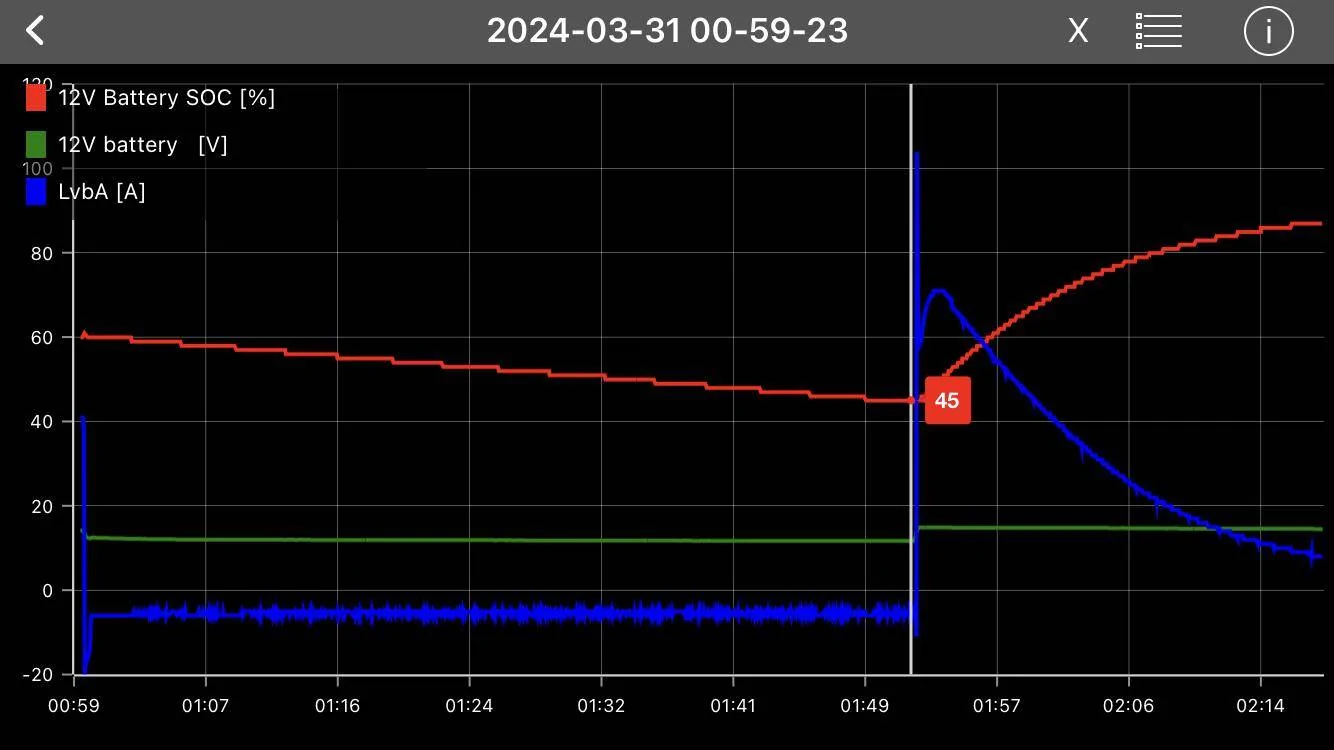
Alright, so I have some results from testing the Battery Optimization OTA. Here's what's been improved:
  • 12V recharge threshold has been increased to 45% SoC (from 35%), so the battery won't get as low as it could before. The recharge event lasts 1-2 hours and the battery will be charged to 95% afterwards.
Ford Mustang Mach-E 24-PU0121-FTDI-FX Update - Battery Optimization + Battery & Remote Start Enhancements IMG_2041

  • Welcome lighting has been capped at only several activations before becoming disabled until the next ignition cycle. This is much better than the 12+ activations it would allow previously, which caused significant 12V drains in households where the fobs (or phone) were kept <25' from the vehicle.
  • Since I haven't gotten another OTA, I'm not able to observe modified OTA behavior yet. But I'm hoping for some additional improvements there as well.
Other than that, everything operates the same as before. If you open the doors or ping the vehicle it will still drain 12V. If you have an always-on dashcam, it will also still drain down your battery until it recharges, causing extra wear and tear on the 12V battery. To prevent this, the daschcam should not be allowed to drain the battery lower than 12.3V (use a setting higher than 12.3V), or better yet, only operate while the vehicle is on.
 
Last edited:


Shayne

Well-Known Member
Joined
Aug 9, 2020
Threads
18
Messages
3,824
Reaction score
2,738
Location
Northern Ontario Canada
Vehicles
2021 MME4x Prem
Occupation
Retired
Country flag
Alright, so I have some results from testing the Battery Optimization OTA. Here's what's been improved:
  • 12V recharge threshold has been increased to 45% SoC (from 35%), so the battery won't get as low as it could before. The recharge event lasts 1-2 hours and the battery will be charged to 95% afterwards.
  • Welcome lighting has been capped at only several activations before becoming disabled until the next ignition cycle. This is much better than the 12+ activations it would allow previously, which caused significant 12V drains in households where the fobs (or phone) were kept <25' from the vehicle.
  • Since I haven't gotten another OTA, I'm not able to observe modified OTA behavior yet. But I'm hoping for some additional improvements there as well.
Other than that, everything operates the same as before. If you open the doors or ping the vehicle it will still drain 12V. If you have an always-on dashcam, it will also still drain down your battery until it recharges, causing extra wear and tear on the 12V battery. To prevent this, the daschcam should not be allowed to drain the battery lower than 12.3V (use a setting higher than 12.3V), or better yet, only operate while the vehicle is on.
So 45% not 50% as initially thought. Both still a bit low at -30C for such a small battery is my take. I think they have got rid of a lot of phantom drain on mine. The welcome lights hardly every come on for me anymore so that is good.

Possible that 45% is a hard limit but also on a schedule? I know the auto preparing to drive helps a lot. My FP app charging screen says it has been plugged in for 209 hours 17 minutes and has charged 1608.1 kWh ;) So sitting for days and the 12V is over 90% right now. That makes more sense than 45% to me.
 

Guy

Well-Known Member
First Name
Guy
Joined
Dec 7, 2020
Threads
0
Messages
276
Reaction score
356
Location
Canada
Vehicles
Premium AWD Long Range
Country flag
My LVB is at 83% this morning, up from 71% last night. No recharge, no “preparing for drive” during the night. This OTA makes a real difference.
 

PedroDaGr8

Well-Known Member
Joined
Jul 10, 2023
Threads
5
Messages
168
Reaction score
194
Location
WA, USA
Vehicles
2021 Mach E Premium (First Edition)
Country flag
Got this update today! It literally followed on the heels of 6.14. So close in fact that I never got a notification that 6.14 installed.
 

mkhuffman

Well-Known Member
First Name
Mike
Joined
Nov 19, 2020
Threads
29
Messages
6,878
Reaction score
9,512
Location
Virginia
Vehicles
2025 Rivian R1T Tri-Max, Jeep GC-L, VW Jetta
Country flag
Got this update today! It literally followed on the heels of 6.14. So close in fact that I never got a notification that 6.14 installed.
For me it was the opposite: 6.14 came quickly after the battery optimization update, and I thought that was intentional. But maybe not based on your experience.
 

mdolan92869

Well-Known Member
First Name
Mike
Joined
Feb 25, 2021
Threads
25
Messages
1,149
Reaction score
2,606
Location
Orange County, CA
Vehicles
'21 Mach-e (Had '83 GT, '89 GT Ragtop, '13 GT)
Occupation
Retired Software Engineer
Country flag
Ran to the store this morning and this showed up. Sitting in the garage installing right now. No 6.14 yet, maybe that will show up tonight.
 

UnforAll

Well-Known Member
Joined
Jul 11, 2021
Threads
5
Messages
223
Reaction score
226
Location
northern Virginia
Vehicles
'21 Mach-E 4x Premium IB; '24 Subaru Crosstrek Sport
Occupation
Grad Student
Country flag
Since this update my app charging isn't showing up while charging. Not a huge issues as much as it is an annoyance. Anyone else get this while L2 charging with this update?
I had the same two nights ago after getting this update, but charging info was back in the app last night and there now.


Top