Jimmyd

Well-Known Member
First Name
Jim
Joined
Oct 19, 2023
Threads
2
Messages
54
Reaction score
33
Location
Babcock Ranch Florida
Vehicles
Mustang Mach E
Occupation
Retired
Country flag
https://discord.gg/Ju3Kq4AQ

This guy has done some amazing work in the shortcuts app. Little cleaner than your current solution.
Not criticizing, just curious. I bring up my ford pass and tell the car what to do and it is done. Just wondering what else can be better. I’m an old man , don’t understand it all. I own two Mach E’s and only had one complaint. So I’m happy with status quo. Don’t understand most of the technical language you guys use.
Sponsored

 
OP
OP
Gullwingdmc

Gullwingdmc

Well-Known Member
First Name
Chip
Joined
May 15, 2021
Threads
85
Messages
2,943
Reaction score
4,110
Location
Boston, MA
Vehicles
2022 Mustang Mach E GT AWD ER - Grabber Blue
Country flag
OP
OP
Gullwingdmc

Gullwingdmc

Well-Known Member
First Name
Chip
Joined
May 15, 2021
Threads
85
Messages
2,943
Reaction score
4,110
Location
Boston, MA
Vehicles
2022 Mustang Mach E GT AWD ER - Grabber Blue
Country flag
Not criticizing, just curious. I bring up my ford pass and tell the car what to do and it is done. Just wondering what else can be better. I’m an old man , don’t understand it all. I own two Mach E’s and only had one complaint. So I’m happy with status quo. Don’t understand most of the technical language you guys use.
No criticism taken. It’s a valid question. For me the big difference is voice. With this workaround I can just raise my wrist say “Hey Siri Start my car” and then I’m done. I don’t have to take out my phone, open the app, wait for it to get its mind together and load the buttons, press the button, wait for the confirmation that it did what I asked.
 

markboris

Well-Known Member
First Name
Mark
Joined
Nov 13, 2019
Threads
43
Messages
5,744
Reaction score
16,394
Location
Sonora, CA
Vehicles
Currently: '20 Shelby GT500 FPB '24 Mach-E GTP GGM
Occupation
Retired
Country flag
No criticism taken. It’s a valid question. For me the big difference is voice. With this workaround I can just raise my wrist say “Hey Siri Start my car” and then I’m done. I don’t have to take out my phone, open the app, wait for it to get its mind together and load the buttons, press the button, wait for the confirmation that it did what I asked.
I do the same as Chip here. I use my watch so that I don't have to take my phone out of my pocket and start pressing buttons plus it executes faster than the FordPass app does. I don't have to use my watch, I can use voice (Siri) on my phone so not to have to press buttons but the watch is easier/faster. Also, you can have Siri read to you your Odometer, Battery SOC, Range remaining, tire pressures, besides all the other functions. On my ICE cars Siri also tells me my remaining engine oil life.
 

Ljrochon

Well-Known Member
First Name
Laurier
Joined
Feb 6, 2024
Threads
2
Messages
53
Reaction score
51
Location
Airdrie Alberta Canada
Vehicles
2023 Mach E Premium Extended Range
Country flag
No criticism taken. It’s a valid question. For me the big difference is voice. With this workaround I can just raise my wrist say “Hey Siri Start my car” and then I’m done. I don’t have to take out my phone, open the app, wait for it to get its mind together and load the buttons, press the button, wait for the confirmation that it did what I asked.
For me the shortcut option allows me to use the action button on my iPhone 15 pro max to start my car.


Kamuelaflyer

Well-Known Member
First Name
Bill
Joined
Feb 18, 2020
Threads
11
Messages
11,358
Reaction score
22,940
Location
Hawaii
Vehicles
2021 Premium Infinite Blue. ER AWD. 2020 Raptor, 2021 Ranger.
Country flag
Last 6 months, this forum has mostly been “Where’s my adapter or OTA”
Speaking of which had anybody gotten the adapter OTA update yet? Soon™?

And I got the wrong battery. Oh wait, I need to wait 4 months for that one. nvm. :p
 

markboris

Well-Known Member
First Name
Mark
Joined
Nov 13, 2019
Threads
43
Messages
5,744
Reaction score
16,394
Location
Sonora, CA
Vehicles
Currently: '20 Shelby GT500 FPB '24 Mach-E GTP GGM
Occupation
Retired
Country flag
For me the shortcut option allows me to use the action button on my iPhone 15 pro max to start my car.
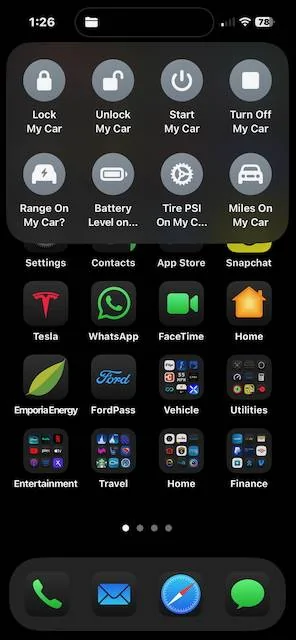
I did that too with my action button (8 shortcuts in one window) just to try it out but don't really use since I use Siri on the watch (or phone if I don't have my watch).

Ford Mustang Mach-E DIY: Start, Lock, or Unlock your car with Siri, Widget, or Shortcut IMG_1346


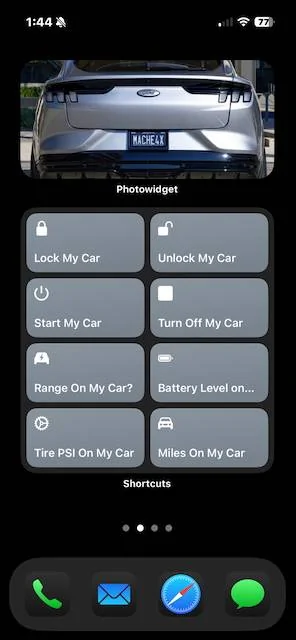
I even have a dedicated Mach-E screen (and one for my ICE Mustang).

Ford Mustang Mach-E DIY: Start, Lock, or Unlock your car with Siri, Widget, or Shortcut IMG_1347 (2)


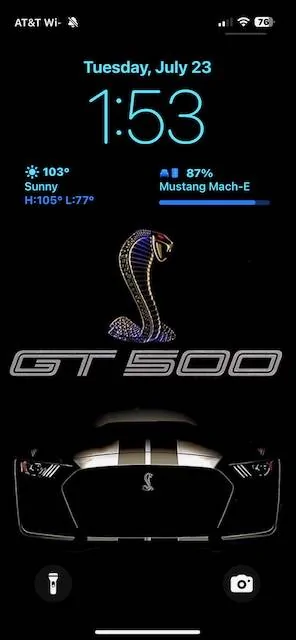
On a different note, I found out ABRP has a widget I can add to my lock screen to show battery SOC.

Ford Mustang Mach-E DIY: Start, Lock, or Unlock your car with Siri, Widget, or Shortcut IMG_1348
 

Ford Motor Company

Well-Known Member
Official Ford Account
First Name
Brian
Joined
May 10, 2021
Threads
68
Messages
3,461
Reaction score
6,544
Location
Michigan
Vehicles
Mustang Mach-E
Occupation
Real Human & Community Manager
Country flag
I’ll be up front, this is a workaround, but it does work and it plays by the rules.

What you need:
- An Apple device
- An Amazon Echo
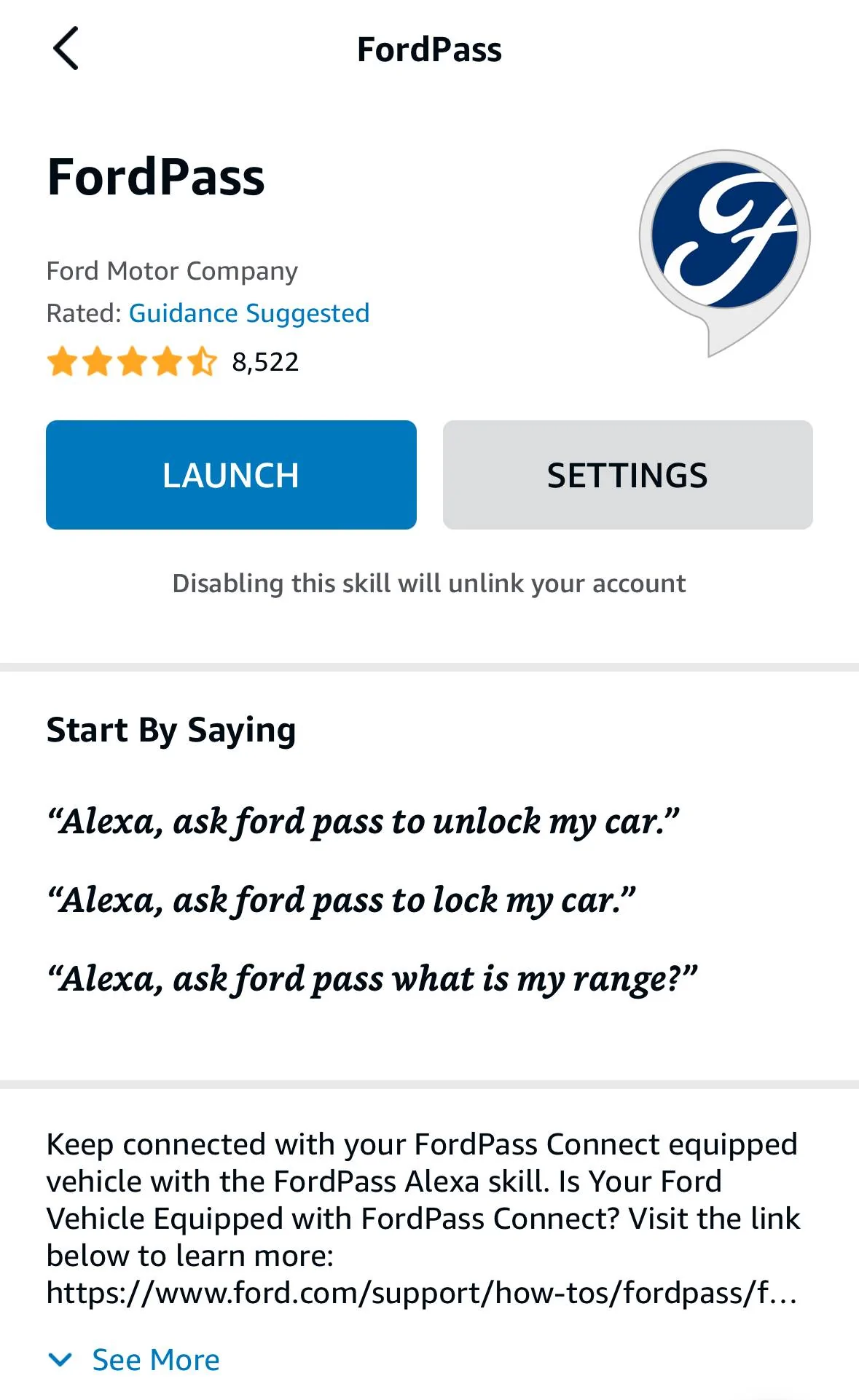
- FordPass Skill for Echo
IMG_8193.jpeg

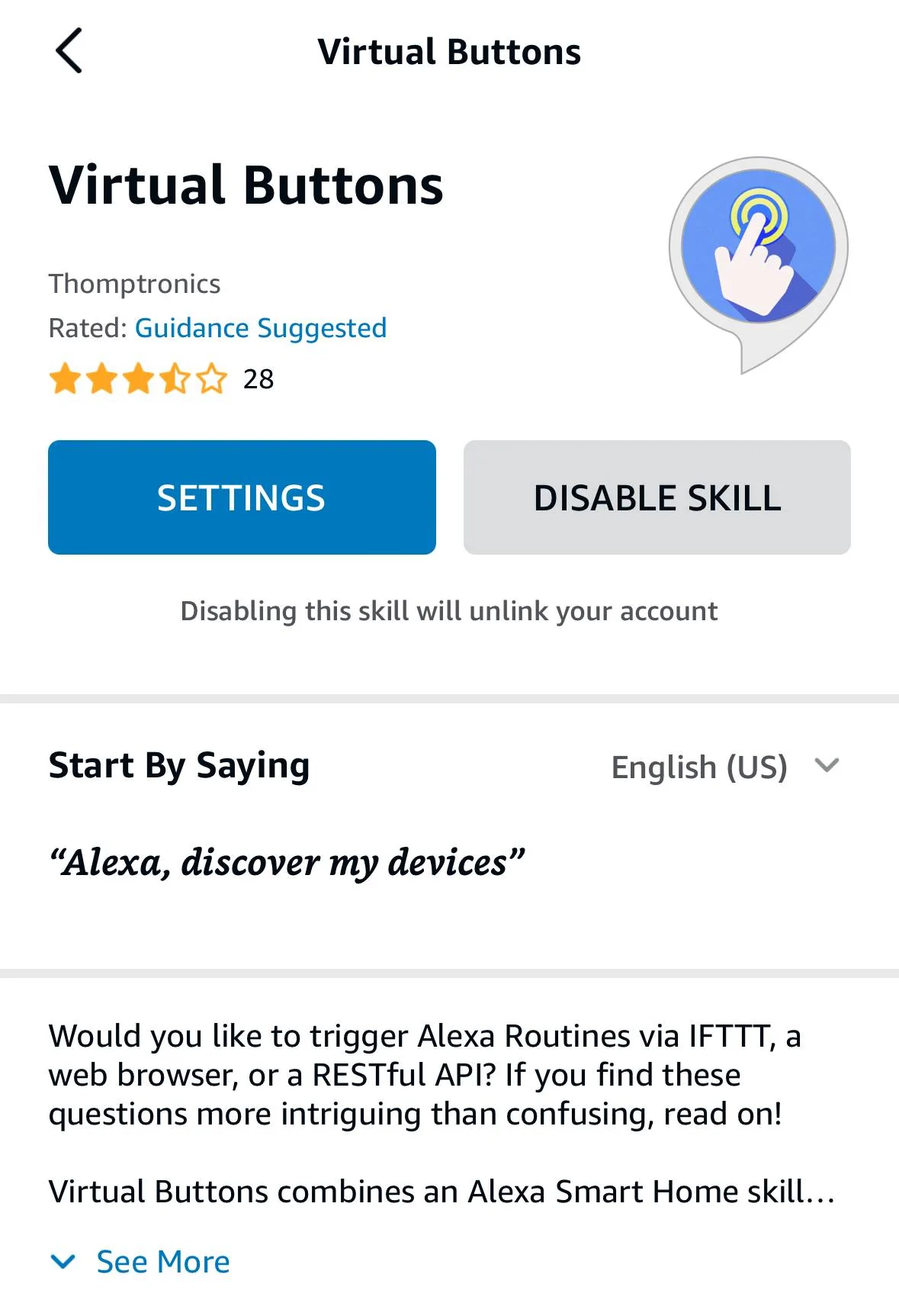
- Virtual Buttons Skill for Echo
IMG_8192.jpeg


How To:
  1. Enable and setup the FordPass Skill in the Alexa app. It will ask you to setup a PIN for starting your vehicle, remember this number.
  2. Enable and setup the Virtual Buttons Skill in the Alexa app. You will need a Patreon account to do this. You get one button (action) for free, more cost money. Each virtual button will create a fake doorbell in your Alexa app.
  3. When you setup Virtual Buttons they will send you an email with a URL in it for each button. Keep this and do not share it with anyone.
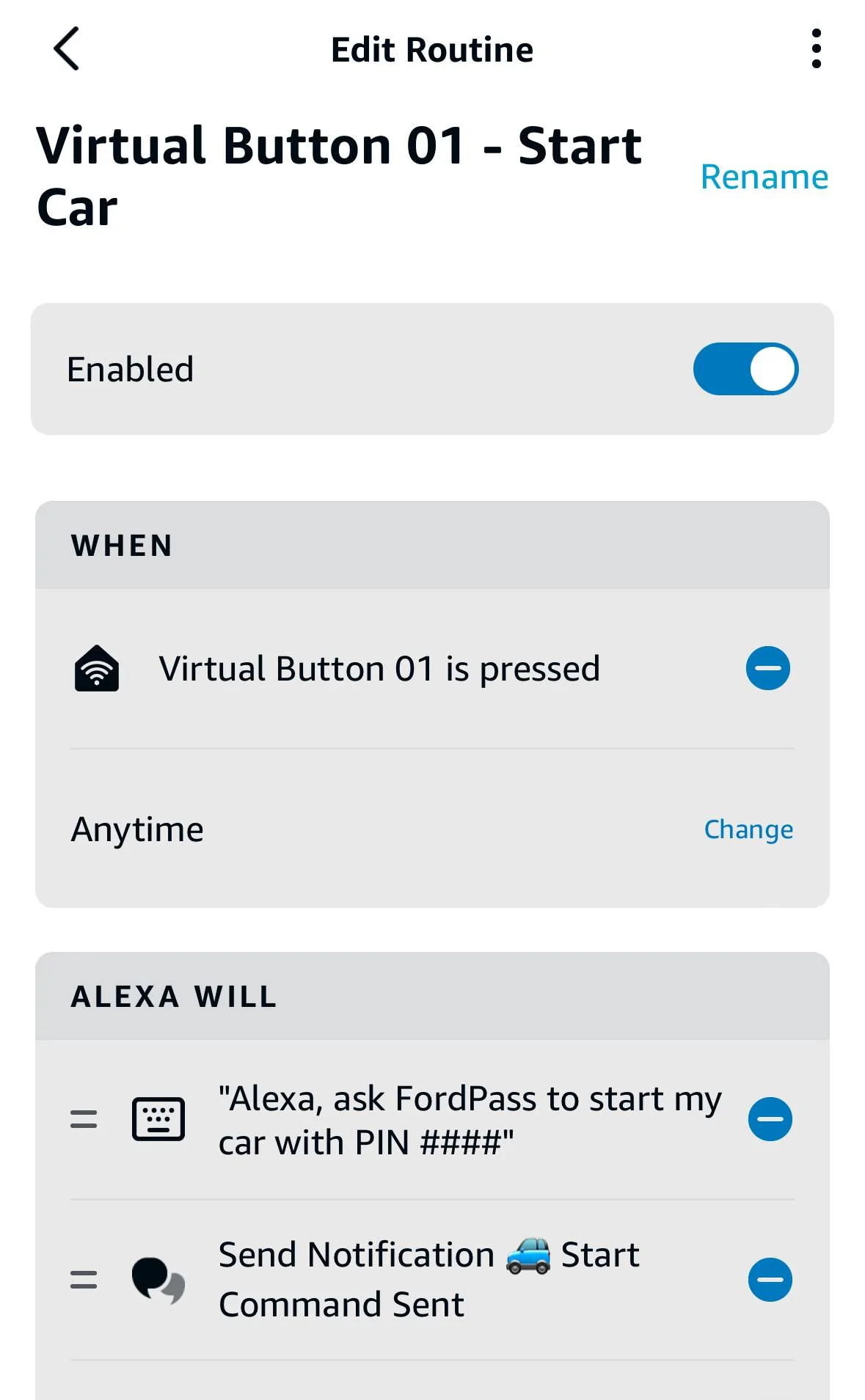
  4. In the Alexa app, create a routine where the trigger is the virtual doorbell being pressed. For the action, select custom, then enter the phrase you would say to Alexa to lock, unlock, or start the car. (See the FordPass skill for phrasing. This is where you’ll need that PIN you setup earlier.). You will also need to set which Echo device will speak out the response to this request. Pick any Echo, not your phone.
    IMG_8190.jpeg
  5. Test run the routine from the Alexa app to make sure it sent the right command to your car.
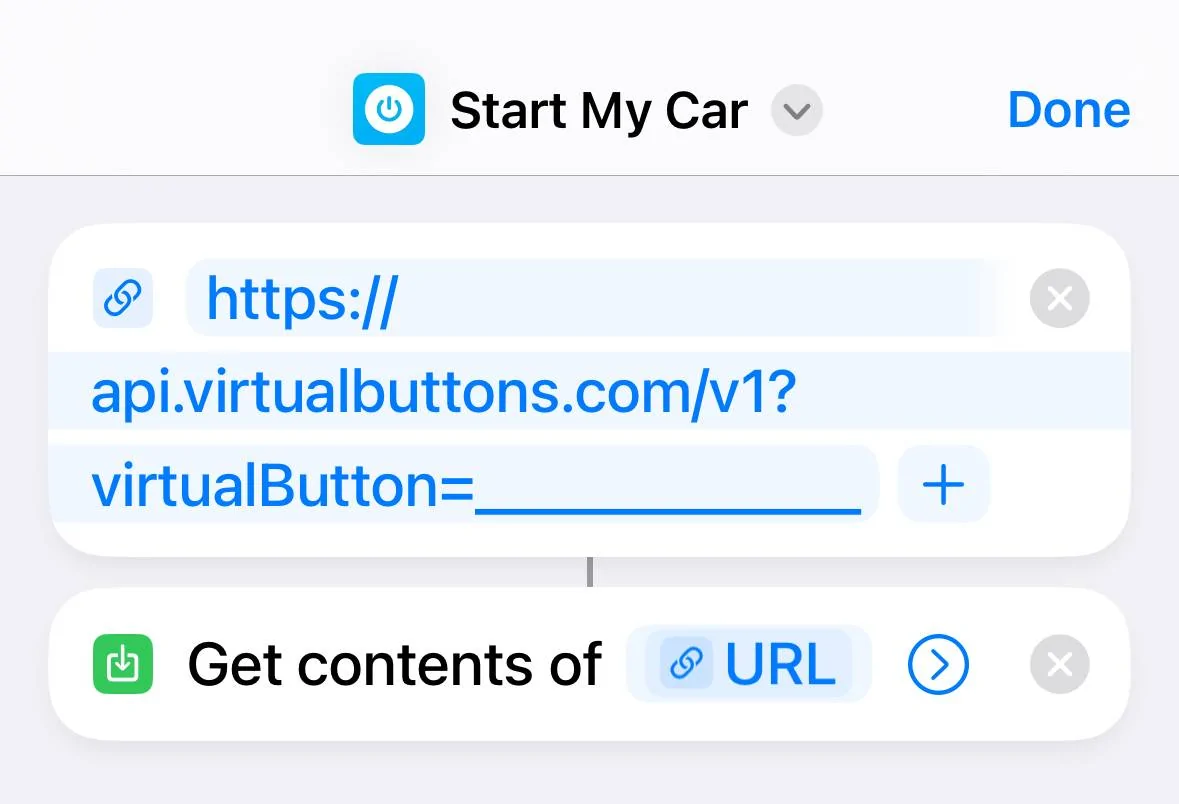
  6. Go to the Shortcuts app on your iPhone and create a new shortcut that looks like this:
    IMG_8191.jpeg
    The URL will be the one that Virtual Buttons emailed you. Name the shortcut whatever you want to say to Siri.
  7. Test run the shortcut to make sure it does what you wanted.
I know this seems like a lot of hoops to jump though, but it does work.

In my testing the lag between Siri > Virtual Buttons > Amazon was a second or less. Any lag after that is the normal delay you would experience if you asked Alexa to Lock, Unlock, Start. Most of that delay seems to be the communication to the car. If the car was sitting idle the total time from request to action was maybe 10-15 seconds. If the car was “awake” it responded in as little as 6 seconds.

This is pretty neat! Thanks for sharing that on here. :)
 

azerik

Well-Known Member
First Name
Erik
Joined
Jan 8, 2023
Threads
79
Messages
4,545
Reaction score
4,557
Location
Chandler/Flagstaff, AZ
Vehicles
'21 Spacey Prem4x, '21 RX450H, 13 Focus EV
Occupation
DevSecNetOps, General PITA
Country flag
I love how when people go to start their MME's, they start.
Mine, I get to sit there for 2 minutes or so hoping it starts. Is it only that fast in the garage on your wifi? I don't have a use case to start mine in the garage most of the time but dang I get tired of looking at my FP screen hoping to not get 'Failed to start' after 2 minutes of awkwardness when I'm out and about.
 

Old_Norm

Well-Known Member
Joined
Jan 14, 2023
Threads
58
Messages
869
Reaction score
1,069
Location
Columbus Ohio
Vehicles
2023 MME Select EAWD, 2023 Maverick Lariat LUX
Occupation
Retired
Country flag
I’ll be up front, this is a workaround, but it does work and it plays by the rules.

What you need:
- An Apple device
- An Amazon Echo
- FordPass Skill for Echo
IMG_8193.webp

- Virtual Buttons Skill for Echo
IMG_8192.webp


How To:
  1. Enable and setup the FordPass Skill in the Alexa app. It will ask you to setup a PIN for starting your vehicle, remember this number.
  2. Enable and setup the Virtual Buttons Skill in the Alexa app. You will need a Patreon account to do this. You get one button (action) for free, more cost money. Each virtual button will create a fake doorbell in your Alexa app.
  3. When you setup Virtual Buttons they will send you an email with a URL in it for each button. Keep this and do not share it with anyone.
  4. In the Alexa app, create a routine where the trigger is the virtual doorbell being pressed. For the action, select custom, then enter the phrase you would say to Alexa to lock, unlock, or start the car. (See the FordPass skill for phrasing. This is where you’ll need that PIN you setup earlier.). You will also need to set which Echo device will speak out the response to this request. Pick any Echo, not your phone.
    IMG_8190.webp
  5. Test run the routine from the Alexa app to make sure it sent the right command to your car.
  6. Go to the Shortcuts app on your iPhone and create a new shortcut that looks like this:
    IMG_8191.webp
    The URL will be the one that Virtual Buttons emailed you. Name the shortcut whatever you want to say to Siri.
  7. Test run the shortcut to make sure it does what you wanted.
I know this seems like a lot of hoops to jump though, but it does work.

In my testing the lag between Siri > Virtual Buttons > Amazon was a second or less. Any lag after that is the normal delay you would experience if you asked Alexa to Lock, Unlock, Start. Most of that delay seems to be the communication to the car. If the car was sitting idle the total time from request to action was maybe 10-15 seconds. If the car was “awake” it responded in as little as 6 seconds.

Worked with
I’ll be up front, this is a workaround, but it does work and it plays by the rules.

What you need:
- An Apple device
- An Amazon Echo
- FordPass Skill for Echo
IMG_8193.webp

- Virtual Buttons Skill for Echo
IMG_8192.webp


How To:
  1. Enable and setup the FordPass Skill in the Alexa app. It will ask you to setup a PIN for starting your vehicle, remember this number.
  2. Enable and setup the Virtual Buttons Skill in the Alexa app. You will need a Patreon account to do this. You get one button (action) for free, more cost money. Each virtual button will create a fake doorbell in your Alexa app.
  3. When you setup Virtual Buttons they will send you an email with a URL in it for each button. Keep this and do not share it with anyone.
  4. In the Alexa app, create a routine where the trigger is the virtual doorbell being pressed. For the action, select custom, then enter the phrase you would say to Alexa to lock, unlock, or start the car. (See the FordPass skill for phrasing. This is where you’ll need that PIN you setup earlier.). You will also need to set which Echo device will speak out the response to this request. Pick any Echo, not your phone.
    IMG_8190.webp
  5. Test run the routine from the Alexa app to make sure it sent the right command to your car.
  6. Go to the Shortcuts app on your iPhone and create a new shortcut that looks like this:
    IMG_8191.webp
    The URL will be the one that Virtual Buttons emailed you. Name the shortcut whatever you want to say to Siri.
  7. Test run the shortcut to make sure it does what you wanted.
I know this seems like a lot of hoops to jump though, but it does work.

In my testing the lag between Siri > Virtual Buttons > Amazon was a second or less. Any lag after that is the normal delay you would experience if you asked Alexa to Lock, Unlock, Start. Most of that delay seems to be the communication to the car. If the car was sitting idle the total time from request to action was maybe 10-15 seconds. If the car was “awake” it responded in as little as 6 seconds.

Works with Android also.
 

azerik

Well-Known Member
First Name
Erik
Joined
Jan 8, 2023
Threads
79
Messages
4,545
Reaction score
4,557
Location
Chandler/Flagstaff, AZ
Vehicles
'21 Spacey Prem4x, '21 RX450H, 13 Focus EV
Occupation
DevSecNetOps, General PITA
Country flag
Seriously.
My car takes over 40 seconds to start (while I stare at the FP screen), even if I'm standing next to it (so I know it's not using the BT connection) but takes all of 2 seconds to shut down. What gives? There a magic fuse I need to find?
 

ChasingCoral

Well-Known Member
First Name
Mark
Joined
Feb 3, 2020
Threads
502
Messages
14,318
Reaction score
28,673
Location
Maryland
Vehicles
2021 GB E4X FE, 2022 F-150 Lightning Lariat ER
Occupation
Retired oceanographer
Country flag
I did that too with my action button (8 shortcuts in one window) just to try it out but don't really use since I use Siri on the watch (or phone if I don't have my watch).

IMG_1346.jpeg


I even have a dedicated Mach-E screen (and one for my ICE Mustang).

IMG_1347 (2).jpeg
Is there one for “Where’s My adapter?”
 

ryannix123

Well-Known Member
First Name
Ryan Nix
Joined
Jan 5, 2024
Threads
42
Messages
274
Reaction score
242
Location
Arlington Heights
Vehicles
2022 Mach-E
Occupation
IT Professional
Country flag
Two things I will never have:

An apple device
An amazon echo device. (ok I do have a kids fire)

Google all day, have a Pixel Pro, Google Minis, Google Smart Displays, etc, etc....
Using Google means you're the product. Apple respects privacy, and it's hard to believe that's a highly touted feature, but it is when you're in the Apple ecosystem.
Sponsored


Top