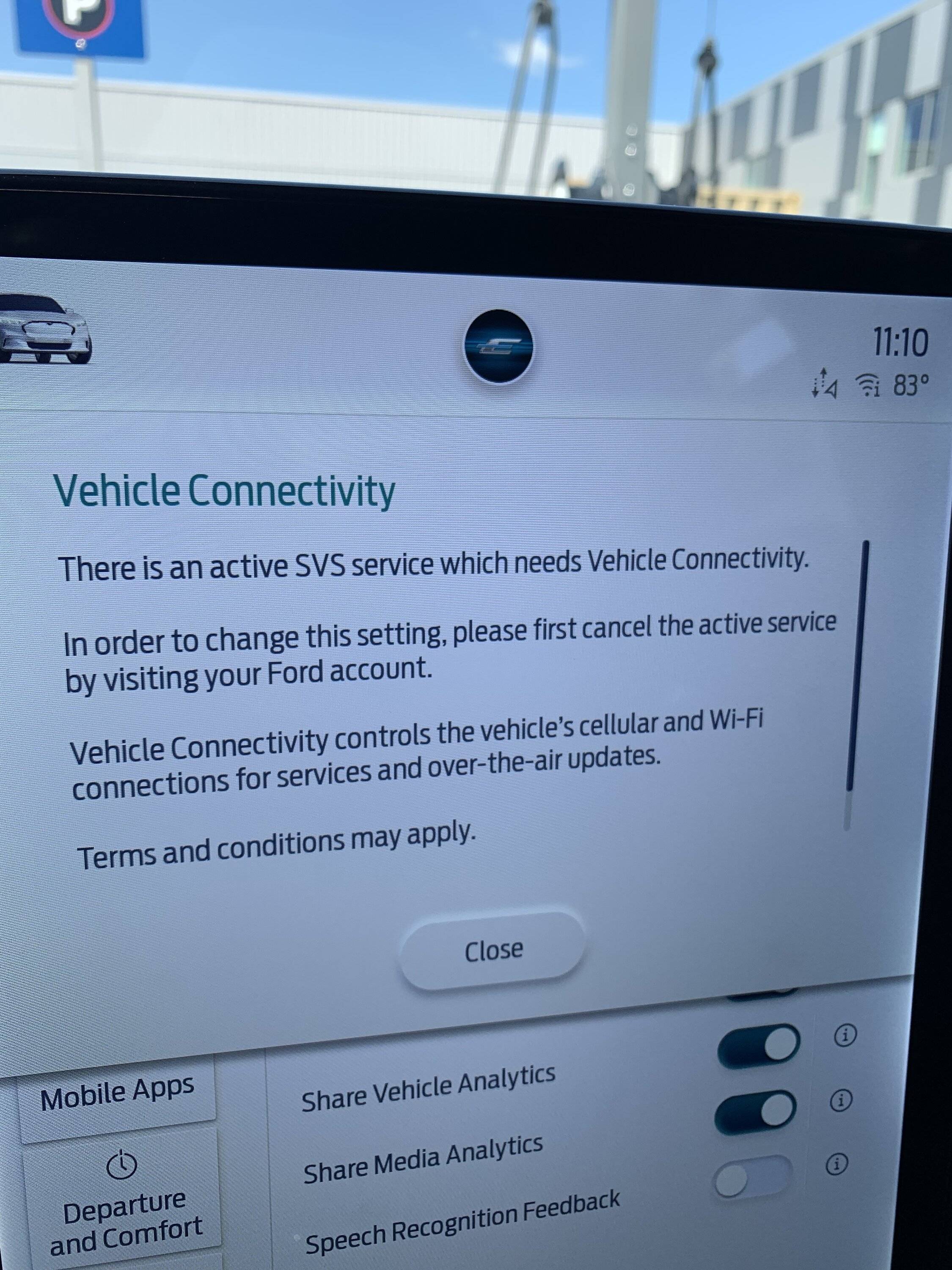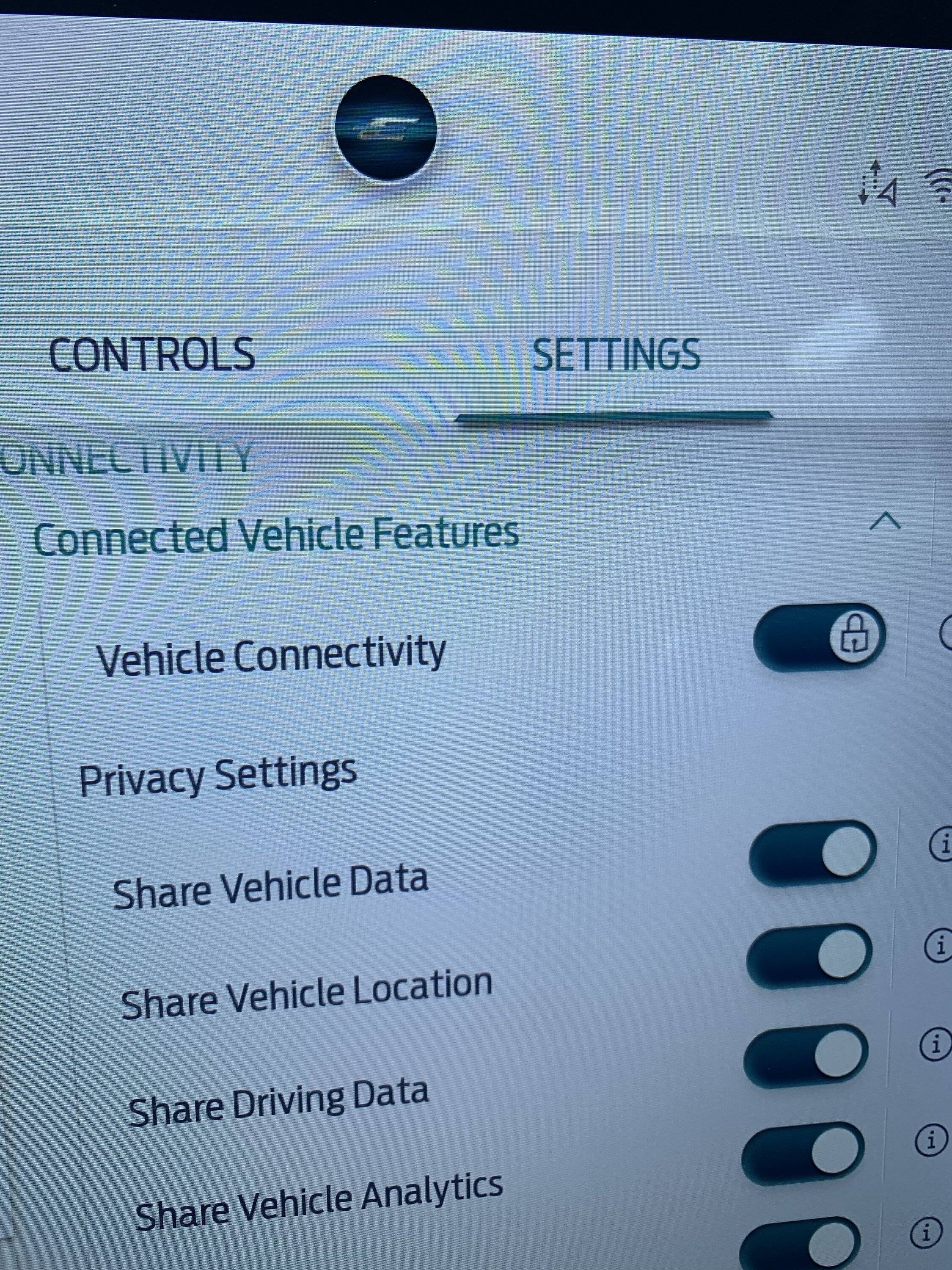
Active SVS Service......

Nklem

Well-Known Member
First Name
Norm
Joined
May 20, 2021
Threads
105
Messages
1,318
Reaction score
1,699
Location
Coast of Maine
Vehicles
Subaru Solterra
Occupation
Mechanical Engineer
Country flag
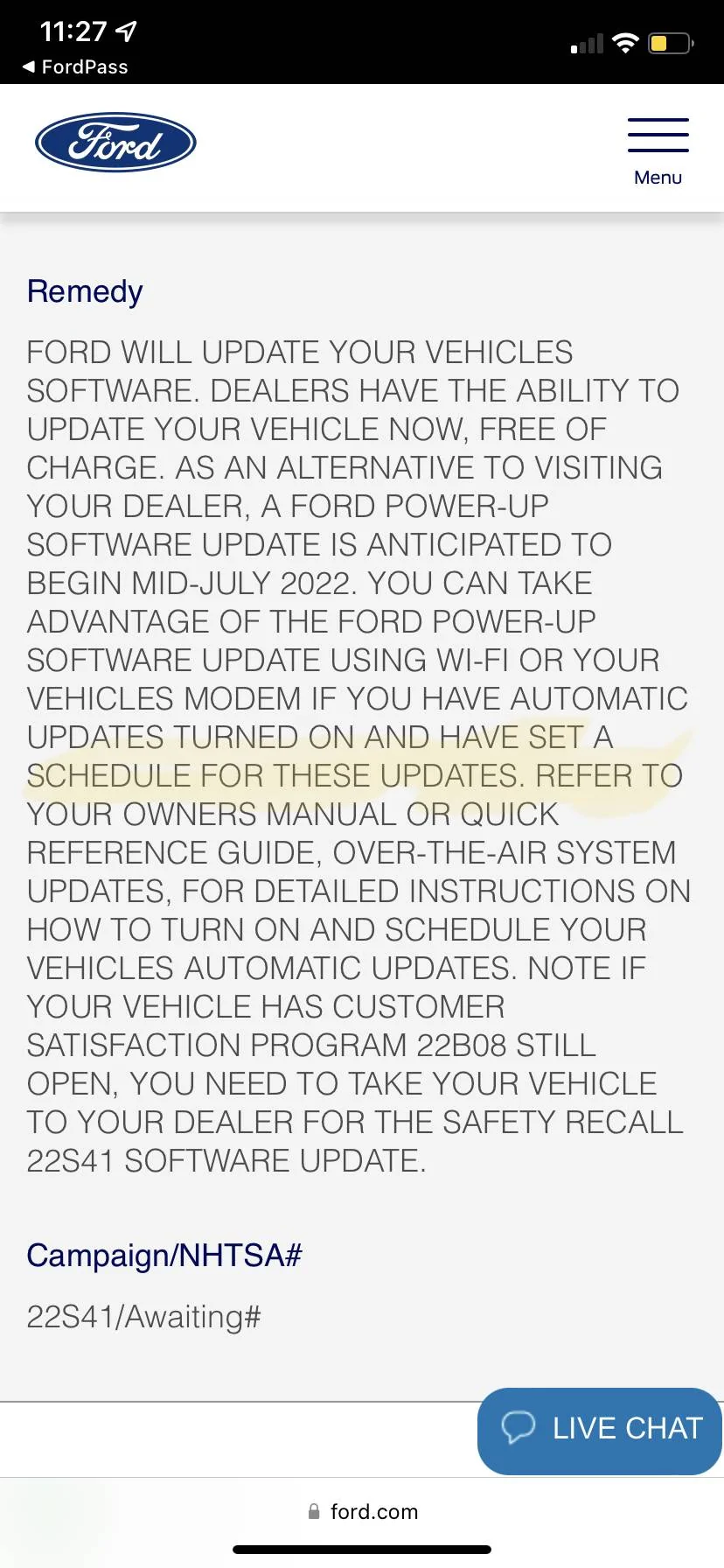
I got the recall notice today on FP. It states you must have a schedule for Automatic Updates for the recall OTA to work. So I got in the car to add a scheduled time (I used to just have Automatic). Anyway I got this message when I tried to add a schedule and this strange Lock on Connectivity.... Anyone know what this may be?

I do not need to turn it off, it’s just something I have never seen before. I was charging at the time…maybe it was talking to FP at the same moment…

Ford Mustang Mach-E Active SVS Service...... 0A2F4431-19C2-4739-8493-E10F1C10B84F


Ford Mustang Mach-E Active SVS Service...... 0732B595-372E-4551-9FCF-D8ADE77012B5


Ford Mustang Mach-E Active SVS Service...... 59903017-1020-4585-BB6E-DC6FD04A841E
Sponsored


macchiaz-o

Well-Known Member
First Name
Jonathan
Joined
Nov 25, 2019
Threads
171
Messages
8,579
Reaction score
15,987
Location
}not/A/gr8'Place.2.store-mEyePassword{
Vehicles
MY21 J1 Premium RWD SR
Country flag
Does your schedule updates screen allow multi-day scheduling, like described here?

https://www.ford.com/support/how-to...ford-power-up-software-updates-using-sync-4a/

Mine is like this ever since an OTA push that occurred in February (iirc). So I set it for every night while I'm asleep. Before that, the option was a choice of anytime or one specific time.

If you don't have the multi-day option, it's possible you may end up needing to bring the vehicle in for the dealer to perform these updates. I'm fuzzy on this detail right now... Hopefully others can confirm or correct.
 
OP
OP
Nklem

Nklem

Well-Known Member
First Name
Norm
Joined
May 20, 2021
Threads
105
Messages
1,318
Reaction score
1,699
Location
Coast of Maine
Vehicles
Subaru Solterra
Occupation
Mechanical Engineer
Country flag
Does your schedule updates screen allow multi-day scheduling, like described here?

https://www.ford.com/support/how-to...ford-power-up-software-updates-using-sync-4a/

Mine is like this ever since an OTA push that occurred in February (iirc). So I set it for every night while I'm asleep. Before that, the option was a choice of anytime or one specific time.

If you don't have the multi-day option, it's possible you may end up needing to bring the vehicle in for the dealer to perform these updates. I'm fuzzy on this detail right now... Hopefully others can confirm or correct.
Yes I have the multi day options and scheduled them for today at 3:00 PM. I will change it often until get the recall done! I am in an area of weak cellular service but keep it connected to home WiFI at home.
 

macchiaz-o

Well-Known Member
First Name
Jonathan
Joined
Nov 25, 2019
Threads
171
Messages
8,579
Reaction score
15,987
Location
}not/A/gr8'Place.2.store-mEyePassword{
Vehicles
MY21 J1 Premium RWD SR
Country flag
Yes I have the multi day options and scheduled them for today at 3:00 PM. I will change it often until get the recall done! I am in an area of weak cellular service but keep it connected to home WiFI at home.
OK -- you have the multi-day option... I think you're all set then.

It won't help to keep changing the settings. There are multiple steps for this type of OTA, and the scheduled time you set is only for the "perform install while vehicle's off" step, number 5 below:

1. Vehicle reports its current software state to Ford. This happens periodically, out of our control, as long as connected services are enabled (as yours are).

2. Ford makes the update available to your vehicle and pushes a notification to the vehicle to begin downloading it.

3. The vehicle downloads the update packages when it can. Usually this happens while you are driving. The download is stored locally in the vehicle until all parts of it are downloaded and verified clean/complete.

4. For an install requiring you to be locked out for awhile, like this one, the vehicle notifies you that an update is available that won't be installed until your scheduled time. This shows up as a bell icon in the upper left portion of the big display.

5. If the vehicle meets requirements at scheduled time (e.g. is off, battery levels meet thresholds), it will begin the install. OR, you can tap the bell icon to choose to proceed right away (i.e. after you turn off and exit the car).
 

Mach-Lee

Well-Known Member
First Name
Lee
Joined
Jul 16, 2021
Threads
262
Messages
11,353
Reaction score
24,980
Location
Wisconsin
Vehicles
2022 Mach-E Premium AWD
Occupation
Sci/Eng
Country flag
Yup, you can't turn of vehicle connectivity unless you cancel all your connected services subscriptions.
 

21FE

Member
First Name
Alan
Joined
Dec 2, 2022
Threads
2
Messages
17
Reaction score
6
Location
Port Angeles Earth
Vehicles
2022 GTPE
Country flag
Did this get resolved ? I traded my '21 FE and the 2022 GTPE has this same issue as you displayed.
Regards Alan
Sponsored


Top