Android Auto Stopped Working after 3.5.3 & 3.5.3.3 Updates!

RLW

Well-Known Member
First Name
Robert
Joined
Nov 25, 2021
Threads
1
Messages
71
Reaction score
86
Location
Murfreesboro, TN
Vehicles
2023 Mustang Mach E Premium AWD Extended Battery
Country flag
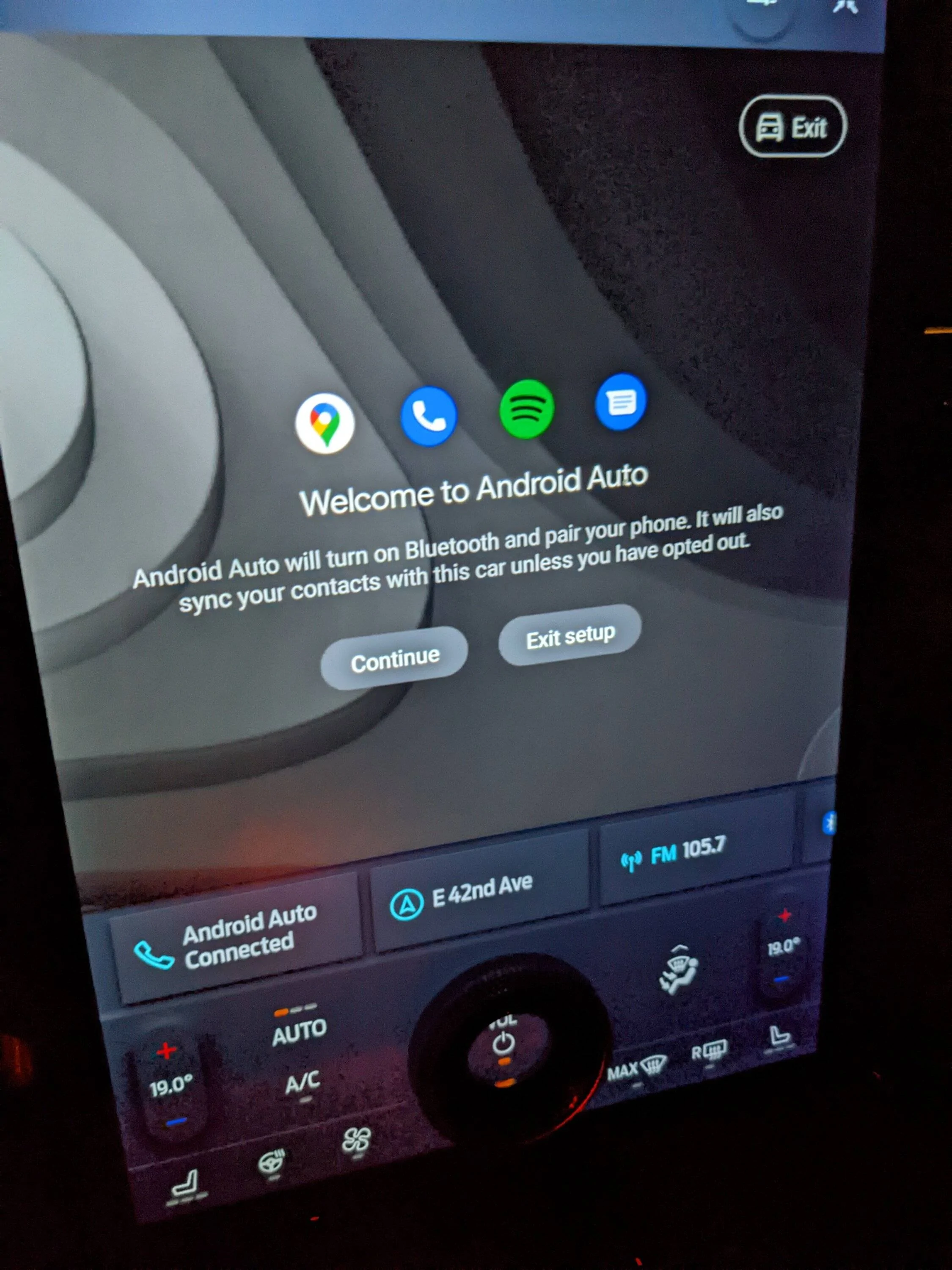
Two days ago, I got the 3.5.3 Update. I was so excited to finally get the update considering I have a Job 1 non-EA Mach E. However, for some reason, I am not able to get Android Auto to connect wirelessly. I get to the step where it asks you to "continue" or "exit setup." I keep pushing the "continue" button, and nothing happens. I have followed the prompts on my phone to no avail. What makes it even weirder is I can play content, and it plays through the Andriod Auto panel, but you can't see the media buttons, it takes calls, but you can't answer the call because it won't show up on the screen. I am able to you the Bluetooth panel successfully and see media controls, so I know it is not a Bluetooth connection issue. I have reset Sync at least 3 times and restarted my Android phone a few times. Nothing seems to get it corrected. I got the 3.5.3.3 update yesterday, and it did not fix the issue. Apple Carplay still works flawlessly since both updates. Has anyone else experienced this same issue? Help, please! Thanks!
Sponsored
 

Dustus

Well-Known Member
First Name
Dustin
Joined
Dec 29, 2021
Threads
12
Messages
311
Reaction score
435
Location
Boise Idaho
Vehicles
2022 Mach E GT
Country flag
Even before that update I was getting a message that the car couldn't wirelessly connect to my phone everytime I got into it. I started plugging it in just to get rid of the message. Now it connects all the time by my Hey Google only works about 50% of the time which is annoying and dangerous if I'm driving and need directions somewhere. I end up fighting with the car instead of paying attention to the road.
 
  • Like
Reactions: RLW
OP
OP

RLW

Well-Known Member
First Name
Robert
Joined
Nov 25, 2021
Threads
1
Messages
71
Reaction score
86
Location
Murfreesboro, TN
Vehicles
2023 Mustang Mach E Premium AWD Extended Battery
Country flag
Have you figured out a solution to this issue yet? I saw on a previous thread someone suggested resetting the wireless app password in the settings. I tried that and it did not remedy the problem.


StrWhtMME

Well-Known Member
First Name
Richard
Joined
Jan 28, 2021
Threads
18
Messages
193
Reaction score
156
Location
Marietta, GA
Vehicles
F-150, Electric Focus. 21 MME Prm SR, 23 Maverick
Country flag
Try doing a soft re-boot of Sync screen. Volume button down and right Arrow, hold for 5-10 seconds, Sync will re-boot. Usually fixes poorly loaded on startup.
 

RobGibb

Member
First Name
Rob
Joined
Jun 9, 2022
Threads
0
Messages
11
Reaction score
5
Location
Canada
Vehicles
Mach e AWD 2021 prem
Country flag
Try doing a soft re-boot of Sync screen. Volume button down and right Arrow, hold for 5-10 seconds, Sync will re-boot. Usually fixes poorly loaded on startup.
Tried that didn't work.
 

RobGibb

Member
First Name
Rob
Joined
Jun 9, 2022
Threads
0
Messages
11
Reaction score
5
Location
Canada
Vehicles
Mach e AWD 2021 prem
Country flag
Have you figured out a solution to this issue yet? I saw on a previous thread someone suggested resetting the wireless app password in the settings. I tried that and it did not remedy the problem.
Have not figured it out yet. I tried the same with no luck.
 

StrWhtMME

Well-Known Member
First Name
Richard
Joined
Jan 28, 2021
Threads
18
Messages
193
Reaction score
156
Location
Marietta, GA
Vehicles
F-150, Electric Focus. 21 MME Prm SR, 23 Maverick
Country flag
You must hold both volume and right arrow at same time. It will re-boot. It might solve the problem.
 

WildfireOne

Well-Known Member
Joined
Dec 20, 2019
Threads
2
Messages
103
Reaction score
102
Location
Southern California
Vehicles
First Edition
Country flag
Though I may not be able to help, it might be useful to someone for troubleshooting to post some additional info:
- your phone, it's OS and update level (e.g. PIXEL 6 PRO, Android 13, Oct update)
- Android Auto version (e.g. 8.1626474)
 

CompilerBreak

Well-Known Member
Joined
May 11, 2021
Threads
9
Messages
295
Reaction score
439
Location
Seattle
Vehicles
2021 MME GT
Country flag
If you haven't, try plugging in for one drive, mine popped up with this after 3.5.3 but I'm always plugged in, hit continue and it was all back to normal.
 

LNFitz

Well-Known Member
Joined
Jun 18, 2021
Threads
6
Messages
169
Reaction score
133
Location
Denver
Vehicles
Ford Mustang Mach-e
Occupation
Saddle Fitter…and yes, have worked with Mustangs
Country flag
I am now often having to use the Unlock button on the FP app and then it tells me it can't find a key and brings up the ENTER CODE screen (PAAK was working fine until these updates). Sometimes it corrects after a few seconds, one time I just started with the code. Definitely glitchier now.

Samsung S21, can't find Android Auto version
 

RobGibb

Member
First Name
Rob
Joined
Jun 9, 2022
Threads
0
Messages
11
Reaction score
5
Location
Canada
Vehicles
Mach e AWD 2021 prem
Country flag
Though I may not be able to help, it might be useful to someone for troubleshooting to post some additional info:
- your phone, it's OS and update level (e.g. PIXEL 6 PRO, Android 13, Oct update)
- Android Auto version (e.g. 8.1626474)
Good idea. Android 13 (beta tester) pixel 5.

I assume it is working for everyone else on Android?


Top