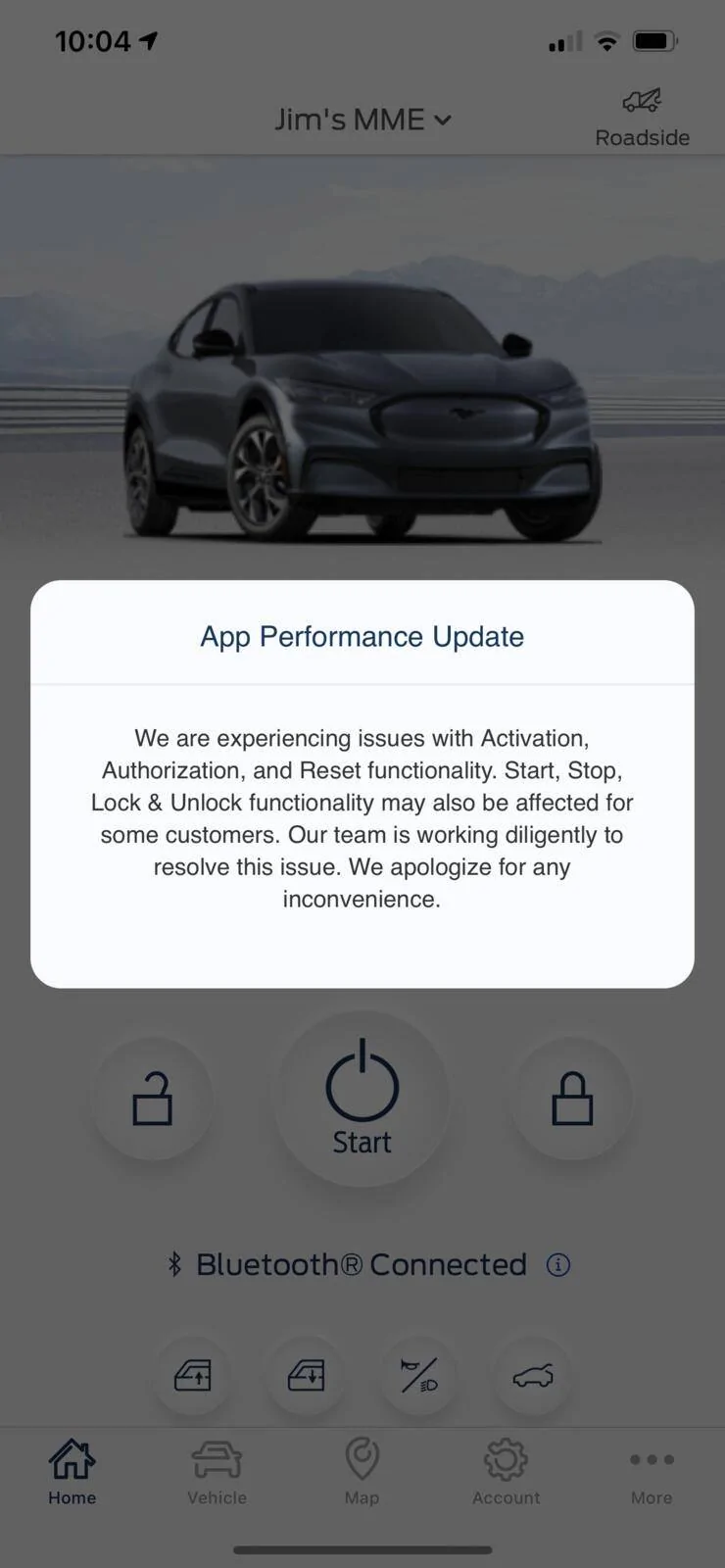
App Performance Update

Jimrpa

Well-Known Member
First Name
Jim
Joined
Sep 10, 2020
Threads
297
Messages
9,521
Reaction score
12,854
Location
Wayne, PA
Vehicles
2021 Infinite Blue Premium Mustang Mach E ER AWD
Occupation
Retied (formerly tried to herd highly technical, independent cats)
Country flag
Just got this screen in FordPass:
Ford Mustang Mach-E App Performance Update 70B721EC-523A-4745-8D9C-F78360720E70
Sponsored


usmcsatcom

Active Member
First Name
Don
Joined
May 21, 2021
Threads
7
Messages
39
Reaction score
39
Location
Texas, USA
Vehicles
MME Premium Infinite Blue
Occupation
Engineer
Country flag
I got the same thing. I’m not sure what I am supposed to make of it. It is probably a notification that they are having back-end issues.

I am running ver 3.25.0 of the app on a Pixel 4
 

Brian707

Well-Known Member
Joined
May 20, 2021
Threads
5
Messages
165
Reaction score
198
Location
Illinois
Vehicles
2021 Infinite Blue Mustang Mach E Premium AWD EXT
Country flag
Could this be why when I roll the windows down on the app it rolls them all down but when I roll them back up the drivers window fails to roll up? The other 3 roll up fine. I only had the car 8 days and this wasn't an issue before yesterday
 
OP
OP
Jimrpa

Jimrpa

Well-Known Member
First Name
Jim
Joined
Sep 10, 2020
Threads
297
Messages
9,521
Reaction score
12,854
Location
Wayne, PA
Vehicles
2021 Infinite Blue Premium Mustang Mach E ER AWD
Occupation
Retied (formerly tried to herd highly technical, independent cats)
Country flag
Could this be why when I roll the windows down on the app it rolls them all down but when I roll them back up the drivers window fails to roll up? The other 3 roll up fine. I only had the car 8 days and this wasn't an issue before yesterday
I would not rely on FordPass for anything at the moment. For now, keep the fob nearby.

It has never been confirmed, but I suspect that the car phones home to the Ford Galactic Supercomputer to confirm the car password, so I’m not sure I’d rely on the car password at the moment either.
 

RickMachE

Well-Known Member
Joined
Jul 1, 2021
Threads
267
Messages
17,903
Reaction score
27,871
Location
SE MI
Vehicles
2022 Mach-E Premium 4X, 2022 Lightning Lariat ER
Country flag
Could this be why when I roll the windows down on the app it rolls them all down but when I roll them back up the drivers window fails to roll up? The other 3 roll up fine. I only had the car 8 days and this wasn't an issue before yesterday
No.


RickMachE

Well-Known Member
Joined
Jul 1, 2021
Threads
267
Messages
17,903
Reaction score
27,871
Location
SE MI
Vehicles
2022 Mach-E Premium 4X, 2022 Lightning Lariat ER
Country flag
I would not rely on FordPass for anything at the moment. For now, keep the fob nearby.

It has never been confirmed, but I suspect that the car phones home to the Ford Galactic Supercomputer to confirm the car password, so I’m not sure I’d rely on the car password at the moment either.
Nuer
Just got this screen in FordPass:
Numerous posts yesterday that Ford is having backend issues. Got the same message last night. FordPass also worked fine at points last night, and this morning works fine.
 

TheVirtualTim

Well-Known Member
First Name
Tim
Joined
Oct 11, 2020
Threads
26
Messages
1,366
Reaction score
2,469
Location
Dearborn, MI
Vehicles
ā€˜21 Mach-E First Edition, ā€˜23 Mach-E GT Performance
Country flag
There is a difference between using the remote control functions of the FordPass app ... vs. Phone as a Key.

PaaK only needs a Bluetooth connection to the car. It was designed to work even if the car is parked in say, an underground parking deck ... or out in areas where there is no cellphone signal, etc.

The FordPass app's remote control capabilities (which are supposed to work even if you are miles away from the car) do rely on the network and back-end server infrastructure.

I don't know if the system is smart enough to leverage the best possible communication path. It's not a good design to require *everything* to go through a cloud datacenter. If the phone and car are on the same WiFi network and if the phone has appropriate security tokens installed in the app ... that should be enough.

I can understand things like setting up Activation & Authorization ... but not things like remote Lock/Unlock, Start, Window Control, etc.

If everything is getting forced to go through the cloud ... then that's part of the problem.

A couple of weeks ago we had heavy rains and flooding (7.5" of rain in just a few hours). It flooded out AT&T's cellular data network. Nobody in Southeast Michigan with AT&T could use any data ... and that included the car. I first noticed I could not get it to do a remote start as I was getting ready to leave. Then a friend called telling me he was trying to use his iPhone to get directions and that wouldn't work (he is on AT&T. He could make voice calls outbound, but couldn't receive calls, couldn't text, and couldn't use data.) They were down for about half a day before the network started coming back up.

The point is ... these things happen. In my opinion it's not ok for the car to rely on the AT&T data link and the cloud datacenter(s) to control things that should just work locally between phone & car.
 

Imkayla88

Active Member
First Name
Kayla
Joined
Apr 6, 2021
Threads
1
Messages
26
Reaction score
19
Location
Tampa
Vehicles
Premium SR RWD
Country flag
As of 20 mins ago, I was able to connect my FordPass app to the car. I got the same notification upon opening the app but continued and it worked.
 
OP
OP
Jimrpa

Jimrpa

Well-Known Member
First Name
Jim
Joined
Sep 10, 2020
Threads
297
Messages
9,521
Reaction score
12,854
Location
Wayne, PA
Vehicles
2021 Infinite Blue Premium Mustang Mach E ER AWD
Occupation
Retied (formerly tried to herd highly technical, independent cats)
Country flag
There is a difference between using the remote control functions of the FordPass app ... vs. Phone as a Key.

PaaK only needs a Bluetooth connection to the car. It was designed to work even if the car is parked in say, an underground parking deck ... or out in areas where there is no cellphone signal, etc.

The FordPass app's remote control capabilities (which are supposed to work even if you are miles away from the car) do rely on the network and back-end server infrastructure.

I don't know if the system is smart enough to leverage the best possible communication path. It's not a good design to require *everything* to go through a cloud datacenter. If the phone and car are on the same WiFi network and if the phone has appropriate security tokens installed in the app ... that should be enough.

I can understand things like setting up Activation & Authorization ... but not things like remote Lock/Unlock, Start, Window Control, etc.

If everything is getting forced to go through the cloud ... then that's part of the problem.

A couple of weeks ago we had heavy rains and flooding (7.5" of rain in just a few hours). It flooded out AT&T's cellular data network. Nobody in Southeast Michigan with AT&T could use any data ... and that included the car. I first noticed I could not get it to do a remote start as I was getting ready to leave. Then a friend called telling me he was trying to use his iPhone to get directions and that wouldn't work (he is on AT&T. He could make voice calls outbound, but couldn't receive calls, couldn't text, and couldn't use data.) They were down for about half a day before the network started coming back up.

The point is ... these things happen. In my opinion it's not ok for the car to rely on the AT&T data link and the cloud datacenter(s) to control things that should just work locally between phone & car.
And to make matters worse, my old router died a few weeks ago on a Sunday night, so I had to run to Target (only place open) to buy a new router. Thing is a POS. Car rarely connects to my home network in my garage (which is less than 20 feet from the router), although my FCCS does connect (on 2.4GHz ?). I iPhone 12 Pro Max and Apple Watch don’t even SEE the 5 GHz network, just the 2.4 GHz network, where they struggle to get a blazing 20 Mbps down (on 1G fiber ?) So my network infrastructure at home isn’t helping. P.S. Anyone have any good recos for non-mesh routers (I’m old school)
 

Mirak

Banned
Banned
Joined
Oct 8, 2020
Threads
111
Messages
3,754
Reaction score
6,166
Location
Kansas
Vehicles
"Sonic" 2021 MME Grabber Blue First Edition
Country flag
There is a difference between using the remote control functions of the FordPass app ... vs. Phone as a Key.

PaaK only needs a Bluetooth connection to the car. It was designed to work even if the car is parked in say, an underground parking deck ... or out in areas where there is no cellphone signal, etc.
Well, they’re somewhat independent, but not entirely. PAAK won’t work, for example, if FordPass isn’t running on your phone.

But I received the same message this morning, and PAAK worked just fine. I did not test any of the Home Screen functions.
 

TheVirtualTim

Well-Known Member
First Name
Tim
Joined
Oct 11, 2020
Threads
26
Messages
1,366
Reaction score
2,469
Location
Dearborn, MI
Vehicles
ā€˜21 Mach-E First Edition, ā€˜23 Mach-E GT Performance
Country flag
And to make matters worse, my old router died a few weeks ago on a Sunday night, so I had to run to Target (only place open) to buy a new router. Thing is a POS. Car rarely connects to my home network in my garage (which is less than 20 feet from the router), although my FCCS does connect (on 2.4GHz ?). I iPhone 12 Pro Max and Apple Watch don’t even SEE the 5 GHz network, just the 2.4 GHz network, where they struggle to get a blazing 20 Mbps down (on 1G fiber ?) So my network infrastructure at home isn’t helping. P.S. Anyone have any good recos for non-mesh routers (I’m old school)
5GHz allows for a faster data rate ... but at the trade-off of worse penetration through walls, distance, etc.

You may also be having interference from neighboring networks using the same channel as your router.

On my home network (and anytime I'm setting up networks for friends), I scan to see what channels are in-use by neighboring networks ... and pick a channel that isn't being heavily used. I find the term 'automatic' (router automatically picks the "best" channel) to mean they are really just using the same default channel without even looking for the best/open channel. When I scan for neighboring networks, it's amazing how many all use the *same* channels (these people are probably frustrated with poor speeds.)

If you happen to have a Mac, launch the "System Information" utility (it's in the Applications -> Utilities folder) and in the categories on the left, pick "Wi-Fi" ... give it a minute to do the scan. It'll generate a report of every WiFi network it can find and it will tell you what channel it is using. Then, on YOUR router, manually pick a channel that isn't used by anyone else.
 
OP
OP
Jimrpa

Jimrpa

Well-Known Member
First Name
Jim
Joined
Sep 10, 2020
Threads
297
Messages
9,521
Reaction score
12,854
Location
Wayne, PA
Vehicles
2021 Infinite Blue Premium Mustang Mach E ER AWD
Occupation
Retied (formerly tried to herd highly technical, independent cats)
Country flag
5GHz allows for a faster data rate ... but at the trade-off of worse penetration through walls, distance, etc.

You may also be having interference from neighboring networks using the same channel as your router.

On my home network (and anytime I'm setting up networks for friends), I scan to see what channels are in-use by neighboring networks ... and pick a channel that isn't being heavily used. I find the term 'automatic' (router automatically picks the "best" channel) to mean they are really just using the same default channel without even looking for the best/open channel. When I scan for neighboring networks, it's amazing how many all use the *same* channels (these people are probably frustrated with poor speeds.)

If you happen to have a Mac, launch the "System Information" utility (it's in the Applications -> Utilities folder) and in the categories on the left, pick "Wi-Fi" ... give it a minute to do the scan. It'll generate a report of every WiFi network it can find and it will tell you what channel it is using. Then, on YOUR router, manually pick a channel that isn't used by anyone else.
Thanks for the advice. I live in a townhouse so no doubt your advice is right. I was hoping to avoid having to muck around with advanced ā€œnetwork engineeringā€, but I thing I am stuck.
Sponsored


Top