Can't connect to FDRS?

DaddyDeuce

Well-Known Member
Joined
May 29, 2024
Threads
10
Messages
154
Reaction score
212
Location
Colorado
Vehicles
Cyber Orange 22 GT PE
Country flag
About an hour ago I bought a two-day license for FDRS, but I can't seem to figure out how to log in. Is it just me or is the system down?

After software installation, the software is able to verify the license.

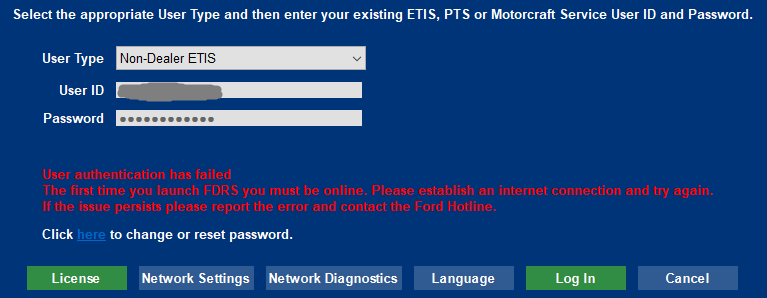
If I try logging in as "Non-Dealer ETIS" I get "User authentication has failed. The first time you launch FDRS you must be online. Please establish an internet connection and try again. If the issue persists please report the error and contact the Ford Hotline".

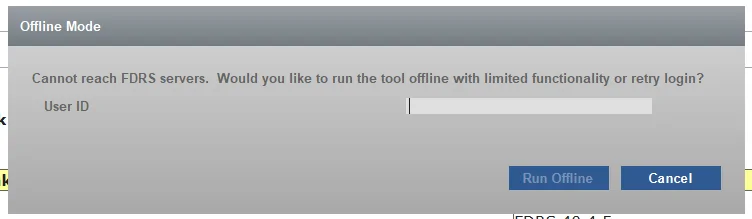
If I try "Independent Operator/Non-Dealer" I immediately get "Cannot reach FDRS servers" even before being asked for a username.

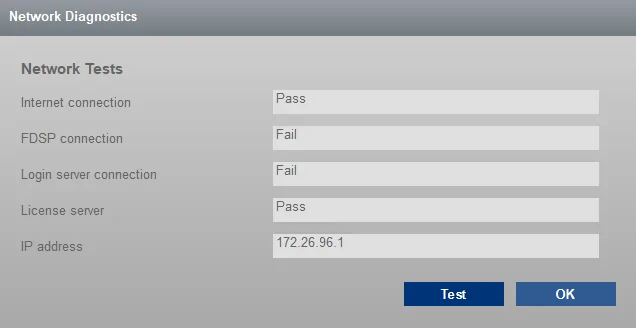
Network tests says it can't connect to something.

Any suggestions? I've tried from two different computers.

Ford Mustang Mach-E Can't connect to FDRS? ford1


Ford Mustang Mach-E Can't connect to FDRS? ford2


Ford Mustang Mach-E Can't connect to FDRS? ford3
Sponsored


Sikkun

Well-Known Member
Joined
May 9, 2024
Threads
3
Messages
1,777
Reaction score
3,396
Location
USA
Vehicles
2023 Mach E
Country flag
About an hour ago I bought a two-day license for FDRS, but I can't seem to figure out how to log in. Is it just me or is the system down?

After software installation, the software is able to verify the license.

If I try logging in as "Non-Dealer ETIS" I get "User authentication has failed. The first time you launch FDRS you must be online. Please establish an internet connection and try again. If the issue persists please report the error and contact the Ford Hotline".

If I try "Independent Operator/Non-Dealer" I immediately get "Cannot reach FDRS servers" even before being asked for a username.

Network tests says it can't connect to something.

Any suggestions? I've tried from two different computers.

ford1.png


ford2.webp


ford3.webp
I’m guessing your most likely having the same issue I had, it’s buried in the FDRS thread but download this older version:

https://1drv.ms/u/s!AkkdGTJEoN1_gtoKYppgKjO5SOHklg

Once you get logged in, then you can update to the new version and it works.

You’ll login with Independent Operator/Non-Dealer, it’ll pop up the normal white Ford login screen.

No clue why a new account can’t login to the current version, but this worked for me this last weekend.
 
OP
OP
DaddyDeuce

DaddyDeuce

Well-Known Member
Joined
May 29, 2024
Threads
10
Messages
154
Reaction score
212
Location
Colorado
Vehicles
Cyber Orange 22 GT PE
Country flag
I’m guessing your most likely having the same issue I had, it’s buried in the FDRS thread but download this older version:

https://1drv.ms/u/s!AkkdGTJEoN1_gtoKYppgKjO5SOHklg

Once you get logged in, then you can update to the new version and it works.

Thanks for the suggestion. It worked differently but I'm still stuck.

On the new version I never get the Ford login prompt. On the old version I do get the prompt, but when it returns to FDRS it pops up a screen that just says "Internal error".

I've gone fishing through a lot of threads of reported login problems but none of the solutions other people posted seem to work.
 

AtomicInternet

Well-Known Member
Joined
Jul 31, 2023
Threads
29
Messages
873
Reaction score
1,457
Location
SC
Vehicles
Focus RS, Mach E Premium
Country flag
Switch the login type till you get the Ford login prompt again. There's 3 options: dealer and two others. I forget which of the two others results in the Ford prompt, but pick that one.

At the ford login prompt, after you login it returns to the login screen for about 30 seconds before finally moving on. I was trying to login repeatedly because impatient. Just login and wait after it reloads the empty ford login screen again.

Not 100% sure this is your problem, but that slowed me down.
 

Sikkun

Well-Known Member
Joined
May 9, 2024
Threads
3
Messages
1,777
Reaction score
3,396
Location
USA
Vehicles
2023 Mach E
Country flag
Thanks for the suggestion. It worked differently but I'm still stuck.

On the new version I never get the Ford login prompt. On the old version I do get the prompt, but when it returns to FDRS it pops up a screen that just says "Internal error".

I've gone fishing through a lot of threads of reported login problems but none of the solutions other people posted seem to work.
Now that you tried logging in on the old one, I assume the white screen came up and you did, it just errors when going back to FDRS.

reinstall the new one, and I believe it will work now.


OP
OP
DaddyDeuce

DaddyDeuce

Well-Known Member
Joined
May 29, 2024
Threads
10
Messages
154
Reaction score
212
Location
Colorado
Vehicles
Cyber Orange 22 GT PE
Country flag
Wow. That was indeed a fix, what a strange problem. Thanks!
 

txaggies07

Well-Known Member
First Name
Aaron
Joined
Jan 21, 2020
Threads
11
Messages
563
Reaction score
842
Location
Texas
Vehicles
2021 MachE FE Rapid Red
Occupation
Engineer
Country flag
I’m guessing your most likely having the same issue I had, it’s buried in the FDRS thread but download this older version:

https://1drv.ms/u/s!AkkdGTJEoN1_gtoKYppgKjO5SOHklg

Once you get logged in, then you can update to the new version and it works.

You’ll login with Independent Operator/Non-Dealer, it’ll pop up the normal white Ford login screen.

No clue why a new account can’t login to the current version, but this worked for me this last weekend.
Lifesaver
Sponsored


Top