

worachj
Well-Known Member
- First Name
- John
- Joined
- Jan 13, 2023
- Threads
- 10
- Messages
- 241
- Reaction score
- 181
- Location
- Eagan, Mn USA
- Vehicles
- 2023 MME Select AWD Rapid Red Metallic (03/10/23)
- Occupation
- Retired


dtbaker61
Well-Known Member
- First Name
- Dan
- Joined
- May 11, 2020
- Threads
- 126
- Messages
- 4,822
- Reaction score
- 4,525
- Location
- santa fe,nm
- Website
- www.envirokarma.org
- Vehicles
- MME (delivered 2/26/21), DIY eMiata BEV
- Occupation
- Solar Sales/install
Try AA Mirror, search infos online on how yo get it.
I tried that.... never did get it to work... but I am not an experienced AndroidAuto user so I might have blown it during install/configuration.
If someone has a step-by-step written up 'for dummies', please post!
Aulander
Well-Known Member
- Joined
- Mar 15, 2022
- Threads
- 11
- Messages
- 367
- Reaction score
- 277
- Location
- Italy
- Vehicles
- Mustang Mach-E Premium AWD

It works, I have used it also today. Just install it, open it on the SYNC display and activate it through the prompt on your phone. Detailed instructions are easily available online.I tried that.... never did get it to work... but I am not an experienced AndroidAuto user so I might have blown it during install/configuration.
If someone has a step-by-step written up 'for dummies', please post!
Last edited:
B177y
Well-Known Member
- First Name
- Bill
- Joined
- Sep 17, 2023
- Threads
- 16
- Messages
- 417
- Reaction score
- 630
- Location
- Olympic Peninsula, WA
- Vehicles
- '23 J2 MME Premium, '24 Lightning Pro ER, '20 Bolt
Re-opening an older thread...
I got Car Scanner to show on my MME screen via Android Auto using the following:
Motorola Edge 2023 with Android 13. Car Scanner installed from the Play Store. OBDLink MX+ OBD device.
Install AAAD from GitHub:
https://github.com/shmykelsa/AAAD
I purchased the licence so that I could download and try all of the mirroring apps in AAAD. It was about $3.25 IIRC. Screen2Auto is the only one that I could get to work for me.
Install "Screen2Auto" from within the AAAD app.
You will have to allow "install from unknown sources" permission, and Screen2Auto will trigger a PlayProtect warning that the app is dangerous. You have to decide for yourself if you are comfortable with both of those. Screen2Auto description says it needs root access, but I am not rooted (full stock android) and it still works for me. First run of Screen2Auto has a list of permissions (including the root permissions) that need to be approved. Toggle all of those "on" and approve the permissions.
I had to fart around a little bit with the phone and Android Auto/Screen2Auto, but the winning combination for me was as follows:
Use a USB connection, at least on the first use.
Let AA connect.
Open Car Scanner on your phone and connect it to your OBD. Open the Car Scanner screen that you want.
Open Screen2Auto on Android Auto (AA) on the MME screen. On the phone, you have to approve "allow streaming" in a message that shows up each time.
If there is an icon of a laptop-ish looking thing in the lower left of the AA Screen2Auto with a slash through it, touch that so there is no slash.
Open Car Scanner on AA within Screen2Auto.
Bam! There's you Car Scanner gauges!
If you can't get it to show up or work correctly, or if the gauges aren't updating on AA, start over. Restart the phone and the MME as needed. Sometimes I have to go back to the Screen2Auto main screen and toggle the slash on and off. Get back to the Screen2Auto home by touching the MME screen with 2 fingers.
Once I got it to work, it seems to work most every time now. It even works with wireless AA, but seems more reliable when connected by USB. When in doubt, start over. Your phone screen needs to stay on since it's mirroring whatever is on it, so using the USB seems to be the best choice to keep the phone charging, and it's the more reliable connection.
Best of luck!
EDIT for more info:
Screen2Auto stays on the bottom half of the MME screen. The top is Google Maps. I can use Google Maps, listen to music/podcasts, and have the Car Scanner gauges all working at the same time and all on the MME screen at the same time.
I got Car Scanner to show on my MME screen via Android Auto using the following:
Motorola Edge 2023 with Android 13. Car Scanner installed from the Play Store. OBDLink MX+ OBD device.
Install AAAD from GitHub:
https://github.com/shmykelsa/AAAD
I purchased the licence so that I could download and try all of the mirroring apps in AAAD. It was about $3.25 IIRC. Screen2Auto is the only one that I could get to work for me.
Install "Screen2Auto" from within the AAAD app.
You will have to allow "install from unknown sources" permission, and Screen2Auto will trigger a PlayProtect warning that the app is dangerous. You have to decide for yourself if you are comfortable with both of those. Screen2Auto description says it needs root access, but I am not rooted (full stock android) and it still works for me. First run of Screen2Auto has a list of permissions (including the root permissions) that need to be approved. Toggle all of those "on" and approve the permissions.
I had to fart around a little bit with the phone and Android Auto/Screen2Auto, but the winning combination for me was as follows:
Use a USB connection, at least on the first use.
Let AA connect.
Open Car Scanner on your phone and connect it to your OBD. Open the Car Scanner screen that you want.
Open Screen2Auto on Android Auto (AA) on the MME screen. On the phone, you have to approve "allow streaming" in a message that shows up each time.
If there is an icon of a laptop-ish looking thing in the lower left of the AA Screen2Auto with a slash through it, touch that so there is no slash.
Open Car Scanner on AA within Screen2Auto.
Bam! There's you Car Scanner gauges!
If you can't get it to show up or work correctly, or if the gauges aren't updating on AA, start over. Restart the phone and the MME as needed. Sometimes I have to go back to the Screen2Auto main screen and toggle the slash on and off. Get back to the Screen2Auto home by touching the MME screen with 2 fingers.
Once I got it to work, it seems to work most every time now. It even works with wireless AA, but seems more reliable when connected by USB. When in doubt, start over. Your phone screen needs to stay on since it's mirroring whatever is on it, so using the USB seems to be the best choice to keep the phone charging, and it's the more reliable connection.
Best of luck!
EDIT for more info:
Screen2Auto stays on the bottom half of the MME screen. The top is Google Maps. I can use Google Maps, listen to music/podcasts, and have the Car Scanner gauges all working at the same time and all on the MME screen at the same time.
dtbaker61
Well-Known Member
- First Name
- Dan
- Joined
- May 11, 2020
- Threads
- 126
- Messages
- 4,822
- Reaction score
- 4,525
- Location
- santa fe,nm
- Website
- www.envirokarma.org
- Vehicles
- MME (delivered 2/26/21), DIY eMiata BEV
- Occupation
- Solar Sales/install
Re-opening an older thread...
I got Car Scanner to show on my MME screen via Android Auto using the following:
Motorola Edge 2023 with Android 13. Car Scanner installed from the Play Store. OBDLink MX+ OBD device.
Install AAAD from GitHub:
https://github.com/shmykelsa/AAAD
I purchased the licence so that I could download and try all of the mirroring apps in AAAD. It was about $3.25 IIRC. Screen2Auto is the only one that I could get to work for me.
Install "Screen2Auto" from within the AAAD app.
You will have to allow "install from unknown sources" permission, and Screen2Auto will trigger a PlayProtect warning that the app is dangerous. You have to decide for yourself if you are comfortable with both of those. Screen2Auto description says it needs root access, but I am not rooted (full stock android) and it still works for me. First run of Screen2Auto has a list of permissions (including the root permissions) that need to be approved. Toggle all of those "on" and approve the permissions.
I had to fart around a little bit with the phone and Android Auto/Screen2Auto, but the winning combination for me was as follows:
Use a USB connection, at least on the first use.
Let AA connect.
Open Car Scanner on your phone and connect it to your OBD. Open the Car Scanner screen that you want.
Open Screen2Auto on Android Auto (AA) on the MME screen. On the phone, you have to approve "allow streaming" in a message that shows up each time.
If there is an icon of a laptop-ish looking thing in the lower left of the AA Screen2Auto with a slash through it, touch that so there is no slash.
Open Car Scanner on AA within Screen2Auto.
Bam! There's you Car Scanner gauges!
If you can't get it to show up or work correctly, or if the gauges aren't updating on AA, start over. Restart the phone and the MME as needed. Sometimes I have to go back to the Screen2Auto main screen and toggle the slash on and off. Get back to the Screen2Auto home by touching the MME screen with 2 fingers.
Once I got it to work, it seems to work most every time now. It even works with wireless AA, but seems more reliable when connected by USB. When in doubt, start over. Your phone screen needs to stay on since it's mirroring whatever is on it, so using the USB seems to be the best choice to keep the phone charging, and it's the more reliable connection.
Best of luck!
EDIT for more info:
Screen2Auto stays on the bottom half of the MME screen. The top is Google Maps. I can use Google Maps, listen to music/podcasts, and have the Car Scanner gauges all working at the same time and all on the MME screen at the same time.
excellent, I may give this a try... sometime before my next road trip. thanks for posting details.
McSquashy
Well-Known Member
- First Name
- Josh
- Joined
- Mar 7, 2024
- Threads
- 33
- Messages
- 602
- Reaction score
- 664
- Location
- Massachusetts
- Vehicles
- 2023 Mach-E Premium 4X ER Vapor Blue
Was going to give AAAD a try, but it's not compatible with Android 14.? Anyone know of a workaround?
iampwd
New Member
- Joined
- Sep 10, 2023
- Threads
- 0
- Messages
- 2
- Reaction score
- 0
- Location
- Sweden
- Vehicles
- Mustang Mach e RWD 91 kWh

The only widely know way right now is to be rooted I think. (Or install it on a lower android version and then upgrade.)Was going to give AAAD a try, but it's not compatible with Android 14.? Anyone know of a workaround?
Edit: I just got a update to CarScanner on my non rooted phone and now it shows up in Android Auto. It's only text. No other ui elements.
Last edited:
JimmyMachE
Well-Known Member
mdpigroaster
Member
Car scanner works fine in Android Auto. If you have it installed on your phone, you have the OBD scanner plugged into the car, go to the apps section in Android auto on your car screen, select car scanner app and you will see your Dashboard(s) in a list. Clicking on your Dashboard(s) will display the data you have set up in the phone app. It is not graphical (no graphs or gauges), just data. You will not get all the features of the phone app, just what is set up in your dashboard(s). This is on my Google 7 pro phone with Veepeak Mini Bluetooth OBD II Scanner for Android ONLY and the free car scanner app with my 2024 MMe premium.
Last edited:
dtbaker61
Well-Known Member
- First Name
- Dan
- Joined
- May 11, 2020
- Threads
- 126
- Messages
- 4,822
- Reaction score
- 4,525
- Location
- santa fe,nm
- Website
- www.envirokarma.org
- Vehicles
- MME (delivered 2/26/21), DIY eMiata BEV
- Occupation
- Solar Sales/install
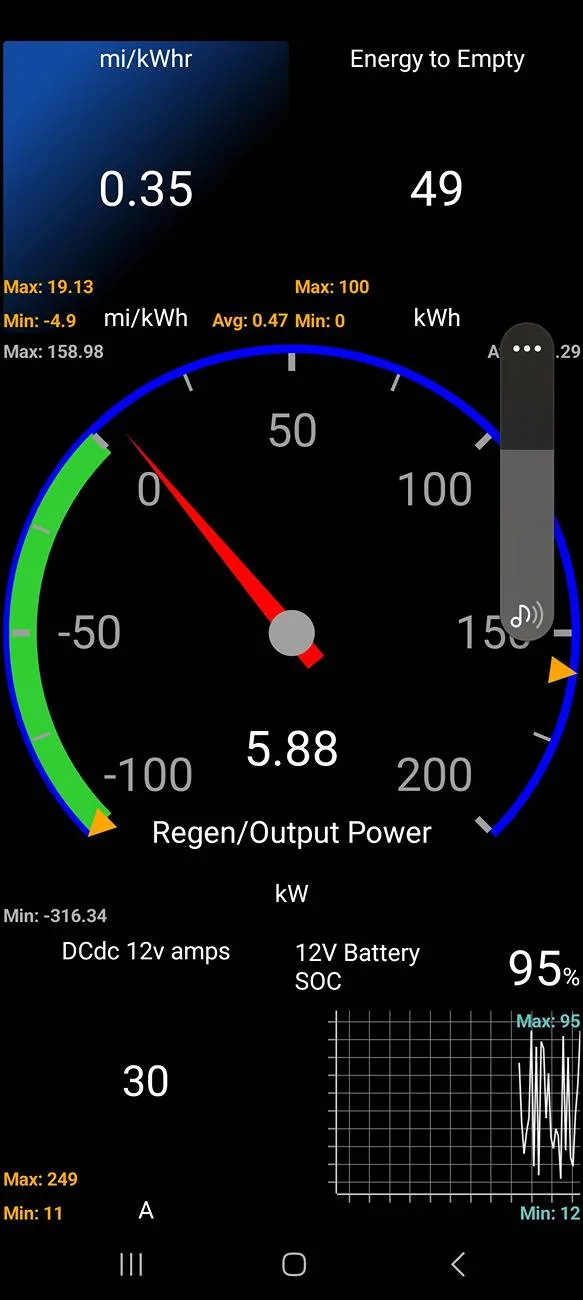
my complaint is that you cannot display a graphical custom dashboard as set up in the phone app. Also, you do not have access to "all" real-time sensor data.Car scanner works fine in Android Auto. If you have it installed on your phone, you have the OBD scanner plugged into the car, go to the apps section in Android auto on your car screen, select car scanner app and you will see your Dashboard(s) in a list. Clicking on your Dashboard(s) will display the data you have set up in the phone app. It is not graphical (no graphs or gauges), just data. You will not get all the features of the phone app, just what is set up in your dashboard(s). This is on my Google 7 pro phone with Veepeak Mini Bluetooth OBD II Scanner for Android ONLY and the free car scanner app with my 2024 MMe premium.
I do NOT want to try and read streaming text values, I want nice big digital "gauges" I can glance at out of the corner of my eye and read without putting on my reading glasses.

what I want to see on the big screen is what I can see on my phone:
Sponsored
Similar threads


- Replies
- 21
- Views
- 9,021


