
condition5
Well-Known Member
- First Name
- Dean
- Joined
- Dec 28, 2024
- Threads
- 30
- Messages
- 136
- Reaction score
- 189
- Location
- Mid Atlantic
- Vehicles
- 2024 Mach-E (Premium)
- Thread starter
- #1
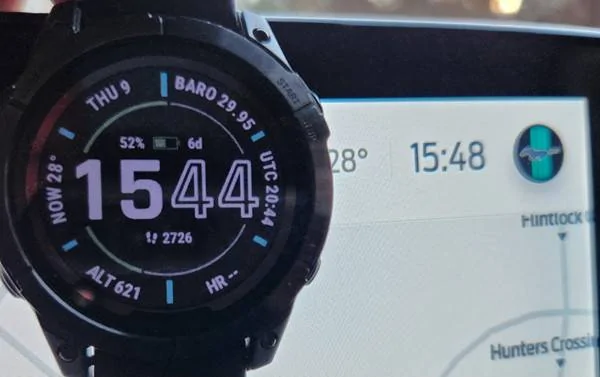
Short version: 2024 Mach-E Premium Center Display shows incorrect time in status bar. See photo of display time and the actual time from a GPS-timed watch...4 minute difference here, and sometimes it was 5.
I haven't tried rebooting the display (instructions are on p. 403 of owners manual).
Anybody else??
Long version:
Two-week owner here. Mid Atlantic cold, snow and slow charging at home (waiting for the charger and electrician) have hindered my exploration of a 2024 Mach-E.
Today I took it on it's longest drive (120 miles round trip). Got to fully test Blue Cruise (jury's out), 1-pedal driving (love it) and lane keeping (the colored bars on the drivers cluster are a fun video game) on a low-traffic highway drive.
Imagine my surprise to see that the big center display shows the incorrect time (off by 4 minutes in this picture with a GPS-timed watch).
Previously the FordPass app showed incorrect dates/years in a multiple charging sessions.
I don't write code...but incorrect date/time displays seem like a spectacularly bad user experience feature.

I haven't tried rebooting the display (instructions are on p. 403 of owners manual).
Anybody else??
Long version:
Two-week owner here. Mid Atlantic cold, snow and slow charging at home (waiting for the charger and electrician) have hindered my exploration of a 2024 Mach-E.
Today I took it on it's longest drive (120 miles round trip). Got to fully test Blue Cruise (jury's out), 1-pedal driving (love it) and lane keeping (the colored bars on the drivers cluster are a fun video game) on a low-traffic highway drive.
Imagine my surprise to see that the big center display shows the incorrect time (off by 4 minutes in this picture with a GPS-timed watch).
Previously the FordPass app showed incorrect dates/years in a multiple charging sessions.
I don't write code...but incorrect date/time displays seem like a spectacularly bad user experience feature.
Sponsored