Help: Can't set charge level when manually starting a charge

Xidor67

Member
First Name
Tony
Joined
Sep 13, 2024
Threads
2
Messages
20
Reaction score
3
Location
Royersford, PA
Vehicles
2023 Mustang Mach-E GT Vapor Blue
Country flag
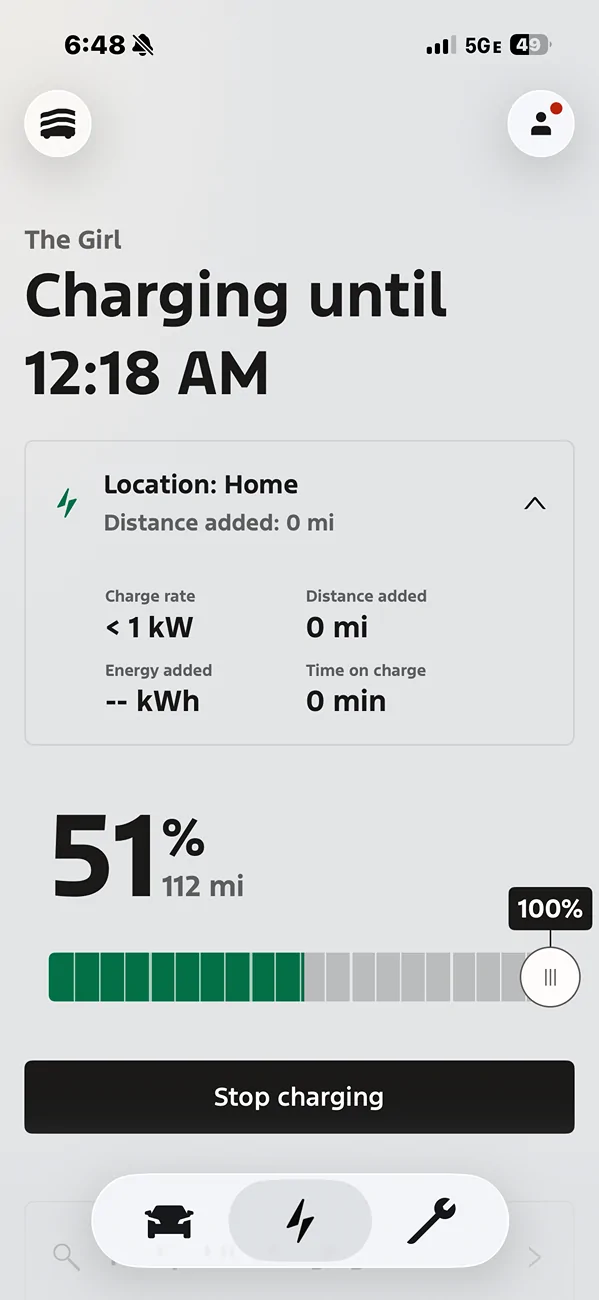
Has anyone experienced this and is there solution? When charging at home (known location on a schedule) I can set a target of 80%. Starting a charge manually in the app resets the target level to 100% and you can't lower it. Trying to lower it just stops the charge.

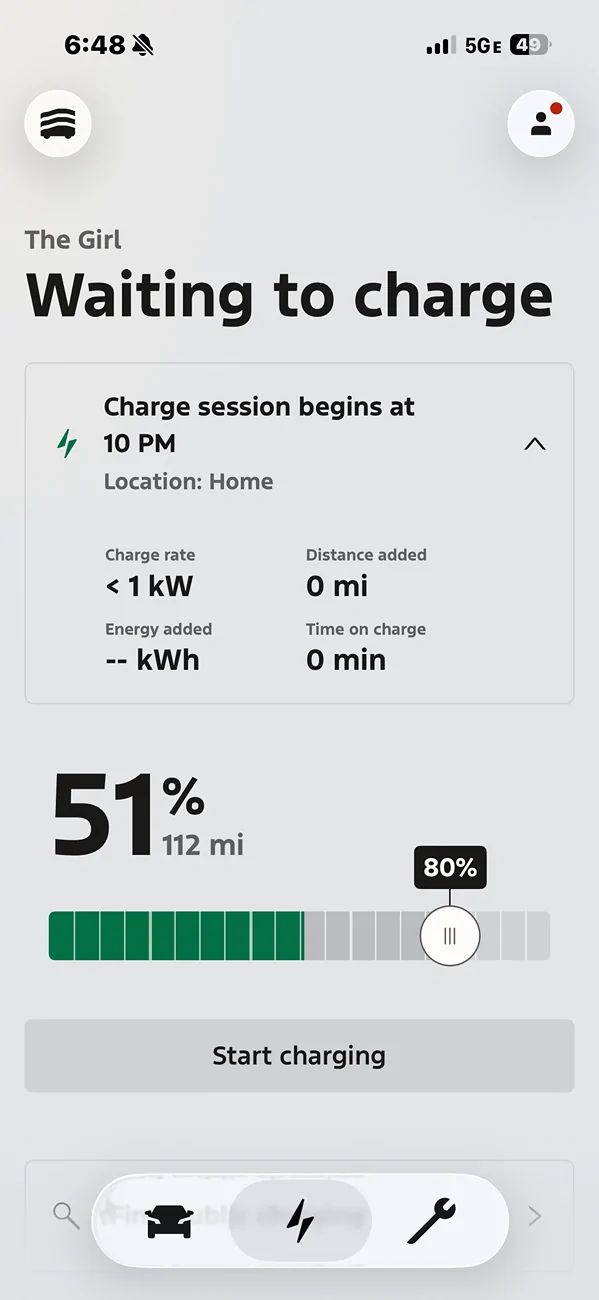
Ford Mustang Mach-E Help: Can't set charge level when manually starting a charge IMG_6694


Ford Mustang Mach-E Help: Can't set charge level when manually starting a charge IMG_6695
Sponsored


RickMachE

Well-Known Member
Joined
Jul 1, 2021
Threads
267
Messages
17,903
Reaction score
27,869
Location
SE MI
Vehicles
2022 Mach-E Premium 4X, 2022 Lightning Lariat ER
Country flag
Yes, everyone. Start Charging means "Charge to 100%". Posted quite a few times.
 

mdwinther35

Well-Known Member
First Name
Matt
Joined
Feb 1, 2024
Threads
3
Messages
144
Reaction score
185
Location
SE Michigan
Vehicles
2023 Mach E Select AWD
Occupation
Retired
Country flag
While charging to 100% if you look under target charge locations you'll still see your regular charge level percentage, using the start charging button (to charge to 100%) doesn't alter that.
 

Bad Dolphin

Well-Known Member
Joined
Jun 27, 2025
Threads
0
Messages
192
Reaction score
143
Location
Hawaii
Vehicles
2024 Mach E GT
While charging to 100% if you look under target charge locations you'll still see your regular charge level percentage, using the start charging button (to charge to 100%) doesn't alter that.
[/QUOTE
It is a weakness in the software, IMHO--or at the least, poor communication. Clear from my short time (April) as a Mach E owner that many find this confusing. "Start Charging" is not synonymous with "Start Charging to 100%," which would be clearer. Personally, I would prefer that "Start Charging" means "Start Charging" and would be governed by any user set limit if max charge. If someone wants to charge to 100%, easy enough to slide the charge limitation marker from whatever the user wants as default (80 or 90) to 100, then slide it back after that one charge session.

Another large problem with the software is its decision to override charge windows, both starting and ending. If one wants to reach the max charge by a certain time, that's what Departure Time is for. For those of us trying to charge during solar producing ours or those who are trying to charging only during low utility cost TOU, the software just doesn't work.

Other companies seem to understand this better than Ford.

Our Knight in armor, Sir Brian not AI, has heard our call, mounted his "pony" and brought this to the attention of Ford engineers. He has been told that at least one end of the charging window will be addressed and a new update may come as early as in December. I believe this is the initiation end of the window rather than the termination end of the window.

Progress is good, even if only in small steps--thanks in advance, Brian.
 

Charge_Rob

Well-Known Member
Joined
Nov 25, 2024
Threads
1
Messages
232
Reaction score
427
Location
Dearborn, MI
Vehicles
2024 Ford F-150 Lightning (2025 Mustang Mach-E Rally on the way!)
Occupation
Charging Nerd
Has anyone experienced this
Yes, this is intended behavior. Manually starting a charge is your way of telling the car that you want to charge immediately to 100%, it will override all other settings.


mkazen

Well-Known Member
First Name
Marc
Joined
Aug 14, 2023
Threads
9
Messages
98
Reaction score
56
Location
Gurnee, IL
Vehicles
Mach E GT
Country flag
So then if you want to charge just one evening to 100% (you're going on a roadtrip in the morning), but you don't want to start charging until midnight and want it to start automatically, how do you do that? Last time I tried, it just charged to the usual 90% I have it set at for home even though I thought I put it at 100%...
 

Bad Dolphin

Well-Known Member
Joined
Jun 27, 2025
Threads
0
Messages
192
Reaction score
143
Location
Hawaii
Vehicles
2024 Mach E GT
Yes, this is intended behavior. Manually starting a charge is your way of telling the car that you want to charge immediately to 100%, it will override all other settings.
I respectfully disagree. Not with what it does now, but rather what it should do.

For those of us who use a charging window to schedule charging during peak solar generation time or during low cost TOU times, that part of the software needs to be fixed to not charge outside of the window while stopping at user set SOC.

Departure time option is there for those who want to make sure that the battery has reached the set charge by a certain time.

Start Charging should do just that--start charging now to SOC set by user.

All three options should follow the user's set as to max charge.

if one typically charges to 90%, for example, and that cutoff SOC has been set in the app by the user, that's where it should stop regardless of which of the three options initiates the charge session.

If one wants to charge temporarily to 100% for a long trip, easy to move the slider in the app to 100%. This should be true of whichever charging initiation is selected--Charging Schedule, Departure Schedule, or Start Charging (now).

IMHO, of course😊!
So then if you want to charge just one evening to 100% (you're going on a roadtrip in the morning), but you don't want to start charging until midnight and want it to start automatically, how do you do that? Last time I tried, it just charged to the usual 90% I have it set at for home even though I thought I put it at 100%...
Wow, that's crazy--it should charge to your set charge limit regardless of which of the three options initiates charging. I have noticed that you do have to "save" the new charge rate after you move the slider and wait a moment for the app to save it. Did you do that? When you went back to your app after it did not charge to 100%, did it say it was set at 100% or at your usual lower SOC? If at the lower SOC, it wasn't fully saved so reverted.
So then if you want to charge just one evening to 100% (you're going on a roadtrip in the morning), but you don't want to start charging until midnight and want it to start automatically, how do you do that? Last time I tried, it just charged to the usual 90% I have it set at for home even though I thought I put it at 100%...
Two part answer.

First of all, when you move the slider from 90% to 100%, you have to look at the bottom of the page for the "save" button and push it. The app should then save--in our case it takes a few seconds of a spinning wheel before you're done. Have you had a chance to try it and see whether it's saved?

To double check, exit the charging page and then go back in and the slider should be at 100%

The next issue is whether if you plug it in at say 9 pm it will actually start to charge at midnight. This is the known problem we hope they're going to get fixed as it currently only works intermittently, if at all.

Right now, the only way to make it happen for sure means you have to wait until midnight. If you plug in manually after the start of your midnight charge session (and you've verified the slider is at 100%), that will work.

Alternatively, since "Start Charging" currently mean "Start Charging to 100%" you could plug in at midnight and it will override your 90% setting and charge to 100%.

(or you could start charging earlier using either method, but you'd lose your target schedule.)

Unfortunately , if you plug Iin before the start of a charging window , the program currently rarely initiates charging st the set time. This is what they're hoping to fix.
 

MoonRiver

Well-Known Member
Joined
Jan 27, 2022
Threads
40
Messages
516
Reaction score
231
Location
Tampa Bay, FL
Vehicles
22 Mach e select, 07 Infiniti G35
Country flag
IMG_6694.webp


IMG_6695.webp

[/QUOTE]
Same thing happened to me the other night, no matter how many times I slid it over it just stopped charging or refused to move. I gave up and went to bed. The next morning Ford App shown it finished charging at my preset 80%. Not 100%. It's very confusing but it goes by your set percentage.
 

mkazen

Well-Known Member
First Name
Marc
Joined
Aug 14, 2023
Threads
9
Messages
98
Reaction score
56
Location
Gurnee, IL
Vehicles
Mach E GT
Country flag
I respectfully disagree. Not with what it does now, but rather what it should do.

For those of us who use a charging window to schedule charging during peak solar generation time or during low cost TOU times, that part of the software needs to be fixed to not charge outside of the window while stopping at user set SOC.

Departure time option is there for those who want to make sure that the battery has reached the set charge by a certain time.

Start Charging should do just that--start charging now to SOC set by user.

All three options should follow the user's set as to max charge.

if one typically charges to 90%, for example, and that cutoff SOC has been set in the app by the user, that's where it should stop regardless of which of the three options initiates the charge session.

If one wants to charge temporarily to 100% for a long trip, easy to move the slider in the app to 100%. This should be true of whichever charging initiation is selected--Charging Schedule, Departure Schedule, or Start Charging (now).

IMHO, of course😊!


Wow, that's crazy--it should charge to your set charge limit regardless of which of the three options initiates charging. I have noticed that you do have to "save" the new charge rate after you move the slider and wait a moment for the app to save it. Did you do that? When you went back to your app after it did not charge to 100%, did it say it was set at 100% or at your usual lower SOC? If at the lower SOC, it wasn't fully saved so reverted.


Two part answer.

First of all, when you move the slider from 90% to 100%, you have to look at the bottom of the page for the "save" button and push it. The app should then save--in our case it takes a few seconds of a spinning wheel before you're done. Have you had a chance to try it and see whether it's saved?

To double check, exit the charging page and then go back in and the slider should be at 100%

The next issue is whether if you plug it in at say 9 pm it will actually start to charge at midnight. This is the known problem we hope they're going to get fixed as it currently only works intermittently, if at all.

Right now, the only way to make it happen for sure means you have to wait until midnight. If you plug in manually after the start of your midnight charge session (and you've verified the slider is at 100%), that will work.

Alternatively, since "Start Charging" currently mean "Start Charging to 100%" you could plug in at midnight and it will override your 90% setting and charge to 100%.

(or you could start charging earlier using either method, but you'd lose your target schedule.)

Unfortunately , if you plug Iin before the start of a charging window , the program currently rarely initiates charging st the set time. This is what they're hoping to fix.
I am 90% sure I hit save but it looks like at least one other user had the same issue. I realize Ford isn't a software company but how hard can it be to make a decent working app? I shouldn't have to initiate charging at midnight myself or babysit it..
 

Charge_Rob

Well-Known Member
Joined
Nov 25, 2024
Threads
1
Messages
232
Reaction score
427
Location
Dearborn, MI
Vehicles
2024 Ford F-150 Lightning (2025 Mustang Mach-E Rally on the way!)
Occupation
Charging Nerd
For those curious, this article goes over the logic: go.ford/chargetimes - specifically the "Will my vehicle ever charge outside a Preferred Charge Time?" question/answer.

You can give the vehicle multiple priorities which can conflict. It needs to be able to break the conflicts, and this article details how it decides to do that.
 

Charge_Rob

Well-Known Member
Joined
Nov 25, 2024
Threads
1
Messages
232
Reaction score
427
Location
Dearborn, MI
Vehicles
2024 Ford F-150 Lightning (2025 Mustang Mach-E Rally on the way!)
Occupation
Charging Nerd
For those of us who use a charging window to schedule charging during peak solar generation time or during low cost TOU times, that part of the software needs to be fixed to not charge outside of the window while stopping at user set SOC.
I charge on Excess Solar all the time, controlled by the EVSE and not the vehicle, with an EVSE that can monitor solar production in real time and adjust charge rate on the fly (Emporia, Wallbox, OpenEVSE, etc. etc.) That's going to be the best way to do it for anyone that wants to do Excess Solar charging. Then there's no need to do any vehicle settings, and the rules apply to any vehicle plugged in (if guests visit, other EVs in the household).
 

RickMachE

Well-Known Member
Joined
Jul 1, 2021
Threads
267
Messages
17,903
Reaction score
27,869
Location
SE MI
Vehicles
2022 Mach-E Premium 4X, 2022 Lightning Lariat ER
Country flag
Using an intelligent charger also allows you to prevent the vehicle from pulling house current unless you do an override. This works for Remote Starts, Departure Times, and on those very cold days when the car tries to pull a sip of juice to warm the battery.

Vehicles sit outside all the time without being plugged in, so if you have peak rates and don't want money spent without your agreement, use an intelligent charger.
 

E90alex

Well-Known Member
Joined
Feb 17, 2025
Threads
3
Messages
1,001
Reaction score
1,813
Location
Seattle, WA
Vehicles
‘25 MME GT
Yes, pressing start charging will immediately start charging to 100% because it assumes you want the car fully charged ASAP for something outside of your normal schedule. Otherwise why not just wait to follow your set schedule?

If for some reason you want it to start charging sooner but still want it to obey your charge limit instead of charging to 100%, just turn off the charge schedule and turn it back on when it’s done.

I think Ford geared the settings to be as simple as possible for people new to EVs. If you have a complicated setup with variable excess solar, TOU electric rates, etc you’re better off with a smarter EVSE that can integrate all that and manage charging within the smart EVSE as desired instead of relying on the car.
 

Bad Dolphin

Well-Known Member
Joined
Jun 27, 2025
Threads
0
Messages
192
Reaction score
143
Location
Hawaii
Vehicles
2024 Mach E GT
For those curious, this article goes over the logic: go.ford/chargetimes - specifically the "Will my vehicle ever charge outside a Preferred Charge Time?" question/answer.

You can give the vehicle multiple priorities which can conflict. It needs to be able to break the conflicts, and this article details how it decides to do that.
Thank you--this is very helpful.

It explains that the charging window is overridden by the software if it calculates that it needs more time to reach the slider set requested charge than the window provides. It says that in that case, the charger will start charging earlier than the set window in order to get the car to the set SOC by the end of the window. It further states that if you want it to stop at the end of the charging window, you must check to make sure it can do so and reach your set SOC. If it won't, it will charge longer, so if you want it to stop, you must readjust your SOC. (Personally, I would like it to just stop and then resume when the next window opens. Otherwise, I would use the Departure option if I wanted full SOC regardless of when it charged.)

But this is not what actually happens to those of us reporting the problem. Instead, when plugging in before the start of the window, the charge never even begins. Only when we plug in at or after the start of the window do we get any charge. If we plug in earlier--say an hour after the window closes the day before--it does not start charging the next time the window is open.

Rather, it doesn't charge at all. And you only find this out when you go to the car and physically unplug it. Then you get a flashing red on the charging port LED and the app tells you there was a charging error.

So the programmers have not succeeded in programming even to their stated goal. I believe that's why they have apparently agreed to fix the start of the charging process at the beginning of the charging window.

To respond to your suggestion, I for one have verified SOC (80% for us), we have only one charging window (10am-5pm to charge primarily on solar,) we have only one charger in the app (Ford Pro), we have no departure time charging set, and we rarely use the Start Charging or Stop Charging command in the app (but these seem to work when we manually use them.) If we plug in after the start of the window, all works. If we plug in before the start of the window, we get a charging error but only when we physically go down to check and unplug and replug.
 

Bad Dolphin

Well-Known Member
Joined
Jun 27, 2025
Threads
0
Messages
192
Reaction score
143
Location
Hawaii
Vehicles
2024 Mach E GT
I charge on Excess Solar all the time, controlled by the EVSE and not the vehicle, with an EVSE that can monitor solar production in real time and adjust charge rate on the fly (Emporia, Wallbox, OpenEVSE, etc. etc.) That's going to be the best way to do it for anyone that wants to do Excess Solar charging. Then there's no need to do any vehicle settings, and the rules apply to any vehicle plugged in (if guests visit, other EVs in the household).
You are correct, but afford should do better than that of they want to sell their own chargers and at least let the car charge only within the window set in their app. Tesla app and charger, without a separate device to read solar ebb and flow, worked flawlessly to barge within the set window witch kir Tesla, and with an adapter, wit our 24 Mach E GT, too. We only replaced the charger because the adapter on the Tesla plug was warmer than we liked, and we foolishly thought that the Ford charger would work well with a Ford EV.🤦🏼

We have an Emporia on order. Thanks to all of you on the Forum who have been able to advise us that the Emporia works better than the Ford proprietary chargers.
Yes, pressing start charging will immediately start charging to 100% because it assumes you want the car fully charged ASAP for something outside of your normal schedule. Otherwise why not just wait to follow your set schedule?

If for some reason you want it to start charging sooner but still want it to obey your charge limit instead of charging to 100%, just turn off the charge schedule and turn it back on when it’s done.

I think Ford geared the settings to be as simple as possible for people new to EVs. If you have a complicated setup with variable excess solar, TOU electric rates, etc you’re better off with a smarter EVSE that can integrate all that and manage charging within the smart EVSE as desired instead of relying on the car.


Thanks for your input. I think that they intend it to be programmed for different charging needs, but messed up the programming. I think that's why they agreed to work on having the initiation of the charging window actually function as intended. Therefore, they've made it way more complicated than it needs to be because it doesn't function as the planned and stated
Sponsored


Top